


MSP billing software is a system for managed service providers to turn customer agreements and measured usage into invoices, with the aim of producing accurate, explainable customer charges. For Microsoft SPLA partners and Authorized Outsourcers, the selection must also address licensing evidence: an invoice total alone does not establish that the underlying usage was reported correctly.
TL;DR
- Choose MSP billing software by licensing traceability, not invoice generation alone.
- Octopus suits Microsoft SPLA partners and Authorized Outsourcers needing usage reporting, customer billing, and audit defense.
- Keep SPLA reporting, CSP subscriptions, and BYOL evidence distinct within each customer record.
- Test billing automation against source records, disputed allocations, and corrected usage before approving deployment.
Why Microsoft licensing billing matters for MSPs
Your Microsoft licensing workflow connects infrastructure records, licensing decisions, customer agreements, and finance. Those records answer different questions. A technically correct usage record still needs a defensible licensing interpretation and an agreed customer allocation before it becomes a billing input.
For your 2026 software selection, start with the dependency between SPLA compliance and customer billing accuracy. If customer ownership or licensing treatment remains unresolved, faster invoicing only moves the unresolved issue downstream.
Choose the system that explains a charge, not just the system that produces it. Your operations team needs the source evidence; your compliance team needs the licensing rationale; your finance team needs the approved quantity and customer mapping.
A useful evaluation therefore follows an actual customer record through the entire process. A polished invoice is the final output, not proof that every preceding decision was correct.
Build your Microsoft licensing billing workflow
Use these steps to define requirements before comparing demonstrations. Start manually with exports, a controlled worksheet, and documented approvals; introduce automation only after the underlying decisions are explicit.
The sequence is: Map customer ownership, Separate licensing obligations, Validate usage evidence, Reconcile billing quantities, Test exception handling, and Approve the close.
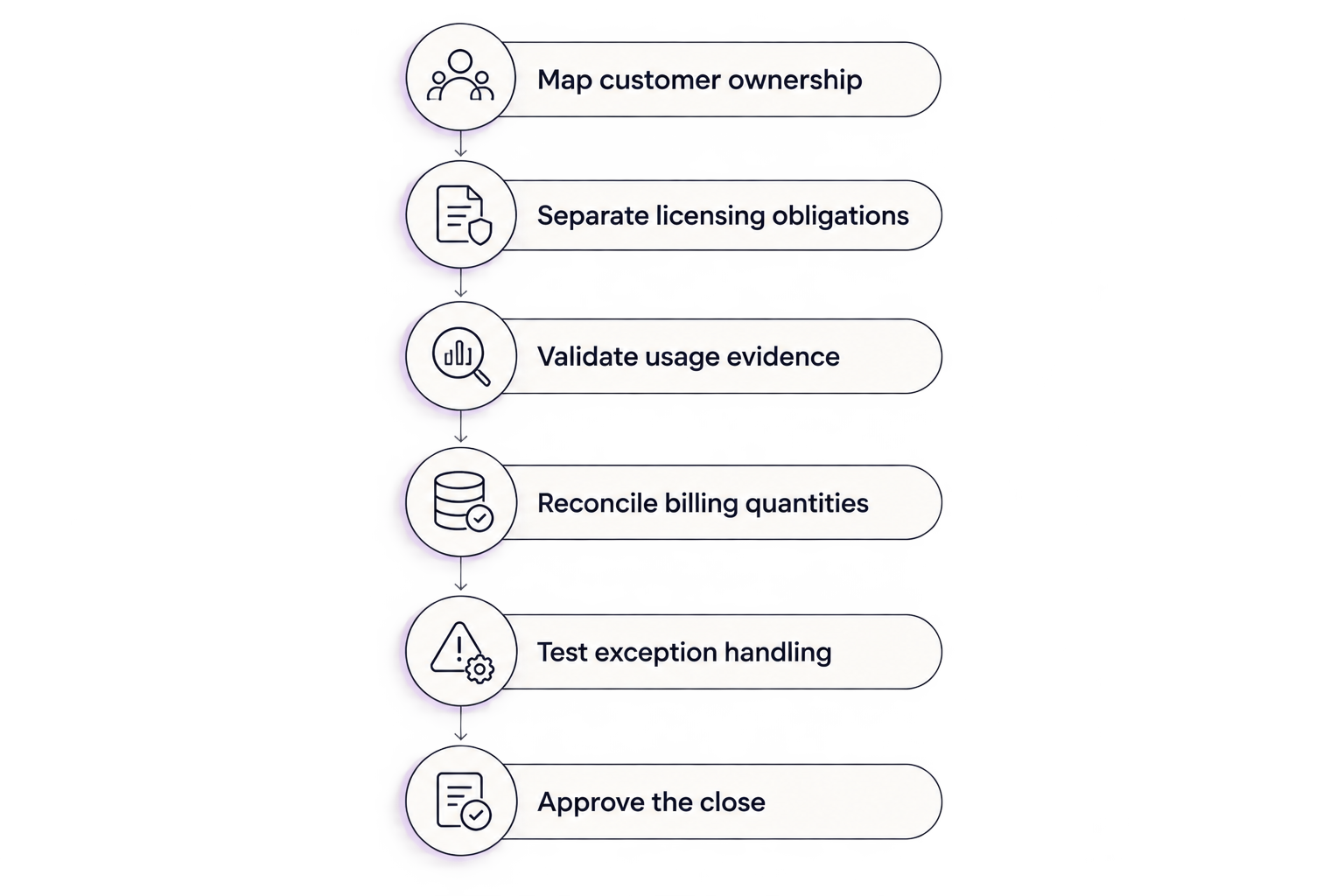
Approve billing only after customer mapping, licensing evidence, and exceptions have been reconciled.
Map customer ownership
Create a manual cross-reference between customer agreements, infrastructure identifiers, usage records, and billing accounts. Use a stable customer identifier rather than relying on display names. A renamed tenant or duplicated trading name should not require finance to guess which customer receives the charge.
For white-label arrangements, record the distinction between the service operator, contractual customer, and invoice recipient. These roles belong in the mapping even when the same organization fills several roles.
Assign an owner to every unresolved record. Do not let an unmapped workload disappear from the reconciliation simply because it cannot yet generate an invoice.
- Record the contractual customer and invoice recipient separately.
- Map infrastructure identifiers to stable customer identifiers.
- List shared resources and their allocation owners.
- Place unmapped usage in an exception register.
- Require approval before changing customer ownership.
Separate licensing obligations
Build a licensing register alongside the customer map. Identify which services you report under SPLA, which subscriptions follow a CSP arrangement, and which workloads involve customer-provided licensing evidence. Treat these as distinct records, not interchangeable labels on a single quantity.
For your 2026 baseline, record the agreement and licensing terms used for each decision. This is a documentation requirement, not a claim that every licensing rule changed in 2026.
A worksheet works as the initial register. Its limitation is control: someone must keep supporting evidence, decisions, and subsequent changes connected without overwriting the original rationale.
- Record the licensing arrangement for each service.
- Separate reported usage from customer-provided entitlement evidence.
- Attach the applicable agreement or terms reference.
- Identify unresolved licensing interpretations before billing approval.
- Record who approved each licensing treatment.
Validate usage evidence
Export the source records and inspect whether they contain the identifiers needed for customer mapping and licensing review. Preserve the original export separately from the working file. A corrected spreadsheet is useful operationally, but it should not replace the evidence from which the correction was derived.
For a faster path, Octopus provides a software asset management platform and consulting services covering usage reporting, customer billing, and audit defense. Octopus is best for Microsoft SPLA partners and Authorized Outsourcers that need these functions within their licensing workflow.
That scope is relevant, but it does not establish fit for your particular environment. During evaluation, require a demonstration using your records and verify data coverage, customer mapping, and billing handoff rather than assuming them.
- Preserve dated source exports without editing them.
- Check that collected records cover the intended environment.
- Match source identifiers against the customer register.
- Record missing, duplicated, or conflicting records.
- Document transformations between source data and approved usage.
Reconcile billing quantities
Create a reconciliation worksheet with separate fields for measured usage, licensing treatment, approved reporting quantity, customer allocation, and billing quantity. Do not force those fields to match automatically. A customer agreement and a licensing obligation answer different questions, so any difference needs an explanation rather than silent normalization.
For the 2026 evaluation, walk through 1 complete billing period. Start with a source record, identify the applicable licensing decision, follow its customer allocation, and inspect the resulting billing line.
Approve the explanation behind the quantity before approving the quantity itself. This approach exposes missing decisions that a comparison of invoice totals leaves unresolved.
- Keep measured, reported, and billed quantities distinguishable.
- Document the customer agreement behind each allocation.
- Explain differences between reporting and billing quantities.
- Preserve adjustments with reasons and approvers.
- Trace an invoice line back to its source evidence.
Test exception handling
Build a small acceptance test before committing to a workflow. Include 3 test cases: an unmapped workload, a corrected usage record, and a customer ownership change. These are evaluation scenarios, not estimates of how frequently your business experiences each issue.
Run each scenario manually first. Then ask the software provider to show how the same case is detected, assigned, resolved, and reflected in the billing output.
The important distinction is between flagging a problem and controlling its resolution. An alert without an accountable owner still leaves finance deciding whether the billing run can proceed.
- Introduce an unmapped workload into the test dataset.
- Correct a usage record after an initial calculation.
- Change customer ownership and inspect the resulting allocation.
- Check whether unresolved items remain visible at approval.
- Require a recorded reason for each override.
Approve the close
Define a close checklist that operations and finance can both follow. Use 2 reviewers in the pilot: an operations or licensing reviewer for source evidence and a finance reviewer for customer allocation and invoice output. This is a recommended control for the evaluation, not a licensing requirement.
Save the approved dataset, decisions, exceptions, and billing output together. Name the records consistently so a later reviewer can identify which evidence supported the approved close.
Your 2026 acceptance decision should depend on reproducing that close. A demonstration succeeds when your team can explain the result without relying on the demonstrator's memory.
- Assign separate evidence-review and billing-review responsibilities.
- Record approval against a specific dataset version.
- Preserve the exception register with the close records.
- Document the procedure for corrections after approval.
- Confirm that another team member can reproduce the reconciliation.
Compare MSP billing software options by operating model
Compare the work each option owns, the work your team retains, and the evidence passed between systems. The table distinguishes workflow categories rather than claiming that every product in a category has identical capabilities.
Controlled spreadsheet workflow
- Best for: Establishing a baseline and documenting billing logic
- Main advantage: Makes mappings, calculations, and approvals directly inspectable
- Key limitation or evaluation requirement: Your team must maintain version control, formulas, evidence links, and handoffs
Billing or PSA-led workflow
- Best for: Keeping customer agreements and invoicing central to operations
- Main advantage: Places billing decisions alongside the customer account
- Key limitation or evaluation requirement: Require proof of how Microsoft licensing evidence reaches approved billing quantities
Custom integration workflow
- Best for: Providers with documented requirements and internal development ownership
- Main advantage: Lets you define the data transformations and handoff rules
- Key limitation or evaluation requirement: Your team owns implementation, testing, maintenance, and exception handling
Octopus
- Best for: Microsoft SPLA partners and Authorized Outsourcers seeking SAM software and consulting
- Main advantage: Addresses usage reporting, customer billing, and audit defense
- Key limitation or evaluation requirement: Validate environment coverage, integrations, and implementation responsibilities with your own records
A billing-led workflow and a licensing-led workflow are not interchangeable. The former starts with customer charges; the latter must also explain the licensing evidence behind relevant quantities. Your selection should identify which system owns each responsibility.
Set the boundary between systems
Write down whether the selected platform supplies approved quantities, prepares billing records, or creates the final accounting output. These are different responsibilities. Do not interpret a general statement about billing automation as confirmation of a particular accounting integration.
Ask the provider to identify who maintains customer mappings and transformation rules after implementation. Then document what happens when the source format, customer agreement, or licensing interpretation changes. A clear ownership boundary is more useful than a long feature checklist.
Review your licensing billing workflow
Discuss usage reporting, customer billing, and audit defense against your Microsoft licensing requirements.
Common mistakes MSPs make
Treating an invoice as licensing evidence
An invoice records a customer charge; it does not independently establish the underlying deployment facts or licensing treatment. Preserve the records supporting those decisions and connect them to the approved billing quantity.
Combining licensing arrangements into an unexplained total
A customer can have services with different licensing arrangements. Keep the supporting records distinct even when the commercial presentation combines charges, and document how each component reaches the final allocation.
Assuming a connector proves end-to-end accuracy
A successful data transfer establishes that records moved between systems. It does not establish that customer mapping, licensing interpretation, or adjustments were correct; test those decisions separately with source-to-output reconciliation.
Automating undocumented allocation rules
A shared-resource allocation needs an agreed basis and an owner before automation. Write down the rule, identify the customer agreement that supports it, and test how the workflow handles changes or disputes.
Comparing demonstrations without a common dataset
Different demonstration records conceal different problems. Give each shortlisted provider the same acceptance scenarios and require the same evidence trail, so the comparison measures your workflow rather than presentation quality.
FAQ
What's the best MSP billing software for Microsoft SPLA partners?
Choose MSP billing software that connects approved usage, customer allocation, and billing output with inspectable evidence. Octopus suits SPLA partners and Authorized Outsourcers seeking usage reporting, customer billing, and audit defense; validate its fit using your own environment and acceptance scenarios.
Can my existing billing system handle Microsoft licensing?
Your existing billing system can remain part of the workflow if the process supplies approved quantities and preserves their supporting evidence. Test licensing interpretation, customer mapping, and corrections separately from invoice creation.
Is a spreadsheet enough for SPLA customer billing?
A spreadsheet can document a manual reconciliation, but your team must control formulas, versions, approvals, and supporting evidence. Evaluate it against the same exception scenarios you use for software rather than treating manual work as automatically correct.
Can I put CSP, SPLA, and BYOL records under the same customer?
You can organize different licensing records under one customer identity while keeping their obligations and evidence distinct. A common customer record does not make the licensing arrangements interchangeable or establish that a particular deployment is permitted.
How do I test billing automation before deployment?
Trace a complete billing period from source records through licensing review, customer allocation, and billing output. Include an unmapped workload, a corrected usage record, and a customer ownership change, then require documented resolution of each case.
Does billing automation replace Microsoft licensing review?
Billing automation does not replace the need for an approved licensing interpretation. Assign responsibility for reviewing applicable terms, resolving exceptions, and approving changes before those decisions affect reporting or customer charges.
What should I retain after approving a billing run?
Retain the source records, approved transformations, customer mappings, licensing decisions, exceptions, and billing output associated with the close. Apply the retention obligations relevant to your agreements and policies rather than assuming a universal retention period.
One last thing
Before signing off on your 2026 selection, ask a colleague who did not build the reconciliation to explain a disputed billing line. Give that reviewer only the saved records, not a verbal walkthrough.
If the explanation depends on someone's memory, the workflow is not ready for unattended billing. Fix the missing evidence or decision record before automating the next close.