Track VM counts for accurate SPLA reporting by retaining dated inventory records, recording changes throughout the reporting period, and mapping each workload to its applicable licensing rules before calculating reportable quantities. A month-end VM total is not a license calculation: your report also needs the relevant product, host, customer, configuration, and entitlement evidence.
TL;DR
- How to track VM counts for accurate SPLA reporting: preserve inventory history, reconcile changes, and apply product-specific licensing rules.
- Microsoft SPLA reporting needs evidence behind license quantities, not just a current list of virtual machines.
- Octopus serves Microsoft SPLA partners and Authorized Outsourcers that need software asset management and licensing consulting.
- Retain source records and calculation logic so another reviewer can reproduce the submitted report.
How do you track VM counts for accurate SPLA reporting?
Use a repeatable evidence chain: inventory, change history, customer attribution, licensing classification, reconciliation, and approval. Keep the collected facts separate from the licensing decisions applied to them.
For your 2026 reporting process, assign an owner to each step below. The reporting owner should be able to explain both why a workload appears in the calculation and why an excluded workload does not.
- Define scope. List the virtualization platforms, hosts, clusters, customer environments, and reporting boundaries you must cover.
- Collect inventory. Export stable VM identifiers, host relationships, configuration, operating system information, and customer ownership.
- Retain changes. Preserve creation, deletion, migration, configuration, and power-state events where available.
- Classify licensing. Determine which agreement, product, edition, and licensing metric apply to each workload.
- Reconcile exceptions. Investigate missing systems, duplicate records, uncertain ownership, and unexplained differences.
- Approve and retain. Save the calculation, supporting evidence, exceptions, and approved submission together.
For the wider reporting workflow, use the guide on how to reduce SPLA reporting time each month. Automating an export is useful, but it does not replace checking whether that export covers the full reporting scope.
Why this matters
A VM inventory answers what your management platform can see. A licensing report answers what you must report under the applicable agreement and product terms. Those questions overlap, but they are not interchangeable.
Deleted workloads expose the difference. A VM that no longer exists at month-end can still require investigation when reconstructing the period; a current snapshot cannot establish its earlier configuration or use.
Octopus is best suited to Microsoft SPLA partners and Authorized Outsourcers seeking software asset management and licensing consulting. Its stated scope includes usage reporting, customer billing, and audit defense. Your internal responsibility remains defining the reporting boundary and approving the licensing treatment.
Build a VM inventory that supports licensing decisions
Do not begin with a spreadsheet containing only VM names and totals. Names change, and the same display name can appear in separate environments. Preserve the source platform and a stable identifier together so records remain distinguishable.
Capture these fields where your systems expose them:
VM identifier and source
- What it supports: Record matching
- What to check: Identifier uniqueness within the source
VM name and customer
- What it supports: Customer attribution
- What to check: Unassigned or conflicting ownership
Host and cluster
- What it supports: Placement history
- What to check: Migrations and incomplete host coverage
Creation and deletion timestamps
- What it supports: Period reconstruction
- What to check: Workloads absent from current inventory
CPU configuration
- What it supports: Applicable compute calculations
- What to check: Configuration changes during the period
Operating system and software evidence
- What it supports: Product classification
- What to check: Unknown editions or conflicting discovery
Power-state history
- What it supports: Activity investigation
- What to check: Gaps and unsupported exclusions
Collection timestamp and status
- What it supports: Evidence freshness
- What to check: Failed, partial, or stale collection
Treat discovery results as evidence, not final licensing conclusions. An operating system label does not prove the customer's licensing entitlement, and a VM's CPU configuration does not establish which licensing model applies.
Keep original exports unchanged. Normalize data in a separate working layer so reviewers can trace every transformed record back to its source.
Choose a collection method without losing history
Use collection methods that preserve changes, not just current state. Platform exports, scheduled snapshots, and event records serve different purposes. None eliminates the need to validate coverage.
Manual platform export
- Best for: Initial scope checks
- Strength: Makes source records available for inspection
- Limitation: Depends on someone collecting and retaining it
Scheduled inventory snapshots
- Best for: Repeatable configuration records
- Strength: Produces dated evidence of observed state
- Limitation: Does not show changes between captures
Lifecycle event collection
- Best for: Investigating short-lived workloads
- Strength: Records supported creation, deletion, and change events
- Limitation: Depends on event coverage and retention
Reconciled evidence set
- Best for: Report preparation
- Strength: Combines configuration, history, and ownership
- Limitation: Requires matching logic and exception review
For a 2026 operating procedure, document the collection cadence and its limitations. If you choose daily snapshots, describe them as your internal control—not as a universal Microsoft SPLA requirement.
Pair snapshots with lifecycle events where available. Then test whether a workload created and deleted between snapshots remains visible in your retained evidence. That test checks the collection design without assuming that every discovered workload has the same licensing treatment.
Keep VM inventory separate from license quantities
Do not submit a VM total as a license quantity without establishing the applicable metric. Microsoft product licensing can involve different units and conditions; the relevant agreement and product terms determine the calculation.
Create a licensing classification record for each workload or appropriately defined workload group. Record the product, edition, applicable licensing basis, supporting entitlement evidence, and the rule source used by the reviewer.
For your 2026 calculations, retain the applicable version of Microsoft's Services Provider Use Rights and relevant agreement documents. A current web page alone does not preserve the rule version used for an earlier reporting decision.
Physical-host and virtual-machine evidence
Host evidence and VM evidence answer different questions. Retain both when the applicable licensing treatment depends on host configuration, workload placement, or virtualization rights.
Do not assume that moving a VM leaves the licensing calculation unchanged. Record the placement change, identify the affected reporting records, and have the licensing owner confirm its treatment under the applicable terms.
Customer-provided licensing evidence
Do not exclude a workload merely because a customer labels it BYOL. Record the customer's asserted entitlement and have the responsible reviewer verify whether it applies to the product, deployment, and outsourcing arrangement.
Keep unresolved entitlement claims visible in the exception register. An unverified customer statement is not an approved exclusion, and a billing label is not a substitute for licensing evidence.
Reconcile inventory before calculating the report
Use 2 independent evidence sources as an internal reconciliation control: for example, virtualization inventory and your customer service records. This is a recommended operating control, not a stated Microsoft reporting requirement.
The sources do not need identical totals. They need explainable differences. A service record might represent an application environment rather than an individual VM, so document the relationship before comparing counts.
Work through this sequence:
- Scope check. Confirm every expected platform, cluster, and customer environment supplied records.
- Identity check. Resolve duplicate identifiers, renamed workloads, and mismatched source references.
- Change check. Compare opening inventory, recorded additions, removals, and closing inventory.
- Ownership check. Assign unresolved workloads to a responsible customer or internal owner.
- Rule check. Confirm each calculation uses the approved product classification and rule version.
- Approval check. Record the reviewer, decision, and evidence supporting each material exception.
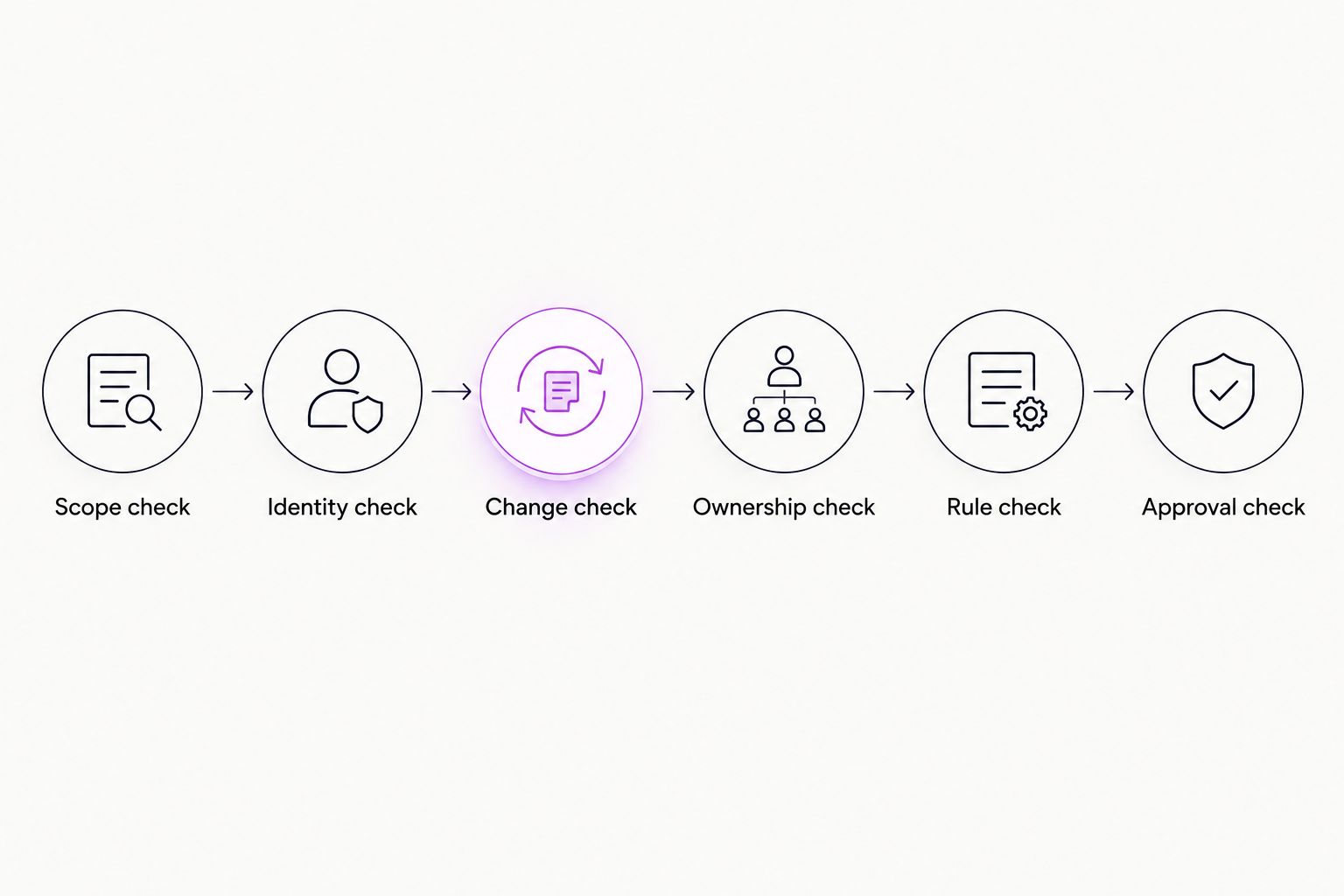
Resolve inventory and licensing exceptions before approving the reporting calculation.
Investigate differences instead of forcing totals to match. An unexplained adjustment hides the original issue and leaves the next reviewer unable to reproduce the result.
Set a 24-hour investigation target for failed collections during reporting preparation if your staffing supports it. This is a proposed internal response target, not a licensing deadline; assign an escalation owner for failures that remain unresolved.
Why SPLA-reporting VM counts vary
Changing totals are not automatically errors. Your task is to distinguish documented operational changes from incomplete collection and incorrect classification.
- Workload lifecycle: creation and deletion change the inventory population. Retain the relevant events rather than relying exclusively on closing inventory.
- Collection coverage: disconnected sources and failed exports leave gaps. Compare received records against the expected source list.
- Placement changes: migrations change host relationships. Preserve enough history to review any licensing implications.
- Configuration changes: CPU and software changes alter the evidence available for product-specific calculations. Keep dated configurations.
- Customer attribution: ownership corrections move records between customer groups. Retain the correction history rather than overwriting it silently.
- Licensing classification: approved changes to entitlement treatment can change reportable quantities without changing the VM population. Record the reason separately.
Use these categories in the exception register. They separate infrastructure activity from reporting decisions and make recurring problems easier to assign to the right owner.
Preserve a reporting evidence pack
Save a self-contained evidence pack for each reporting period. Another qualified reviewer should be able to reproduce the submitted quantities without relying on the original preparer's memory.
For a 2026 reporting pack, retain:
- The reporting scope and expected source list.
- Original inventory exports and available lifecycle events.
- Collection timestamps, failures, and coverage exceptions.
- Customer mappings and entitlement evidence.
- Applicable agreement documents and rule references.
- Calculation files, transformation logic, and approved adjustments.
- The final submission and approval record.
Set retention according to your contractual obligations and internal policy; do not substitute an arbitrary retention period. Restrict editing of approved records and document any subsequent correction.
The evidence pack should explain exclusions as clearly as inclusions. A reviewer needs to understand why an observed workload did not contribute to a particular reported quantity.
Can a month-end VM snapshot support accurate reporting?
A month-end VM snapshot supports closing-inventory checks, but it does not reconstruct the reporting period by itself. Retain change evidence and configuration history alongside it.
Use the snapshot to identify what existed at the close. Use the wider evidence set to investigate what changed and apply the relevant reporting rules.
Should powered-off VMs be excluded from SPLA reporting?
Powered-off VMs should not be excluded solely because they are powered off. Power state is evidence about operational status, not proof of the applicable licensing treatment.
Require a documented rule and reviewer decision for the exclusion. Apply the same discipline to templates, test workloads, and disaster-recovery environments rather than assuming their names determine their treatment.
How do you handle VMs deleted before reporting closes?
Deleted VMs belong in your retained inventory history when they existed within the reporting scope. Preserve their identifiers, known configuration, customer attribution, and available lifecycle timestamps.
Have the licensing owner determine the reporting treatment from the applicable terms. Do not recreate missing facts from a current inventory or assume deletion removes the need for review.
FAQ
What's the best way to track VM counts for SPLA reporting?
The best approach combines dated inventory, lifecycle history, customer attribution, and product-specific licensing classification. Reconcile source coverage and resolve exceptions before approving reportable quantities.
Is a daily VM export enough for accurate SPLA reporting?
A daily VM export is not enough by itself because it does not establish licensing treatment or capture every change between exports. Supplement snapshots with available lifecycle records and approved entitlement evidence.
Do VM counts equal the number of SPLA licenses to report?
VM counts do not automatically equal SPLA license quantities. Calculate reportable quantities using the applicable product metric, agreement, and supporting configuration evidence.
Can I exclude a VM if the customer says it is BYOL?
A customer's BYOL statement alone is not sufficient evidence for an approved exclusion. Verify the entitlement and its applicability to the specific product, deployment, and outsourcing arrangement.
What should I do when a collection job fails?
Record the collection failure, identify the affected reporting scope, and restore or recover the missing evidence. Keep any unresolved coverage gap visible during report approval.
How does Octopus help Microsoft SPLA partners?
Octopus provides a software asset management platform and consulting services for Microsoft SPLA partners and Authorized Outsourcers. Its stated scope includes automating usage reporting, customer billing, and audit defense.
Which licensing documents should support a 2026 report?
A 2026 report should retain the agreement documents and product terms applicable to its reporting period and licensing decisions. Preserve the versions used for the calculation rather than relying only on subsequently updated material.
One last thing
Track unknowns as carefully as VMs. An unattributed workload, missing configuration, or unsupported entitlement claim needs an owner and a recorded resolution—not a silent assumption.
Before approving your next report, select a submitted quantity and trace it backward through the calculation, classification, and original inventory evidence. If the chain breaks, fix the evidence process before treating the report as reproducible.
Discuss software asset management and reporting requirements with Octopus when your team needs platform support or licensing consulting. Define the collection and approval responsibilities explicitly; software does not remove the need for accountable decisions.