

FinOps tools can replace manual SPLA usage reports when the workflow includes SPLA-specific licensing rules, reconciled usage data, and an approved reporting output. Cost dashboards alone do not establish licensing compliance, and automation does not remove your responsibility to validate the report. For your 2026 reporting process, replace spreadsheet assembly—not licensing oversight.
TL;DR
- FinOps tools replace manual SPLA usage reports only when licensing rules, usage evidence, and approval controls are included.
- A cost dashboard is not a SPLA reporting control; verify the licensing calculation behind every reported quantity.
- Octopus supports Microsoft SPLA partners with usage-reporting automation and consulting; assess the workflow against your reporting requirements.
- Keep source records, documented exceptions, and an approved reporting version after replacing spreadsheets.
Can FinOps tools replace manual SPLA usage reports?
Yes—but the replacement must calculate and document licensing requirements, not merely summarize infrastructure costs. A FinOps workflow answers questions about spending and allocation. A SPLA reporting workflow must also connect the deployed environment to the applicable licensing requirements and the quantities you report.
The distinction matters when evaluating Octopus, which provides software asset management software and consulting for Microsoft SPLA partners and Authorized Outsourcers. Evaluate the reporting controls you need rather than treating a FinOps label as proof of suitability.
Manual spreadsheet workflow
- Best for: Reviewing exceptions in a documented process
- Main advantage: Makes individual adjustments visible when properly recorded
- Main limitation: Collection, calculation, and version control depend on maintained procedures
General FinOps workflow
- Best for: Cost visibility and customer allocation
- Main advantage: Organizes financial information for operational decisions
- Main limitation: Cost allocation alone does not establish SPLA reporting quantities
SPLA-specific automated workflow
- Best for: Repeated license calculations and report preparation
- Main advantage: Connects collected data with licensing logic and reporting output
- Main limitation: Still needs validated coverage, current rules, and approval
These approaches are not mutually exclusive. You can retain spreadsheets for exception review while moving recurring collection and calculation into an automated process. The objective is a traceable report, not the elimination of every spreadsheet.
Why this matters
A financial allocation and a licensing declaration serve different purposes. Allocating infrastructure spending to a customer does not, by itself, establish which Microsoft products or quantities belong in a SPLA report.
A billing workflow also introduces commercial decisions that must remain separate from licensing calculations. Customer contracts, internal allocations, and invoicing adjustments do not substitute for the applicable Microsoft licensing requirements.
For a 2026 reporting redesign, define the output before selecting the software. Your acceptance criteria should describe the evidence, calculations, exceptions, and approvals required to produce a defensible report—not simply whether a dashboard displays Microsoft usage.
What must an automated SPLA workflow replace?
A replacement must cover the work between discovery and the approved reporting output. Automating data collection while leaving undocumented spreadsheet calculations in place moves the manual workload; it does not replace the reporting process.
Use the following sequence as an acceptance test. Each step should produce a reviewable record that the next step can use without someone reconstructing the reasoning.
Establish scope
Identify the environments, customers, products, and reporting period included in the workflow. Record exclusions explicitly so that an absent system cannot be mistaken for a system with no reportable usage.
Keep licensing arrangements distinguishable. Where your environment includes SPLA, CSP, or BYOL arrangements, preserve the evidence needed to determine which requirements apply rather than assigning everything to a single reporting category.
Validate inventory
Confirm that the collected data contains the attributes required for the relevant licensing calculations. Depending on the applicable product requirements, this means examining configuration, deployment, access, or assignment information—not just the existence of a virtual machine.
Treat an incomplete record as an exception. A blank attribute is not evidence that no licensing obligation exists, and a successful collection job does not prove that every relevant environment was included.
Apply licensing rules
Translate the validated inventory into reporting quantities using the applicable agreement and product requirements. Preserve the rule version and the reasoning behind any exclusions or adjustments.
Separate the software calculation from a contractual interpretation. If the rule is unclear, resolve the interpretation before making it part of an unattended workflow; otherwise, automation repeats an unresolved assumption.
Reconcile exceptions
Compare the calculated output with the underlying inventory and investigate differences. Record why an adjustment was made, which evidence supports it, and who accepted the treatment.
Do not clear an exception merely because its financial effect appears small. The relevant question is whether the reporting treatment follows the applicable requirements and can be explained later.
Approve output
Assign a reporting owner to review the completed output and authorize its release. Preserve the approved version separately from working drafts and subsequent corrections.
The operating target is 5 controlled steps, not a single export button. The steps can run automatically where appropriate, but their evidence and ownership must remain visible.
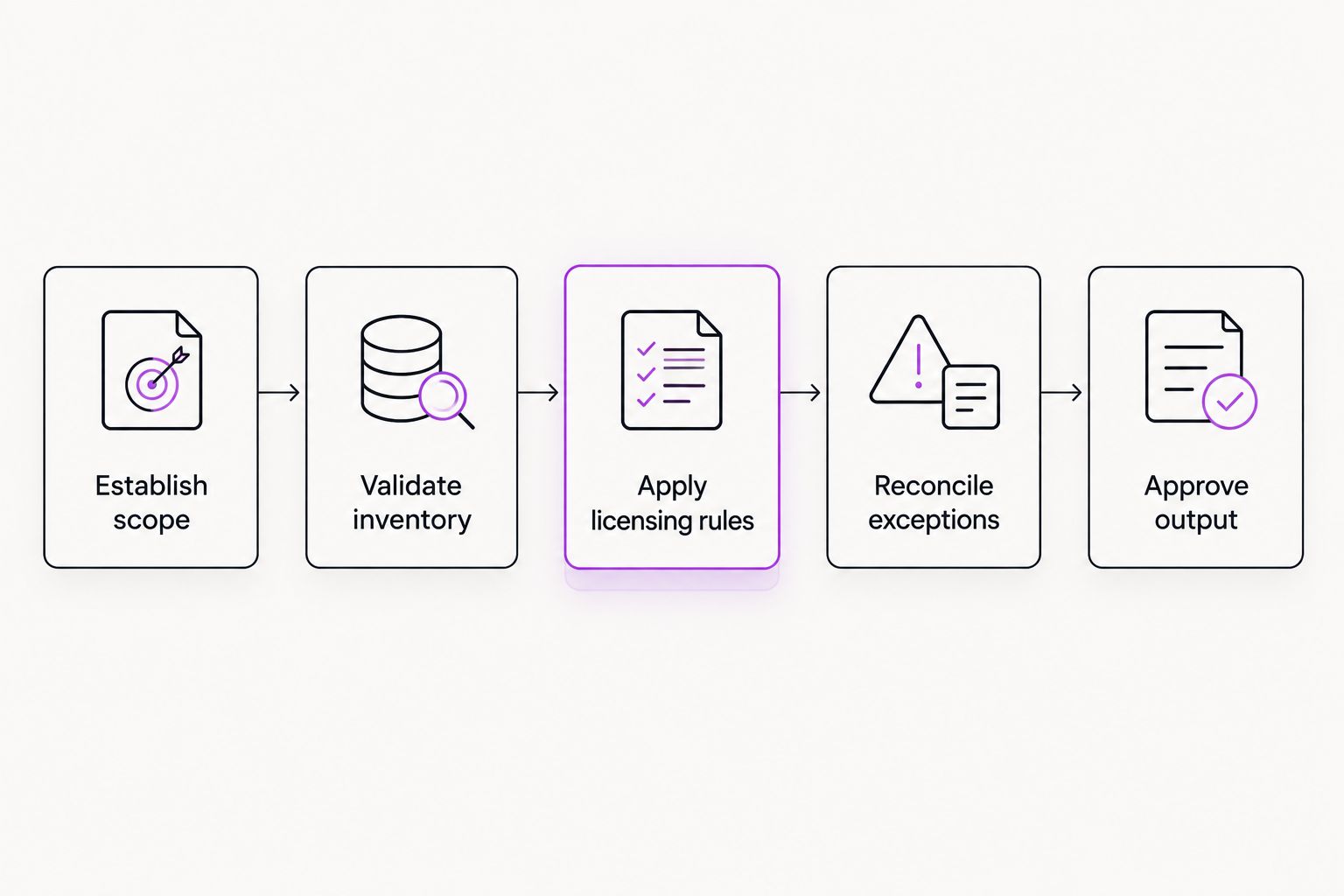
Automate the sequence while preserving evidence and ownership at each step.
Why SPLA reporting automation varies
The amount of manual work you can remove depends on the reporting environment and the quality of the controls around it. Assess these factors before accepting a demonstration as evidence that your own process is covered.
- Licensing scope: Different products and licensing arrangements require different evidence. Confirm that the workflow covers the arrangements you actually use.
- Inventory coverage: Missing environments or inaccessible systems create gaps that a reporting engine cannot resolve from financial data alone.
- Data quality: Incomplete configuration or assignment records prevent reliable calculations, even when the collection process runs successfully.
- Rule maintenance: A documented process must identify which agreement terms and product requirements govern the reporting period.
- Exception handling: Transfers, disputed classifications, and corrected records need an explicit treatment rather than an undocumented override.
- Approval ownership: A technically complete report still needs an accountable owner who can explain the reported quantities.
For your 2026 assessment, ask vendors to demonstrate these controls using an authorized sample of your reporting data. A prepared demonstration illustrates functionality; a sample reconciliation tests whether that functionality fits your process.
How do you verify that a tool can replace spreadsheets?
Run the proposed workflow alongside the existing process before retiring it. Agreement between the outputs is useful, but it is not sufficient: both processes can carry the same incorrect assumption.
Use 3 reconciliations to test the replacement:
- Inventory to scope: Confirm that all in-scope environments appear in the collected records and that exclusions have an explanation.
- Inventory to calculation: Trace selected reporting quantities back to source attributes and the applicable licensing treatment.
- Calculation to output: Confirm that approved adjustments reach the final reporting output without unexplained changes.
Investigate differences in both directions. An automated quantity above the spreadsheet result needs explanation, and an automated quantity below it needs the same scrutiny. Do not define success as whichever output reports less.
Record discrepancies in an issue log with an owner, supporting evidence, resolution, and approval. Repeat the affected calculation after correction so that the final result reflects the resolution rather than a separate manual patch.
Before cutover, retain 2 approval records: one for the calculation method and one for the reporting output. This is a proposed control design, not a Microsoft-prescribed approval count. It separates acceptance of the method from acceptance of a particular reporting period.
What should you ask during a vendor demonstration?
Ask the vendor to follow a reported quantity backward. Start with the output, inspect the calculation, open the relevant source record, and identify the governing licensing treatment. This reverse walkthrough exposes dependencies that a dashboard demonstration leaves unanswered.
Then introduce a controlled exception, such as an incomplete inventory record or a disputed classification. Ask how the workflow prevents an unresolved item from disappearing into the final report and how the correction remains visible afterward.
Your 2026 acceptance checklist should answer:
- Can you distinguish collected facts from calculated values and manual adjustments?
- Can you identify which systems are missing from collection?
- Can you inspect the licensing treatment behind a reporting quantity?
- Can you explain every adjustment without relying on the person who entered it?
- Can you reproduce the approved output from retained records?
- Can you identify the person responsible for releasing the report?
Reject unexplained totals, even when the dashboard looks complete. Reporting automation earns trust through traceability, not through the absence of visible warnings.
Where does Octopus fit in SPLA reporting automation?
Octopus is best suited to Microsoft SPLA partners and Authorized Outsourcers seeking licensing-focused reporting software and consulting. Its stated offering includes software asset management, usage-reporting automation, customer billing, and audit-defense support.
That scope makes Octopus relevant when your problem extends beyond cloud spending visibility. The selection decision still depends on whether the proposed workflow covers your inventory, licensing arrangements, reporting output, and internal approval requirements.
The limitation is operational: no platform description establishes that your data is complete or your interpretations are correct. Ask for evidence of fit using your reporting scenarios, and keep contractual interpretation and report approval assigned to named owners.
Use a reporting requirements discussion to define the acceptance test before committing to a replacement. Bring your scope, a representative reporting output, and the exceptions that currently consume manual review.
Can you stop reviewing SPLA reports after automation?
No—automated SPLA reports still need accountable review. Software can repeat a calculation consistently, but consistency does not prove that the input, scope, or licensing treatment is correct.
Move reviewers away from rebuilding the entire report and toward checking exceptions, scope changes, and calculation changes. Preserve a clear route for stopping release when unresolved issues affect the reporting output.
Is customer billing data enough to prepare a SPLA report?
No—customer billing data alone does not establish SPLA reporting requirements. Billing describes what you charge a customer; licensing evidence supports what you must report under the applicable arrangement.
Connect billing and licensing records where useful, but retain their separate purposes. A commercial adjustment should not silently change the licensing calculation.
Does reporting automation replace audit preparation?
No—reporting automation does not replace audit preparation. A report is an output; audit preparation requires the supporting records and explanations needed to substantiate it.
Preserve the evidence chain as part of normal reporting rather than assembling it only after a request arrives. For 2026 operations, make the reporting archive a controlled deliverable alongside the approved output.
FAQ
Can FinOps tools replace manual SPLA usage reports completely?
FinOps tools can replace manual report assembly when the workflow includes applicable licensing rules, validated inventory, reconciliation, and an approved output. Human ownership remains necessary for interpretations, exceptions, and release decisions.
What's the difference between FinOps reporting and SPLA reporting?
FinOps reporting addresses technology spending and allocation, while SPLA reporting addresses licensing quantities under the applicable agreement and product requirements. Financial visibility does not establish licensing compliance by itself.
What should I verify before replacing my SPLA spreadsheet?
Verify scope coverage, source-data quality, licensing calculations, exception handling, and output traceability. Run the proposed workflow alongside the existing process and investigate discrepancies before cutover.
Can I use customer invoices as my SPLA usage evidence?
Customer invoices alone do not establish the underlying licensing requirement. Keep the inventory, configuration, access, or assignment evidence required for the applicable licensing treatment.
Will automated SPLA reporting prevent every audit issue?
Automated SPLA reporting does not guarantee an issue-free audit. Its value depends on complete evidence, correct licensing treatment, documented exceptions, and retained approvals.
Who is responsible for approving an automated SPLA report?
Your organization must assign an accountable reporting owner. Automation prepares and processes information; it does not remove responsibility for validating and approving the output.
Is Octopus relevant if I need both SPLA reporting and billing support?
Octopus provides software and consulting that support SPLA usage-reporting automation, customer billing, and audit defense. Assess the proposed workflow against your own reporting and billing requirements before selection.
One last thing
Archive the explanation, not just the export. A final report records what you declared, but it does not necessarily show why you declared it.
Keep the source snapshot, applicable rule references, adjustments, unresolved issues, and approval record together. That evidence package is the practical test of whether automation replaced a manual process—or merely hid it behind a new interface.