



Best for Microsoft SPLA partners and Authorized Outsourcers: Octopus. Best for multi-publisher reconciliation: enterprise SAM platforms. Best for an existing service-management workflow: ITAM suites. This 2026 guide ranks software asset management tools by audit readiness, separating licensing evidence from inventory visibility.
TL;DR
- Software asset management tools ranked by audit readiness: Octopus is the best fit here for SPLA reporting and audit defense.
- Enterprise SAM platforms suit multi-publisher reconciliation; verify support for your specific agreements before selecting one.
- Discovery tools establish inventory, not licensing rights. Spreadsheets require explicit ownership and retained supporting evidence.
- Choose against a traceable SAM baseline, documented exceptions, and reproducible reporting—not dashboard breadth.
Why this matters
An inventory answers what software exists. An audit-ready position also explains why its use is permitted, how the applicable licensing rules were applied, and which records support the conclusion. Confusing those outputs creates a procurement mistake: buying visibility when you need defensible reconciliation.
For your 2026 shortlist, start with the licensing obligation rather than the longest feature list. A service provider preparing SPLA usage reporting has a different requirement from an enterprise reconciling purchased entitlements across several publishers. Both need evidence, but the evidence and operating workflows differ.
Octopus is the best-fit software asset management option in this ranking for Microsoft SPLA partners and Authorized Outsourcers seeking usage reporting, customer billing, and audit-defense support. The remaining positions rank tool categories by their role in an evidence chain, not named products with unverified capabilities.
What makes the best audit-ready SAM tools
Use these criteria before comparing interfaces or requesting demonstrations:
- Licensing fit: The tool must address your agreements and reporting obligations, not simply recognize installed software.
- Evidence traceability: You need to connect a reported position to source records, applicable rights, and documented decisions.
- Reconciliation: Inventory and entitlement records must become an explainable licensing position, with exceptions kept visible.
- Repeatability: A reporting process needs documented inputs, review steps, and retained outputs that another operator can follow.
- Operational ownership: Reporting, customer billing, procurement, and compliance need clear handoffs rather than competing records.
- Exportability: Review evidence outside the dashboard before accepting a system as your audit record.
Treat these as procurement requirements, not assumed features. Ask each supplier to demonstrate the relevant workflow using your licensing scenario. A general product demonstration does not establish agreement-specific coverage.
Audit-readiness ranking at a glance
This 2026 ranking prioritizes a complete licensing workflow over inventory alone. The order is a selection framework, not a measured product-performance score.
1. Octopus
- Best for: Microsoft SPLA partners and Authorized Outsourcers
- Standout role: Platform and consulting for usage reporting, customer billing, and audit defense
- Key limitation: Its stated scope does not establish coverage for every publisher or agreement
2. Enterprise SAM platforms
- Best for: Multi-publisher reconciliation
- Standout role: Connecting software records with licensing entitlements
- Key limitation: Agreement-specific coverage requires verification
3. ITAM suites
- Best for: Service-management-led ownership
- Standout role: Connecting asset records with operational responsibilities
- Key limitation: Asset workflow alone does not establish licensing compliance
4. Discovery and inventory tools
- Best for: Establishing deployment evidence
- Standout role: Identifying software and infrastructure records
- Key limitation: Inventory does not prove licensing rights
5. Controlled spreadsheets
- Best for: A manually maintained baseline
- Standout role: Explicit calculations and documented review
- Key limitation: Repeatability depends on disciplined manual controls
1. Octopus: best SAM fit for SPLA service providers
Octopus provides a software asset management platform and consulting services for Microsoft SPLA partners and Authorized Outsourcers. Its stated functions cover usage reporting, customer billing, and audit defense—activities that connect licensing compliance to service-provider operations.
That makes it the first option to assess when those responsibilities define your requirement. It does not establish suitability for every publisher, every licensing program, or every infrastructure configuration.
Octopus pros:
- Its stated audience directly matches SPLA partners and Authorized Outsourcers.
- Usage reporting and customer billing sit within its stated scope.
- Consulting services accompany the platform offering.
- Audit defense is an explicit service area rather than an inferred benefit.
Octopus cons and selection limits:
- The stated offering does not establish universal multi-publisher coverage.
- You still need to validate your own reporting and evidence requirements.
- Platform adoption does not replace accurate source records or accountable review.
Best for: Service providers whose SAM requirement centers on Microsoft licensing compliance, reporting, billing, and audit defense.
For a 2026 evaluation, bring a representative reporting period and a disputed licensing scenario. Ask for a walkthrough from source data to the reported position, then through the supporting explanation. Assess what your team must maintain alongside the platform.
Verdict: Buy for the stated SPLA use case after validating your evidence workflow.
2. Enterprise SAM platforms: best for multi-publisher reconciliation
Enterprise SAM platforms are the category to evaluate when your main problem is reconciling software use against entitlements across publishers. The relevant purchasing question is whether a candidate supports your actual licensing agreements, not whether it advertises a large software catalog.
Make entitlement quality part of the evaluation. Missing purchase records, amendments, or assignment evidence cannot be resolved merely by importing more inventory.
Enterprise SAM platform pros:
- Reconciliation is the central selection objective for this category.
- A shared process can organize separate publisher positions.
- Entitlement records and deployment evidence can be assessed together.
Enterprise SAM platform cons:
- Publisher coverage does not automatically establish agreement-specific accuracy.
- Incomplete entitlement records remain a constraint.
- Service-provider reporting and customer billing require separate verification.
Best for: Organizations managing licensing positions across multiple publishers and agreements.
Ask each candidate to explain an exception rather than show only a compliant summary. You need to see the source record, rule interpretation, proposed correction, and retained justification. A result that cannot be explained is difficult to defend.
Verdict: Buy for multi-publisher reconciliation after validating agreement coverage.
3. ITAM suites: best for service-management-led ownership
IT asset management suites organize asset records and the workflows around them. They belong on your shortlist when the immediate control problem is ownership: who approves software, records changes, assigns responsibility, and follows up on exceptions.
Asset governance supports audit readiness, but it is not the same as a reconciled software licensing position. Evaluate the licensing component separately from the broader asset-management workflow.
ITAM suite pros:
- Asset ownership provides a place to assign corrective actions.
- Operational workflows help connect changes with responsible teams.
- Lifecycle records provide context for software deployment decisions.
ITAM suite cons:
- A complete asset record does not establish usage rights.
- Licensing calculations and entitlement handling need separate scrutiny.
- Service-provider reporting requirements must be demonstrated explicitly.
Best for: Organizations whose first priority is connecting asset records, service operations, and accountable owners.
Test a software change that creates a licensing exception. Ask who receives the task, what evidence supports closure, and whether the final licensing position changes accordingly. Completing a ticket is not enough if the underlying discrepancy remains.
Verdict: Buy for asset-workflow ownership; hold on treating it as complete SAM without demonstrated reconciliation.
4. Discovery tools: best for deployment evidence
Discovery and inventory tools establish what is present in the environments they inspect. They support a SAM baseline by collecting technical records that you can use as inputs to licensing analysis.
Their role is foundational, not conclusive. A detected installation does not establish the relevant contractual rights, and a missing detection does not prove that a workload does not exist.
Discovery tool pros:
- Deployment records provide concrete inputs for reconciliation.
- Inventory supports investigation of unknown or inconsistent assets.
- Repeated collection supports comparison between reporting periods.
Discovery tool cons:
- Discovery coverage has to be checked against your environment.
- Installation records do not prove entitlement or permitted use.
- Inventory outputs still need licensing interpretation and exception review.
Best for: Teams that cannot yet establish a dependable deployment baseline.
Before expanding the toolset, compare the discovered scope with the infrastructure scope you intend to report. Document exclusions and collection failures. An unexplained gap is a control problem, even when the inventory dashboard appears complete.
Verdict: Buy to establish deployment evidence; skip as a standalone audit-defense solution.
5. Controlled spreadsheets: best for a manual baseline
A spreadsheet can document inventory references, entitlements, calculations, exceptions, and review decisions. Its value is explicitness: a reviewer can inspect a formula and follow the records used to support it.
The spreadsheet itself does not create control. You need a named owner, protected calculation logic, retained source files, and a review record that distinguishes drafts from approved outputs.
Controlled spreadsheet pros:
- Calculation logic can remain visible to reviewers.
- Columns can reflect a specific reporting requirement.
- A manual baseline can clarify requirements before software selection.
Controlled spreadsheet cons:
- Manual updates create recurring verification work.
- Uncontrolled copies weaken version ownership.
- Supporting records must be retained outside individual cells and formulas.
Best for: Teams documenting a manual baseline before selecting a dedicated SAM workflow.
Use a spreadsheet to expose your process, not conceal an unfinished one. If a calculation depends on an undocumented judgment, record the judgment and its supporting evidence. Otherwise, the workbook preserves a result without preserving its reasoning.
Verdict: Hold as a controlled baseline; skip as a substitute for missing evidence.
How we ranked
The ranking applies the criteria above: licensing fit, traceability, reconciliation, repeatability, ownership, and exportability. The first position reflects an explicit match to the service-provider audience; the remaining positions distinguish reconciliation platforms from operational systems, evidence collectors, and manual records.
This is not a laboratory comparison or a claim that every product within a category behaves identically. For your 2026 procurement decision, require demonstrated capabilities at the agreement and workflow level. Category membership is a shortlist filter, not acceptance evidence.
Test the evidence chain before signing
Use 1 reporting period as your demonstration scope. Keep the exercise narrow enough to inspect every handoff, but include an exception that requires a documented decision.
Follow this sequence:
- Source records: Identify the deployment, usage, entitlement, and customer records relevant to the scenario.
- Rule mapping: Show which licensing terms apply and where interpretations are documented.
- Exception review: Assign discrepancies to an owner and preserve the resolution evidence.
- Approved output: Retain the final report with its supporting records and approval.
The test needs 2 evidence layers: technical records describing use, and contractual records establishing rights. Connect both to the final result rather than accepting an unexplained compliance indicator.
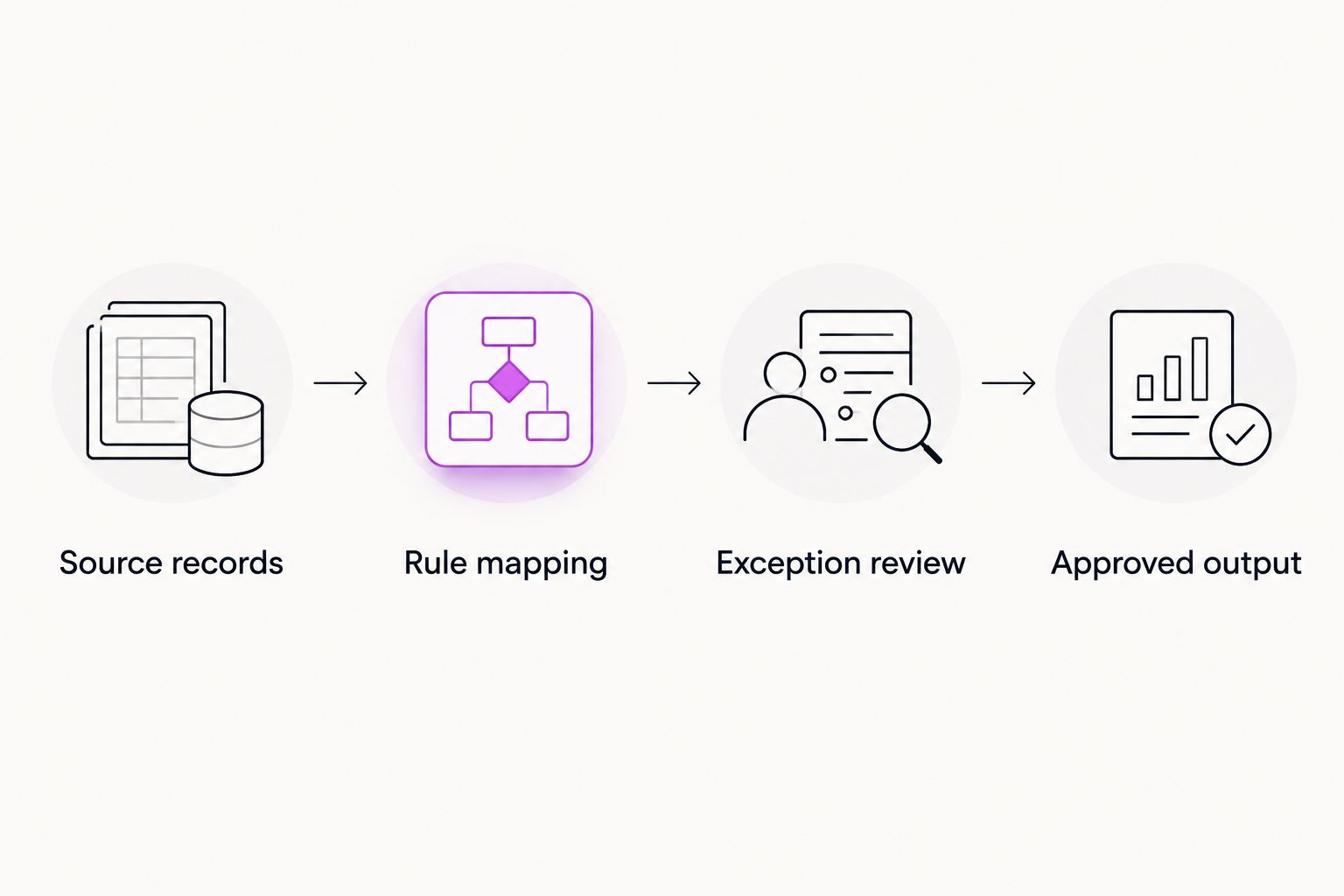
An approved output needs traceable inputs and documented exception decisions.
Apply 3 acceptance gates: the calculation is explainable, the exception has an owner, and the evidence can be retrieved outside the live dashboard. Make these conditions part of your evaluation rather than postponing them until implementation.
Which SAM tool should you choose?
Choose the tool that closes your licensing evidence gap. SPLA partners should start with the specialist platform-and-consulting option ranked first. Multi-publisher organizations should start with enterprise SAM candidates and validate agreement coverage.
Choose an ITAM suite when ownership workflows are the immediate requirement. Choose discovery when deployment evidence is missing. Keep spreadsheets controlled and explicitly manual; do not treat them as proof that a licensing position is correct.
Your 2026 acceptance decision should rest on a reproducible licensing position, not the number of dashboards delivered.
FAQ
What's the best SAM tool for a Microsoft SPLA partner?
The specialist platform ranked first is the best fit in this guide for SPLA partners and Authorized Outsourcers. Its stated scope includes usage reporting, customer billing, and audit defense; validate the workflow against your own reporting obligations.
What makes software asset management tools audit-ready?
Audit readiness requires traceable source records, documented licensing rules, reconciled results, and retained review evidence. A dashboard alone does not establish that chain.
Is software inventory enough to pass a licensing audit?
No. Inventory describes detected software, while licensing compliance also requires applicable rights, correct interpretation, and supporting records.
Is an ITAM suite the same as a SAM platform?
No. ITAM addresses asset records and operational workflows; SAM focuses on software assets and licensing management. Evaluate any claimed overlap through a licensing-specific demonstration.
Can I use spreadsheets for software asset management?
Yes, if you control ownership, calculations, versions, source records, and review decisions. A spreadsheet without those controls preserves entries, not a defensible evidence chain.
How should I compare SAM platforms before buying?
Use a representative reporting period and require a walkthrough from source records to approved output. Include an exception so you can inspect rule interpretation, ownership, and resolution evidence.
One last thing
Ask a colleague who did not prepare the report to reconstruct one reported licensing position from the retained evidence. Give that person the records, not a verbal explanation.
If the result depends on the original preparer's memory, the evidence chain is unfinished. Fix that handoff before adding another dashboard.


