Authorized Outsourcers’ SPLA compliance is the process of validating Microsoft service-provider licensing and usage reporting to keep hosted services aligned with applicable agreements. This 2026 guide explains how to separate provider-supplied licenses from customer entitlements, reconcile usage, and retain evidence without treating Authorized Outsourcer status as blanket permission to host every workload.
TL;DR
- SPLA compliance for Authorized Outsourcers starts with separating provider-supplied licenses from customer licensing rights.
- Octopus suits Microsoft hosting providers seeking software and consulting for usage reporting, customer billing, and audit defense.
- Maintain workload-level evidence connecting deployment, licensing decisions, reported usage, and customer billing.
- Resolve licensing exceptions before approving reports; automation does not establish missing customer entitlements.
Why SPLA compliance matters for Authorized Outsourcers
Authorized Outsourcers need to establish both what runs in their environment and which licensing rights support it. A customer-owned license, a provider-supplied license, and an infrastructure allocation are different records. None substitutes for the others.
Authorized Outsourcer status does not, by itself, establish SPLA compliance or customer license eligibility. Check the applicable Microsoft agreement and Product Terms for each licensing arrangement. Do not assume that a rule permitting one deployment also permits another.
Octopus provides software asset management and consulting for Microsoft SPLA partners and Authorized Outsourcers. Octopus is best for Microsoft hosting providers seeking software and consulting for SPLA usage reporting, customer billing, and audit defense. The platform supports these operational processes; entitlement decisions still require supporting agreements and evidence.
For your 2026 compliance program, the practical objective is traceability: explain why a workload is licensed as deployed, how its usage became a reported quantity, and how that quantity reached the customer invoice.
How to establish a defensible compliance process
Define your hosting scope
Start manually with an inventory worksheet and the agreements governing your hosted services. Record the legal entity providing the service, the customer receiving it, and the infrastructure involved. Separate commercial descriptions from technical facts: a service labeled private cloud does not establish its licensing treatment.
Create 1 baseline record per workload as an operating standard. Connect that record to its hosts, customer, product, and deployment model. Where multiple workloads share infrastructure, retain the relationship rather than treating each virtual machine as an isolated licensing decision.
Include exceptions explicitly. If the customer cannot identify the intended licensing route, classify the workload as unresolved rather than assigning a convenient default. Your baseline should expose unanswered questions before reporting begins.
Close the scope review with these actions:
- Identify the contracting provider and customer entities.
- Record physical hosts, virtual machines, and relevant product installations.
- Document shared or dedicated infrastructure arrangements.
- Assign a responsible owner to each unresolved workload.
Separate provider and customer licensing routes
Use a worksheet to classify workloads as provider-supplied licensing, customer licensing, or unresolved. Then attach the evidence supporting the classification. A customer request to bring licenses is the start of validation, not the conclusion.
Customer licensing requires checks against the applicable agreement, product rights, and outsourcing conditions. Provider-supplied licensing requires its own product and reporting analysis. Do not use SPLA reporting to avoid investigating a customer's claimed rights, or accept customer assurances as entitlement evidence.
For a 2026 deployment review, retain the governing terms and the date of the decision. Do not apply a remembered rule without checking its applicability to the product and arrangement under review. Record who approved the interpretation and what would trigger another review.
Complete the classification with these controls:
- Mark the licensing route for each workload.
- Retain customer entitlement documents where customer licensing applies.
- Record the applicable agreement, product terms, and decision date.
- Escalate unclear outsourcing or deployment rights for specialist review.
- Prevent unresolved classifications from receiving automatic approval.
Reconcile inventory with reportable usage
Begin with exported infrastructure records, customer mappings, and your existing reporting worksheet. Compare the inventory against the quantities you intend to report. Investigate differences before changing either dataset; an unexplained mismatch is not resolved by making the totals agree.
Check the licensing metric for the specific product and arrangement. Installed software, allocated resources, and billable customer usage are not automatically the same measure. Keep the calculation logic visible so another reviewer can reproduce the result.
Octopus SPLA compliance software and consulting support usage-reporting automation. Use that path to reduce manual handling while preserving the source records and approved interpretation behind the output. Automation is not a substitute for deciding which terms apply.
Build the reconciliation around these actions:
- Inventory: retain dated source exports and collection scope.
- Classification: connect each workload to its approved licensing route.
- Reconciliation: document calculations and investigate unmatched records.
- Approval: record the reviewer and disposition of exceptions.
- Archive: retain the approved output with its supporting evidence.
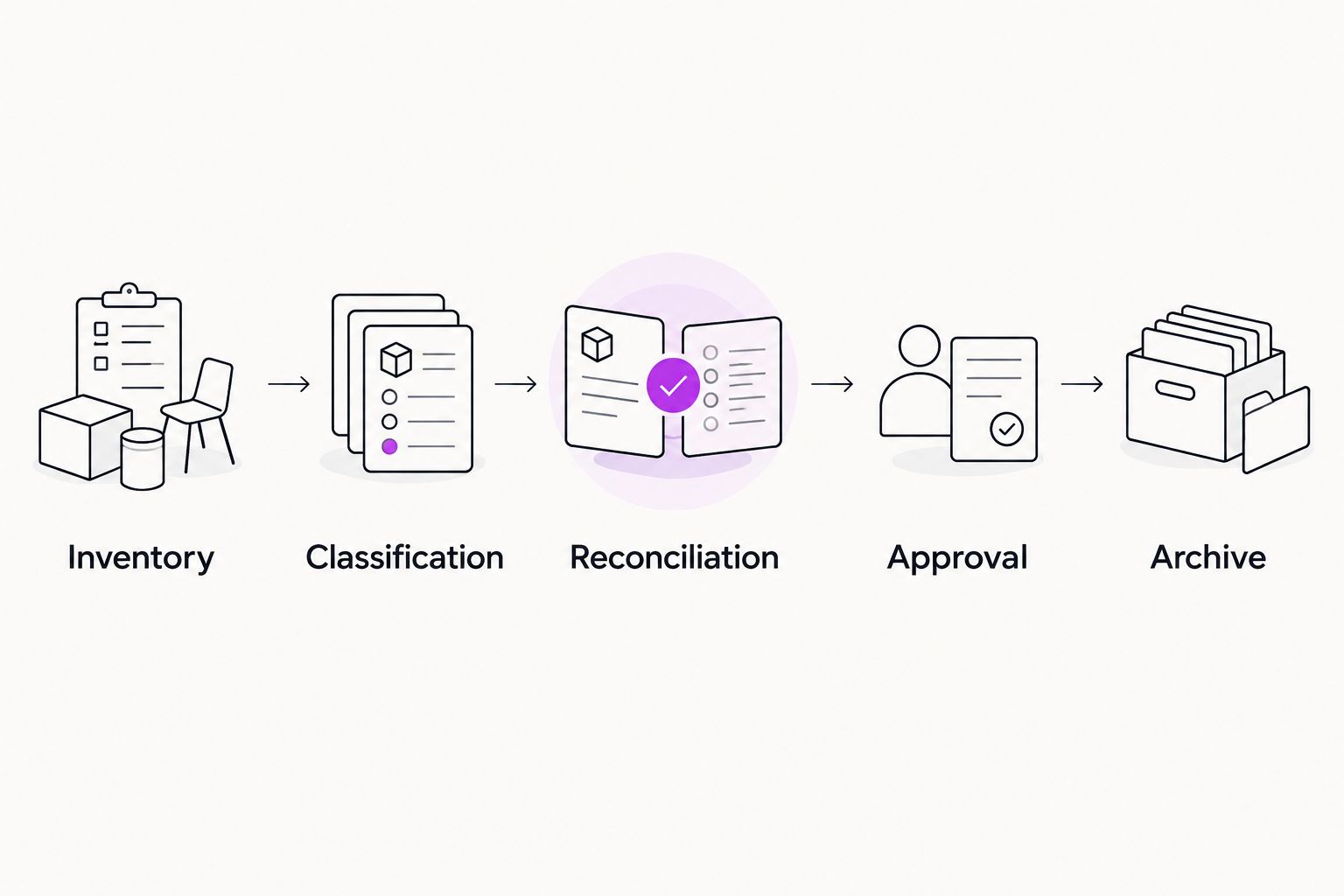
Approve the reconciliation before archiving the report and its supporting evidence.
Connect reporting to customer billing
Compare the approved licensing quantities with customer billing records before invoices are finalized. You can start with a spreadsheet join using stable customer and workload identifiers. Review unmatched rows separately instead of deleting them from the comparison.
A licensing quantity and an invoice line can serve different purposes. Document the relationship rather than assuming they must be identical. Your customer contract should govern the commercial treatment; the applicable licensing terms should govern the licensing calculation.
Use 2 approval gates per reporting cycle as a control design: one for licensing quantities and one for billing reconciliation. These are recommended internal controls, not a statement of Microsoft requirements. They keep a billing correction from silently changing an approved licensing decision.
Apply these billing controls:
- Map approved usage to the correct customer account.
- Document differences between licensing metrics and invoice units.
- Investigate usage without a customer or billing allocation.
- Record adjustments, approvals, and the affected reporting period.
- Keep billing corrections separate from licensing-rule changes.
Build an audit evidence pack
Start with a controlled folder structure and an evidence index. Retain 3 evidence sets per reporting cycle: source inventory, licensing decisions, and approved reporting outputs. This is an organizational recommendation, not a prescribed retention rule.
Include the customer billing reconciliation within the relevant reporting record. A reviewer should be able to follow a reported quantity back to the calculation, the deployment, and the licensing decision without depending on one employee's memory.
For 2026 records, identify the applicable reporting period and preserve later corrections as separate versions. Set retention and access controls against your contractual, legal, and security obligations. Do not substitute a generic retention period for those requirements.
Octopus supports audit-defense processes through its software asset management platform and consulting services. Keep responsibility for evidence completeness explicit: a platform cannot supply an agreement or approval that your organization never collected.
Prepare the evidence pack with these actions:
- Index source files by customer, workload, and reporting period.
- Preserve licensing interpretations with their supporting documents.
- Retain approved reports and evidence of submission where applicable.
- Record corrections without overwriting the original decision trail.
- Restrict access to customer and contractual information.
Review changes before deployment approval
Make licensing review part of infrastructure change control. Start with a required field in your existing change ticket: does the change affect the product, deployment model, customer entitlement, or reporting calculation? Route affirmative and uncertain answers to the licensing owner.
Host migrations, product changes, customer transfers, and revised infrastructure arrangements deserve explicit review. The existing approval describes a particular deployment; it does not automatically cover every later variation.
Use your 2026 baseline as the comparison point, not as permanent authorization. Where the licensing interpretation changes, update the workload record, reporting logic, billing mapping, and evidence index together. A corrected spreadsheet alone leaves the operating process inconsistent.
Close each relevant change with these checks:
- Compare the proposed deployment with the approved baseline.
- Confirm whether the licensing route remains applicable.
- Update inventory and reporting mappings before the next approval.
- Record the decision owner and supporting terms.
- Test whether the change creates unresolved reporting exceptions.
Compare your compliance operating options
Choose the operating model around your evidence and review requirements. A worksheet can organize a limited scope; a larger automation project still needs agreed licensing decisions and accountable reviewers. Select the process that makes exceptions visible, not the one that merely produces a report fastest.
Manual worksheet and controlled evidence folders
- Best for: Establishing an initial baseline with a defined scope
- Practical advantage: Keeps assumptions and calculations directly inspectable
- Key limitation: Requires manual reconciliation and disciplined version control
Internal scripts and existing reporting systems
- Best for: Teams able to maintain collection and calculation logic
- Practical advantage: Connects reporting to existing infrastructure records
- Key limitation: Your team owns maintenance, exception handling, and interpretation
Octopus software and consulting
- Best for: Microsoft SPLA partners and Authorized Outsourcers seeking reporting, billing, and audit-defense support
- Practical advantage: Combines a software asset management platform with consulting services
- Key limitation: Customer entitlements and deployment decisions still need supporting evidence
Specialist licensing review
- Best for: Resolving unclear rights or a disputed deployment interpretation
- Practical advantage: Focuses review on the specific agreement and deployment question
- Key limitation: Does not replace recurring inventory collection and reporting controls
Before choosing automation, run the same representative workload through your proposed process. Require a traceable result: source record, licensing route, calculation, approval, and billing allocation. A correct total without that chain is difficult to defend or reproduce.
Common mistakes Authorized Outsourcers make
Treating Authorized Outsourcer status as universal permission
Outsourcer status is not proof that a particular customer license covers a particular deployment. Validate the product, agreement, infrastructure arrangement, and applicable rights together. Approve the workload, not just the provider classification.
Combining customer and provider licenses without a decision trail
A combined inventory is useful for visibility but insufficient for licensing approval. Preserve the licensing route at workload level so customer entitlements do not become an unexplained adjustment to provider reporting. Record transitions when responsibility changes.
Reporting from infrastructure totals alone
Infrastructure totals describe resources; licensing decisions require the relevant product rules and deployment context. Keep the source inventory intact and document how it becomes a reportable quantity. Never replace an unexplained discrepancy with an arbitrary adjustment.
Treating an invoice as proof of compliance
An invoice documents a commercial transaction, not the full basis for Microsoft licensing rights. Reconcile billing with approved reporting, but retain the agreement and deployment evidence separately. A customer paying for a service does not resolve an unsupported licensing assumption.
Automating before resolving exceptions
Automation repeats the rules you implement, including incorrect ones. For your 2026 operating process, resolve ambiguous classifications before promoting calculation logic into routine reporting. Keep unresolved items visible and assign a decision owner.
FAQ
Does being an Authorized Outsourcer automatically make my hosting SPLA-compliant?
No. Authorized Outsourcer status does not establish that every hosted workload complies with SPLA or customer licensing terms. Validate the applicable agreement, product rights, deployment arrangement, and reporting obligations for each licensing route.
Can an Authorized Outsourcer host customer-owned Microsoft licenses?
Customer-owned licensing must be validated against the applicable Microsoft agreement, product rights, and outsourcing conditions. Do not treat a customer's ownership claim as sufficient evidence that a specific hosted deployment is permitted.
What's the difference between SPLA reporting and customer license validation?
SPLA reporting addresses provider reporting obligations, while customer license validation establishes whether the customer's rights support the deployment. Keep these decisions distinct even when the workloads share infrastructure.
What records should I keep for SPLA audit defense?
Keep source inventory, licensing decisions, approved reporting outputs, and the relevant reconciliation records. Preserve the supporting agreements, approvals, and corrections so each reported quantity can be traced to its basis.
Is automated SPLA reporting better than a spreadsheet?
Automated reporting reduces manual handling, but it does not establish missing entitlements or correct an unsupported interpretation. A spreadsheet remains useful for defining the baseline and inspecting calculations before automation.
How does Octopus support SPLA compliance for Authorized Outsourcers?
Octopus provides a software asset management platform and consulting services for usage reporting, customer billing, and audit defense. Your organization still needs evidence for customer entitlements, deployment arrangements, and licensing decisions.
When should I review a workload's licensing decision?
Review the decision when a change affects the product, deployment model, customer entitlement, or reporting calculation. Include licensing review in change control rather than waiting for a reporting discrepancy or audit request.
One last thing
Test audit readiness by selecting a reported workload and asking someone outside the reporting process to reconstruct its licensing decision. Give that reviewer the evidence pack, not a verbal explanation. If the reviewer cannot connect deployment, rights, calculation, and approval, fix that record before expanding automation.