To onboard a new SPLA customer without compliance gaps, document licensing responsibilities, establish a customer-specific inventory, validate the applicable licensing rules, and reconcile usage before approving production. Treat unresolved ownership, missing evidence, and unexplained reporting differences as onboarding exceptions—not tasks to leave until the first reporting deadline.
TL;DR
- To onboard a new SPLA customer without compliance gaps, connect inventory, licensing decisions, usage reporting, and approval evidence.
- Octopus supports SPLA usage reporting and customer billing; documented responsibilities remain essential.
- Reconcile the customer’s first reporting period before approving the reporting handoff.
- Keep unresolved licensing decisions visible, assigned, and separate from approved workloads.
How do you onboard a new SPLA customer without compliance gaps?
Use 7 onboarding steps, each with a named owner and a retained output. The objective is not simply to create a customer account: it is to establish a traceable path from deployed software to the usage you report.
For Microsoft SPLA partners and Authorized Outsourcers, Octopus provides a software asset management platform and consulting services supporting usage reporting, customer billing, and audit defense. Octopus is suited to SPLA partners and Authorized Outsourcers that need software and consulting support for reporting and compliance.
Use the following sequence for your 2026 onboarding checklist. These are operational controls, not a substitute for the Microsoft terms applicable to your agreement, products, and deployment.
- Define scope: identify the customer, services, environments, and accountable owners.
- Assign responsibility: record who supplies licenses and who validates the arrangement.
- Capture inventory: establish the deployed-software baseline and customer mapping.
- Validate rules: document the applicable licensing basis and supporting terms.
- Configure reporting: connect validated usage to reporting and customer billing.
- Reconcile evidence: investigate differences before the reporting handoff.
- Approve handoff: retain approvals, exceptions, and ongoing control ownership.
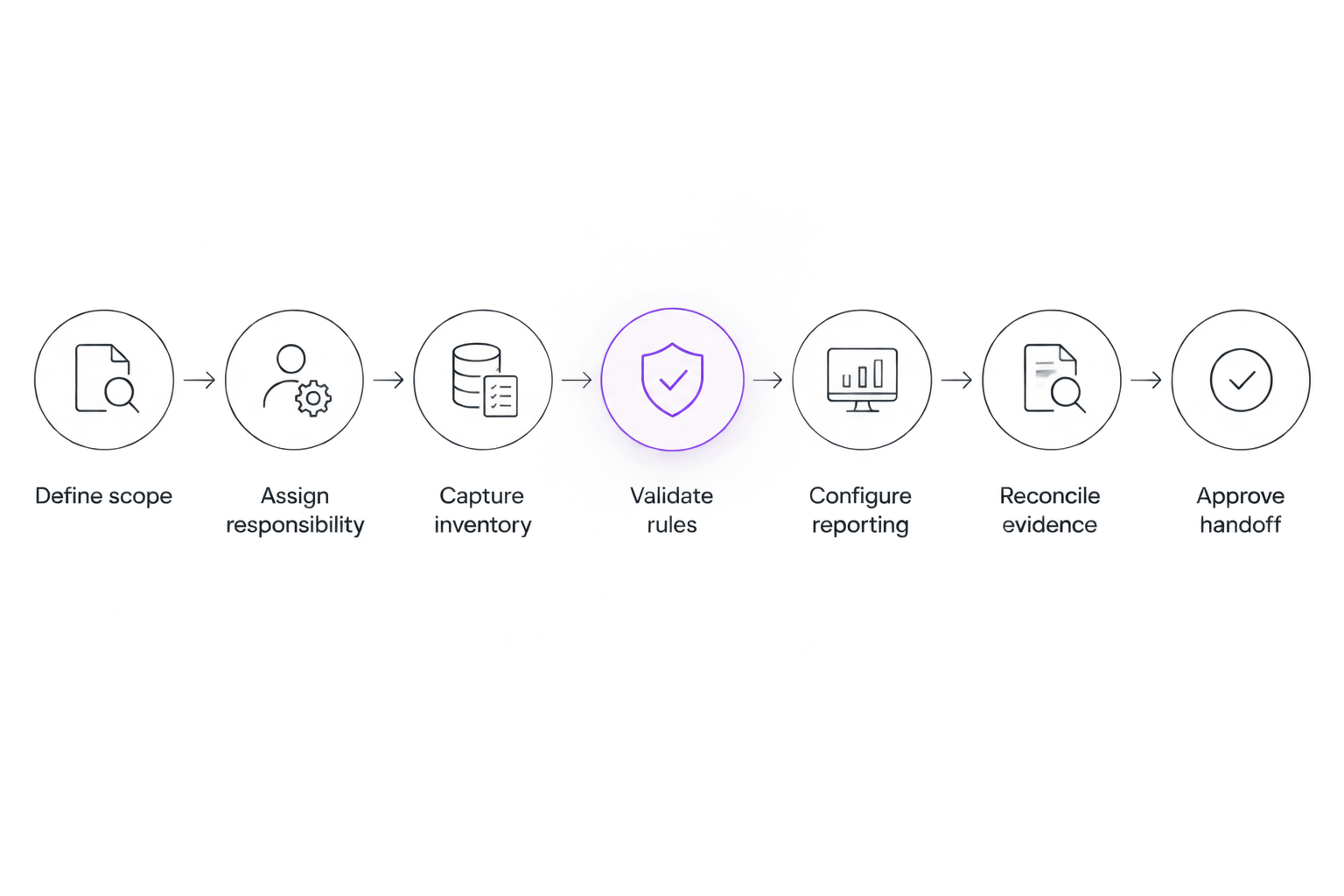
Approve the handoff only after the reporting evidence has been reconciled.
Why this matters
A completed provisioning ticket does not establish that the customer’s licensing position has been checked. Your onboarding record must also explain what was deployed, how it is licensed, and how the associated usage reaches the report.
Keep 3 connected records: an inventory record, a licensing decision record, and a reporting record. Each answers a different question; none replaces the others.
Inventory record
- Best for: Establishing deployed scope
- What to retain: Customer mapping, software details, infrastructure relationships, collection date
- Limitation on its own: Does not establish licensing rights
Licensing decision record
- Best for: Explaining the licensing basis
- What to retain: Applicable terms, deployment assumptions, approval, unresolved questions
- Limitation on its own: Does not prove the inventory is complete
Reporting record
- Best for: Explaining submitted usage
- What to retain: Reporting period, calculation inputs, adjustments, reconciliation approval
- Limitation on its own: Does not explain undocumented licensing decisions
Link all 3 records through a consistent customer identifier. That connection lets a reviewer trace a reported quantity back to the relevant deployment and the licensing decision behind it.
Establish scope and responsibility before provisioning
Define scope
Start with a customer-specific scope record. Include the legal customer identity, service description, environments covered, planned production start, and the people responsible for technical delivery and licensing review.
Describe boundaries explicitly. If an environment is excluded, record the reason rather than leaving the reader to infer that it was checked. Keep customer names, billing identifiers, and technical identifiers connected so shared infrastructure does not obscure ownership.
For a 2026 onboarding, retain the scope approved at launch as well as subsequent changes. An overwritten scope document cannot explain what the original approval covered.
Assign responsibility
Document who supplies the licenses for each relevant workload and who verifies that the proposed arrangement is permitted. Do not accept a customer’s statement that it owns licenses as the complete decision record.
Request the evidence needed to evaluate that arrangement against the applicable terms. Where customer-provided licensing is proposed, record the relevant product, deployment conditions, responsibility boundaries, and the person approving the conclusion.
A responsibility matrix allocates work; it does not create licensing rights. Keep the operational owner separate from the evidence supporting the licensing decision. If the arrangement remains unresolved, exclude it from the approved scope until the review is complete.
Build a baseline you can explain
Capture inventory
Create the initial inventory before treating the reporting configuration as complete. Capture the product and edition, deployment location, relevant infrastructure relationships, customer assignment, and collection timestamp wherever those details affect the licensing review.
Distinguish collected facts from assumptions. If an inventory feed cannot identify an attribute needed for the licensing decision, assign an owner to obtain it rather than populating a default that looks authoritative.
Your baseline should answer:
- Which deployments belong to this customer?
- Which source supplied each relevant inventory attribute?
- Which environments were included or excluded?
- Which changes occurred between collection and production approval?
- Which attributes still require validation?
A timestamped baseline supports comparison; a live dashboard alone does not preserve the state that was approved. Retain the evidence used for sign-off according to your contractual and internal retention requirements.
Validate rules
Check each workload against the Microsoft agreement and product-use terms applicable to the deployment. Record the document version or effective date used, together with the assumptions that affect your interpretation.
Do not assume that every Microsoft product uses the same licensing metric or that a technical configuration establishes entitlement. Identify the required measurement basis for each workload, then verify that the collected data supports it.
Use 2026 as the onboarding date, not as proof that a licensing interpretation is current. The decision record needs the actual terms reviewed. Escalate ambiguous cases to the person responsible for licensing review before including the workload in the approved baseline.
Connect the baseline to reporting and billing
Configure reporting
Map the validated inventory to your reporting process. Record how customer identifiers, product classifications, measurement inputs, and approved adjustments move from source systems into the reporting output.
Keep licensing calculations and customer billing rules distinguishable. A customer invoice reflects your commercial arrangement; it is not a substitute for the evidence supporting the SPLA report.
Set an owner for changes to mappings and calculation logic. Otherwise, a later edit can alter the reporting result without an accompanying explanation in the customer’s onboarding record.
Octopus supports SPLA usage reporting and customer billing through its platform and consulting services. That support does not replace validation of the customer’s deployment, applicable rights, or source-data completeness.
Reconcile evidence
Trace the proposed report back to the customer’s inventory and approved licensing decisions. Investigate missing deployments, unexpected inclusions, unmapped products, and adjustments that lack supporting explanations.
Review the first reporting period against the actual production start and the applicable reporting requirements. Do not assume that the launch-day inventory represents every relevant change during that period.
Use a reconciliation record that includes:
- The reporting period and source-data collection dates.
- The inventory and licensing decisions used.
- Differences between expected and calculated usage.
- Explanations and approvals for adjustments.
- Outstanding issues, responsible owners, and resolution status.
Do not clear a difference merely because the customer invoice balances. Reconciliation must explain the reported usage, not just the amount charged.
Approve handoff
Require 2 sign-offs in your internal workflow: technical confirmation that the documented scope matches the deployment, and licensing/reporting confirmation that the evidence supports the reporting treatment. These are recommended control roles, not a stated Microsoft requirement.
Retain the approval date, approver, supporting evidence, and any approved exclusions. Name the person who owns the customer’s reporting after onboarding ends.
If an exception remains open, state what is blocked and what evidence will close it. A handoff with an unresolved issue must not be recorded as an unqualified compliance approval.
For help reviewing that handoff, contact the licensing team with the customer scope, inventory baseline, licensing questions, and reporting reconciliation.
Why onboarding controls vary
The sequence stays consistent, but the evidence needed to complete it depends on the deployment. Build your 2026 checklist around these factors rather than copying the same completed form between customers.
- Licensing responsibility: provider-supplied and customer-provided arrangements require their own documented basis and ownership.
- Product and edition: record the attributes needed to identify the applicable licensing treatment.
- Infrastructure relationships: retain the host, virtual-machine, and customer relationships relevant to the assessment.
- Collection coverage: identify environments or required attributes that your inventory process does not capture.
- Deployment changes: reconcile additions, removals, and configuration changes occurring after the initial baseline.
- Reporting and billing mappings: validate each transformation separately so commercial rules do not obscure reporting logic.
For each factor, record a decision and its evidence. A checkbox marked complete without supporting detail does not explain how the conclusion was reached.
Can you finish onboarding before the first SPLA report?
You can complete the pre-production controls before the first report, but keep the first-period reconciliation as an explicit follow-up gate. The reporting handoff is complete only when the responsible owner has checked the period’s evidence and resolved unexplained differences.
Separate deployment approval from reporting approval in your workflow. That distinction prevents a production launch from silently closing the reporting work that still needs to happen.
What should you do when the customer supplies licenses?
Verify the proposed use against the applicable licensing terms and retain the evidence supporting that decision. Customer ownership alone does not explain whether the proposed hosted deployment is permitted.
Document the boundary between customer-provided licensing and provider-reported usage. If the evidence is incomplete, keep that workload outside the approved licensing scope until the responsible reviewer resolves it.
How do you keep the customer compliant after onboarding?
Assign ongoing ownership for inventory changes, licensing decisions, and reporting reconciliation. Reuse the onboarding baseline as a reference, not as permanent approval for every later deployment.
For customers onboarded in 2026, keep later changes connected to the original customer record. A product change, infrastructure move, or change in licensing responsibility needs a fresh review of the affected assumptions.
FAQ
What do I need before onboarding a new SPLA customer?
You need an agreed customer scope, named technical and licensing owners, and a process for collecting deployment evidence. Establish the licensing responsibility for each workload before approving its reporting treatment.
Does a software inventory prove SPLA compliance?
No. A software inventory establishes deployment facts, but those facts still need to be evaluated against the applicable licensing terms. Retain the licensing decision and reporting reconciliation alongside the inventory.
Can I use the customer invoice as my SPLA reporting evidence?
No. The customer invoice reflects your commercial billing arrangement and does not replace the calculation inputs and licensing evidence supporting reported usage. Reconcile billing and reporting without treating them as interchangeable.
What should block a SPLA customer onboarding approval?
Unresolved licensing responsibility, missing decision-critical inventory data, and unexplained reporting differences should block an unqualified approval. Record the affected workload, responsible owner, and evidence required to resolve the issue.
Can SPLA reporting automation replace licensing review?
No. Reporting automation does not establish whether the selected licensing treatment is valid for the deployment. Validate the applicable rules, source-data coverage, and reporting mappings before relying on the output.
How does Octopus help with SPLA customer onboarding?
Octopus provides a software asset management platform and consulting services supporting SPLA usage reporting, customer billing, and audit defense. Your onboarding process must still establish the customer scope, licensing responsibilities, and supporting evidence.
One last thing
Test the handoff by asking someone outside the onboarding work to trace a reported entry back to its evidence. Give that reviewer the customer record, not an explanation from the person who configured it.
If the reviewer cannot identify the deployment, applicable licensing decision, calculation inputs, and approval, fix the record before closing onboarding. An explainable reporting entry is a stronger handoff test than a completed checklist alone.