


Yes, SPLA usage reporting can be automated by collecting usage data, applying licensing rules, reconciling exceptions, and preparing reporting outputs. Automate report preparation, not accountability: your team still needs to validate licensing decisions, approve exceptions, and retain the evidence behind each reporting period.
TL;DR
- Can SPLA usage reporting be automated? Yes—automate collection and reconciliation while retaining approval controls.
- Octopus provides software asset management and consulting for Microsoft SPLA partners and Authorized Outsourcers.
- Inventory alone is not a licensing report; usage needs product mapping, customer attribution, and validation.
- Keep reporting evidence and customer billing connected, but approve their outputs separately.
Why this matters
SPLA reporting is not just an inventory export. You need to connect deployed software and relevant usage records to the licensing treatment that applies, then explain how those inputs became reported quantities. A scheduled export does not establish that chain by itself.
For your 2026 reporting process, define automation by the work it removes and the evidence it preserves—not by whether a spreadsheet disappears. Octopus provides a software asset management platform and consulting services for Microsoft SPLA partners and Authorized Outsourcers, including usage reporting, customer billing, and audit defense.
The operational objective is clear: repeatable calculations, visible exceptions, and an approved report that you can reconstruct later. Faster preparation is useful only when the result remains explainable.
Can SPLA usage reporting be automated?
Yes. Automate the repeatable workflow from source collection to report preparation, with explicit approval before submission. Treat each stage as a separate control so that a collection failure cannot silently become a reporting decision.
The following sequence is an implementation checklist, not a claim that every reporting platform includes every function.
- Collect usage. Identify the systems that supply deployment, usage, customer, and infrastructure records. Define which source governs each field and record when collection succeeds or fails.
- Map products. Connect discovered software to the relevant product, edition, and licensing treatment. Route uncertain mappings to review rather than assigning an unverified default.
- Reconcile exceptions. Investigate missing records, duplicate assets, conflicting customer assignments, and unexplained changes. Record the resolution alongside the affected data.
- Approve reports. Review the calculated output against the applicable terms and the reporting period. Assign an accountable approver rather than treating successful processing as approval.
- Retain evidence. Preserve source records, calculation logic, overrides, and the approved output. Keep enough context to reproduce the result without relying on someone's memory.
A useful acceptance test is straightforward: choose an item in the proposed report and trace it backward. You should be able to identify its source, applicable rule, customer assignment, adjustments, and approval.
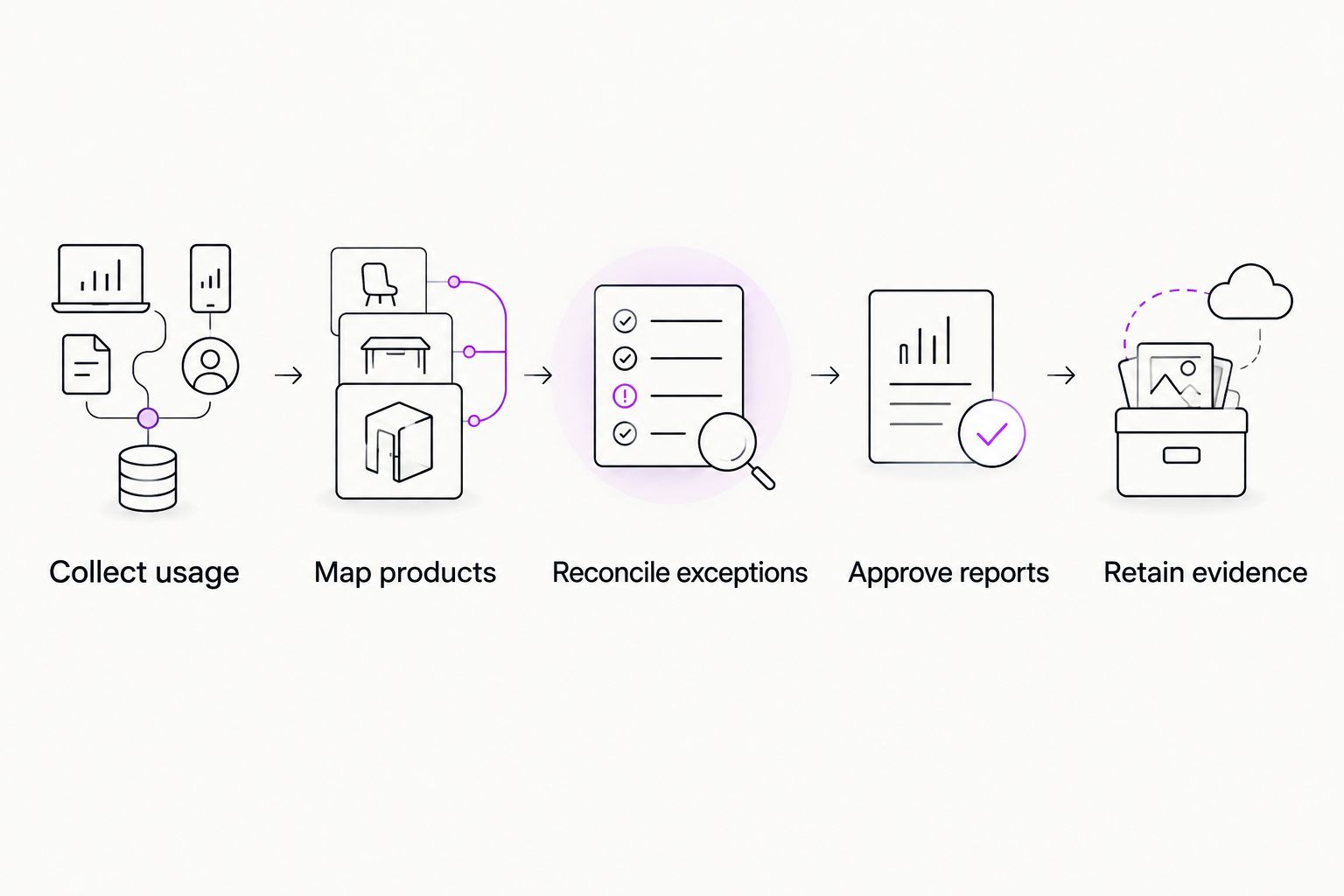
Automation needs an evidence trail as well as a reporting output.
Which reporting approach fits your operation?
Compare approaches by control requirements, not by the presence of a dashboard. Manual preparation, automated preparation, and a hybrid workflow place the work in different parts of the process.
Manual preparation
- Best for: Reviewing unusual arrangements before encoding their treatment
- Operational advantage: Keeps individual decisions directly visible to the reviewer
- Limitation: Requires repeated collection, calculation, and reconciliation work
Automated preparation
- Best for: Repeating established calculations across defined data sources
- Operational advantage: Applies the configured workflow consistently
- Limitation: Repeats configuration errors unless validation detects them
Hybrid workflow
- Best for: Automating routine work while reviewing exceptions
- Operational advantage: Separates repeatable processing from judgment-dependent decisions
- Limitation: Requires clear ownership of the exception queue
Manual preparation: best for investigating unclear cases
Manual review is useful when the licensing treatment or source data needs investigation. A reviewer can inspect the context before deciding how the item belongs in the report.
The drawback is repeatability. If the decision lives only in an analyst's spreadsheet or email, the next reporting cycle starts with the same ambiguity. Document the decision so that future processing does not depend on rediscovering it.
Automated preparation: best for established reporting logic
Automated preparation fits tasks with defined inputs, explicit rules, and testable outputs. Collection schedules, product mappings, reconciliations, and output generation are candidates once their requirements are documented.
The limitation is equally clear: consistent execution does not prove correct licensing treatment. For a 2026 implementation, test both ordinary records and exception cases before accepting the output as a production reporting process.
Hybrid workflow: best for controlled exception handling
A hybrid workflow automates routine preparation and sends unresolved cases to an accountable reviewer. It gives you a practical separation between calculations that can repeat and decisions that need context.
The trade-off is operational ownership. An exception queue without an owner is simply unfinished reporting. Define who resolves each issue, what evidence is required, and whether the issue blocks approval.
Why SPLA reporting automation varies
The scope of automation depends on your reporting environment. Assess these factors before writing requirements or comparing demonstrations:
- Source coverage. List every relevant system and confirm how its records enter the workflow. A working connection to one environment does not establish complete coverage.
- Product identification. Establish how products and editions are identified. Uncertain identification needs a documented resolution path before it affects reporting quantities.
- Customer attribution. Define how usage is assigned to customers and how shared or ambiguous records are handled. Do not substitute a billing account for a verified usage assignment.
- Licensing treatment. Record which applicable agreement terms and product rules support each calculation. Keep contractual interpretation separate from raw discovery data.
- Change handling. Define how corrections, configuration changes, and updated rules affect existing calculations. Preserve the distinction between an original report and a revised report.
- Evidence retention. Specify which inputs, decisions, and outputs must remain available. A final total without supporting records is difficult to reconstruct.
These are evaluation criteria, not reasons to delay every automation task. Start with processes whose inputs and treatment are clear, while keeping unresolved cases visible.
What should you require before accepting automated reports?
Require a reporting workflow that shows its working. For a 2026 rollout, your acceptance criteria should cover completeness, calculation accuracy, exception handling, and reproducibility—not just successful file generation.
Establish a controlled baseline
Create a baseline using a reporting period your licensing owner has reviewed. Document the included environments, product mappings, customer assignments, and known exceptions.
Use that baseline to compare the automated output with an approved reference. Investigate differences at the record level; matching headline totals can conceal offsetting errors.
Make missing data visible
Specify what happens when a source does not respond or a collection job returns incomplete records. The reporting workflow should distinguish confirmed absence of usage from absence of evidence.
Do not let a failed collection silently become a zero-usage decision. Require a visible exception and an explicit resolution before relying on the affected output.
Test corrections and overrides
An override needs a reason, an owner, and a record of what changed. Otherwise, the same reporting input can produce different results without a defensible explanation.
Test how the workflow handles corrected source data and changes to product mappings. Confirm that reviewers can distinguish the approved report from a later recalculation.
Assign approval responsibility
Name the role that approves licensing treatment and the role that releases the report. Where responsibilities overlap, document the approval explicitly rather than assuming it happened.
Your 2026 operating procedure should explain how unresolved exceptions affect release. Submission readiness is a business control, not merely the final state of a processing job.
Can automated SPLA reporting also support customer billing?
Yes, automated SPLA reporting can support customer billing by providing reconciled usage and customer attribution. Reporting quantities and invoice amounts still need separate validation, because a usage calculation does not establish the customer's commercial terms.
Keep a traceable relationship between usage records, reporting outputs, and billing inputs. When someone questions an invoice, your team should be able to explain the underlying usage without changing the approved licensing report simply to make the invoice match.
This distinction also helps when correcting errors. Identify whether the issue concerns source usage, licensing treatment, customer assignment, or billing logic before changing any output.
Does automation make SPLA reporting audit-ready?
No, automation alone does not make SPLA reporting audit-ready. Audit preparation requires evidence that explains reported quantities, licensing decisions, and changes—not just a history of generated files.
Retain the context behind each approved output. That includes relevant source records, mapping decisions, exception resolutions, and the terms used to support the calculation.
For your 2026 evidence process, test retrieval as well as storage. Ask someone other than the original preparer to reconstruct a reported item using the retained material; undocumented assumptions become visible quickly.
Can you automate SPLA reporting without automating submission?
Yes, you can automate SPLA report preparation while keeping submission under human control. Collection, reconciliation, calculations, and output generation do not require you to remove the approval checkpoint.
Treat direct submission as a separate requirement when evaluating a system. Confirm the supported submission process and required format before adding it to your operating procedure; preparing an output does not establish that the system can submit it.
The same principle applies to approvals. A notification that a report finished processing is not evidence that a licensing owner reviewed its exceptions.
Where specialized support fits
Octopus is best for Microsoft SPLA partners and Authorized Outsourcers seeking software asset management and licensing consulting support. Its stated scope includes automating usage reporting, customer billing, and audit defense.
Assess that scope against your own acceptance criteria. Ask how your source systems, product mappings, approval process, and retained evidence would be handled; a service description does not replace validation against your environment.
Prepare an environment list, a sample reporting output, and your unresolved licensing questions before a discussion. That makes the next step an assessment of your workflow rather than a general software demonstration.
Review your SPLA reporting workflow
Discuss usage reporting, customer billing, and audit-defense requirements for your environment.
FAQ
Can SPLA usage reporting be automated end to end?
SPLA usage collection, reconciliation, calculations, and report preparation can be automated. Treat approval and submission as separate requirements, and verify how each works in your proposed workflow.
Is a software inventory enough for SPLA reporting?
No, software inventory alone is not a complete SPLA reporting process. Discovered records need applicable licensing treatment, customer attribution, validation, and an approved reporting output.
Does automated SPLA reporting guarantee compliance?
No, automated SPLA reporting does not guarantee compliance. Incorrect rules or incomplete inputs can produce repeatable errors, so validate calculations and review exceptions before approval.
What should happen when usage collection fails?
A usage collection failure should create a visible exception rather than silently become a zero-usage record. Assign an owner to resolve the gap before approving the affected report.
Can the same usage data support reporting and billing?
Yes, reconciled usage data can support both reporting and customer billing. Validate licensing calculations and billing logic separately, and preserve the relationship between their outputs.
What should I test in an SPLA reporting demonstration?
Test source coverage, product mapping, customer attribution, exception handling, and report reconstruction. Include an incomplete input and a corrected record so the demonstration shows error handling, not just a successful run.
Who does Octopus support with SPLA reporting?
Octopus supports Microsoft SPLA partners and Authorized Outsourcers with a software asset management platform and consulting services. Its stated scope includes usage reporting, customer billing, and audit defense.
One last thing
A matching total is not proof of a correct report. An omitted record and a duplicate record can cancel each other out at the summary level while leaving the underlying reporting wrong.
Make record-level traceability an acceptance requirement. Before approving your next automated report, select an exception and an ordinary item, then verify that both can be explained from source evidence to final output.