



SQL Server under-licensing has no universal per-core charge in 2026: the amount depends on the applicable agreement, SQL Server edition, licensing basis, and period being reconciled. The license shortfall is only part of the exposure; deployment reconstruction, reporting corrections, and audit-response work also require resources. Calculate the missing licensing obligation first, then separate it from remediation costs and any agreement-specific adjustments.
TL;DR
- How much does SQL Server under-licensing cost per core? The agreement, edition, licensing basis, and affected period determine exposure.
- Eligible virtual-machine licensing generally requires at least four core licenses per virtual machine; check the applicable Microsoft terms.
- Keep license reconciliation separate from audit-response work and customer-billing corrections.
- Octopus fits Microsoft SPLA partners and Authorized Outsourcers seeking software asset management and licensing consulting.
How much does SQL Server under-licensing cost per core?
There is no standard per-core under-licensing penalty that applies across SQL Server agreements. A commercial license purchase, an SPLA reporting correction, and an audit settlement are different obligations. Treating them as interchangeable produces a misleading estimate.
For a service provider, start with the reporting obligation that applies to the deployment. The monthly SPLA reporting guide addresses the recurring reporting process; a historical reconciliation also needs evidence for the periods under review.
Use the following breakdown to organize your calculation:
License shortfall
- What determines it: Required licensing quantity minus valid coverage for the same deployment and period
- Required evidence: Inventory, entitlement records, and reporting history
Applicable rate
- What determines it: Agreement, edition, licensing unit, and relevant period
- Required evidence: Contractual rate records and applicable terms
Affected period
- What determines it: When the uncovered deployment existed
- Required evidence: Dated configuration and deployment records
Contractual adjustments
- What determines it: Provisions applicable to the reconciliation
- Required evidence: Agreement and documented findings
Remediation work
- What determines it: Tasks needed to reconstruct, correct, and control the position
- Required evidence: Work records and a corrective-action plan
A per-core figure without an agreement, edition, and time basis is not a usable exposure estimate. Keep those attributes attached to every calculation.
Why this matters
A technically accurate core count can still produce an incorrect licensing position. Minimum licensing requirements, deployment rights, and evidence of entitlement all affect whether a workload is covered.
For your 2026 review, distinguish infrastructure inventory from a licensing baseline. Inventory describes what exists; the baseline applies the relevant licensing rules and connects the resulting requirement to valid coverage. Neither a processor count nor an invoice completes that reconciliation alone.
The practical consequence is straightforward: do not approve an exposure calculation simply because its multiplication is correct. First confirm that it counts the right licensing units.
Physical-core licensing: check each processor
Under Microsoft's SQL Server core-licensing guidance, physical-core licensing generally requires coverage for all physical cores in the server, subject to a minimum of 4 core licenses per physical processor. Confirm the applicable product terms and deployment rights before applying this basis.
This is a licensing minimum, not an under-licensing charge. Counting only the cores used by a SQL Server process does not establish the physical-server licensing requirement.
Best for: evaluating deployments licensed on a physical-core basis. This approach ties the calculation to the host's processors, but it does not establish virtualization rights by itself; those depend on the applicable licenses and terms.
Record processor configuration alongside the server identity. A total host-core count without processor-level detail can conceal a minimum requirement.
Virtual-machine licensing: check the minimum per VM
For SQL Server deployments eligible for individual virtual-machine licensing, Microsoft's guidance generally requires licensing the virtual cores allocated to each VM, subject to a minimum of 4 core licenses per VM. Eligibility and use rights depend on the applicable agreement and license benefits.
A VM assigned 2 virtual cores therefore does not automatically create a requirement for only 2 core licenses. Under the four-core minimum, the licensable quantity is 4 core licenses before assessing existing coverage.
Best for: evaluating eligible workloads licensed individually by VM. This basis connects licensing to VM allocation, but eligibility, minimums, and changes in allocation still need checking.
Do not use average CPU utilization as a substitute for allocated virtual cores. Utilization describes workload activity; it does not establish the licensing quantity.
Core-license packs: distinguish licenses from purchase units
Microsoft SQL Server core licenses are commonly sold in packs covering 2 cores. That packaging detail matters when reconciling procurement records with a requirement expressed in individual core licenses.
A record showing a quantity of packs must be converted into the corresponding core-license quantity before comparison. Otherwise, the entitlement side and the requirement side use different units.
Best for: checking commercial purchase records against a core-license requirement. Pack conversion clarifies quantity, but it does not establish whether the licenses cover the relevant edition, deployment, or period. Do not assume that commercial purchase packaging defines your SPLA reporting unit; use the unit specified in your agreement.
Which licensing basis belongs in the calculation?
Choose the licensing basis from the applicable rights and deployment facts, not from whichever calculation produces the smallest quantity. For a 2026 reconciliation, retain the terms relevant to the actual period under review.
Physical-core licensing
- Best for: Deployments licensed at host level
- What it contributes: Processor and physical-core requirements
- Limitation: Core counts alone do not prove virtualization rights
Individual-VM licensing
- Best for: Eligible workloads licensed by VM
- What it contributes: Allocated virtual cores and per-VM minimums
- Limitation: Requires eligibility and allocation history
Commercial purchase records
- Best for: Reconciling acquired entitlements
- What it contributes: Edition, quantity, and purchasing evidence
- Limitation: A purchase does not prove correct deployment coverage
SPLA reporting records
- Best for: Reconciling service-provider declarations
- What it contributes: Reported products, quantities, and periods
- Limitation: A submitted report does not prove inventory completeness
The strongest evidence set connects deployment, licensing rules, and coverage for the same period. A table of current servers cannot establish historical compliance without supporting records.
Why SQL Server under-licensing exposure varies
These factors change the obligation being reconciled. Resolve each one before assigning a financial amount:
- Agreement and program: SPLA reporting obligations and commercial license entitlements require different reconciliation methods. Identify which applies to each deployment.
- SQL Server edition: establish the deployed edition and the entitlement covering it. Do not treat different editions as interchangeable.
- Licensing basis: physical-core and eligible individual-VM licensing count different infrastructure attributes and apply minimums differently.
- Deployment rights: verify the rights attached to the licenses, including relevant subscription or Software Assurance conditions.
- Affected period: a current inventory does not show when an uncovered workload began, changed, moved, or stopped.
- Evidence quality: incomplete inventory and reporting history create reconstruction work and prevent a clean match between requirements and coverage.
Separate disagreements about facts from disagreements about licensing interpretation. Missing VM allocation history is an evidence problem; determining which rights apply is a licensing question. Each needs a different corrective action.
How do you calculate the shortfall without inventing a rate?
Build the calculation from traceable records. For your 2026 reconciliation, retain the source behind every quantity, rule, rate, and period.
Establish scope
Identify the agreement, SQL Server editions, deployments, customers, and periods under review. Define exclusions explicitly so that an omitted environment does not appear to be a reviewed environment.
Reconstruct deployment
Collect dated host and VM configurations, SQL Server installation details, and changes affecting the licensing basis. Preserve identifiers that connect historical records to the same workload.
Apply licensing rules
Translate the deployment facts into required licensing quantities. Apply the relevant minimums and confirm eligibility before using an individual-VM calculation.
Reconcile coverage
Match the requirement to valid entitlements or reported quantities, as appropriate to the agreement. Keep edition, unit, and period consistent on both sides.
Separate remediation
Document the uncovered licensing quantity independently from reporting corrections, customer-billing changes, audit-response work, and contractual adjustments. This prevents unrelated items from becoming an unexplained per-core figure.
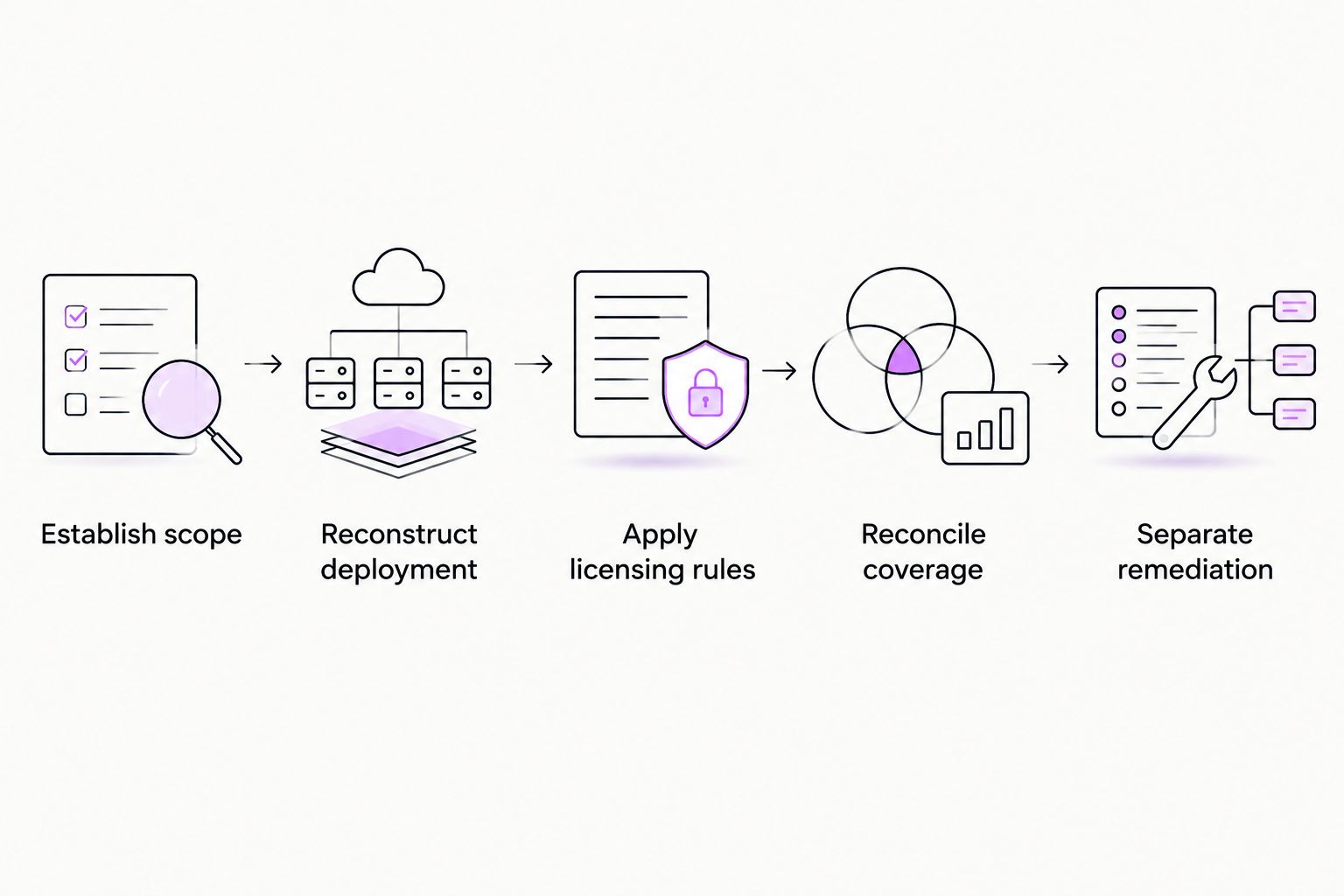
Establish the licensing quantity before assigning an amount to the shortfall.
The resulting calculation should be reproducible by someone who did not prepare it. If a reviewer cannot trace a quantity back to a deployment record or a rule back to the applicable terms, resolve that gap before treating the estimate as settled.
Does every missing core create the same liability?
No. A missing core-license quantity does not carry a universal liability across agreements, editions, and periods. The financial treatment follows the applicable obligation rather than a standard penalty schedule.
Keep the unit visible in every worksheet. A core license, a two-core purchase pack, and a recurring reporting quantity are not interchangeable labels.
Can you use today's deployment to calculate past exposure?
No. Today's deployment establishes the current configuration, not the historical configuration throughout the review period. Use dated allocation records, configuration changes, reporting files, and entitlement records to reconstruct past requirements.
Where a historical fact remains unresolved, keep it identified as an open item rather than silently replacing it with the current configuration. A documented uncertainty is more useful than a precise-looking total built on an unsupported assumption.
Does buying licenses now resolve earlier under-licensing?
A current purchase does not, by itself, establish coverage for an earlier period. Historical resolution depends on the agreement, applicable rights, and the correction or settlement process.
Confirm the required remedy before authorizing procurement. A purchase that addresses the current deployment can leave historical reporting or contractual issues unresolved.
Where software and consulting fit
Octopus is best for Microsoft SPLA partners and Authorized Outsourcers that need software asset management and licensing consulting. The platform and consulting services support usage-reporting automation, customer billing, and audit defense.
The benefit is connecting recurring operational work with compliance management. The limitation is equally important: software does not replace the applicable Microsoft terms, and automation cannot make incomplete source records authoritative. Assign ownership for deployment data, licensing interpretation, and unresolved exceptions.
For a 2026 review, evaluate Octopus against the process you need to control—not against an assumed universal per-core penalty.
Discuss your SQL Server licensing position
Discuss SPLA reporting, customer billing, and audit-defense requirements.
Discuss licensing requirements
FAQ
What's the standard SQL Server under-licensing penalty per core?
SQL Server has no universal under-licensing penalty per core. The applicable agreement, edition, licensing basis, affected period, and resolution terms determine the obligation.
Do I need four SQL Server core licenses for a two-vCPU VM?
Eligible individual-VM core licensing generally requires at least 4 core licenses per VM, including a VM allocated 2 virtual cores. Confirm eligibility and the applicable Microsoft terms before using this licensing basis.
Are SQL Server core licenses sold individually?
Microsoft SQL Server core licenses are commonly sold in packs covering 2 cores. Convert purchase-pack quantities into core-license quantities before comparing them with a deployment requirement.
Can low CPU usage reduce my SQL Server core-license requirement?
Low CPU usage does not replace the core-count rules under the applicable licensing basis. Establish the relevant physical-core or virtual-core requirement and apply the required minimums.
Is an SPLA reporting correction the same as purchasing licenses?
An SPLA reporting correction is not the same process as acquiring commercial license entitlements. Reconcile the deployment against the agreement governing its use and reporting.
Can licensing software guarantee that my SQL Server deployment is compliant?
Licensing software cannot replace valid rights, complete deployment evidence, or correct interpretation of the applicable terms. Octopus provides software asset management and consulting for Microsoft SPLA partners and Authorized Outsourcers, including reporting, billing, and audit-defense work.
One last thing
Check unit consistency before debating the total. A worksheet can reconcile perfectly while comparing purchase packs on one side with individual core licenses on the other.
Keep separate fields for deployment quantity, licensing requirement, entitlement or reported quantity, and applicable unit. That distinction makes the calculation reviewable and exposes errors that a single cost-per-core column conceals.


