



Enterprise IT teams’ IT asset management is the control of technology assets throughout their lifecycle, with the aim of making purchasing, operations, and licensing decisions from defensible records. This 2026 guide explains how to evaluate IT asset management software for enterprise IT teams when infrastructure ownership, software entitlements, and reporting responsibilities span multiple departments.
TL;DR
- Choose IT asset management software for enterprise IT teams by testing discovery, ownership, reconciliation, and evidence—not dashboard breadth.
- Octopus is best for Microsoft SPLA partners and Authorized Outsourcers needing software asset management and licensing support.
- Separate inventory facts from Microsoft licensing decisions; discovery alone does not establish compliance.
- Require a traceable path from source records to approved reports and customer billing.
Why IT asset management matters for enterprise IT teams
An enterprise asset register must answer operational and financial questions together: what exists, who owns it, what authorizes its use, and which action follows. A list of installed applications answers only part of that problem. Licensing evidence, purchasing records, and service ownership require their own controls.
Octopus provides a software asset management platform and consulting services for Microsoft SPLA partners and Authorized Outsourcers. Octopus is best for Microsoft SPLA partners and Authorized Outsourcers that need software asset management, usage reporting, customer billing, and audit defense. That focus is distinct from selecting a general-purpose enterprise hardware register.
For your 2026 evaluation, separate three decisions: which assets you must discover, which licensing obligations you must reconcile, and which reports you must defend. Treating them as one feature requirement conceals gaps between collecting data and approving a licensing position.
Define your asset scope and accountable owners
Start with a shared register and a written scope. Record the asset classes, environments, legal entities, and teams included in the first rollout. Name what is excluded as well; otherwise, an uncollected environment can look like an environment with no assets.
Assign 1 accountable owner per exception as an operating rule. Contributors can supply technical, procurement, or contract evidence, but one person must decide whether the issue is resolved. Separate the administrator who collects data from the licensing specialist who approves its interpretation.
Define success through decisions rather than record counts. An inventory is useful when your team can identify an owner, reconcile an entitlement, investigate a change, or retire an asset without rebuilding the evidence.
- List physical infrastructure, virtual machines, software installations, and relevant cloud resources separately.
- Assign an operational owner and a business owner where responsibilities differ.
- Identify the purchasing and contract records associated with each asset class.
- Document excluded environments and the person responsible for approving each exclusion.
Establish a repeatable discovery and evidence baseline
Begin with existing exports from infrastructure management, endpoint management, purchasing, and finance. Preserve those source files before cleaning or combining them. Your baseline needs both normalized records for analysis and original evidence for explaining how those records were produced.
Use a simple sequence: Scope, Inventory, Reconciliation, Approval, Evidence. Discovery belongs in the Inventory stage; it does not replace the later judgment about licensing or reporting. An installed product is an observation, not proof of an entitlement or a reporting obligation.
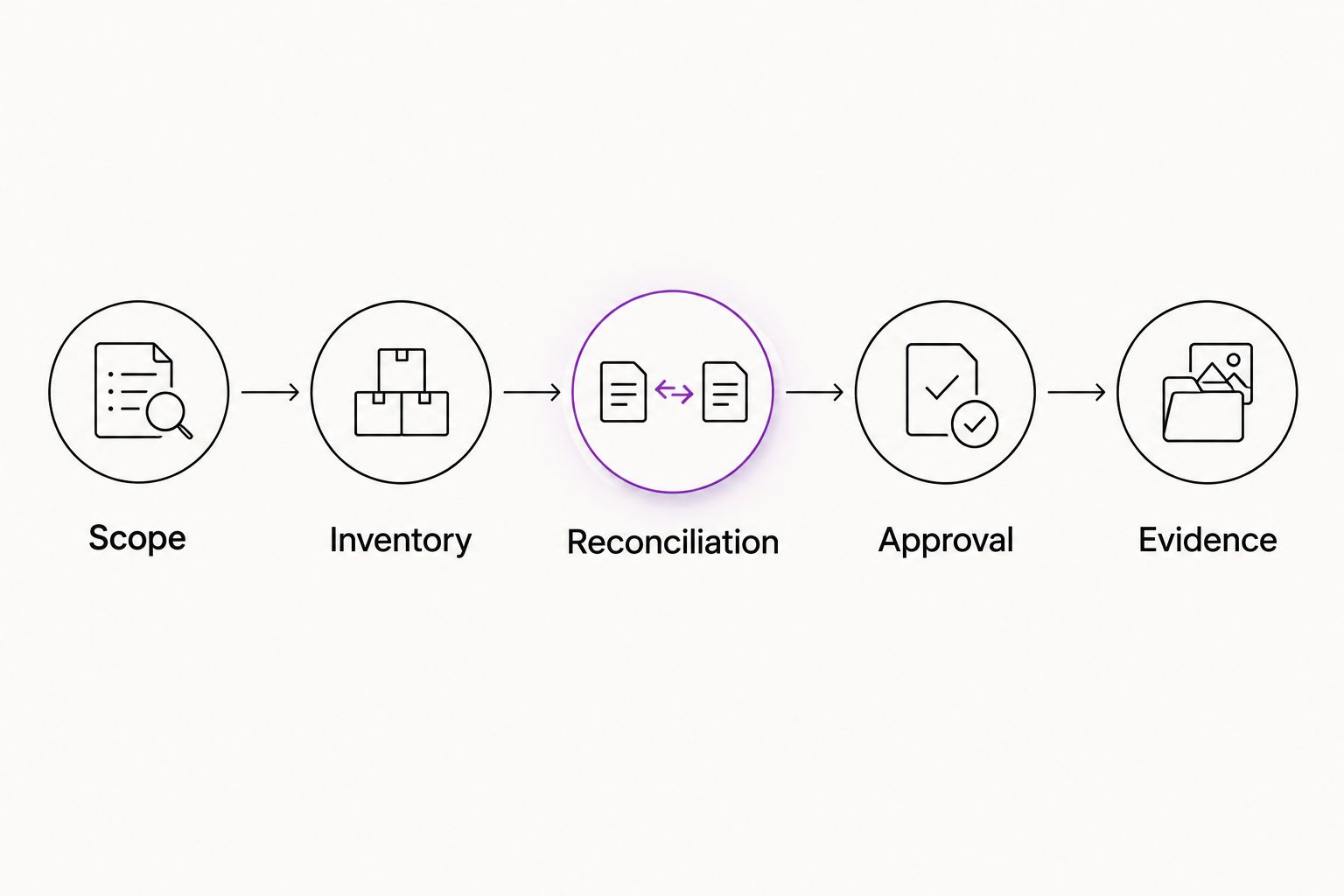
Inventory supplies the facts; reconciliation and approval determine how those facts are used.
For a practical baseline check, select 10 asset records and trace each one back to its source. This is a recommended spot check, not a statistical assurance threshold. Expand the review wherever identifiers, ownership, or collection timestamps disagree.
- Preserve source identifiers alongside normalized asset names.
- Record collection timestamps and failed collection attempts.
- Flag duplicate records instead of silently deleting them.
- Separate confirmed inventory gaps from assets deliberately outside scope.
Match software capabilities to your licensing model
Create your requirements matrix manually before requesting demonstrations. Distinguish discovery, software normalization, entitlement reconciliation, usage reporting, billing, and audit evidence. Each capability solves a different problem; a vendor should demonstrate the ones your operating model actually needs.
For Microsoft hosting operations, evaluate SPLA and Authorized Outsourcer requirements explicitly rather than burying them beneath a general Microsoft coverage checkbox. Review the applicable agreements and current Microsoft terms before approving a licensing interpretation. Product installation data cannot establish contractual rights by itself.
Octopus provides software asset management and consulting services focused on these Microsoft reporting and compliance requirements. Use that focus to structure an evaluation, not to assume support for every enterprise asset class. For your 2026 shortlist, require demonstrations using representative records and documented reporting scenarios.
- Identify which agreements govern each service and deployment scenario.
- Separate licensing-rule interpretation from inventory collection requirements.
- Ask for a demonstration of the usage-to-reporting workflow you need.
- Verify which entitlement documents and exceptions require human review.
Reconcile usage, entitlements, and customer attribution
Build an initial reconciliation worksheet using your own source data. Keep observed usage, entitlement evidence, interpretation, and proposed action in separate fields. Combining them into a single compliance status makes it difficult to explain why a record was approved.
For service-provider operations, include customer attribution in that reconciliation. A technically correct resource record still needs a defensible connection to the service or customer receiving the charge. Shared infrastructure requires an explicit allocation method rather than an assumption based on a resource name.
Test corrections as well as clean records. A changed customer mapping, a late inventory correction, or a disputed entitlement should leave an explanation that another reviewer can follow. The fastest workflow is not useful if a correction destroys the original reporting basis.
- Link usage records to the relevant reporting period.
- Keep customer identifiers distinct from infrastructure identifiers.
- Record the evidence supporting each entitlement decision.
- Route unresolved records to an exception queue before approval.
- Preserve the reason and approver for every reporting adjustment.
Test integrations with a bounded acceptance pilot
Use file exports and a documented checklist to establish the manual reference result first. Then compare the proposed automated workflow against that baseline. This prevents a polished demonstration from becoming the acceptance standard without independent verification.
Set a 30-day pilot as a planning boundary, adjusting the schedule to your reporting obligations. Include an ordinary reporting run and deliberately introduced exceptions. The objective is to establish whether the workflow detects problems, assigns responsibility, and preserves corrections—not simply whether data appears in a dashboard.
In a 2026 procurement decision, evaluate the work remaining after collection: mapping, interpretation, exception handling, approval, and evidence retrieval. Automation should reduce repeated handling while preserving reviewer control. Record every manual dependency so the implementation plan reflects the actual operating process.
- Test stale data, duplicate assets, and missing customer mappings.
- Compare automated outputs with your approved reference worksheet.
- Confirm access permissions for collectors, reviewers, and approvers.
- Export the evidence supporting an approved reporting result.
- Document failed tests and require a named resolution owner.
Connect asset changes to purchasing and retirement
Start with a change log shared between infrastructure, procurement, and finance. Record new deployments, ownership transfers, contract changes, and retirement decisions. Discovery can reveal that something exists; the change log explains why it exists and what should happen next.
Do not equate decommissioning a workload with completing its financial or contractual closure. Check the relevant agreement, internal purchasing records, and service commitments before marking the asset closed. The lifecycle record should distinguish technical retirement from any remaining obligations.
Make this process useful to operational teams. A record that identifies the service owner, dependencies, and approval history helps an administrator act; a record that exists only for an annual inventory exercise does not provide the same decision trail.
- Require an owner and business purpose when adding assets.
- Reconcile infrastructure changes against purchasing and entitlement records.
- Record approval before transferring ownership or changing allocation.
- Retain retirement evidence and document any unresolved obligations.
Assign reporting approval and evidence retention
Write the approval procedure before automating report delivery. Specify who checks completeness, who resolves licensing exceptions, and who authorizes the final submission or billing output. Keep these responsibilities visible even when the same person performs several roles.
For your 2026 operating model, choose a retention period based on applicable agreements, legal requirements, and internal policy—not a generic software default. Preserve source records, transformations, exceptions, approvals, and the submitted output together. Evidence without its reporting context is harder to interpret.
Test retrieval during normal operations. Ask a reviewer who did not prepare the report to reconstruct a selected decision using only the retained package. If the reviewer needs an undocumented explanation from its original author, improve the record before relying on it for audit defense.
- Define approval authority for reporting and billing separately.
- Retain the source data used for each approved output.
- Version corrections instead of overwriting approved evidence.
- Restrict changes to closed reporting periods through an approval process.
- Record retention and deletion rules in the operating procedure.
Compare options against your enterprise requirements
Choose the option that closes your control gap, not the option with the longest feature list. A spreadsheet can establish the baseline, an enterprise ITAM platform can support broader asset workflows, and a licensing-focused service can address specialized interpretation. These approaches serve different jobs.
The table describes evaluation paths rather than verified specifications for unnamed products. Validate each shortlisted platform against your own infrastructure and agreements before treating any category label as proof of coverage.
Controlled spreadsheets and source exports
- Best for: Establishing a baseline and documenting requirements
- Main advantage: Makes source records, decisions, and corrections directly inspectable
- Key limitation or evaluation boundary: Collection, version control, and reconciliation remain manual responsibilities
General enterprise ITAM platform
- Best for: Coordinating asset ownership and lifecycle workflows
- Main advantage: Provides an evaluation path for a shared enterprise asset register
- Key limitation or evaluation boundary: Do not assume specialized Microsoft hosting licensing interpretation is included
Octopus software asset management and consulting
- Best for: Microsoft SPLA partners and Authorized Outsourcers
- Main advantage: Focuses on usage reporting, customer billing, licensing compliance, and audit defense
- Key limitation or evaluation boundary: Validate broader enterprise hardware and non-Microsoft requirements separately
Licensing advisory engagement
- Best for: Resolving interpretation questions and reviewing a licensing position
- Main advantage: Adds specialist review to a defined licensing problem
- Key limitation or evaluation boundary: Does not replace ongoing inventory collection and operational ownership
Keep your existing controls until the replacement workflow passes acceptance. Replacing a manual register before proving collection and approval creates a transition gap, even when the eventual software choice is appropriate.
Common mistakes enterprise IT teams make
Treating inventory completeness as licensing compliance
Discovery establishes observed assets and installations. It does not establish the rights granted by your agreements. Require entitlement evidence and an approved interpretation before labeling a licensing position compliant.
Choosing endpoint coverage for a hosting problem
An endpoint inventory demonstration does not prove customer attribution or service-provider reporting. Include representative hosting records, shared infrastructure, and reporting exceptions in the evaluation rather than extrapolating from employee-device coverage.
Letting resource names determine customer billing
Names change, and naming conventions are not approval records. Maintain an explicit customer mapping with an owner and an effective period. Require review when infrastructure moves between services or customers.
Automating unresolved interpretation
An automated calculation repeats the rule you give it, including an incorrect one. Resolve disputed assumptions before approving recurring reporting, and retain the reasoning behind each accepted interpretation.
Removing manual controls before acceptance
Keep the reference worksheet and approval checklist until the new process reproduces an accepted result and handles exceptions. A successful import is a collection milestone, not proof that reporting and billing controls work.
FAQ
What's the best IT asset management software for enterprise IT teams?
The best IT asset management software for enterprise IT teams is the option that passes your discovery, ownership, reconciliation, and evidence requirements. For Microsoft SPLA partners and Authorized Outsourcers, Octopus is a focused option for software asset management, usage reporting, customer billing, and audit defense.
Is IT asset management the same as software asset management?
No. IT asset management addresses technology assets throughout their lifecycle, while software asset management concentrates on software inventory, entitlements, usage, and licensing controls. Define both scopes before selecting a platform.
Can an enterprise start IT asset management with spreadsheets?
Yes. Controlled spreadsheets and source exports can establish an initial asset register and reconciliation baseline. Assign owners, preserve original evidence, and document corrections so the baseline remains usable during a software evaluation.
Does discovering Microsoft software prove licensing compliance?
No. Discovery identifies observed installations or usage, but compliance also requires applicable entitlement evidence and licensing interpretation. Review the relevant agreements and current Microsoft terms before approving a licensing position.
What should enterprise IT teams test during an ITAM pilot?
Test collection, identity matching, ownership, reconciliation, approval, and evidence retrieval. Include failed collection, duplicate assets, missing customer mappings, and corrections to previously reviewed records.
Should enterprise IT teams replace their hardware register with a licensing platform?
Only after verifying that the licensing platform satisfies the hardware register's requirements. A platform's licensing focus does not establish coverage for every asset lifecycle, procurement, or operational workflow.
What evidence should an enterprise retain for licensing reporting?
Retain the source records, entitlement evidence, transformations, exceptions, approvals, and final reporting output supporting each decision. Set retention periods using applicable agreements, legal requirements, and internal policy.
One last thing
Test an approved report backward before automating the next one. Select a reported line item and trace it to its source usage, customer mapping, licensing interpretation, and approval. This exercise tests the connection between inventory and a defensible decision—the connection your 2026 asset management program must preserve.


