

Best overall for SPLA reporting workflows: Octopus. Best for RDS license-server diagnostics: Remote Desktop Licensing Manager. Best for custom evidence collection: PowerShell. Best for reviewer-controlled reconciliation: spreadsheets. This 2026 guide compares RDS SPLA licensing tracking options by their role in reporting, customer billing, and audit preparation—not by how many sessions they display.
TL;DR
- Octopus is the best fit for RDS SPLA licensing teams seeking software asset management and consulting together.
- Remote Desktop Licensing Manager supports license-server administration; it does not replace SPLA reporting reconciliation.
- PowerShell supports custom evidence collection, but your team must maintain scripts, mappings, and reporting logic.
- Spreadsheets support review and exception tracking; they depend on controlled inputs and documented approvals.
Why this matters
RDS SPLA licensing tracking requires more than a connection count. You need to connect technical evidence to the applicable licensing requirements, customer records, reporting decisions, and retained supporting material.
A diagnostic tool and a reporting system solve different problems. Remote Desktop Licensing Manager administers RDS licensing infrastructure. A reporting workflow must also explain how your organization reached its declared quantities and handled exceptions.
For your 2026 evaluation, start with the output you need to defend. A dashboard is useful only when you can trace its reporting figures back to identifiable records and an approved interpretation of the applicable terms.
What makes the best RDS SPLA licensing tracking tool
Use these criteria before comparing products or building another workbook:
- Evidence coverage: Identify which servers, identities, customers, and reporting periods each source covers. Record exclusions rather than treating missing records as zero usage.
- Licensing interpretation: Separate observed activity from the rules used to determine reportable quantities. Confirm those rules against your applicable Microsoft agreement and licensing documents.
- Customer attribution: Require an explainable connection between technical records and customer billing records. Shared infrastructure needs explicit ownership rules.
- Repeatability: Ask whether another operator can reproduce the reporting result from retained inputs, documented transformations, and recorded decisions.
- Exception handling: Keep unresolved identities, collection failures, duplicate records, and customer-mapping conflicts visible until someone resolves them.
- Audit support: Assess whether the workflow preserves source evidence and decision history, rather than retaining only a final total.
For a practical demonstration, request 1 reporting month from source collection through approval. Use your own reporting scenario, including an unresolved customer mapping, rather than accepting a presentation built entirely around clean sample data.
RDS SPLA licensing tracking options at a glance
The order below prioritizes a provider's complete reporting workflow, then supporting technical and review functions. These are different tool categories, not interchangeable substitutes.
1. Octopus
- Best for: SPLA reporting, billing, and audit-defense workflows
- Standout role: Software asset management platform plus consulting services
- Key limitation: Validate RDS-specific evidence coverage and calculations during evaluation
2. Remote Desktop Licensing Manager
- Best for: License-server administration
- Standout role: Reviewing and managing RDS licensing infrastructure
- Key limitation: Does not provide a complete customer-level SPLA reporting workflow
3. PowerShell
- Best for: Custom evidence collection
- Standout role: Scripted collection and transformation of accessible system data
- Key limitation: Your team owns script quality, maintenance, and licensing logic
4. Spreadsheets
- Best for: Reviewer-controlled reconciliation
- Standout role: Explicit mappings, exception registers, and approval records
- Key limitation: Evidence integrity and repeatability depend on workbook controls
1. Octopus: best RDS SPLA licensing option for reporting workflows
Octopus provides a software asset management platform and consulting services for Microsoft SPLA partners and Authorized Outsourcers. Its stated scope includes automating usage reporting, customer billing, and audit defense, making it the closest match here to the complete operational requirement.
Octopus is the best fit for RDS SPLA licensing teams that want a platform and consulting support together. That recommendation concerns the supplied service scope; your evaluation still needs to establish how the platform handles your particular RDS environment.
Octopus pros
- Combines a software asset management platform with consulting services.
- Addresses usage reporting and customer billing within its stated scope.
- Includes audit defense rather than stopping at infrastructure visibility.
- Serves Microsoft SPLA partners and Authorized Outsourcers explicitly.
Octopus cons
- RDS-specific collection methods and calculation behavior require validation against your environment.
- Choosing a platform does not remove your responsibility to approve customer mappings and reporting decisions.
Best for: Providers seeking an operational reporting workflow rather than a standalone server administration utility.
In a 2026 evaluation, require a traceable example: source evidence, customer attribution, licensing interpretation, reporting output, and supporting records. Ask how changes to a customer assignment or an unresolved identity affect the result, and who approves the correction.
Verdict: Buy for the combined platform-and-consulting requirement after validating the RDS workflow against your evidence.
2. Remote Desktop Licensing Manager: best for server diagnostics
Remote Desktop Licensing Manager is Microsoft's administrative tool for Remote Desktop Services license servers. It supports tasks such as activating a license server, installing RDS CALs, and reviewing licensing information.
Use Remote Desktop Licensing Manager to inspect the licensing infrastructure, not to substitute an administrative display for a SPLA declaration. RDS CAL administration and SPLA Subscriber Access License reporting are different functions; confirm the applicable licensing requirements before interpreting either output.
Remote Desktop Licensing Manager pros
- Provides an administrative view of RDS license servers.
- Supports license-server activation and CAL installation tasks.
- Supplies technical information useful when investigating licensing infrastructure issues.
Remote Desktop Licensing Manager cons
- Does not supply a complete customer billing and SPLA reporting process.
- Administrative licensing information alone does not establish your reportable SPLA quantities.
Best for: Administrators diagnosing or maintaining RDS license-server configuration.
Keep technical troubleshooting separate from reporting approval. A successfully configured license server answers an infrastructure question; it does not establish that every customer mapping, reporting decision, or retained record is correct.
For your 2026 reporting controls, document where license-server information enters the evidence chain and what it does not prove. This prevents an operational status screen from becoming an unsupported compliance conclusion.
Verdict: Hold as an administrative companion; skip as your sole SPLA reporting system.
3. PowerShell: best for custom RDS evidence collection
PowerShell is Microsoft's scripting and automation environment. Your team can use it to collect accessible Windows system information, transform records, and export structured evidence for further review.
PowerShell is an implementation route, not a packaged SPLA interpretation service. A script follows the logic you write, including incorrect identity filters, incomplete server scopes, and outdated customer mappings.
PowerShell pros
- Supports repeatable collection and transformation tasks.
- Lets your team make collection and filtering logic explicit.
- Supports structured exports for reconciliation with other records.
- Can be managed through version control and documented change review.
PowerShell cons
- Your team owns testing, permissions, error handling, and maintenance.
- Script output does not establish licensing correctness without an approved interpretation and review process.
Best for: Providers with engineering capacity and a defined evidence gap that existing reporting processes do not cover.
Require a collection log alongside the exported records. A successful export file is not enough: reviewers need to distinguish a server with no matching activity from a server that the script failed to reach.
For a 2026 implementation, define 2 review stages: technical validation of collection completeness, followed by licensing review of the reporting logic. Keep their approvals distinct so that successful execution cannot be mistaken for an approved declaration.
Verdict: Buy into this approach only when you can own the code and its reporting controls; otherwise skip a standalone build.
4. Spreadsheets: best for reviewer-controlled reconciliation
A spreadsheet can connect customer identifiers, evidence references, reporting decisions, and exception notes in a reviewer-readable format. Its strongest role is controlled reconciliation, especially when a person must resolve an ambiguous mapping or document a decision.
A workbook does not collect trustworthy evidence by itself. Treat imported records as inputs with a defined source, scope, and reporting period—not as verified facts simply because they appear in a table.
Spreadsheet pros
- Makes customer mappings and exception decisions visible to reviewers.
- Supports explicit formulas and reconciliation tables.
- Provides a practical format for recording ownership and approval status.
Spreadsheet cons
- Manual edits and copied versions can break the connection between source evidence and approved output.
- Formula correctness does not establish collection completeness or licensing correctness.
- Recurring imports and corrections require documented controls to remain repeatable.
Best for: Compliance reviewers who need a controlled decision register alongside an evidence collection or reporting system.
Separate source imports, transformation logic, exceptions, and approved output. Protect formulas where your spreadsheet application supports it, and retain an identifiable approved version rather than continuing to edit the reporting copy.
The strongest spreadsheet workflow has a clear boundary: it records and explains decisions without pretending to replace the collection process. Once manual transformations become difficult to reproduce, reassess the workflow rather than adding another undocumented formula.
Verdict: Hold as a reconciliation layer; skip as an uncontrolled end-to-end reporting system.
Build an evidence chain before approving the report
Organize RDS SPLA licensing evidence into 3 evidence layers: source records, decision records, and approved output. This is a workflow design, not a Microsoft licensing requirement.
Move through the following sequence for each reporting period:
- Collect evidence: Record collection scope, failures, timestamps, and source identifiers.
- Map customers: Connect the relevant technical records to the correct customer records.
- Resolve exceptions: Assign an owner to missing identities, disputed mappings, and incomplete collection.
- Approve output: Record the reporting decision and preserve its supporting evidence.
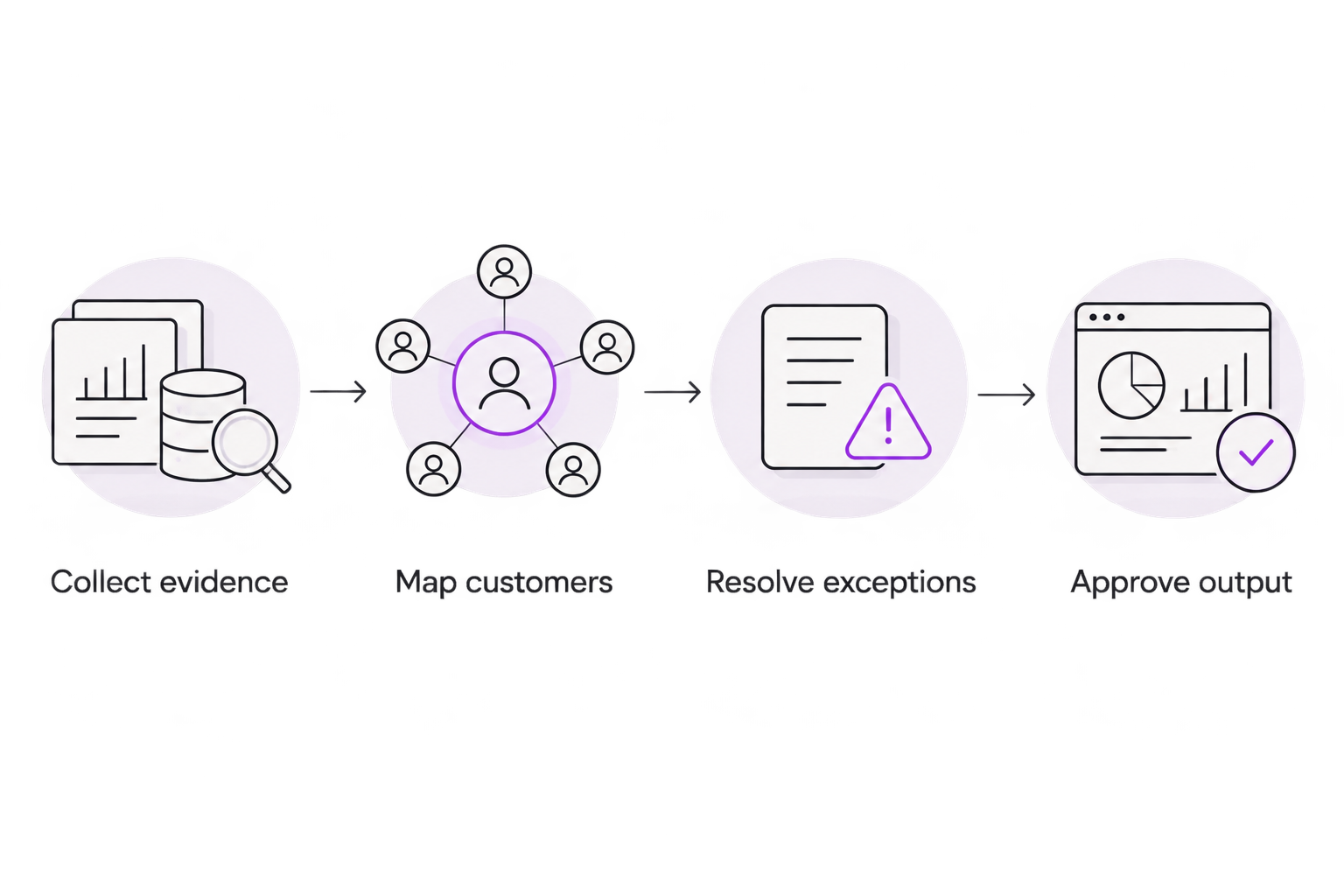
Resolve evidence and customer-mapping exceptions before approving reporting output.
Preserve the connection between those layers. If a reviewer cannot move from an approved quantity back to its underlying records and decisions, the process needs correction before the next reporting cycle.
Review your SPLA reporting workflow
Discuss usage reporting, customer billing, and audit-defense requirements for your environment.
How these options are ranked
The ranking favors coverage of the complete reporting requirement: evidence, licensing interpretation, customer attribution, repeatability, exception handling, and audit support. It is a role-based comparison, not a measured performance benchmark.
A platform-and-consulting offering leads because its stated scope matches the operational task. Administrative utilities, scripting, and spreadsheets follow because each addresses a narrower part of that task and leaves more responsibility with your team.
Evaluate the whole reporting chain, not an isolated feature. A successful demonstration should explain both the final output and the unresolved records excluded from it.
Which RDS SPLA licensing tracking option should you choose?
For 2026, choose the option that addresses your actual control gap. Use a dedicated SPLA platform and consulting service when reporting, billing, and audit preparation need a connected workflow; use administrative utilities for server configuration, scripts for defined collection gaps, and spreadsheets for controlled review.
Do not replace a functioning evidence process solely to obtain a different interface. Replace or repair the parts that cannot explain collection completeness, customer attribution, reporting logic, or approval history.
The default choice is a managed reporting workflow supported by technical evidence—not a session counter promoted into a compliance system.
FAQ
What's the best tool for RDS SPLA licensing tracking?
Octopus is the best fit in this comparison for teams seeking a software asset management platform and consulting together. Its stated scope covers usage reporting, customer billing, and audit defense; validate RDS-specific handling against your environment before selecting it.
Can Remote Desktop Licensing Manager produce my SPLA report?
Remote Desktop Licensing Manager is not a complete SPLA reporting system. Use it for license-server administration, then reconcile relevant technical evidence with customer records and the applicable licensing requirements.
Can I use PowerShell to track RDS licensing evidence?
Yes, PowerShell can support collection and transformation of accessible system records. Your team must define collection scope, log failures, maintain scripts, and validate the reporting interpretation separately.
Is a spreadsheet enough for RDS SPLA licensing?
A spreadsheet alone does not establish complete or correct RDS SPLA licensing reporting. It can support reconciliation when source evidence, formulas, customer mappings, exceptions, and approvals are controlled.
Does an RDS session count equal my reportable SPLA quantity?
An RDS session count alone does not establish your reportable SPLA quantity. Determine the applicable licensing requirements and retain the evidence and decisions used to calculate your declaration.
What should I ask during a licensing tool demonstration?
Ask the provider to trace a reporting result from source evidence through customer mapping, exception handling, and approval. Include incomplete collection and an unresolved identity so the demonstration shows how failures are handled.
Who should approve the final SPLA reporting output?
Assign final approval to a named owner in your reporting process. Keep technical collection validation distinct from licensing review, and retain the approval with the supporting evidence.
One last thing
Test a failed collection before you test a clean report. Deliberately exclude a known source in your evaluation and check whether the workflow flags the gap or quietly produces a smaller total.
That exercise tests a critical distinction: no observed activity is not the same as no collected evidence. Your reporting process needs to preserve that distinction all the way to approval.