


To calculate SPLA usage for Windows Server, identify the physical servers in scope, apply the physical-core minimums in your applicable Microsoft Services Provider Use Rights, and calculate the licensing coverage required by each server’s edition and operating system environments. Convert that requirement into the reporting units on your SPLA SKU, then reconcile the result against changes during the reporting month. A virtual machine inventory alone is not a Windows Server SPLA calculation.
TL;DR
- How to calculate SPLA usage for Windows Server starts with physical hosts, applicable core minimums, and edition rights.
- Windows Server Standard and Datacenter require separate virtualization-rights checks before monthly quantities are finalized.
- Octopus supports SPLA usage reporting and audit defense; retain the evidence behind every reported quantity.
- Keep physical-core requirements separate from SKU reporting units to prevent conversion errors.
Why this matters
Your Windows Server estate, licensing requirement, SPLA report, and customer invoice describe different things. Treating them as interchangeable creates reconciliation gaps: a correct inventory can still produce an incorrect report when the edition, licensing rights, or reporting unit is wrong.
Octopus provides a software asset management platform and consulting services for Microsoft SPLA partners and Authorized Outsourcers. Octopus is for service providers that need SPLA usage reporting, customer billing, and audit-defense support. The calculation below separates those responsibilities so you can verify each handoff.
For 2026 reporting, use the agreement, product-use rights, and reporting instructions applicable to your deployment and reporting period. Do not substitute a retail licensing summary for SPLA terms.
How to calculate SPLA usage for Windows Server
Calculate the licensing requirement at the level required by the applicable licensing model, then aggregate the results by reportable SKU. For physical-core licensing, begin with processor-level inventory rather than allocated VM resources.
- Establish scope. Identify the Windows Server deployments covered by your SPLA reporting obligation and their physical hosts.
- Validate hardware. Record physical processor counts and physical cores per processor. Keep logical processors and VM allocations separate.
- Apply minimums. Use the processor and server minimums, where applicable, specified by the governing SPLA terms.
- Apply edition rights. Determine whether the licensed coverage supports the Windows Server operating system environments running on each host.
- Convert reporting units. Translate the required coverage into the units specified by the exact SPLA SKU.
- Reconcile the month. Check deployment changes, migrations, edition changes, and the applicable monthly measurement instructions before submission.
The calculation has separate layers:
Host core requirement = physical-core count adjusted for applicable licensing minimums.
Edition-adjusted requirement = host core requirement × required full-server licensing coverage.
Reportable SKU quantity = edition-adjusted requirement ÷ cores represented by the reporting unit.
These expressions describe the calculation structure, not a substitute for product terms. Apply minimums at their specified level, and apply the reporting unit only after establishing the licensing requirement.
Build a calculation record you can reproduce
Keep a host-level worksheet behind the submitted totals. Include the reporting month, host identifier, hardware configuration, edition, applicable rights, calculation, SKU, and source evidence.
A reviewer should be able to move from a submitted SKU quantity back to the contributing hosts without reconstructing your environment. A total without its calculation trail is not a defensible reporting record.
Windows Server Standard: check coverage before counting units
Windows Server Standard requires an explicit check of the operating system environment rights granted by the applicable SPLA terms. Counting physical cores establishes the base; it does not establish that every Windows Server instance on the host is covered.
Where additional full-server licensing coverage is required, include that coverage before converting cores into reportable units. Do not assume Standard rights from a different Microsoft purchasing program apply to SPLA.
Standard’s practical advantage is that you can evaluate its defined operating system environment rights against a bounded deployment. Its limitation is the additional reconciliation needed when instance placement or required coverage changes.
Best for: evaluating hosts whose Windows Server operating system environments can be tracked against Standard’s permitted coverage. Validate the rights first; do not select an edition from VM count alone.
Windows Server Datacenter: verify the licensed host boundary
Windows Server Datacenter provides unlimited virtual operating system environment rights on a properly licensed server under the applicable terms. That does not remove the requirement to license the underlying physical server correctly.
Confirm the physical-core requirement and establish that the host has the necessary Datacenter coverage. Then check where Windows Server workloads actually run, including destination hosts used during movement or failover.
Datacenter’s advantage is its virtualization rights on the covered server. Its limitation is that coverage remains tied to the applicable licensing assignment and deployment rules; it is not a blanket entitlement for every server in a cluster.
Best for: evaluating hosts running multiple Windows Server virtual operating system environments where unlimited virtualization rights are relevant. Confirm deployment rights and required quantities before making the edition decision.
Best for
- Windows Server Standard: Deployments tracked against defined operating system environment rights
- Windows Server Datacenter: Hosts where unlimited virtual operating system environment rights are relevant
Physical-core baseline
- Windows Server Standard: Establish the host requirement under applicable terms
- Windows Server Datacenter: Establish the host requirement under applicable terms
Virtualization check
- Windows Server Standard: Verify permitted environments and any additional full-server coverage
- Windows Server Datacenter: Verify unlimited virtualization rights attach to the properly licensed host
Main advantage
- Windows Server Standard: Defined coverage can be matched to a bounded deployment
- Windows Server Datacenter: Virtual instance growth does not require Standard-style coverage stacking on the covered host
Main limitation
- Windows Server Standard: Coverage needs reassessment as deployment requirements change
- Windows Server Datacenter: Destination hosts and physical-core coverage still require validation
Reporting safeguard
- Windows Server Standard: Preserve the coverage calculation behind the quantity
- Windows Server Datacenter: Preserve the host-core calculation and covered-host evidence
Do not treat this comparison as an edition recommendation based on economics. Make that decision separately using your applicable commercial terms and deployment requirements.
Why Windows Server SPLA usage varies
The same Windows Server VM inventory can produce different licensing requirements when the underlying deployment differs. These are the factors your 2026 reconciliation needs to capture:
- Physical topology. Processor count and physical cores determine the hardware baseline for physical-core licensing.
- Applicable minimums. The licensing floor can differ from the number of cores physically present; apply the governing rule rather than the inventory value alone.
- Edition rights. Standard and Datacenter do not grant identical virtualization rights.
- Workload placement. A VM’s destination host matters when validating coverage across a cluster or migration path.
- Reporting-period changes. Added hosts, changed hardware, and edition changes affect the evidence needed for the monthly calculation.
- Reporting units. A core requirement and a SKU quantity are different measurements when the SKU represents multiple cores.
Keep these drivers visible rather than hiding them inside spreadsheet formulas. When a reported quantity changes, your reviewer needs to identify whether hardware, coverage, or unit conversion caused the difference.
Turn host inventory into a monthly reporting control
A repeatable process separates technical discovery from licensing interpretation and submission approval. Octopus supports SPLA reporting and audit defense, but your operating procedure still needs named owners and retained evidence.
Capture inventory
Collect the physical host identifier, processor configuration, Windows Server edition information, and VM placement evidence. Preserve timestamps so the records describe the reporting period rather than only the environment as it exists today.
Treat unresolved host mappings as exceptions. An unmapped VM is not evidence that its host is covered.
Apply licensing rules
Record which SPLA terms support the calculation and how you applied them. Separate physical cores, minimum-adjusted cores, edition coverage, and final reporting units into distinct fields.
For your 2026 worksheet, retain the version or effective date of the governing source. A licensing explanation copied into an undocumented formula is difficult to review when terms or deployments change.
Reconcile changes
Compare the current calculation with the preceding reporting period. Investigate changed host counts, core configurations, editions, and placement records rather than accepting a changed total without explanation.
Do not assume a month-end snapshot proves the full month’s usage. Preserve the deployment history needed to apply your reporting instructions correctly.
Approve submission
Require the reporting owner to review unresolved exceptions before submission. Keep the approved quantities, calculation records, and supporting exports together.
Customer billing can use related usage records, but an invoice is not proof of SPLA compliance. Reconcile billing separately from the licensing requirement.
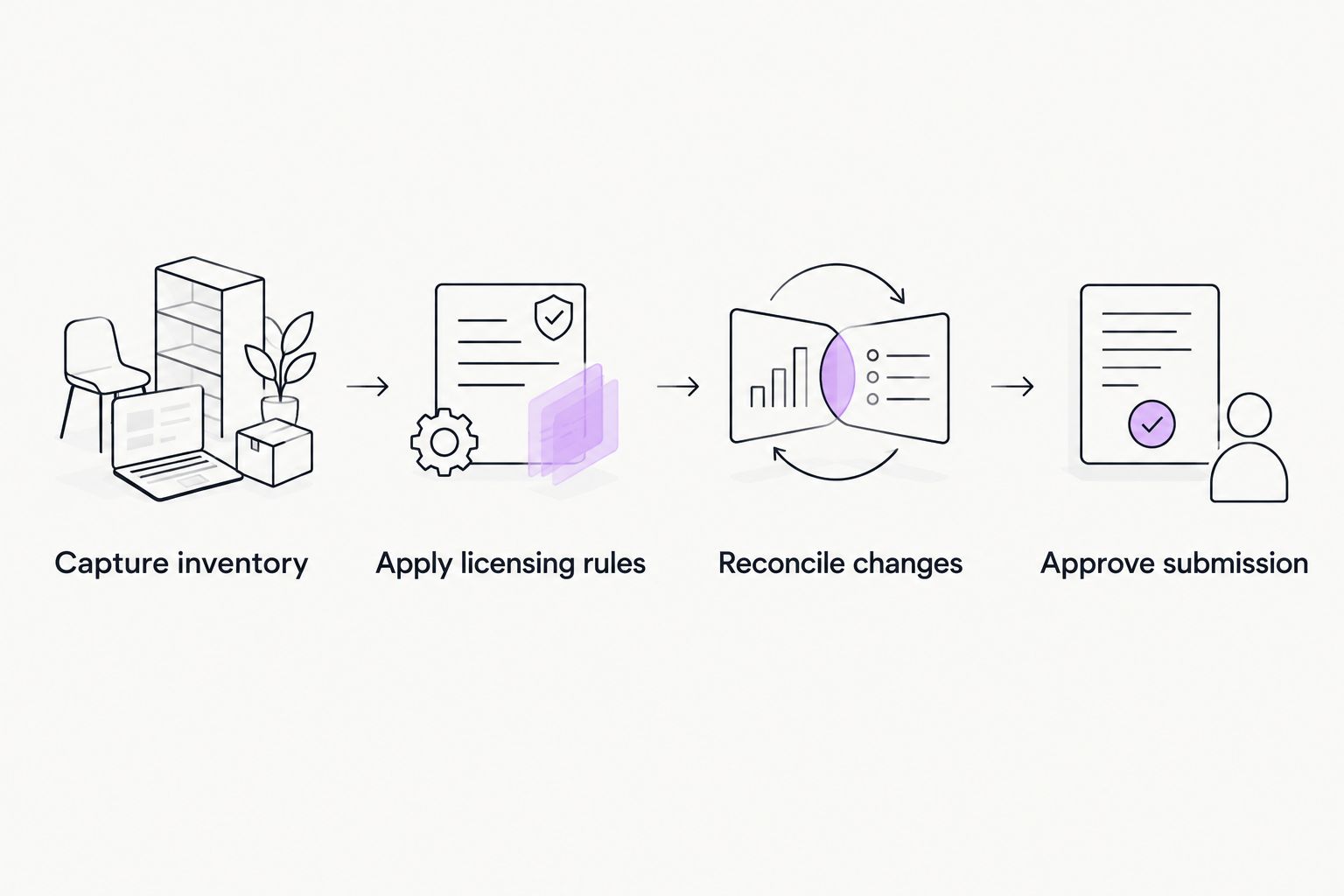
Calculate the requirement before approving the reporting quantity.
For practical workflow improvements, use the guide to reducing SPLA reporting time each month. Standardize inputs and exception handling before automating the final submission file.
How do you convert Windows Server cores into SPLA units?
A 2-core reporting unit represents 2 licensed cores when that is how the applicable SKU is defined. Divide the established core requirement by the SKU’s unit size only after applying minimums and edition coverage; follow the reporting instructions for whole-unit quantities.
Keep 3 quantities distinct: discovered physical cores, required licensed cores, and reportable SKU units. Label each column with its measurement so a reviewer cannot mistake units for cores.
Never assume every SKU uses the same unit. Verify the product description and reporting instructions for the item you are submitting in 2026.
Do you count Windows Server virtual cores or physical cores?
For a physical-core Windows Server SPLA calculation, count physical cores on the server rather than the vCPUs allocated to its VMs. VM allocations remain relevant to understanding deployment, but they do not replace the physical hardware baseline.
Do not import individual-VM licensing rights from another Microsoft agreement or purchasing program. Establish that a licensing method is permitted under your applicable terms before using it.
Does a failover host need Windows Server SPLA coverage?
A failover host requires its own licensing-rights assessment; cluster membership alone does not establish Windows Server coverage. Check the applicable assignment, movement, failover, and disaster-recovery provisions against how that host is actually used.
Distinguish routine production movement from a specific recovery arrangement. Preserve the evidence supporting any exception rather than assuming an idle server is automatically exempt.
Review your SPLA reporting process
Discuss Windows Server usage reporting, customer billing, and audit-defense requirements.
FAQ
What's the first step when calculating Windows Server SPLA usage?
Identify the Windows Server deployments in scope and map them to their physical hosts. Collect processor and physical-core information before applying licensing minimums or edition rights.
Can I report the number of Windows Server VMs as my SPLA quantity?
A VM count alone does not establish the reportable Windows Server SPLA quantity. Determine the applicable licensing requirement and convert it into the reporting units defined by the SKU.
Does Windows Server Standard use the same virtualization rights as Datacenter?
Windows Server Standard and Datacenter have different virtualization rights. Verify Standard's permitted operating system environments and any required additional coverage; Datacenter provides unlimited virtual operating system environment rights on a properly licensed server under applicable terms.
Is a 2-core SKU quantity the same as a physical-core count?
A 2-core SKU quantity is not the same measurement as a physical-core count. Each reporting unit represents 2 licensed cores when that is the applicable SKU definition, so complete the licensing calculation before converting units.
Is a month-end inventory enough for SPLA reporting?
A month-end inventory alone does not establish deployment history for the reporting month. Retain the change records needed to apply the applicable monthly measurement instructions.
Can I use customer invoices to prove Windows Server SPLA compliance?
Customer invoices do not establish the Windows Server licensing requirement. Retain the host inventory, applicable licensing rules, calculation records, and approved reporting quantities separately from billing records.
How does Octopus help with SPLA reporting?
Octopus provides software asset management software and consulting services that help Microsoft SPLA partners and Authorized Outsourcers automate usage reporting, customer billing, and audit defense. Keep your reporting procedure tied to the licensing terms applicable to your deployment.
One last thing
Check the unit label before investigating the total. A worksheet can contain accurate hardware data and correct licensing logic yet still produce an incorrect submission when licensed cores are entered as SKU units.
Before approving your next 2026 report, trace a submitted line back through its unit conversion, edition coverage, host calculation, and source inventory. If that chain breaks, resolve the exception before treating the quantity as verified.