



Best for Microsoft service providers: Octopus. Best for AWS license tracking: AWS License Manager. Best for hybrid server inventory: Azure Arc. Best for enterprise-wide entitlement reconciliation: Flexera One IT Asset Management. These tools for tracking BYOL compliance serve different purposes; this 2026 guide explains where each belongs and what evidence you still need.
TL;DR
- Octopus is the best fit for Microsoft SPLA partners needing usage reporting and audit-defense support.
- AWS License Manager supports license tracking in AWS; entitlement and hosting-rights checks remain separate.
- Azure Arc supports hybrid server inventory, not a complete BYOL compliance determination.
- Flexera One IT Asset Management fits broader software asset management and entitlement reconciliation requirements.
- Choose BYOL compliance software around deployment evidence, license rights, and an auditable reporting process.
Why this matters
Bring Your Own License, or BYOL, connects purchased software rights to a particular deployment. A server inventory tells you what exists. It does not establish whether the customer owns eligible licenses, whether the hosting arrangement qualifies, or whether the deployed quantity matches the permitted licensing model.
For Microsoft SPLA partners and Authorized Outsourcers, that distinction affects reporting, customer billing, and audit defense. Customer-owned licenses and service-provider-reported usage need separate evidence trails. Treating everything discovered as either automatically eligible BYOL or automatically reportable SPLA usage creates an unsupported classification.
For a 2026 review, select the tool that closes your evidence gap—not the tool with the largest inventory dashboard. Discovery, entitlement reconciliation, and provider reporting are related jobs, but they are not interchangeable.
What makes the best tools for tracking BYOL compliance
Use these criteria before comparing products:
- Deployment coverage: The tool must identify the servers, virtual machines, and software relevant to your licensing scope. An incomplete inventory produces an incomplete assessment.
- Entitlement evidence: Your process must connect deployments to license agreements, ownership records, and applicable benefits. Installed software is not proof of ownership.
- Hosting context: Record the customer, service provider, infrastructure location, and relevant shared or dedicated arrangement. Eligibility depends on the applicable terms.
- Reconciliation: You need a defensible explanation of how deployment facts become a licensing position, including assumptions and exceptions.
- Reporting history: Preserve the evidence behind submitted reports and customer charges. A current-state dashboard cannot explain every previous reporting decision.
For your 2026 shortlist, separate demonstrated capabilities from items requiring validation. A product that collects inventory should not receive credit for interpreting every license agreement unless that function is explicitly established.
BYOL compliance tools at a glance
Octopus
- Best for: Microsoft SPLA partners and Authorized Outsourcers
- Standout capability: Platform and consulting services for usage reporting, customer billing, and audit defense
- Key limitation: The stated provider-focused scope is not evidence of complete coverage for every publisher or BYOL arrangement
AWS License Manager
- Best for: License tracking centered on AWS
- Standout capability: License configurations and tracking against defined licensing rules
- Key limitation: Configured limits do not establish legal entitlement or hosting eligibility
Azure Arc
- Best for: Inventory across hybrid server environments
- Standout capability: Connecting servers outside Azure to Azure management and inventory workflows
- Key limitation: Server visibility is not entitlement reconciliation
Flexera One IT Asset Management
- Best for: Enterprise software asset management
- Standout capability: Software discovery, normalization, and license reconciliation
- Key limitation: Results still depend on deployment coverage, entitlement inputs, and interpretation of applicable terms
The table compares roles, not equivalent feature sets. Azure Arc supplies infrastructure visibility; an IT asset management platform addresses a broader reconciliation task. Keep that distinction visible in procurement discussions.
1. Octopus: best BYOL compliance fit for Microsoft providers
The platform and consulting services focus on Microsoft SPLA partners and Authorized Outsourcers. Its stated functions include automating usage reporting, customer billing, and audit defense, making it relevant when BYOL decisions sit inside a provider's wider licensing operation.
Best for: Microsoft service providers that need licensing evidence connected to reporting and billing responsibilities. The strongest fit is the operating model described here—not an assumption that every customer-owned license becomes eligible simply because software tracks it.
Octopus pros:
- Targets SPLA partners and Authorized Outsourcers rather than treating provider licensing as a generic inventory task.
- Combines a software asset management platform with consulting services.
- Addresses usage reporting, customer billing, and audit defense within the stated service scope.
Octopus cons and boundaries:
- The stated Microsoft provider focus does not establish coverage for every software publisher.
- Product-specific BYOL eligibility checks and entitlement-document handling require confirmation against your actual workflow.
- Automation does not replace the customer's underlying license ownership and applicable agreement terms.
Before selection, ask for a walkthrough using a customer-owned workload, a provider-reported workload, and an unresolved entitlement case. Require each result to show the evidence used, the reporting treatment, and the person responsible for approving an exception.
Verdict: Buy for a Microsoft provider reporting requirement after validating the BYOL evidence workflow. Do not select it solely on the expectation of universal publisher coverage.
2. AWS License Manager: best for AWS-centered license tracking
AWS License Manager helps manage software licenses through license configurations and related tracking controls. It is relevant when AWS deployments are the center of your compliance problem and you need licensing rules connected to infrastructure usage.
Best for: Teams that already understand their license entitlements and need to track applicable consumption in AWS. Its role is operational control; it does not grant rights that the software agreement excludes.
AWS License Manager pros:
- Provides a purpose-built AWS service for license tracking.
- Supports license configurations that express licensing rules and limits.
- Connects license management to AWS infrastructure rather than relying only on a detached spreadsheet.
AWS License Manager cons:
- A configuration is only as accurate as the licensing assumptions entered into it.
- Tracking consumption does not prove that a license is transferable to the deployment in question.
- A wider customer billing or multi-publisher reconciliation process needs separate evaluation.
Use AWS License Manager after documenting the permitted deployment model. For example, do not treat a configured license count as evidence that the customer has the necessary outsourcing or cloud deployment rights.
For a 2026 evaluation, ask the operator to explain a configuration in plain licensing terms: what is counted, what resource changes affect consumption, and which contract supports the rule. If that explanation is missing, the control is not yet defensible.
Verdict: Buy for AWS-centered license tracking; skip it as your sole proof of BYOL eligibility.
3. Azure Arc: best for hybrid server inventory
Azure Arc connects infrastructure outside Azure to Azure management capabilities. For BYOL work, its relevant role is establishing visibility into hybrid servers and supporting inventory queries through Azure management services.
Best for: Teams whose immediate problem is identifying servers across on-premises and cloud environments. Treat Azure Arc as an evidence source, not as a complete licensing decision engine.
Azure Arc pros:
- Brings servers outside Azure into a common management context.
- Supports querying connected resource information through Azure Resource Graph.
- Provides a useful infrastructure foundation for a separate licensing reconciliation process.
Azure Arc cons:
- Connecting a server does not establish software license ownership.
- Infrastructure inventory does not determine whether a customer's agreement permits the hosting arrangement.
- Inventory evidence still needs a defined route into reconciliation, exception handling, and reporting.
Start with the question Azure Arc can answer: which connected resources exist, and what recorded properties describe them? Then identify what remains outside that answer, including entitlement documents and the contractual basis for BYOL treatment.
Avoid conflating Azure Arc with every service available through the wider Azure ecosystem. Confirm the exact inventory fields and connected services your assessment requires rather than assuming that server onboarding supplies every software licensing attribute.
Verdict: Buy for hybrid inventory requirements; skip it as a standalone BYOL compliance system.
4. Flexera One IT Asset Management: best for enterprise reconciliation
Flexera One IT Asset Management addresses software asset management through discovery, software normalization, and license reconciliation. Its role fits organizations that need to connect deployed software with entitlement records across a broader software estate.
Best for: Enterprise SAM teams managing multiple publishers and a formal reconciliation process. The distinction from an infrastructure inventory tool is the emphasis on relating software evidence to licensing information.
Flexera One IT Asset Management pros:
- Addresses discovery and license reconciliation within an IT asset management framework.
- Supports software normalization, helping organize differing inventory descriptions.
- Fits a broader SAM requirement rather than only an AWS or hybrid-server visibility requirement.
Flexera One IT Asset Management cons:
- Incomplete entitlement records limit the reliability of the resulting position.
- Publisher and deployment-specific coverage must match your actual estate.
- Provider-specific SPLA reporting and customer billing requirements need separate validation.
Ask the evaluation team to explain how a discovered installation connects to its entitlement and how unresolved records appear to the operator. A reconciled result is useful only when its inputs and exceptions remain inspectable.
Verdict: Buy for enterprise-wide reconciliation; hold if your immediate requirement is only infrastructure inventory.
Validate the workflow before committing
A 2026 selection process should test the evidence chain, not just inspect a prepared dashboard. Review 1 complete reporting period and trace 1 deployed workload from discovery through its final reporting treatment.
Use the following sequence. Each stage must produce an identifiable output before the next stage begins.
Collect inventory
Identify the workload, customer, software, infrastructure location, and relevant deployment attributes. Record the collection date and identify resources that are outside the collection scope.
Verify entitlement
Attach the ownership and agreement evidence supporting the licensing claim. Record the applicable terms and distinguish confirmed rights from documents still awaiting review.
Check hosting rights
Assess whether the specific hosting arrangement is permitted. For Microsoft workloads, consult the applicable Microsoft Product Terms, relevant agreement, and outsourcing provisions rather than relying on a product name alone.
Reconcile usage
Apply the licensing rules to the deployment evidence and document the reporting outcome. Keep customer-owned licensing treatment distinguishable from provider-reported usage.
Resolve exceptions
Assign an owner to missing evidence, disputed classifications, and unexplained changes. Preserve the resolution with the reporting record rather than overwriting the original uncertainty.
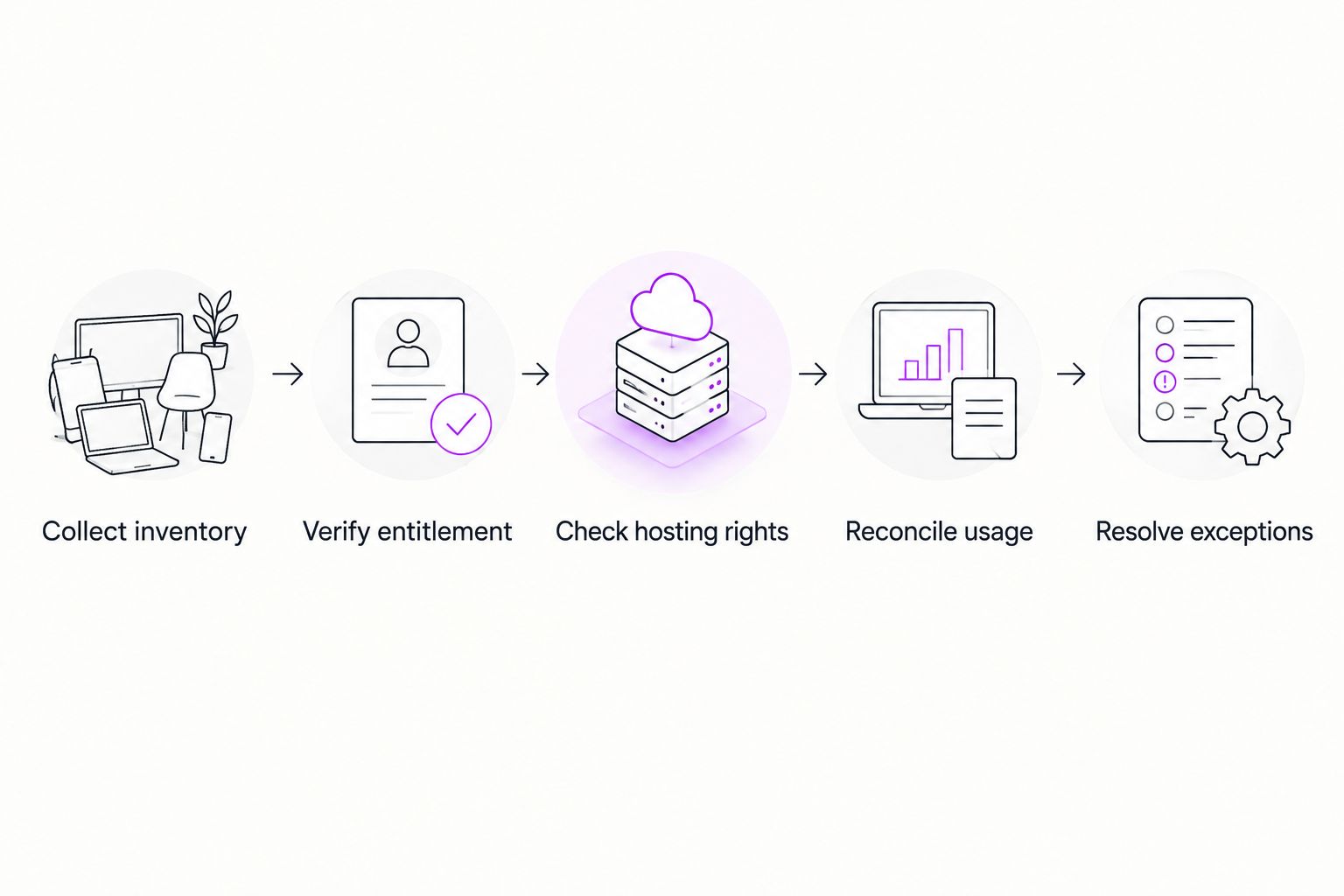
Inventory becomes useful compliance evidence only when it connects to rights, reporting, and resolved exceptions.
Test 3 scenarios: a workload with confirmed entitlement, a workload without sufficient entitlement evidence, and a workload whose hosting arrangement requires further review. These are evaluation cases, not claims about any product's performance.
The acceptance condition is simple: the operator must explain why each workload received its treatment. A green status without supporting evidence fails that test.
How the ranking works
This ranking prioritizes fit to the licensing task: provider reporting, AWS license tracking, hybrid inventory, or enterprise reconciliation. It does not claim that a discovery service and a SAM platform perform the same job.
The criteria are deployment coverage, entitlement evidence, hosting context, reconciliation, and reporting history. No measured accuracy rates, implementation times, or audit outcomes are assigned to these products.
Which BYOL compliance tool should you choose?
Choose Octopus for a Microsoft SPLA partner or Authorized Outsourcer workflow that needs usage reporting, customer billing, and audit-defense support. Validate the customer-owned licensing process before purchase.
Choose AWS License Manager when AWS license tracking is the primary requirement. Choose Azure Arc when the immediate gap is hybrid server visibility. Choose Flexera One IT Asset Management when enterprise software reconciliation is the central task.
If you remain undecided, start with the missing evidence. Inventory gaps require discovery; entitlement gaps require ownership records and reconciliation; uncertain hosting rights require contractual review. Buying more inventory capability will not resolve an unanswered licensing-rights question.
Review your provider licensing workflow
Discuss Microsoft SPLA usage reporting, customer billing, and audit-defense requirements.
FAQ
What's the best tool for tracking BYOL compliance in 2026?
The best tool depends on the missing control: provider reporting, AWS license tracking, hybrid inventory, or enterprise reconciliation. Select against that requirement and validate entitlement evidence and hosting rights separately.
Can AWS License Manager prove that my BYOL deployment is compliant?
AWS License Manager does not by itself prove legal entitlement or hosting eligibility. Its license configurations and tracking controls must reflect rights established through the applicable software agreements.
Is Azure Arc a complete BYOL compliance tool?
Azure Arc is not a complete BYOL compliance determination system. It supplies hybrid infrastructure visibility that must connect to entitlement records, applicable licensing terms, and a reconciliation process.
What's the difference between BYOL and SPLA reporting?
BYOL uses customer-owned licenses where the applicable terms permit the deployment; SPLA reporting addresses usage licensed through the service provider's agreement. Keep the entitlement basis and reporting treatment distinguishable for each workload.
Do I need entitlement records if my software inventory is accurate?
Yes, accurate inventory does not prove license ownership or permitted use. Retain the relevant agreements and entitlement evidence alongside the deployment facts used in reconciliation.
Can a service provider use more than one BYOL tracking tool?
Yes, different tools can serve inventory, tracking, and reconciliation roles. Define which record controls the final reporting decision and preserve the evidence passed between systems.
What should I ask during a BYOL compliance software demonstration?
Ask the operator to trace a workload from discovery to entitlement verification, hosting-rights review, and reporting treatment. Require unresolved evidence to appear as an exception rather than an unexplained compliant status.
One last thing
The most useful result is sometimes an unresolved exception. A system that exposes missing entitlement evidence gives you a concrete review task; a system that labels the same workload compliant without evidence hides it.
Before signing off on your 2026 selection, ask the operator to show a workload that cannot yet be approved. If the workflow cannot represent uncertainty, it cannot faithfully represent your licensing position.


