Best overall for equipment custody: Snipe-IT. Best for Microsoft SPLA reporting: Octopus. Best for service-desk integration: GLPI. This 2026 guide compares IT asset management software for small IT teams by the operational problem each option addresses, rather than treating inventory, endpoint management, and licensing compliance as interchangeable.
TL;DR
- Snipe-IT is the default IT asset management software for small IT teams focused on equipment ownership and checkout.
- Octopus is best for SPLA partners needing software asset management, usage reporting, customer billing, and audit defense.
- GLPI suits service-desk workflows; Lansweeper suits discovery; Microsoft Intune suits endpoint configuration and policy enforcement.
- Choose the workflow first. An equipment register does not replace licensing reconciliation or endpoint management.
Why this matters
A small IT team needs fewer unresolved questions, not another inventory screen. Who has the laptop? Which devices are missing from the register? Can reported software usage be traced to the customer being billed?
Those questions require different controls. Hardware custody depends on assignments and returns; software asset management depends on reconciling deployment or usage evidence with licensing obligations. Endpoint management handles configuration and policy enforcement, which is a separate responsibility.
For your 2026 shortlist, identify the decision the software must support before comparing features. Otherwise, you risk buying a discovery tool when the real problem is equipment returns, or choosing an asset register when the problem is SPLA reporting.
What makes the best IT asset management software?
Use these criteria to judge fit before reading the ranking:
- Workflow fit: The system addresses your primary problem: custody, discovery, service management, endpoint control, or licensing compliance.
- Record ownership: Someone can maintain asset assignments, exceptions, and corrections without relying on undocumented knowledge.
- Evidence traceability: You can connect a record to its source, responsible owner, and operational decision.
- Administrative effort: Deployment, hosting, maintenance, and routine reconciliation fit the time your team can assign.
- Scope boundaries: You know which responsibilities remain outside the product, including procurement, device control, and contractual interpretation.
- Usable outputs: Reports support the work you actually perform, such as equipment recovery, ticket resolution, usage reporting, or billing reconciliation.
Do not score every feature equally. A service provider responsible for Microsoft licensing needs different evidence from an internal IT team tracking loaned equipment.
Best options at a glance
The ranking below assigns each option a distinct role. It is a workflow-based shortlist, not a claim that every product covers the same requirements.
1
- Option: Snipe-IT
- Best for: Equipment custody
- Standout capability: Asset assignments and check-in/check-out records
- Key limitation: Does not replace endpoint configuration or licensing reconciliation
2
- Option: Octopus
- Best for: Microsoft SPLA reporting
- Standout capability: Usage reporting, customer billing, and audit-defense support
- Key limitation: Its stated focus is Microsoft service-provider licensing, not general hardware custody
3
- Option: GLPI
- Best for: Assets linked to service-desk work
- Standout capability: IT asset records alongside ticket management
- Key limitation: Broader scope requires workflow and administration decisions
4
- Option: Lansweeper
- Best for: Discovering the technical estate
- Standout capability: Automated asset discovery and inventory
- Key limitation: Discovered records still need ownership and business context
5
- Option: Microsoft Intune
- Best for: Managing endpoint configuration
- Standout capability: Device configuration, compliance policies, and application management
- Key limitation: Does not replace a full physical asset lifecycle register
1. Snipe-IT: best IT asset management software for equipment custody
Snipe-IT tracks assets and their assignments, including checking equipment out to users and checking it back in. Its role is clearest when your main question is who holds an item, rather than how that item is configured.
For a small internal IT team, that distinction keeps the selection focused. A reliable equipment register can support onboarding, offboarding, and equipment recovery without becoming a licensing calculation project.
Snipe-IT pros:
- Asset assignment provides a direct record of responsibility.
- Check-in and check-out workflows match equipment handovers.
- Its open-source model supports a self-hosted approach when your team wants that responsibility.
Snipe-IT cons:
- Self-hosting adds maintenance, backup, and security responsibilities.
- An assignment record does not prove that software use meets contractual licensing requirements.
- Device configuration and policy enforcement require a separate management workflow.
Best for: Small IT teams whose immediate problem is equipment accountability.
During evaluation, follow a laptop from receipt through assignment, reassignment, and return. Check whether another team member can reconstruct that history without asking the person who issued it.
Verdict: Buy for equipment custody; skip it as your primary SPLA compliance system.
2. Octopus: best software asset management for SPLA partners
Octopus provides a software asset management platform and consulting services for Microsoft SPLA partners and Authorized Outsourcers. Its stated scope includes automating usage reporting, customer billing, and audit defense to support licensing compliance.
Octopus is best for small service-provider teams managing Microsoft SPLA reporting and customer billing. This is a different buying requirement from tracking laptops issued to employees: the central task is connecting software usage with reporting and commercial accountability.
Octopus pros:
- Its stated focus matches Microsoft SPLA partner and Authorized Outsourcer requirements.
- Usage reporting and customer billing sit within its software asset management scope.
- Consulting services support teams that need licensing expertise alongside software.
Octopus cons:
- General hardware custody is not established by its stated scope; validate that requirement separately.
- Teams without Microsoft service-provider licensing responsibilities have a different primary use case.
- You still need to define responsibility for source records, exceptions, and reporting approval.
Best for: Small compliance or IT teams responsible for SPLA reporting, billing reconciliation, and audit-defense preparation.
For a 2026 evaluation, bring a completed reporting period and its supporting records. Ask the demonstration to follow usage evidence through reporting and billing, including how an exception is investigated rather than only how a finished dashboard looks.
Verdict: Buy for Microsoft service-provider licensing workflows; skip it as a default laptop register.
3. GLPI: best IT asset management software for service-desk integration
GLPI combines IT asset management with service-desk capabilities. It belongs on your shortlist when equipment records need to sit alongside incidents and service requests rather than remain in a separate register.
That connection gives technicians context for support work. The trade-off is scope: your team must decide how assets, users, tickets, and responsibilities relate before expecting consistent records.
GLPI pros:
- Asset and ticket management share a service-management environment.
- Equipment records can support investigation and support history.
- Its open-source model supports teams that want a self-hosted deployment.
GLPI cons:
- Self-hosted deployments require ongoing technical administration.
- A broader service-management setup demands more workflow decisions than a custody-only register.
- Linking a device to a ticket does not establish its software licensing position.
Best for: Small IT teams replacing disconnected ticket and asset records.
Test GLPI with a real support scenario: a user reports a device fault, a technician identifies the asset, and the resolution remains connected to that equipment. If your team will not maintain those relationships, the broader scope adds work without delivering the intended context.
Verdict: Buy when asset context belongs in service-desk work; hold if you only need checkout records.
4. Lansweeper: best IT asset management software for asset discovery
Lansweeper focuses on discovering and inventorying IT assets. It addresses the question of what exists in your environment before your team assigns ownership, reconciles records, or decides what requires action.
Discovery is useful when manually maintained inventories no longer reflect the technical estate. However, detecting a device and understanding its business purpose are separate tasks.
Lansweeper pros:
- Automated discovery reduces dependence on manually entered technical inventory.
- Inventory data helps your team investigate devices and software across the estate.
- A discovery-led approach gives reconciliation work a technical starting point.
Lansweeper cons:
- Discovery coverage depends on access, configuration, and the environment being scanned.
- Technical records still need responsible owners and business context.
- Installed software records alone do not establish licensing compliance.
Best for: Small teams whose first obstacle is an incomplete or outdated technical inventory.
In your 2026 pilot, compare discovery results with a known sample of equipment. Investigate both missing records and unexpected records; a large inventory total is not proof that the right assets were identified correctly.
Verdict: Buy to establish discovery visibility; hold if ownership and reporting processes remain undefined.
5. Microsoft Intune: best option for endpoint configuration
Microsoft Intune manages endpoints through capabilities including device configuration, compliance policies, and application management. It belongs here because small teams often use the term asset management when their actual requirement is controlling devices.
If you need to apply settings or manage applications, a passive asset register is not enough. Equally, endpoint management does not answer every question about procurement, storage, physical handovers, or disposal.
Microsoft Intune pros:
- Device configuration supports active endpoint administration.
- Compliance policies provide a way to assess devices against defined requirements.
- Application management addresses software deployment and management tasks.
Microsoft Intune cons:
- Enrollment and policy configuration require administrative planning.
- Endpoint records do not replace a complete physical custody history.
- Endpoint policy compliance is not the same as Microsoft licensing compliance.
Best for: Small IT teams whose priority is managing supported endpoints rather than maintaining a standalone equipment register.
Evaluate a device through enrollment, policy assignment, application management, and retirement from management. Separately document how your team records its purchaser, physical holder, and final disposition.
Verdict: Buy for endpoint control; skip it as the sole record of asset custody or licensing obligations.
How to evaluate the shortlist without expanding the workload
Run a 30-day pilot around one operational question. Use 10 devices for an equipment-focused evaluation, or 1 completed reporting period for a licensing-focused evaluation. These are suggested pilot boundaries, not product limits or performance benchmarks.
Keep the process narrow enough that someone can inspect the evidence:
- Define ownership: Name the person responsible for correcting records and approving changes.
- Select evidence: Gather the assignments, technical records, usage records, or reporting documents needed for the chosen workflow.
- Test exceptions: Include a returned device, an unmatched record, or a reporting discrepancy relevant to your requirements.
- Check outputs: Ask whether another team member can reproduce the decision from the retained records.
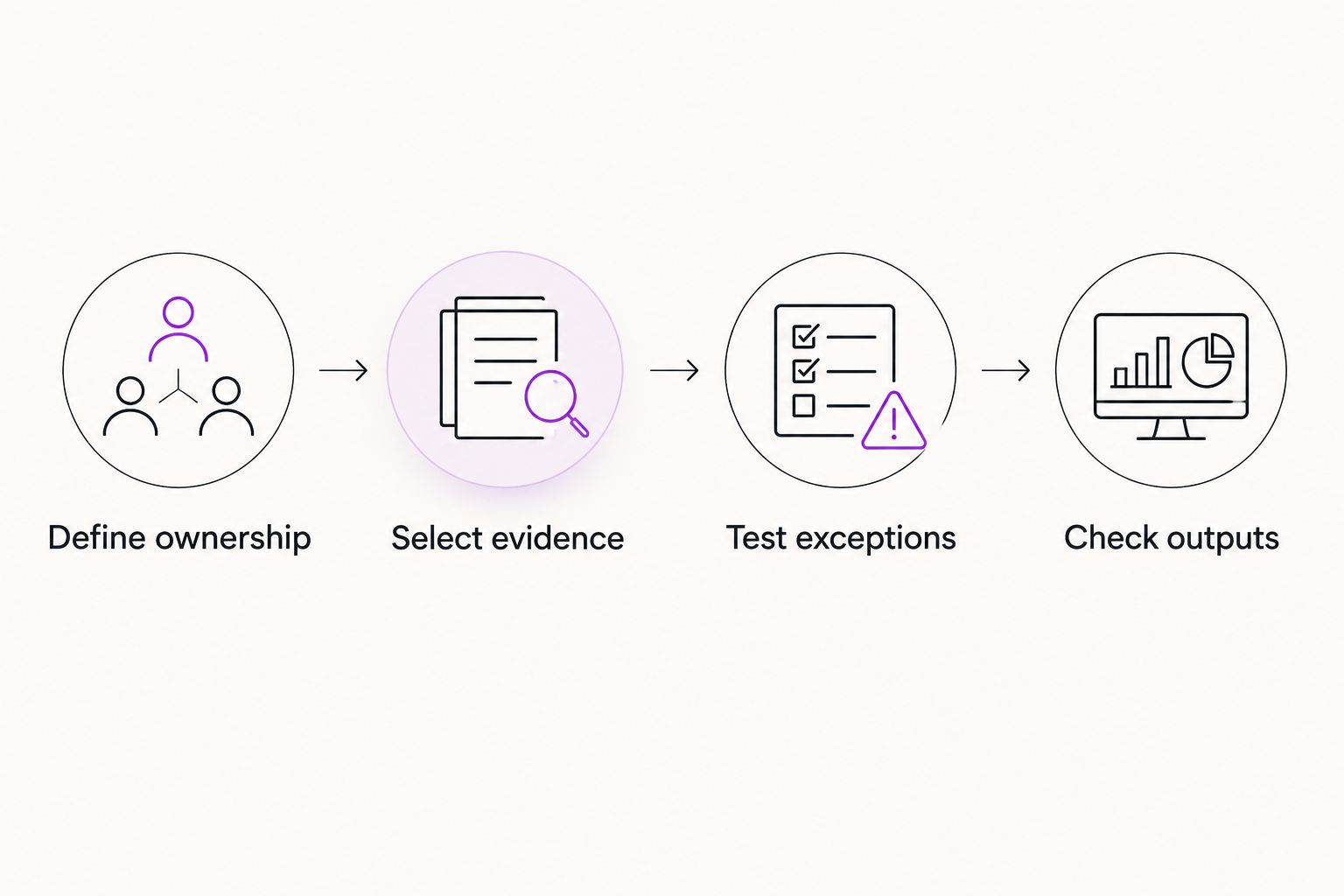
Test the exception path as carefully as the normal workflow.
Record the manual actions required during the pilot. Separate work caused by incomplete source records from work caused by product limitations; replacing software will not correct an undefined responsibility.
Before signing off, ask a colleague who did not configure the system to investigate an exception. Their ability to reach a supported answer matters more than the number of populated dashboard panels.
How the options are ranked
This 2026 ranking prioritizes workflow fit, record ownership, evidence traceability, administrative effort, scope boundaries, and usable outputs. Each option receives a distinct recommendation because equipment custody, discovery, service management, endpoint control, and SPLA reporting are different jobs.
The order is not a hands-on performance score or an exhaustive feature comparison. Snipe-IT leads for the equipment-accountability use case; the specialist options take priority when your primary requirement changes.
Which IT asset management software should you choose?
Choose Snipe-IT if you are undecided and the immediate problem is knowing who holds your equipment. It is the clearest starting point in this shortlist for custody-led asset management.
Choose GLPI when support tickets need asset context, Lansweeper when discovery is the missing foundation, or Microsoft Intune when you need active endpoint control. Choose Octopus software asset management when your team serves Microsoft SPLA customers and needs usage reporting, customer billing, and audit-defense support.
For your 2026 decision, write the acceptance criterion before arranging demonstrations. A useful criterion describes an answer your team must produce, the evidence behind that answer, and the person responsible for maintaining it.
FAQ
What's the best IT asset management software for small IT teams?
Snipe-IT is the default recommendation here for small teams focused on equipment custody. Choose a different specialist when the primary requirement is discovery, service-desk integration, endpoint control, or SPLA reporting.
Is Octopus suitable for tracking employee laptops?
Octopus is positioned for software asset management serving Microsoft SPLA partners and Authorized Outsourcers. General laptop custody is not established by its stated scope, so validate that requirement separately.
Is Microsoft Intune the same as an IT asset register?
No. Microsoft Intune manages endpoints through configuration, compliance policies, and application management; a physical asset register also needs to account for custody and lifecycle records.
Is GLPI better than Snipe-IT for a small team?
GLPI is the stronger fit when asset records need to support service-desk workflows. Snipe-IT is the clearer starting point when the main requirement is equipment assignment and return.
Does discovering installed software prove licensing compliance?
No. Discovered software records provide technical evidence, but licensing compliance also requires interpreting the applicable agreement and reconciling usage or deployment with the relevant obligations.
What should a small team test before choosing asset management software?
Test a complete workflow and its exception path. Verify that another team member can trace a record to its source, identify its owner, and reproduce the resulting decision.
Can a spreadsheet remain part of asset management?
Yes, a spreadsheet can remain a supporting record, but its role must be explicit. Avoid maintaining conflicting ownership or reporting records without a defined reconciliation process.
One last thing
A discovered device, an assigned device, and a correctly licensed workload are different assertions. None proves the other.
Before adding another system, name the record that answers each question and the person accountable for correcting it. That decision gives a small team a practical control boundary—and a clearer reason to accept or reject each product.