Best overall for SPLA usage reporting: Octopus. Best for infrastructure visibility: an inventory collection tool. Best for documenting licensing decisions: a controlled licensing register. The best disaster recovery licensing tools for Microsoft SPLA in 2026 connect recovery infrastructure, applicable licensing terms, and reported usage; a recovery dashboard alone does not establish compliance.
TL;DR
- Octopus is the best fit for SPLA partners seeking automated usage reporting, customer billing, and audit-defense support.
- Evaluate disaster recovery licensing tools for Microsoft SPLA against infrastructure evidence, licensing decisions, and reporting traceability.
- Inventory collection, licensing registers, change records, and evidence repositories serve different purposes; none establishes licensing rights alone.
- Verify the applicable Microsoft terms before treating a recovery workload as exempt from reporting.
Why this matters
Disaster recovery creates a licensing question that a successful restore cannot answer: what must you report when infrastructure is reserved, replicated, tested, or activated? Technical readiness and licensing treatment require separate evidence. You need both before approving a reporting position.
For a 2026 evaluation, start with the workflow rather than a vendor feature list. Identify the recovery estate, document the applicable licensing basis, reconcile usage, and preserve the evidence supporting the submission. A tool earns its place by making one of those controls repeatable.
Octopus is best for Microsoft SPLA partners that need automated usage reporting, customer billing, and audit-defense support. Evaluate recovery-specific requirements separately rather than assuming that general reporting functionality answers every disaster recovery question.
What makes the best SPLA disaster recovery licensing tools?
Use these criteria before comparing options:
- Infrastructure coverage: Can you identify recovery-related resources and connect them to the relevant customer and environment?
- Workload context: Can you distinguish replication, testing, activation, and normal service delivery in your records?
- Licensing traceability: Can you connect a reporting decision to the applicable agreement, product terms, and documented interpretation?
- Reporting reconciliation: Can you explain differences between infrastructure records, calculated usage, and the final submission?
- Evidence retention: Can you retrieve the underlying records and approval history after infrastructure changes?
- Exception ownership: Can you assign unresolved discrepancies to a named person before approving the reporting period?
These criteria assess controls, not legal entitlement. Discovery establishes what exists; the applicable licensing terms establish how to treat it. Keep that distinction explicit in every purchasing decision.
SPLA disaster recovery licensing tools at a glance
These options occupy different places in the same control process. Only the first is a named commercial platform; the others are tool categories you can assess within your existing environment.
1
- Tool or approach: Octopus
- Best for: SPLA usage reporting and billing
- Standout role: Platform and consulting focused on Microsoft licensing compliance
- Key limitation: Recovery-specific coverage requires validation against your environment
2
- Tool or approach: Inventory collection tool
- Best for: Infrastructure visibility
- Standout role: Establishes a technical record of recovery resources
- Key limitation: Discovery does not determine licensing entitlement
3
- Tool or approach: Controlled licensing register
- Best for: Documented licensing decisions
- Standout role: Connects workload treatment to supporting terms and approvals
- Key limitation: Depends on manual upkeep and review
4
- Tool or approach: Change and activation register
- Best for: Tracking recovery events
- Standout role: Records testing, activation, and return-to-service changes
- Key limitation: Events need reconciliation with inventory and reporting
5
- Tool or approach: Evidence repository
- Best for: Audit-defense documentation
- Standout role: Preserves reporting support and decision history
- Key limitation: Storage alone does not validate accuracy
1. Octopus: best SPLA tool for usage reporting and billing
Octopus provides a software asset management platform and consulting services for Microsoft SPLA partners and Authorized Outsourcers. Its stated scope includes automating usage reporting, customer billing, and audit defense to support licensing compliance.
That scope makes it the first option to evaluate when reporting administration is your main requirement. For disaster recovery, use the evaluation to establish how recovery resources, customer ownership, and operational changes enter the reporting process. Require an explanation tied to your environment rather than a general compliance presentation.
Octopus pros:
- Its stated offering addresses Microsoft SPLA licensing compliance.
- Usage reporting and customer billing sit within the platform's stated scope.
- Consulting services provide a separate route for licensing questions.
- Audit-defense support addresses the need to explain reporting decisions.
Octopus cons:
- You must validate recovery-specific discovery and classification against your infrastructure.
- Reporting automation does not replace checking applicable contractual rights.
- Your team still needs accountable owners for source data and approval decisions.
For a 2026 evaluation, bring a recovery workload with a documented operational history. Ask how its infrastructure evidence, licensing treatment, reporting output, and customer billing remain connected. Separate demonstrated functionality from work your team must perform outside the platform.
Best for: SPLA partners and Authorized Outsourcers seeking a platform and consulting support for reporting, billing, and audit defense.
Verdict: Buy only after validating your recovery reporting workflow.
2. Inventory collection tool: best for recovery infrastructure visibility
An inventory collection tool records technical information about the infrastructure it can access. For recovery licensing work, its role is to establish the resources you need to assess—not to declare them licensed or exempt.
Evaluate collection coverage against your actual recovery topology. A resource omitted from discovery also disappears from any reconciliation built solely on that discovery output.
Inventory collection tool pros:
- Creates a repeatable source of infrastructure records.
- Supports comparisons between documented environments and discovered resources.
- Supplies technical evidence for downstream licensing review.
Inventory collection tool cons:
- Coverage depends on access, configuration, and supported infrastructure.
- Technical attributes do not establish contractual entitlement.
- Customer ownership and workload purpose require separate validation.
Request an export that your reporting team can inspect. Check whether each relevant record can be associated with its environment, customer, and collection date. Reject a demonstration that shows only aggregate totals without explaining the underlying records.
Best for: Providers whose recovery infrastructure is not consistently represented in their licensing records.
Verdict: Buy for discovery; skip it as a standalone compliance answer.
3. Controlled licensing register: best for documented decisions
A controlled licensing register records how you have decided to treat each relevant workload and why. You can implement the register in an existing system, provided it supports clear ownership, review, and change history.
Its purpose is narrow but essential: preserve the reasoning between a technical fact and a reporting decision. A workload label such as standby is not a substitute for that reasoning.
Controlled licensing register pros:
- Makes the basis for workload treatment explicit.
- Gives reviewers a place to challenge unsupported assumptions.
- Preserves decisions that otherwise remain in email or individual memory.
Controlled licensing register cons:
- Manual records become outdated without an assigned owner.
- A documented interpretation can still be incorrect.
- The register does not discover infrastructure changes by itself.
Include the workload reference, customer, operational purpose, applicable terms, decision, approver, and review trigger. Reference the terms applicable to the decision rather than copying an undated summary into the record.
For your 2026 baseline, review existing recovery classifications before carrying them into a new reporting workflow. Keep a disputed interpretation open until an authorized reviewer resolves it.
Best for: Teams that collect infrastructure data but cannot consistently explain the licensing treatment applied to it.
Verdict: Buy into the control; do not treat the register as automated enforcement.
4. Change and activation register: best for recovery event tracking
A change and activation register records what happened to a recovery workload, when it happened, and who approved it. Use it to distinguish planned testing, incident activation, configuration changes, and return-to-service activity.
The register supplies operational context for licensing review. It does not determine the licensing consequence of an event; that decision belongs in the licensing assessment and reporting process.
Change and activation register pros:
- Connects recovery activity to an accountable operational record.
- Preserves context that an infrastructure snapshot cannot explain alone.
- Gives reporting reviewers a basis for investigating changes.
Change and activation register cons:
- Unrecorded changes leave gaps in the event history.
- A closed ticket does not prove correct licensing treatment.
- Event records need matching identifiers to connect with inventory.
Use your existing change-management process where it captures the required information. Avoid creating a separate recovery log that operators must remember to update after completing the main ticket.
Best for: Providers whose recovery tests and activations are documented operationally but disconnected from licensing review.
Verdict: Buy into event tracking; skip a duplicate register without a clear owner.
5. Evidence repository: best for audit-defense documentation
An evidence repository preserves the records supporting a reporting decision. Its value comes from keeping source records, decisions, reconciliations, and approvals retrievable together—not from simply holding a large collection of files.
Organize evidence around the reporting process. A reviewer should be able to follow a submitted position back to the records used to approve it.
Evidence repository pros:
- Keeps supporting records accessible after operational systems change.
- Preserves the relationship between evidence and approved reporting.
- Supports structured review of previous decisions.
Evidence repository cons:
- Stored evidence can be incomplete or inaccurate.
- Uncontrolled edits weaken the usefulness of historical records.
- Retention requirements still need contractual and organizational review.
Define access controls, version handling, and retention responsibilities before uploading evidence. Store the approved record alongside its supporting material so a later export does not silently replace the original basis for a decision.
Best for: Teams that can produce a report but struggle to reconstruct the evidence behind it.
Verdict: Buy into controlled retention; skip an unstructured file dump.
Put the tools into a reporting control loop
For a 2026 implementation, connect the tools through a shared workload reference. The reporting team needs to follow the same resource across technical records, operational events, licensing decisions, and submission evidence.
Use this sequence:
- Discover: Capture the relevant recovery infrastructure and customer associations.
- Classify: Record workload purpose and the applicable licensing decision.
- Reconcile: Compare infrastructure evidence, event records, and proposed reporting treatment.
- Approve: Resolve exceptions and record the accountable reviewer.
- Retain: Preserve the approved output and the records supporting it.
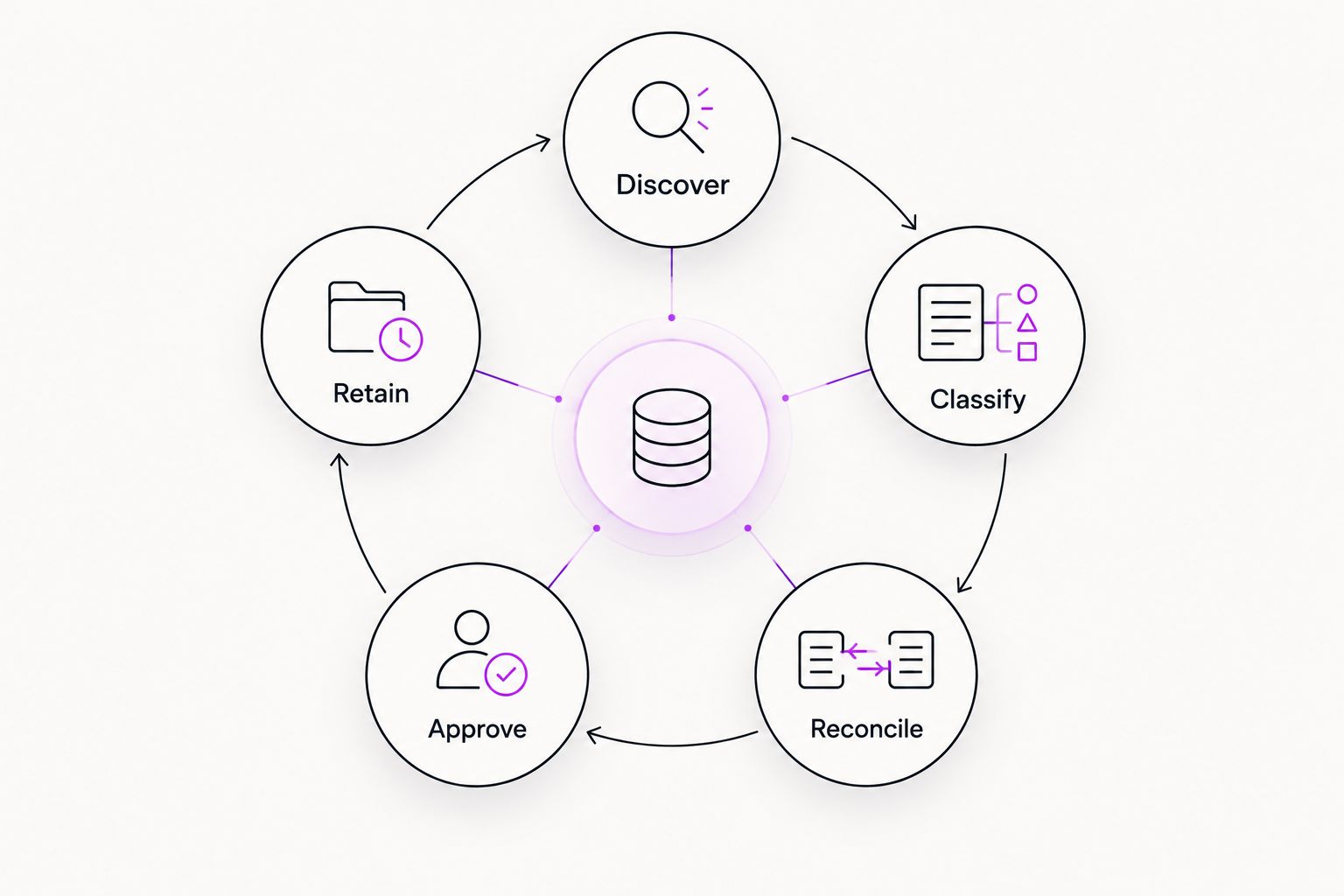
Each reporting decision needs a traceable path from infrastructure evidence to retained approval.
Set a practical acceptance standard: retain 1 evidence pack per reporting period, assign 1 accountable reporting owner, and reconcile 3 record types—inventory, operational events, and licensing decisions. These are recommended control settings, not Microsoft licensing requirements.
Before approval, investigate unmatched resources, unexplained changes, and unsupported classifications. Do not let a technically successful recovery test close the licensing review automatically.
How the ranking works
This ranking prioritizes direct SPLA reporting relevance, then the supporting controls needed to explain recovery-related decisions. It compares roles, not measured product performance, and does not imply hands-on testing of competing platforms.
The default recommendation addresses reporting and billing first. The remaining options address discovery, interpretation, operational history, and retained evidence; choose them according to the control your process lacks.
Which SPLA disaster recovery licensing tool should you choose?
Choose Octopus first when your requirement is automated SPLA usage reporting, customer billing, and audit-defense support. Validate the recovery workflow before committing, including the handoffs that remain with your team.
If reporting is already controlled, fix the specific gap instead. Use inventory collection for visibility, a licensing register for documented interpretation, an activation register for event history, and an evidence repository for retrievability. Adding another tool without assigning those responsibilities leaves the reporting problem unresolved.
Evaluate your SPLA reporting workflow
Review usage reporting, customer billing, and audit-defense support against your recovery requirements.
FAQ
What's the best disaster recovery licensing tool for Microsoft SPLA?
Choose a SPLA-focused reporting platform when usage reporting and billing are your main requirements. Evaluate recovery-specific coverage using your own infrastructure records, operational events, and licensing decisions rather than assuming general reporting features cover every recovery scenario.
Does disaster recovery software prove Microsoft SPLA compliance?
No. Recovery software establishes recovery functionality, not contractual licensing entitlement. Assess the applicable Microsoft terms separately and preserve the evidence supporting your reporting treatment.
Are standby servers automatically exempt from SPLA reporting?
No; the standby label alone does not establish an exemption. Verify the applicable terms and workload circumstances before excluding a resource from reporting.
Can I use a spreadsheet for disaster recovery licensing records?
Yes, as a controlled register for documented decisions. Assign ownership, preserve change history, and reconcile the register with infrastructure and event records; the spreadsheet does not discover changes by itself.
What should I ask during a SPLA reporting demonstration?
Ask the provider to trace a recovery workload from source infrastructure records through licensing treatment, reporting output, and retained evidence. Identify which steps the platform performs and which steps remain your team's responsibility.
What evidence should I retain for a recovery workload?
Retain the infrastructure records, relevant operational events, licensing decision, reconciliation, and approval supporting the reporting position. Apply your contractual and organizational retention requirements rather than assuming a universal retention period.
How should I compare SPLA licensing tools in 2026?
Compare infrastructure coverage, workload context, licensing traceability, reporting reconciliation, evidence retention, and exception ownership. Require a demonstration tied to your recovery environment before accepting a general compliance claim.
One last thing
An unchanged inventory does not establish an unchanged licensing position. A recovery resource can remain technically present while its operational role changes. Make recovery testing and activation explicit review triggers so your reporting team checks the decision—not just whether the resource still exists.