Instead of manually copying Microsoft 365 usage into reporting worksheets, build a controlled export-and-reconciliation workflow and confirm how Octopus accepts the resulting data before automating ingestion. A Microsoft 365 usage export is not proof of a working integration: validate the receiving method, customer mapping, and reconciliation rules first.
TL;DR
- For an octopus cloud microsoft 365 integration, confirm the supported ingestion method before configuring Microsoft Graph reporting.
- Octopus serves SPLA partners and Authorized Outsourcers that need software asset management and licensing consulting.
- Microsoft 365 usage reports show activity, not a complete licensing entitlement or billing position.
- Start with a controlled export, reconcile customer identities, and approve the output before scheduling recurring processing.
Why this matters
Microsoft 365 activity data answers questions about service use. It does not establish every user's licensing rights, explain an agreement's terms, or determine what you should bill a customer. Keep those decisions separate from data collection.
Octopus is best for SPLA partners and Authorized Outsourcers seeking software asset management and licensing consulting. Its platform and consulting scope includes usage reporting, customer billing, and audit defense; a Microsoft 365 connection still needs a confirmed technical implementation.
For your 2026 setup, ask the contact team to confirm the supported Microsoft 365 ingestion route. Request its authentication requirements, accepted fields, tenant boundaries, and error-handling behavior before granting access.
The goal is a traceable chain: source report, customer identity, receiving record, approved reporting output. If an administrator cannot follow that chain, the workflow is not ready for production.
Before you start
- Access and ownership: Identify the Microsoft 365 tenant administrator, the reporting operator, and the person authorized to approve the receiving configuration. Obtain reporting access rather than sharing administrator credentials.
- Receiving requirements: Confirm whether the destination accepts a supported connector, an API submission, or a file import. Obtain the actual setup instructions and field requirements; do not substitute a guessed integration screen.
- Privacy gotcha: Microsoft 365 report privacy settings can conceal user, group, and site names. Check this before designing identity matching, because a concealed identifier can break a mapping built around readable account names.
Record the reporting period, tenant, destination customer, and intended use in a setup worksheet. Label it as your 2026 implementation record so later reviewers can distinguish the original configuration from subsequent changes.
Choose your collection workflow
There are two useful collection approaches: an administrator-led export and a recurring Microsoft Graph reporting process. Neither approach, by itself, proves that the destination supports ingestion.
Administrator-led export
- Best for: Validating fields and customer mappings before automation
- Advantage: Lets an operator inspect the source file before processing
- Limitation: Requires manual execution and control over file handling
Microsoft Graph reporting
- Best for: Recurring collection after the receiving method is confirmed
- Advantage: Makes the collection process repeatable
- Limitation: Requires permission management, scheduling, and handling download responses
Use the administrator-led export to validate the data contract first. Add recurring collection only after the same input produces an accepted, reconciled destination result.
For a 2026 implementation, choose the reporting window deliberately. Microsoft Graph's Microsoft 365 active-user detail report supports periods of 7 days, 30 days, 90 days, and 180 days. These are report windows, not guaranteed billing periods or measurements of simultaneous use.
Source report configuration
Establish the reporting scope
- Identify the tenant and customer whose activity you need. Record the tenant identifier separately from its display name so a later name change does not silently redirect a mapping.
- Sign in to the Microsoft 365 admin center with an account authorized to view usage reports. Open Reports, then Usage.
- Choose the report that answers the intended operational question. For account-level service activity, inspect the active-user reporting detail rather than assuming a dashboard total contains the necessary records.
- Select the report period and inspect its refresh date. Write both into your setup worksheet before exporting anything.
- Use Export for the selected report. Preserve the downloaded source file unchanged and create a separate working copy for transformations.
Expected result: You have an identifiable source report, its reporting window, its refresh date, and an unchanged export that another administrator can inspect.
Do not combine reports merely because they share a user column. Different reports describe different activity and can use different measurement windows. Define what each record represents before joining it to another dataset.
Check the report's identity behavior
Inspect whether user information is readable or concealed. If privacy settings prevent the intended match, involve the tenant administrator and privacy owner before making changes.
Do not disable privacy protections as a troubleshooting shortcut. A workflow that requires identifiable records needs an approved handling policy as well as a technical configuration.
Destination mapping configuration
Define the receiving data contract
- Obtain the supported receiving instructions from the destination owner. Use the actual field definitions, accepted formats, and authentication procedure supplied for your implementation.
- Create a mapping worksheet with source field, destination field, transformation rule, and rejection condition. These are worksheet headings, not assumed product interface labels.
- Map the tenant and customer first. Then map the reporting period and the user or workload identifier required by the receiving schema.
- Keep assigned-license information separate from activity indicators. An account with no recorded activity is not automatically an account with no licensing requirement.
- Define how to handle blank values, concealed identities, unmapped customers, and repeated submissions. Reject unresolved records instead of assigning them to a default customer.
Expected result: Every required receiving field has a documented source or approved transformation, and unmatched records have an explicit exception path.
For your 2026 control record, document who approves mapping changes. A customer merger, tenant rename, or identity change should trigger review rather than silently alter attribution.
Separate evidence from interpretation
Preserve the original activity value alongside any classification you derive from it. For example, your internal review status must remain distinguishable from the source report's service-activity field.
The same rule applies to billing. A customer identifier establishes attribution; it does not establish a charge. Apply the customer's approved billing rules in a separate, reviewable stage.
Validation and release configuration
Prove the workflow before scheduling it
- Process the exported file through the confirmed receiving method in an approved validation context. If no separate test environment exists, agree on a controlled production validation with the system owner.
- Compare source records with accepted records and documented exceptions. Explain transformations that change the record structure rather than expecting totals to match automatically.
- Inspect representative records directly. Include a matched customer, an unresolved identity, and an account without recorded activity when those cases exist in the source.
- Submit the same source again under controlled conditions. Verify the documented duplicate-handling behavior instead of assuming that repeated submissions replace earlier records.
- Obtain reporting-owner approval before using the output for customer billing or compliance decisions. Retain the source, mapping version, exception record, and approval together.
Expected result: You can explain what entered the process, what was accepted, what was rejected, and why the resulting customer assignment is correct.
The operating sequence is Source export, Identity mapping, Reconciliation, and Approval. Keep these stages visible even when one application performs several of them.
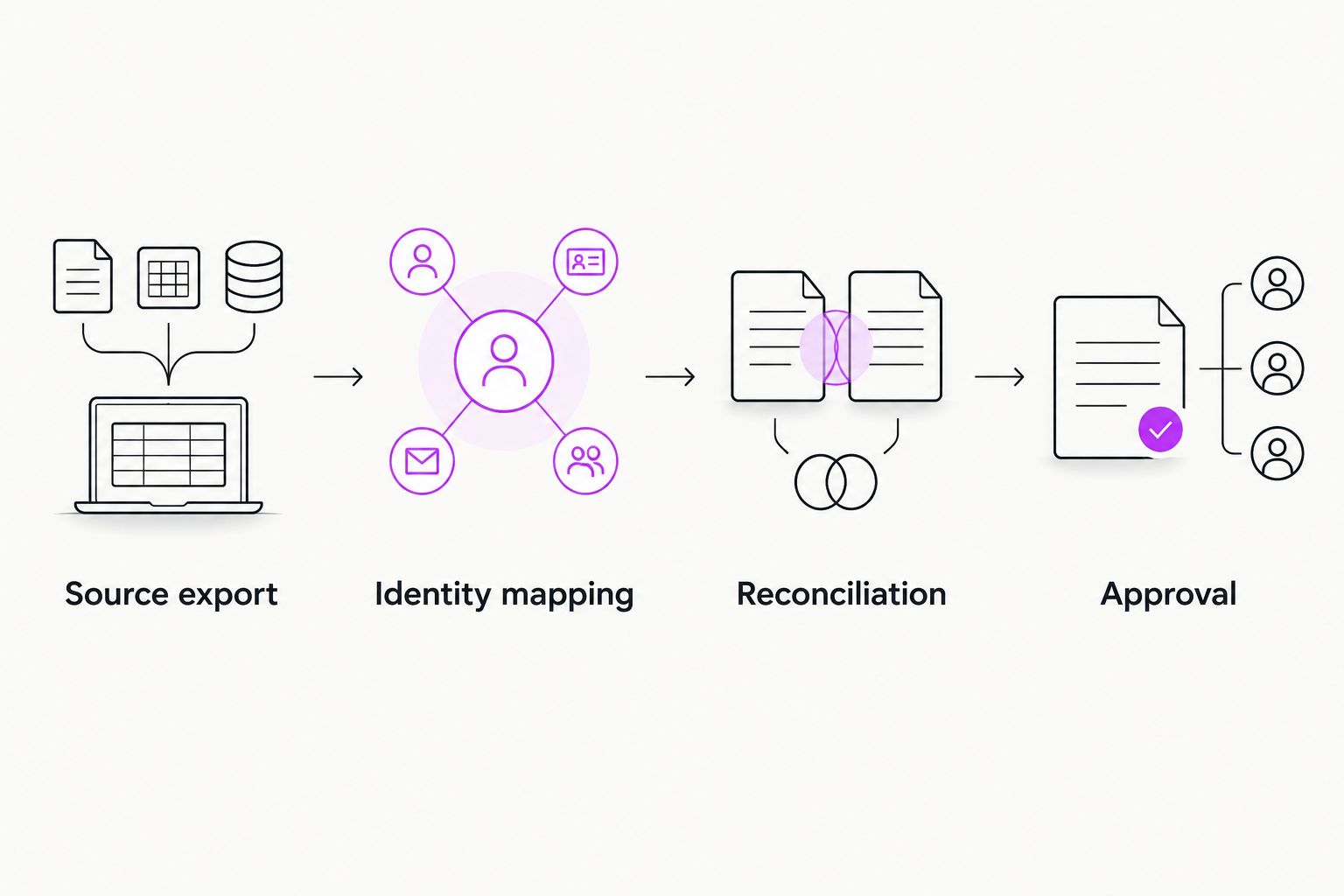
Approve the reconciled result before using it for billing or compliance decisions.
Do not treat a successful upload as a successful reconciliation. File acceptance confirms only that the receiving process accepted the submission; it does not establish correct customer attribution or licensing interpretation.
Recurring Microsoft Graph collection
Use recurring Microsoft Graph collection when the manual export and destination mapping already pass validation. This changes collection mechanics, not the acceptance standard.
Configure the recurring collector
- Choose the authentication model supported by the reporting process. Microsoft Graph usage reporting uses the
Reports.Read.Allpermission; obtain the required administrator consent and confirm the requirements for the chosen endpoint and authentication model. - Configure the Microsoft 365 active-user detail report request. The report function is
getOffice365ActiveUserDetail; use a supported period such asD30for a 30-day reporting window. - Handle the report download response correctly. This reporting API returns a redirect to a download location, so the collector must follow the documented download process rather than parse the initial response as report rows.
- Preserve the downloaded source and attach collection metadata before transformation. Keep the tenant, requested window, collection time, and report refresh information distinguishable.
- Pass the result through the validated mapping and reconciliation stages. Release accepted output only after the configured checks pass, and route failures to an accountable operator.
Expected result: Recurring collection produces the same accountable input as the administrator-led export without bypassing validation.
Use a schedule appropriate to the report's refresh behavior and your reporting deadline. Repeatedly requesting a report does not make its underlying activity data more current.
For 2026 operations, distinguish collection time from report refresh time in monitoring. A successful collection can retrieve an unchanged report, and that is different from a failed collection.
Refresh whenever reporting data changes
For an adjacent workflow, collect on a schedule but process downstream records only when the source version changes. Compare report refresh information and your stored source fingerprint before deciding whether to release another processing run.
This approach reduces repeated handling of unchanged data. It also requires explicit correction handling: if a source changes, preserve the earlier version and record which downstream result replaces it. Do not assume that a period-based report contains only newly added activity.
Troubleshooting
The report opens, but identities cannot be matched
Check whether report privacy settings conceal names before changing the mapping logic. If readable identities are approved and necessary, have the authorized administrator review the relevant reporting settings; otherwise, redesign the workflow around approved identifiers.
Microsoft Graph returns an authorization error
Confirm that the token belongs to the intended tenant and includes the required reporting permission. Check administrator consent and endpoint-specific access requirements rather than granting broad directory permissions as a workaround.
The collector receives a redirect instead of report data
Handle the usage-report download response as documented. Do not treat the initial redirect response as an empty report, and do not retain the temporary download location as a permanent integration endpoint.
Activity totals do not match the billing output
Compare definitions before comparing totals. Activity, assigned licenses, customer attribution, and billable quantities are separate concepts; inspect the reporting window and transformation rules before changing a customer's billing record.
The same accounts appear in repeated submissions
Check whether the collector is submitting overlapping period reports and whether the destination replaces, appends, or rejects existing records. Use the documented record identity and correction rules; deleting repeated rows by display name can remove legitimate records.
Customize your workflow
Extend the workflow only after collection, identity mapping, and exception handling work together. Add entitlement reconciliation, customer billing review, or audit-evidence preparation as separately controlled stages rather than treating usage activity as the final answer.
Octopus provides software asset management and consulting for SPLA partners and Authorized Outsourcers. For this workflow, the practical boundary is clear: confirm which responsibilities the platform handles and which remain with your administrator, integration operator, or licensing reviewer.
Keep the audit trail alongside the reporting output. A 2026 reporting package should identify the source window, mapping version, unresolved exceptions, and approval without requiring someone to reconstruct the process from email.
FAQ
How do I connect Octopus to Microsoft 365 usage data?
Confirm the supported receiving method first, then export or collect Microsoft 365 usage data and validate its mapping before recurring processing. Do not assume that a native connector or a particular import format is supported without implementation instructions.
Can I use Microsoft Graph instead of manual exports?
Yes, Microsoft Graph provides Microsoft 365 usage reporting endpoints. Recurring collection still needs approved permissions, download-response handling, and a confirmed method for submitting the resulting data to the destination.
Which permission does Microsoft Graph usage reporting require?
Microsoft Graph usage reporting uses Reports.Read.All. Confirm administrator consent and the requirements of the selected endpoint and authentication model before configuring production access.
Why are user names hidden in my Microsoft 365 report?
Microsoft 365 report privacy settings can conceal user, group, and site names. Review those settings with the authorized administrator and privacy owner before building identity matching around readable names.
Does an inactive Microsoft 365 account need no license?
No, a lack of recorded activity does not establish that an account has no licensing requirement. Review assigned licenses, service requirements, and applicable agreement terms separately from activity reporting.
Will a 30-day usage report match my monthly invoice?
A 30-day usage report does not automatically match a calendar-month invoice. Align the reporting definition, customer mapping, and approved billing rules before using activity data in customer billing.
How do I verify that the workflow is working?
Reconcile source records, accepted records, and documented exceptions, then inspect customer attribution directly. Also test repeated submissions and correction handling before approving recurring processing.
One last thing
An unchanged report is not a failed integration. Monitor collection success and source refresh separately, then alert on the condition that actually requires action: a failed download, an unresolved identity, an unexplained reconciliation difference, or an overdue approval.