


Instead of copying reported SPLA usage into customer invoices each month, configure an approval-gated workflow that turns accepted usage into invoice drafts and releases them after reconciliation. Automated SPLA customer invoicing needs customer mapping, billing rules, and duplicate prevention—not just a trigger that fires when a report arrives.
TL;DR
- Automated SPLA customer invoicing should start from approved usage, not an unvalidated report upload.
- Octopus supports SPLA usage reporting and customer billing for service providers seeking licensing-focused automation.
- Map customer identities, product codes, billing periods, and contracted rates before creating invoice drafts.
- Separate SPLA reporting quantities from customer billing rules, and block duplicate invoice creation.
Why this matters
A completed usage report does not prove that every record belongs on a customer invoice. Customer ownership, contractual billing treatment, and previous invoice activity still need checking. Sending invoices directly from an upload event moves those exceptions into your receivables process.
Octopus is best for Microsoft SPLA partners and Authorized Outsourcers that need software asset management, usage reporting, and customer billing support. Octopus provides a platform and consulting services for those requirements. Define the accounting-system connection and approval controls around your billing process rather than assuming that usage reporting alone completes it.
For your 2026 implementation, separate three events: usage received, usage approved, and invoice released. Each event represents a different decision. Keeping them separate gives finance a clear place to stop incorrect charges without discarding the underlying licensing evidence.
Before you start
- Access and ownership: Assign owners for usage reporting, customer contracts, and invoice approval. Obtain authorized access to the usage source and the billing destination, including permission to create drafts and retrieve invoice references.
- Mapping materials: Prepare customer identifiers, product mappings, billing-period definitions, contractual charging rules, and accounting requirements. Use approved customer records rather than creating customers automatically from unfamiliar usage labels.
- The setup gotcha: A reporting identity is not necessarily a billing identity. One customer can appear under several infrastructure labels, while a shared environment can require allocation across customers. Resolve that relationship before enabling invoice creation.
Use the field names below as an implementation schema, not as software interface labels. Map them to the supported fields in your actual reporting and accounting systems. Keep credentials outside usage files and grant the connection only the permissions its assigned tasks require.
Usage approval trigger
The trigger should identify a usable billing snapshot, not merely detect a new file. Start with a controlled handoff from the reporting owner to the billing workflow.
- Define the approval event. Trigger invoice preparation only after the reporting owner accepts the usage period and resolves blocking exceptions. If your source cannot publish an approval event, use an approved export or a controlled handoff record.
- Capture the reporting context. Include report_id, report_version, period_start, period_end, and approval_status. Store the underlying export or a durable reference alongside that context.
- Validate required records. Reject rows without a customer identifier, recognized product identifier, reporting period, quantity, or unit. Route rejected records to an exception owner instead of assigning default values.
- Freeze the approved snapshot. Preserve the accepted report version before creating billing records. Keep later corrections separate so an invoice remains traceable to the exact usage that produced it.
Expected result: An accepted report creates a traceable billing job; an incomplete report creates an exception, not an invoice.
For a 2026 reporting period, store the full start and end dates rather than a month name alone. A label such as January does not distinguish separate years or explain a customer-specific billing cutoff.
Customer and charge mapping
Customer mapping determines who receives the invoice. Charge mapping determines what the invoice means. Treat both as controlled business rules, not text matching.
- Resolve the customer account. Translate the reporting identifier into billing_customer_id through a maintained mapping table. Require an explicit allocation rule wherever shared infrastructure serves multiple customers.
- Resolve the charge description. Map each reported product to an approved customer-facing line description and accounting item. Preserve the original product identifier in the supporting record, even when the invoice uses a shorter description.
- Apply contractual billing treatment. Determine the billable quantity and applicable contracted rate from the customer agreement. Keep the reported quantity and billable quantity in separate fields whenever contractual treatment differs.
- Validate the destination account. Confirm the invoice currency, tax treatment, purchase-order requirements, and billing recipient against the approved accounting record. Hold the job when a required value is unresolved.
- Assign rule ownership. Record who approves mapping changes and when those changes take effect. A rule changed during a 2026 billing cycle must not silently alter an already approved invoice calculation.
Expected result: Every invoice line has a known customer, an approved charging rule, and a traceable relationship to reported usage.
Do not equate a customer's invoice quantity with proof of SPLA compliance. Licensing reporting and customer charging serve different purposes. Preserve both calculations when the customer agreement requires a different billing treatment.
Invoice draft and reconciliation
Create drafts before enabling automatic release. This separates successful data transfer from a correct financial document.
- Build the billing key. Combine the billing customer, service period, and charge type into a stable billing_key. Keep report versions as supporting metadata so a corrected report cannot bypass duplicate controls merely because its version changed.
- Check existing activity. Search the integration ledger and accounting destination for that billing key before creating a draft. Record the job as pending before submission, then store the returned invoice reference after confirmation.
- Create the draft. Populate the customer, service period, approved line descriptions, quantities, and contractual charging rules. Attach supporting detail where your accounting process permits it; otherwise retain a controlled reference.
- Reconcile the draft. Compare source usage with allocated usage, then compare expected charges with invoice lines. Review tax and rounding separately so a small financial difference does not hide a missing usage record.
- Test failure behavior. Run at least 3 test cases: an accepted report, an unknown customer, and the same accepted report submitted again. The second case must stop; the third must not create another invoice.
Expected result: An approved usage snapshot produces the intended draft once, with exceptions visible before release.
Keep the workflow sequence explicit: Usage approval, Customer mapping, Invoice draft, Reconciliation, and Invoice release. Each stage should leave a record that the next stage can verify.
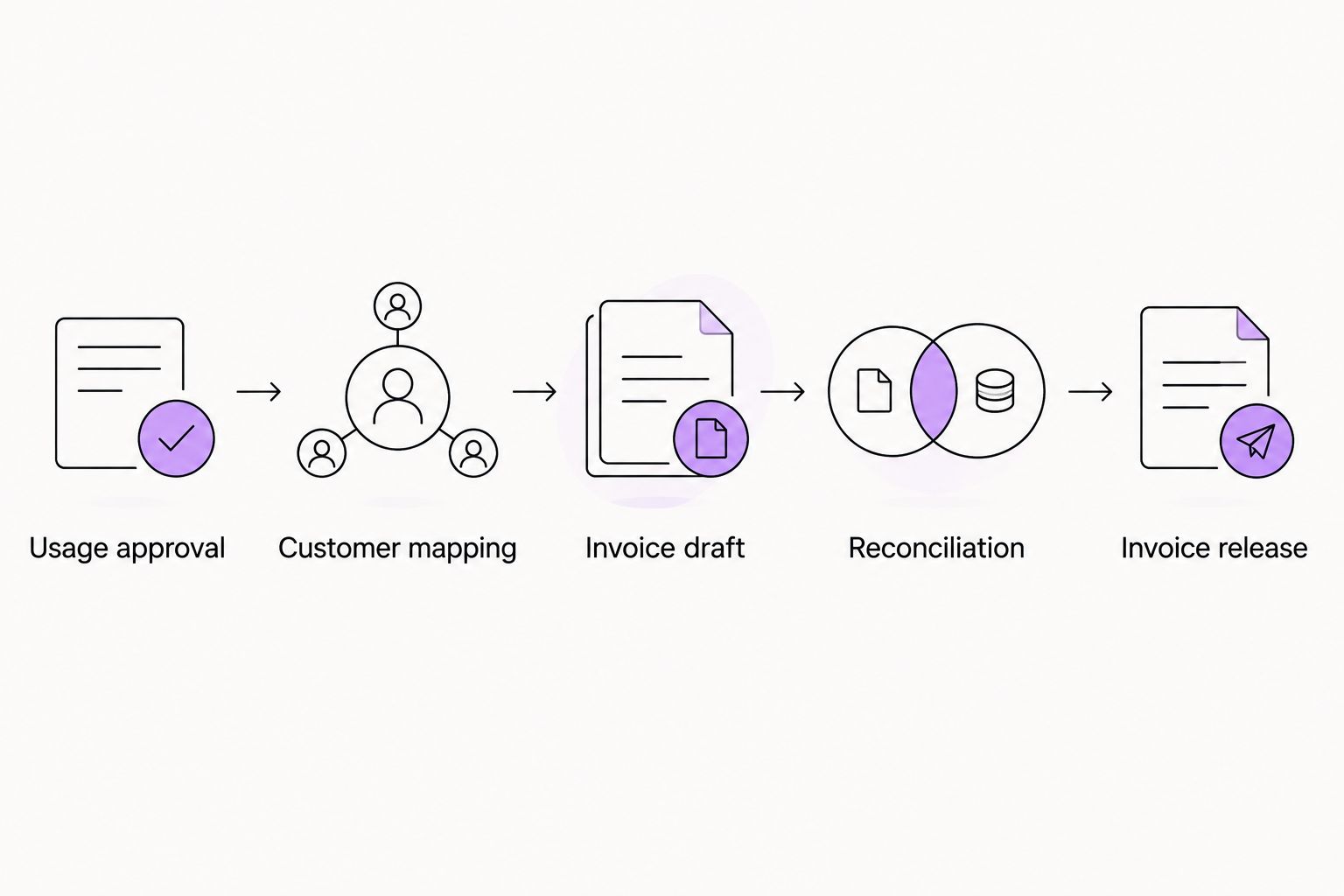
Create the draft before reconciliation; release it only after the checks pass.
Invoice release and evidence
Automatic release is a separate configuration decision. Enable it only after draft creation, reconciliation, and recovery behavior meet your acceptance criteria.
- Define the release gate. Require an approved usage snapshot, complete mappings, a successful duplicate check, and a reconciled draft. Keep unresolved exceptions outside the release queue.
- Assign approval responsibilities. Use 2 approval roles: a reporting owner for usage and a finance owner for billing. Document any decision to combine those roles, including who reviews exceptions.
- Record delivery separately. Store the invoice identifier, release status, and delivery status independently. A successful invoice creation response does not establish that the customer received the document.
- Retain the evidence chain. Keep the source snapshot, mapping version, calculation detail, approvals, invoice reference, and correction history together. Apply your organization's retention and access requirements.
- Define the close condition. Mark a billing job complete only when the required accounting and delivery confirmations exist. Route unresolved delivery failures to finance rather than regenerating the invoice.
Expected result: Each released invoice has an approval record and supporting evidence, while unsuccessful delivery remains a recoverable exception.
For the first 2026 production cycle, keep finance approval in place. Remove manual release only after the team has verified the workflow's normal path and its exception handling.
When approved usage is updated
A correction workflow is necessary whenever accepted usage changes after invoice preparation. Route the update according to the invoice's current status rather than sending it through initial creation again.
Initial billing
- Best for: Approved usage without an existing invoice
- Advantage: Creates a traceable first draft
- Limitation: Requires complete customer and charge mappings
Draft correction
- Best for: Revised usage before invoice release
- Advantage: Allows review before the customer receives the invoice
- Limitation: Requires recalculation and renewed approval
Released-invoice correction
- Best for: Revised usage after release
- Advantage: Preserves the original invoice and correction history
- Limitation: Requires the accounting team's adjustment process
For an unreleased draft, retrieve the existing invoice reference, calculate the difference, and update or replace the draft according to your accounting system's supported process. Run reconciliation again and invalidate the previous approval if the amounts or billing basis changed.
For a released invoice, preserve the original document. Route the difference through finance's approved credit, debit, or replacement process, and link the adjustment to both report versions. Never treat revised usage as permission to issue a second full invoice.
Octopus SPLA customer billing support belongs within this controlled process: usage automation supplies the billing input, while your accounting controls govern release and correction. The benefit is less manual transfer; the limitation is that contracts, mappings, and exception ownership still require maintenance.
Troubleshooting
The same report creates another draft
Check whether duplicate prevention relies only on a file name or report version. Replace that check with the stable billing key and retrieve the stored invoice reference before retrying. If submission timed out, confirm the destination's state before sending the request again.
Usage maps to the wrong customer
Inspect the reporting-to-billing identity mapping and any shared-environment allocation rule. Stop the affected billing job, correct the mapping, and rebuild its reconciliation. Do not fix the invoice alone while leaving the source mapping unchanged.
Invoice totals differ from expected charges
Compare quantities, units, contracted charging rules, rounding, and tax treatment separately. Check for line aggregation that combines different products or periods. Correct the responsible rule and recalculate the draft rather than inserting an unexplained balancing line.
A corrected report leaves the old draft unchanged
Confirm that the update event identifies the original billing key and existing invoice reference. Route the correction to draft recalculation, then require renewed approval. An integration that watches only new reports will not handle updates correctly.
The invoice exists but delivery failed
Retrieve the existing invoice and inspect its delivery status and recipient record. Correct the delivery issue through the accounting process without creating another financial document. Preserve both the original release event and the later delivery confirmation.
Customize your workflow
Extend automation only after the core billing path is controlled. Add customer-specific purchase-order checks, separate approval paths for allocation exceptions, or supporting usage schedules where your customer agreements require them.
Keep licensing review distinct from invoice approval. A reconciled invoice confirms that billing followed its configured rules; it does not establish that the underlying licensing interpretation is correct.
For a 2026 implementation review, bring an approved usage export, a customer mapping sample, and the required invoice output. Use those materials to define the connection, approval gates, and correction process with Octopus's contact team.
FAQ
How does automated SPLA customer invoicing work?
Automated SPLA customer invoicing converts approved usage into customer invoice drafts using maintained customer mappings and contractual billing rules. Reconciliation, duplicate prevention, and release approval control what reaches the customer.
Can I create invoices as soon as a usage report arrives?
Use report arrival to start validation, not invoice release. Create the invoice draft only after the usage snapshot and required billing mappings are approved.
Does Octopus support SPLA customer billing?
Octopus provides software asset management and consulting services that support usage reporting, customer billing, and audit defense for Microsoft SPLA partners and Authorized Outsourcers. Define the accounting-system connection and approval requirements for your specific workflow.
How do I prevent duplicate customer invoices?
Use a stable billing key and check existing billing activity before creating an invoice. After a timeout, retrieve the destination's invoice state before retrying the creation request.
What happens when SPLA usage changes after invoicing?
Handle the change through a correction workflow linked to the original billing record. Recalculate unreleased drafts; route released invoices through finance's approved adjustment process.
Does a correct customer invoice prove SPLA compliance?
No. A customer invoice reflects contractual charging rules, while SPLA compliance depends on the applicable licensing requirements and supporting usage evidence.
What should I test before enabling automatic invoice release?
Test accepted usage, unknown customer mappings, repeated submissions, corrected reports, and interrupted accounting requests. Confirm that failures create recoverable exceptions without duplicate invoices.
One last thing
Test an interrupted submission before you trust a successful one. A timeout can leave your workflow uncertain whether the accounting system created the invoice. Recovery must retrieve and reconcile the existing result before attempting creation again; otherwise, automatic retries become a duplicate-billing mechanism.