

Multi-tenant cloud providers’ SPLA compliance is the process of matching hosted Microsoft software usage to applicable licensing obligations, with the aim of producing defensible reports across shared infrastructure. This 2026 guide explains how to separate tenant attribution, licensing calculations, customer billing, and audit evidence without treating them as interchangeable records.
TL;DR
- SPLA compliance for multi-tenant cloud environments requires traceable infrastructure records, applicable licensing rules, and reconciled reporting.
- Octopus fits Microsoft SPLA partners seeking software and consulting for usage reporting, customer billing, and audit defense.
- Separate SPLA obligations from customer BYOL claims; shared infrastructure does not establish license eligibility.
- Approve each reporting period against preserved evidence, not an inventory export alone.
Why this matters
A tenant allocation is not a licensing calculation. Assigning a virtual machine to a customer tells you who consumes the service. It does not establish which licensing model applies, which infrastructure must be counted, or whether customer-owned licenses cover that deployment.
Octopus provides a software asset management platform and consulting services for Microsoft SPLA partners and Authorized Outsourcers. Keep those roles distinct: the correct reporting treatment depends on the deployment, the agreement, and the rights attached to the software—not the provider’s label alone.
Why SPLA compliance matters for multi-tenant cloud providers
Shared infrastructure creates an attribution problem. A physical host can support workloads associated with different customers, while the licensing calculation can depend on facts that exist above or below the tenant boundary. Customer billing therefore needs a different view from compliance reporting.
Your operational constraints also change continuously. Workloads move, customers leave, infrastructure expands, and software editions change. A current inventory cannot, by itself, explain what happened throughout a closed reporting period.
For your 2026 control plan, maintain 3 connected records per workload: its technical deployment, its customer allocation, and its licensing treatment. This is a recommended evidence structure, not a Microsoft-mandated record format. It lets a reviewer trace a reported quantity back to the infrastructure and rule that produced it.
Build a repeatable reporting process
Use this sequence: Inventory, Classification, Calculation, Reconciliation, Approval, Archive. Start with exports and controlled spreadsheets if necessary; establish the decision rules before automating them.
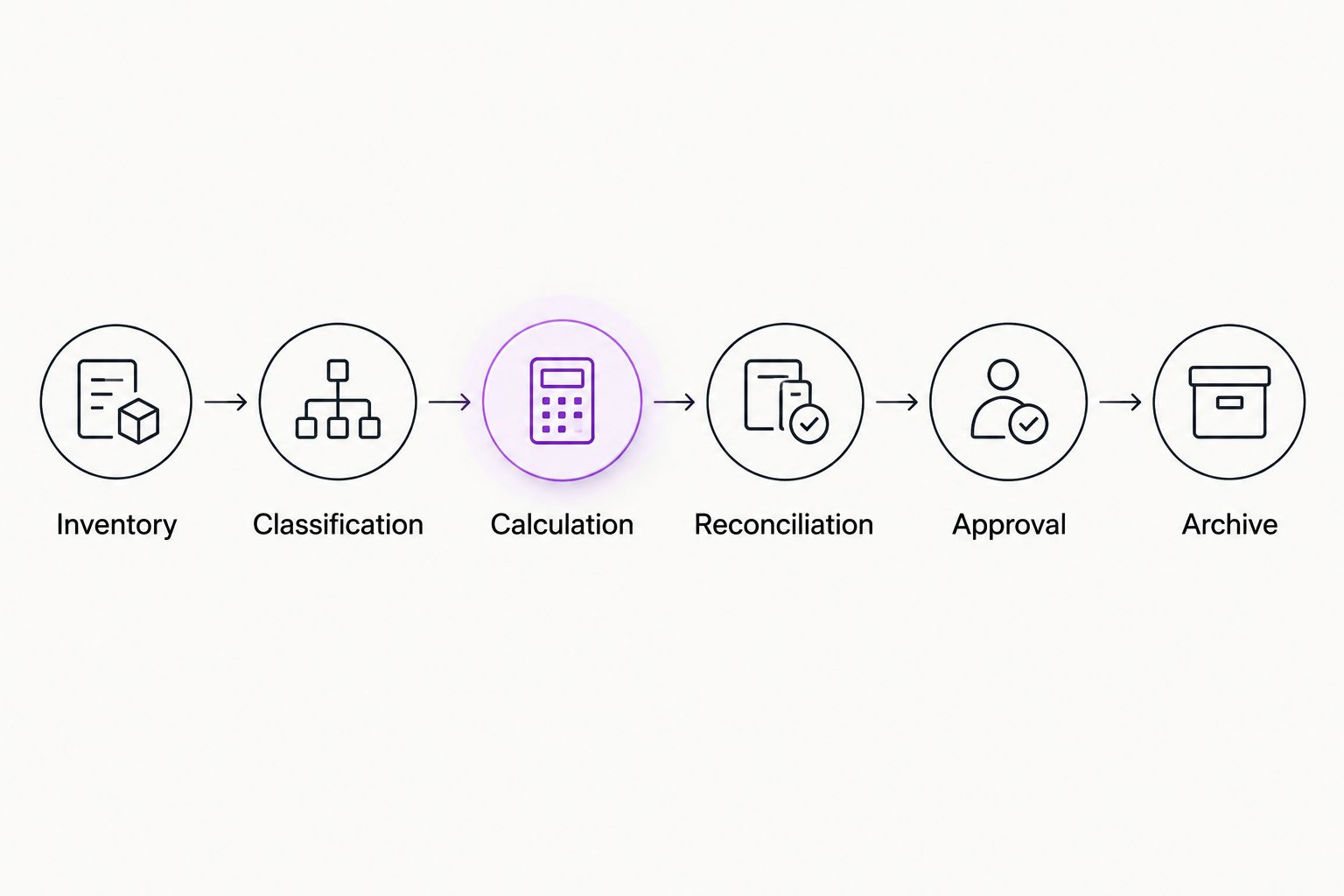
Classify deployment rights before calculating and approving reportable quantities.
1. Establish your infrastructure and tenant inventory
Start by exporting records from your virtualization management system, server inventory, and customer service register. Use stable identifiers to join the records. Names alone are insufficient when administrators rename machines or reuse customer naming conventions.
Capture the relationships needed to explain each deployment: physical host, virtual workload, software installation, and customer allocation. Where a calculation depends on host characteristics, guest records alone leave the calculation unsupported.
Treat unassigned workloads as exceptions requiring investigation. Do not silently exclude them because the billing system lacks a customer match. Equally, do not assume that every discovered installation creates an identical licensing obligation; classification comes next.
Close this step with an inventory someone else can reproduce:
- Record stable host and workload identifiers.
- Map workloads to customers and service owners.
- Capture software editions and relevant infrastructure attributes.
- Preserve dated exports and collection coverage.
- Assign an owner to every unmatched record.
2. Classify each workload’s licensing basis
Create a controlled worksheet that records the proposed licensing basis for each deployment and the evidence supporting it. Distinguish provider-supplied SPLA licensing from customer-supplied licenses and other arrangements requiring separate review.
BYOL is a claim to validate, not an exemption code. A customer’s statement that it owns Microsoft licenses does not establish that those licenses cover the specific product, deployment, outsourcing arrangement, or shared environment.
For 2026 deployments, check the governing agreements and applicable Microsoft product terms rather than copying an old classification. Record the document version and the reason for the decision. When eligibility remains unresolved, escalate the classification before allowing it to determine the submitted report.
- Identify the software product and edition.
- Record the proposed licensing basis.
- Attach supporting agreement and entitlement evidence.
- Check deployment-specific outsourcing restrictions.
- Route unresolved cases to a licensing specialist.
3. Calculate obligations from the correct technical scope
Build the manual calculation first. For each product, document the applicable licensing metric, the technical scope it covers, and the inputs required to calculate the obligation. Use the agreement and product-specific rules to determine that scope.
Do not convert allocated virtual resources directly into reportable quantities unless the applicable rules support that calculation. Physical infrastructure, virtualization rights, minimums, and access requirements need separate consideration where relevant.
Octopus SPLA compliance software and consulting provide a route to automating usage reporting after those classifications are established. Automation reduces reliance on repeated manual handling; it does not remove the need to validate source coverage and rule interpretation.
Keep the calculation explainable enough that a reviewer can reproduce a selected result without relying on the person who built the spreadsheet.
- Specify the licensing metric for each product.
- Identify the infrastructure included in the calculation.
- Document applicable minimums and virtualization rights.
- Preserve calculation inputs and rule references.
- Review exceptions before aggregating report quantities.
4. Reconcile licensing quantities and customer allocations separately
Perform 2 separate reconciliations: infrastructure to licensing quantities, then customer allocations to billing records. Combining them into a single total hides differences in purpose. An invoice explains a commercial charge; a licensing report explains an obligation under the applicable agreement.
Begin with spreadsheet joins and exception filters. Investigate workloads without licensing treatment, licensing quantities without source evidence, and billable services without a customer mapping. A clean grand total does not resolve record-level mismatches.
For your 2026 reporting process, define how amendments enter both records. A correction to a tenant allocation does not necessarily change the licensing total, while a software edition correction can require a different licensing review.
- Compare inventory coverage with calculated quantities.
- Reconcile customer allocations with billing inputs.
- Investigate unmatched and duplicated records.
- Separate commercial adjustments from licensing corrections.
- Record the resolution of every reporting exception.
5. Approve the reporting period against preserved evidence
Assign 1 accountable owner per reporting period. Contributors can collect data, resolve technical exceptions, and review licensing decisions, but the final approval needs a named owner. This is an internal control recommendation, not a claim about a prescribed Microsoft staffing requirement.
Use a shared approval register before investing in workflow automation. Record who reviewed the calculation, which evidence set supported it, and which exceptions remained open at submission. Never mark an unresolved issue as resolved simply to complete the period.
Check the submission requirements in your agreement and reporting process. An internally approved spreadsheet is not proof that the required report was submitted correctly. Retain the submission record separately from the working calculation.
- Name the accountable reporting owner.
- Review material changes and unresolved exceptions.
- Approve the evidence set and calculated output together.
- Preserve submission confirmation and subsequent amendments.
- Restrict changes to approved reporting files.
6. Preserve an audit trail and review infrastructure changes
Store a closed evidence package for each reporting period. Include the inventory extracts, tenant mappings, classification decisions, calculations, approvals, and submission records. Retention periods should follow your contractual obligations and internal policy rather than an arbitrary number of months.
Then connect operational changes to licensing review. Host migrations, new software editions, customer exits, and changes in outsourcing arrangements can invalidate assumptions carried forward from the previous period.
Octopus SPLA compliance consulting addresses audit defense alongside reporting support. The value of that support depends on evidence you can produce; neither consulting nor automation substitutes for missing historical records.
- Preserve source extracts with collection dates.
- Retain the rule references used for each calculation.
- Keep corrections linked to the original reporting period.
- Trigger review when deployment assumptions change.
- Test whether a reviewer can reconstruct a selected result.
Compare your compliance operating options
Octopus is best for Microsoft SPLA partners seeking software and consulting for usage reporting, customer billing, and audit defense. Select an operating model based on the work you need to control, not simply the number of spreadsheets you want to remove.
The options below describe different responsibilities. Inventory collection establishes technical facts; licensing review interprets those facts; reporting operations produce and preserve the approved output. You still need each responsibility covered when one platform supports several of them.
Controlled spreadsheets and exports
- Best for: Providers establishing a documented baseline
- Main advantage: Makes calculations and decisions directly inspectable
- Key limitation: Requires manual updates, reconciliation, and version control
Discovery and inventory tooling
- Best for: Providers with incomplete infrastructure visibility
- Main advantage: Supplies structured technical records for review
- Key limitation: Inventory alone does not establish licensing eligibility
Specialist licensing consulting
- Best for: Providers resolving contract or deployment questions
- Main advantage: Supports interpretation of specific licensing scenarios
- Key limitation: Advice still needs accurate operational evidence
Octopus platform and consulting
- Best for: SPLA partners combining reporting, billing, and audit-defense needs
- Main advantage: Connects software and consulting support around those tasks
- Key limitation: Still requires validated source data and deployment-specific decisions
Before selecting software, test a representative reporting period against your own evidence requirements. Ask how missing records, changed classifications, approvals, and corrections will be handled. Do not accept a demonstration total as proof that your deployment has been classified correctly.
Review your SPLA reporting process
Explore software and consulting for usage reporting, customer billing, and audit defense.
Common mistakes multi-tenant cloud providers make
Treating customer billing as the compliance record
Billing records follow your commercial model. Licensing records must follow the applicable licensing obligations. Preserve the connection between them, but do not force both to use the same allocation method when their purposes differ.
Accepting BYOL without deployment evidence
A license purchase record is not the complete eligibility assessment. Validate the product rights and the specific hosting arrangement before excluding a workload from provider-supplied licensing calculations.
Losing history when workloads move
A live inventory shows the current environment, not necessarily the environment relevant to a closed report. Preserve dated evidence and change records so workload movements do not erase the basis of an earlier calculation.
Applying one rule across every Microsoft product
Different products and editions require their own licensing analysis. Maintain product-specific calculations instead of copying a familiar Windows Server treatment into SQL Server or another product without checking the applicable rules.
Automating unresolved classifications
Automation repeats the logic you give it. An unsupported BYOL assumption or incomplete host scope remains a control failure even when every report is generated consistently. Resolve the classification before scaling the workflow.
FAQ
What is SPLA compliance for multi-tenant cloud environments?
SPLA compliance for multi-tenant cloud environments means matching hosted Microsoft software usage to the applicable SPLA obligations across shared infrastructure. It requires technical evidence, licensing classification, reproducible calculations, and retained reporting records.
Can I use customer billing records as my SPLA report?
Customer billing records are not a substitute for a validated SPLA calculation. Commercial allocations and licensing obligations serve different purposes, so reconcile them without assuming they must use identical quantities.
Does BYOL automatically exempt a tenant from SPLA reporting?
BYOL does not automatically establish an exemption from provider-supplied licensing. Validate the customer's entitlements, product rights, and deployment arrangement before deciding how that workload should be treated.
Is an inventory export enough to defend a licensing report?
An inventory export alone does not explain licensing eligibility or the calculation used in a report. Preserve the relevant rules, classification decisions, calculation inputs, approvals, and submission evidence alongside the export.
Can spreadsheets manage multi-tenant SPLA compliance?
Controlled spreadsheets can document inventory mappings, calculations, and approvals. They require disciplined version control and reconciliation, especially when infrastructure changes or multiple people edit reporting records.
What should I check before automating SPLA reporting in 2026?
Validate source coverage, tenant mappings, licensing classifications, and product-specific calculations before automating SPLA reporting in 2026. Test exceptions and corrections as well as the final aggregate output.
What does Octopus provide for SPLA partners?
Octopus provides a software asset management platform and consulting services for Microsoft SPLA partners and Authorized Outsourcers. Its stated scope includes usage reporting, customer billing, and audit defense; deployment-specific licensing decisions still need supporting evidence.
One last thing
Test your evidence backward, not just your calculation forward. Select a reported quantity from a closed period and ask a reviewer to trace it back through the rule, deployment, tenant allocation, and original technical record.
Make that reconstruction part of your 2026 reporting control. If the reviewer needs an administrator’s memory to bridge a gap, document the missing evidence and fix the collection process before the next approval.