

Instead of manually comparing VM inventories after every infrastructure change, configure automated under-licensing alerts: a VM-count change triggers an entitlement check, and only a confirmed shortfall becomes a licensing alert. Keep incomplete inventory and unresolved licensing assignments in separate exception queues so operational changes do not become unsupported compliance findings.
TL;DR
- For automated under-licensing alerts vm count is a trigger, not proof of a licensing shortfall.
- Octopus supports SPLA partners and Authorized Outsourcers with software asset management and licensing consulting.
- Evaluate licensing scope, product, entitlement, and inventory completeness before escalating a VM change.
- Keep reporting exceptions separate from confirmed licensing shortfalls and preserve evidence for both.
Why this matters
A VM count tells you that infrastructure changed. It does not establish which licensing obligation changed. A new VM, a migrated VM, and a duplicate discovery record need different treatment before they reach your compliance owner.
Octopus is best for Microsoft SPLA partners and Authorized Outsourcers seeking software asset management and licensing consulting. Use Octopus as the starting point for that combined platform-and-services approach; the workflow below defines the detection logic and evidence your implementation should retain.
For your 2026 control baseline, separate infrastructure detection from licensing determination. Your monitoring layer identifies a change; your licensing rules decide whether that change creates an additional reporting requirement or an entitlement gap.
This separation also makes the alert actionable. The recipient needs the affected customer, workload, licensing basis, and evidence—not just a message that the VM total increased.
Before you start
- Access and evidence: Obtain read access to the relevant virtualization inventory, customer assignments, product inventory, reporting records, and entitlement evidence. Assign an owner who can validate the applicable Microsoft licensing terms.
- A defined rule scope: Choose the customer, infrastructure boundary, product, and licensing arrangement the rule covers. Record the applicable 2026 terms and their effective dates rather than applying one rule to every workload.
- The non-obvious gotcha: VM count is not a universal licensing measure. Host placement, processor or core information, product edition, virtualization rights, and customer licensing eligibility can change the calculation. Block a definitive under-licensing verdict when required evidence is missing.
The configuration labels below are proposed fields for your own workflow, not Octopus interface labels. Use the equivalent controls in your inventory, rules, and ticketing systems; preserve the same meanings when your systems use different names.
Inventory trigger configuration
Establish the comparison boundary
- Define Customer scope using a stable customer identifier. Add Infrastructure scope to distinguish the relevant hosts, clusters, or management environments.
- Set Workload identity to a persistent inventory identifier rather than a display name. Keep the source-system identifier alongside it to distinguish records collected from different environments.
- Define Reporting period and Snapshot time. Compare records within the intended reporting boundary, and preserve their collection timestamps.
- Store Previous inventory and Current inventory as separate snapshots. Retain the underlying workload records, not just their totals.
Expected result: You can explain which workloads changed, where they belonged, and which observation supported the change. A reviewer can reconstruct the comparison without relying on an alert summary.
For an initial test configuration, use 2 completed snapshots. This is a comparison design, not a Microsoft licensing requirement. If the first inventory is incomplete, establish a valid baseline before enabling compliance escalation.
Detect changes without losing context
- Set Change threshold to 1 added VM for the initial detection rule. Treat this as a monitoring choice, not a licensing minimum.
- Record Change type as creation, removal, movement, or inventory correction. Use supporting events where available; do not infer a migration solely from a disappearing record.
- Compare both workload identities and aggregate counts. A customer can gain one workload and lose another while the total stays unchanged.
- Send relevant changes to License evaluation. Route incomplete collections to Inventory exception instead.
Expected result: Each detected change has a reason and an evidence trail. A net-zero count change does not hide a workload replacement, product change, or movement between licensing scopes.
A count-only trigger is useful for triage because it is simple to inspect. Its limitation is equally clear: it misses changes that affect licensing without changing the total. Keep identity-level comparison enabled alongside the count check.
Licensing rule configuration
Map each workload to its licensing basis
- Populate Product and Edition from verified workload evidence. A generic VM record is insufficient to establish the installed software or its licensing requirements.
- Populate Licensing basis using the applicable agreement and supporting records. Keep provider reporting obligations separate from customer-supplied licensing claims.
- Attach Infrastructure attributes required by the relevant rule. Depending on the licensing basis, these can include host placement, processor information, assigned virtual resources, and virtualization rights.
- Require Entitlement evidence wherever the calculation relies on existing rights. An unverified customer statement belongs in an exception queue, not in the approved entitlement total.
Expected result: Every evaluated workload has a documented route from inventory evidence to the applicable calculation. Unresolved classifications remain visible instead of silently receiving a default license assignment.
For this control, set the acceptance target to 0 unmapped workloads within the evaluated scope. That is an internal completeness requirement. It does not mean missing records prove under-licensing; it means the evaluation remains incomplete until the records are resolved.
Calculate the gap before creating an alert
- Set Required quantity from the applicable licensing rule and verified infrastructure facts. Do not substitute the VM total unless that rule actually uses VM count.
- Set Covered quantity from validated entitlements or the relevant reporting position. Do not treat a previous usage report as a perpetual pool of rights.
- Calculate Uncovered quantity only when the required and covered quantities use the same licensing unit and scope.
- Assign Evaluation status as confirmed shortfall, reporting exception, covered, or evidence required. Attach Rule version and the supporting records to the result.
Expected result: A confirmed shortfall identifies a positive uncovered quantity under a documented rule. A reporting exception identifies a reporting mismatch; missing evidence identifies an unresolved evaluation. These are separate findings.
For a 2026 rules register, retain the effective date with each rule version. When terms change, preserve the rule used for the original evaluation rather than overwriting its history.
The decision path should remain explicit: Inventory change, Scope validation, License evaluation, and Exception routing. Each stage answers a different question before the workflow assigns ownership.
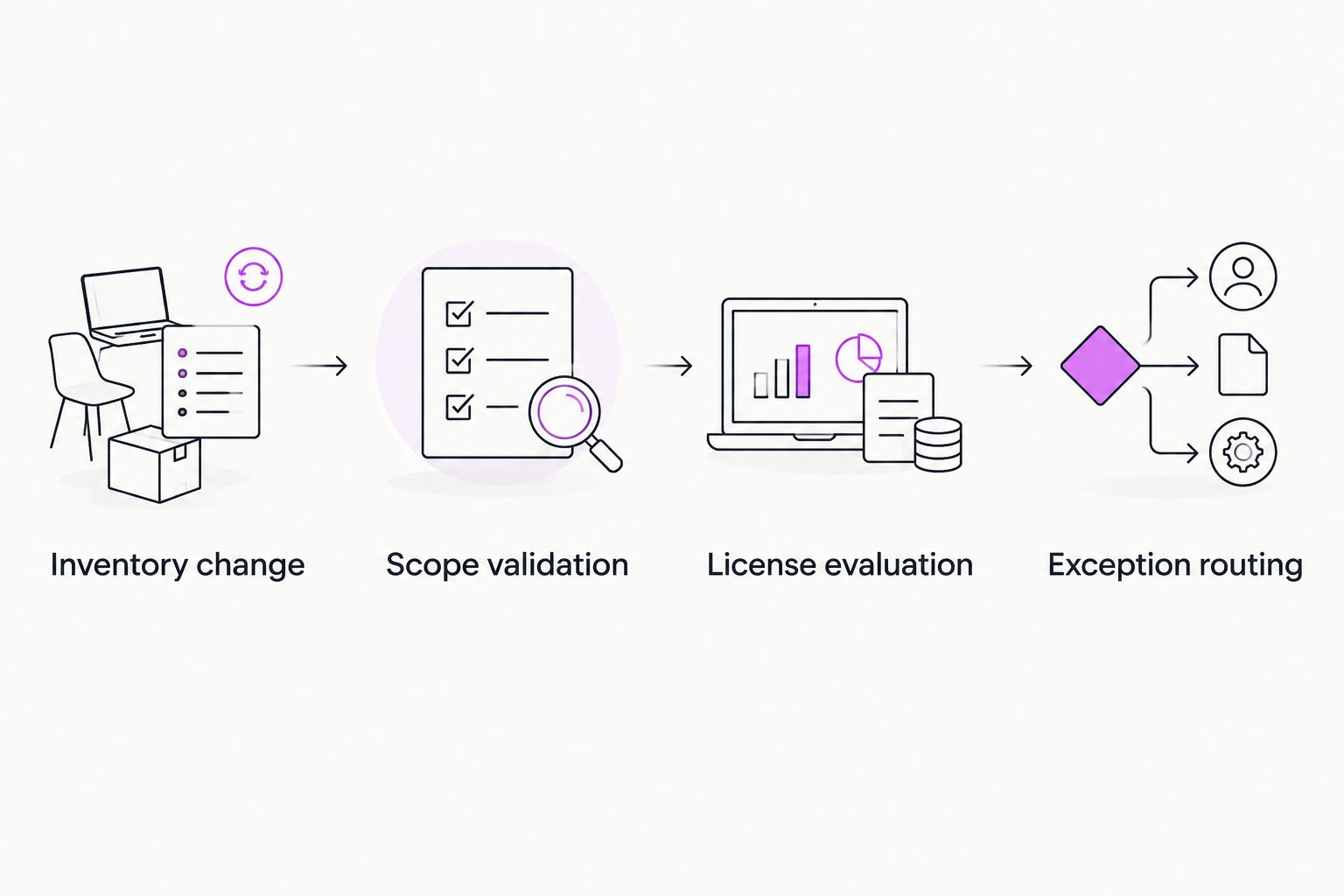
An infrastructure change reaches a licensing verdict only after scope and evidence checks.
Alert routing and verification
Build an actionable exception record
- Include Customer, Workload identity, Change type, and Observation time in the record. Add the relevant reporting period so the recipient knows which obligation needs attention.
- Include Licensing basis, Required quantity, Covered quantity, and Uncovered quantity when the calculation is complete. State the licensing unit beside each quantity.
- Assign Owner according to the finding. Inventory problems go to infrastructure operations; interpretation and entitlement questions go to the licensing owner; reporting mismatches go to the reporting owner.
- Set Deduplication key from the customer, workload or licensing scope, product, and reporting period. Update an existing open finding when the same unresolved condition is evaluated again.
Expected result: The alert reaches someone who can resolve it, carries its supporting evidence, and does not generate a fresh ticket on every collection cycle.
Do not label an alert “confirmed under-licensing” when its calculation is incomplete. Use a precise status such as evidence required. The distinction prevents uncertainty from being presented as a verified compliance finding.
Test the control before enabling escalation
- Create a controlled test record for an added workload. Confirm that detection occurs and the rule evaluates the correct customer and product.
- Test a migration, a duplicate inventory record, and an incomplete collection. Confirm that none becomes a confirmed shortfall without supporting licensing evidence.
- Test an actual gap in a non-production rule dataset. Confirm that the record contains the calculation, owner, and evidence references.
- Test closure and recurrence. A resolved finding should retain its history; a later valid recurrence should remain distinguishable from the original incident.
Expected result: Your 2026 acceptance record shows both detection and rejection behavior. The workflow catches a valid shortfall and refuses to invent one from bad inventory.
Re-evaluate whenever licensing evidence changes
VM additions are only one useful trigger. Re-evaluate the affected scope when host placement, product edition, entitlement evidence, customer assignment, or the applicable rule changes—even when the VM count remains constant.
Choose the evaluation scope deliberately. A workload-level change can require a host-level or customer-level calculation when the licensing basis depends on shared infrastructure or broader rights.
VM-change evaluation
- Best for: Infrastructure teams triaging additions and removals
- Advantage: Connects a visible operational event to a licensing check
- Limitation: Misses licensing changes unrelated to VM totals
Evidence-change evaluation
- Best for: Compliance owners maintaining licensing records
- Advantage: Rechecks coverage when rights or classifications change
- Limitation: Depends on accurate evidence updates and ownership
Scheduled reconciliation
- Best for: Reporting owners checking period completeness
- Advantage: Reviews the full defined scope rather than isolated events
- Limitation: Does not replace event-driven detection between reconciliations
Use event-driven checks for response and scheduled reconciliation for completeness. Neither control replaces the other. A missed event must not permanently remove a workload from licensing review.
For the 2026 reporting calendar, align reconciliation with your actual reporting obligations. Keep collection time, evaluation time, and reporting period separate so a late-arriving record does not silently rewrite an approved submission.
Troubleshooting
A migrated VM appears as new consumption
Check whether the source and destination records represent the same workload. Reconcile persistent identifiers and migration evidence before counting both records. If the move changes the licensing boundary, re-evaluate that boundary even after removing the duplicate.
VM counts increased, but no shortfall appeared
Inspect the evaluation status and calculation. A count increase can be covered by applicable rights or produce a reporting exception rather than an entitlement gap. Verify that the workflow ran; do not force a shortfall merely because the infrastructure total rose.
Alerts repeat after someone opens a ticket
Check the deduplication key and the connection between the evaluation record and the ticket. Update the existing finding while the same condition remains unresolved. Reassignment or acknowledgement should not be treated as resolution.
A workload disappeared and the finding closed
Inspect collection completeness before accepting the removal. A failed collector or inaccessible environment is not evidence of decommissioning. Require verified removal evidence or a complete comparison before closing a finding on that basis.
The calculation compares incompatible quantities
Inspect licensing units, product editions, and scope boundaries. VM totals cannot be subtracted from core quantities, and unrelated customer entitlements cannot be pooled without a valid licensing basis. Correct the mapping and rerun the affected scope.
Customize your workflow
Expand the control from detection into reporting and billing reconciliation. Preserve the inventory observation, licensing decision, reporting adjustment, and customer billing action as separate records linked by customer and reporting period.
Octopus provides software asset management and consulting services for usage reporting, customer billing, and audit defense. Keep implementation acceptance specific: validate your inventory sources, applicable licensing rules, exception ownership, and evidence retention before treating the workflow as a production control.
Automation reduces repeated comparison work, but it does not replace licensing interpretation. A configured rule consistently repeats its assumptions—including incorrect ones. Assign an owner to approve rule changes and review unresolved classifications.
Define your licensing alert workflow
Discuss inventory scope, licensing evidence, reporting exceptions, and ownership.
FAQ
Can VM-count changes automatically prove under-licensing?
No. A VM-count change should trigger a licensing evaluation, not establish the verdict. The evaluation needs the applicable licensing basis, infrastructure facts, and supporting entitlement or reporting records.
What should trigger an automated licensing check?
Trigger a check when relevant workload inventory or licensing evidence changes. Include additions, removals, host placement changes, product changes, and entitlement updates within the defined scope.
What if the VM count stays the same?
Re-evaluate when workload identities or licensing attributes change even if the total stays the same. Replacing a workload or moving it across licensing boundaries can require a different calculation.
How do I prevent false alerts during VM migrations?
Reconcile workload identity and migration evidence before treating source and destination records as separate consumption. Then evaluate whether the destination changes the applicable licensing requirements.
What belongs in an under-licensing alert?
Include the customer, affected scope, product, licensing basis, calculation, evidence references, reporting period, and owner. Identify the licensing unit explicitly and distinguish confirmed shortfalls from missing evidence.
Does Octopus support SPLA compliance work?
Octopus provides a software asset management platform and consulting services for Microsoft SPLA partners and Authorized Outsourcers. Its stated scope includes usage reporting, customer billing, and audit defense.
Should an unresolved evidence issue block the workflow?
An unresolved evidence issue should block a definitive licensing verdict, not stop exception tracking. Route the issue to an owner and rerun the evaluation after the evidence is validated.
One last thing
A falling VM count deserves the same evidence discipline as a rising count. A smaller inventory can reflect decommissioning, but it can also reflect collection failure or a changed discovery boundary. Before reducing a reporting position or closing an alert, prove what disappeared and why.