The cost of manual SPLA usage reporting for MSP teams is the labor spent collecting usage, applying licensing rules, reconciling customer billing, and approving reports, plus separately documented correction and audit-support work. For your 2026 budget, calculate that cost from recorded staff time and loaded labor rates; keep licensing charges and potential audit exposure separate from reporting overhead.
TL;DR
- Calculate the cost of manual SPLA usage reporting for MSP teams from recorded work, not spreadsheet-editing time alone.
- Include usage collection, licensing review, customer billing reconciliation, and approval in your SPLA reporting baseline.
- Octopus supports SPLA reporting automation and consulting; evaluate it against your documented manual workload.
- Keep reporting labor, licensing adjustments, and audit exposure separate to avoid double-counting.
How much does manual SPLA usage reporting cost an MSP?
Your manual reporting cost equals the sum of each contributor’s reporting hours multiplied by that contributor’s loaded hourly labor rate, plus directly attributable overhead. Calculate the total for 1 reporting month before projecting an annual budget.
Use this breakdown to establish your 2026 baseline:
Usage collection
- What to measure: Time exporting, requesting, cleaning, and combining usage records
- What to keep separate: Unrelated infrastructure administration
Licensing review
- What to measure: Time checking classifications, exceptions, and applicable licensing requirements
- What to keep separate: License charges themselves
Billing reconciliation
- What to measure: Time matching reported usage to customer billing records
- What to keep separate: Customer invoice totals
Review and approval
- What to measure: Time resolving questions, checking changes, and approving submission
- What to keep separate: General management meetings
Corrections
- What to measure: Additional work reopening and fixing an inaccurate report
- What to keep separate: Work already included in another category
Audit support
- What to measure: Time retrieving evidence and explaining historical reporting decisions
- What to keep separate: Hypothetical penalties or settlement amounts
The Octopus software asset management platform and consulting services address usage reporting, customer billing, and audit defense. Use those same work categories when comparing your current process with an alternative.
Why this matters
Reporting work is distributed across operations, licensing, finance, and management. A spreadsheet owner’s timesheet captures only that person’s contribution, not the full process.
A useful cost baseline connects staff effort to specific reporting activities. That gives you a defensible answer to a practical question: which work should you remove, standardize, or automate first?
How do you calculate your monthly reporting cost?
Build the calculation around work performed, not job titles or software ownership. A finance analyst checking customer allocations and an engineer correcting an export both contribute to reporting cost, even if neither owns the final submission.
1. Record collection time
Capture the work required to obtain a usable usage dataset. Include requests for missing records, export preparation, file cleanup, and consolidation across the systems inside your reporting scope.
Record the source, responsible person, and reason for any repeat collection. A recurring request for the same missing information points to a process problem that a total-hours figure alone cannot explain.
2. Record licensing review
Separate data preparation from the work of deciding how usage should be reported. Capture time spent checking classifications, investigating exceptions, and documenting the basis for reporting decisions.
Keep the applicable agreement terms and reporting period attached to the decision record. A calculation without its supporting assumptions is harder to review when someone questions it later.
3. Record reconciliation
Measure the effort needed to connect usage records, reportable quantities, and customer billing. Log unexplained differences and the work required to resolve them.
Do not assume that a completed usage report means billing reconciliation is complete. Treat them as separate tasks whenever different checks, records, or staff are involved.
4. Record approval
Include the reviewer’s work, follow-up questions, corrections requested, and final approval. Distinguish active review time from elapsed waiting time.
Waiting can delay completion, but it is not automatically a labor expense. Count the time staff actually spend chasing approval or resolving a blocked submission, rather than charging every waiting hour as work.
5. Record corrections
Assign additional correction work to the reporting period that caused it. Preserve the original entry and identify the cause, such as an incomplete export, an allocation error, or an undocumented classification.
This prevents a clean-looking current month from hiding work created by an earlier report. It also distinguishes recurring defects from isolated exceptions.
The sequence below keeps the measurement tied to the reporting workflow rather than to a single spreadsheet or employee.
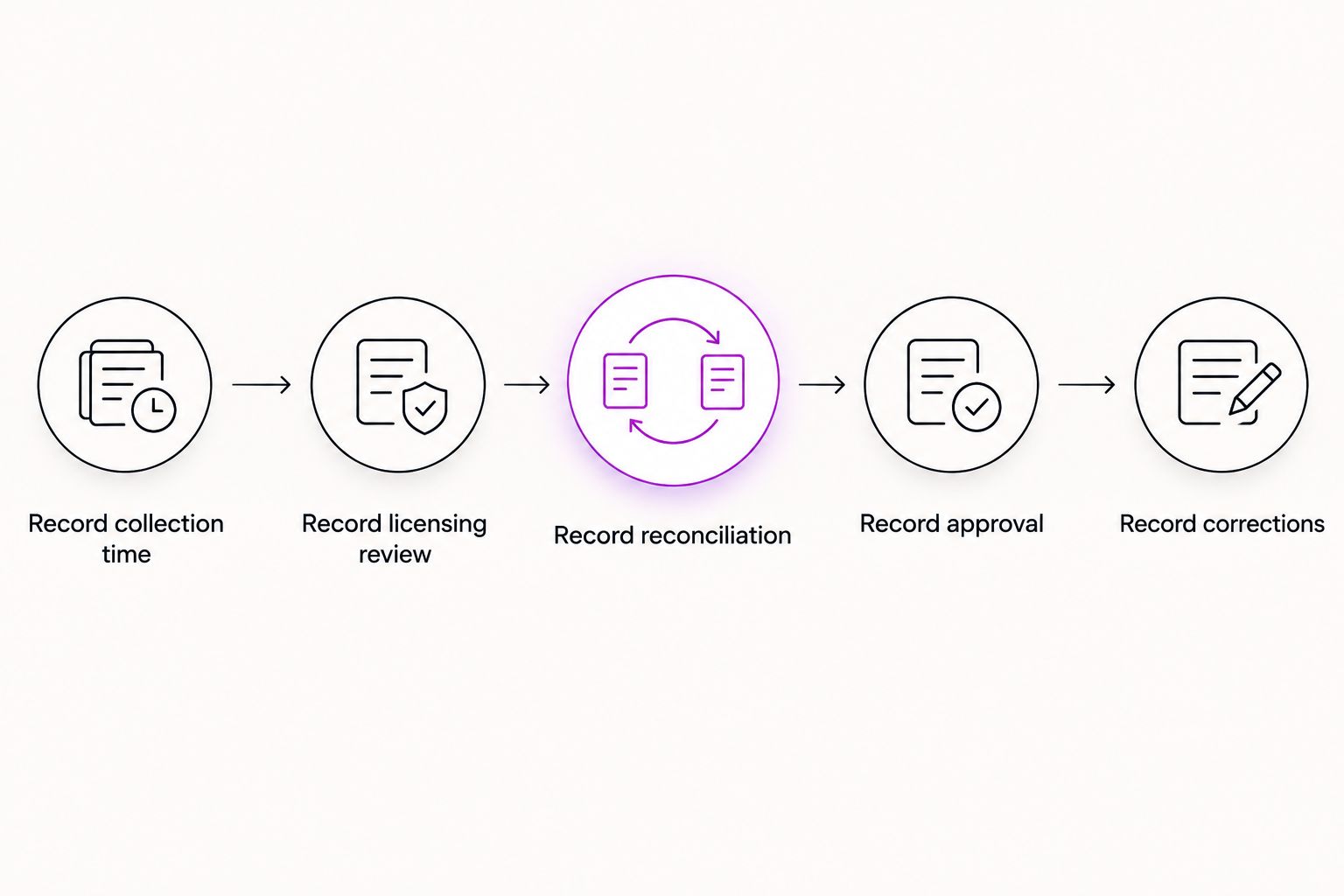
Measure each stage separately so the reporting total includes work outside the final spreadsheet.
Apply loaded labor rates
Use your finance team’s loaded hourly labor rate for each contributor. Apply the same rate methodology across departments so the comparison does not mix salary-only figures with fully loaded employment costs.
Your calculation is:
Monthly reporting labor = sum of each contributor’s recorded hours × that contributor’s loaded hourly rate.
Then add directly attributable reporting overhead that is not already included in those rates. Do not allocate an entire shared-system expense to SPLA reporting when the system also supports unrelated work.
How do you turn monthly effort into an annual budget?
For a stable workload, annual recurring reporting labor equals the monthly baseline multiplied by 12 reporting months. For a changing workload, budget each month separately and add the results.
Use a representative operating period for your 2026 forecast. Identify onboarding, migrations, infrastructure changes, and exceptional corrections rather than treating every unusual month as normal recurring effort.
Keep these budget categories distinct:
- Recurring operations: Collection, licensing review, reconciliation, and approval required to complete routine reports.
- Process changes: Work to modify exports, mappings, responsibilities, or reporting procedures.
- Historical remediation: Work to investigate and correct earlier reporting periods.
- Audit support: Work to assemble evidence and respond to questions about reporting history.
Do not label all four categories as monthly reporting overhead. Separating them shows whether your recurring process is expensive, your historical records need attention, or a change project is temporarily increasing the workload.
Why manual SPLA reporting cost varies
The cost drivers are the work categories in your baseline, not an unsupported industry average. For your 2026 review, investigate these factors against recorded tasks:
- Collection effort: Track how much work is required to obtain complete usage records and prepare them for review.
- Licensing review effort: Identify the decisions that require investigation, supporting documentation, or specialist input.
- Billing reconciliation: Measure the work needed to explain differences between usage reporting and customer billing records.
- Approval work: Record reviewer effort and repeated questions rather than treating approval as an administrative formality.
- Correction work: Separate errors caused by incomplete source data from errors introduced during preparation or review.
- Evidence retrieval: Measure the work required to reconstruct historical submissions and their supporting decisions.
Use the findings to assign corrective actions. If collection dominates, improve the source-data handoff. If reconciliation dominates, address the connection between usage records and customer allocations before changing the submission format.
Is manual reporting cheaper than automated reporting?
Compare total operating work, not spreadsheet ownership against a software subscription alone. Manual and automated workflows retain different responsibilities, and your evaluation must account for both implementation and continuing review.
Manual workflow
- Best for: Teams with controlled reporting scope and documented checks
- Advantage: Staff can inspect and amend working files directly
- Limitation to measure: Collection, reconciliation, and evidence preparation remain assigned staff work
Automated workflow
- Best for: Teams seeking to reduce repeat reporting tasks
- Advantage: Defined collection and reporting tasks can be automated
- Limitation to measure: Setup, exception handling, and review still require ownership
Platform with consulting
- Best for: Teams needing software and licensing-process support
- Advantage: Connects reporting tools with advisory assistance
- Limitation to measure: Scope, responsibilities, and continuing internal effort need explicit agreement
Do not assume automation removes every task in your baseline. During evaluation, mark each activity as removed, reduced, unchanged, or newly required, and support the classification with a demonstrated workflow.
For a 2026 business case, separate implementation effort from recurring operations. Otherwise, you risk comparing a manual steady-state month with an automated setup period, or excluding the internal work required to adopt the new process.
Where does Octopus fit in the cost calculation?
Octopus is best for Microsoft SPLA partners and Authorized Outsourcers seeking usage reporting automation, customer billing support, and audit-defense consulting. Its stated scope covers both a software asset management platform and consulting services.
Evaluate Octopus against the tasks your baseline identifies, not against an assumed savings percentage. The platform and service scope does not establish how much of your specific workload disappears; confirm that through a review of your data sources, reporting responsibilities, and exceptions.
Use your evaluation to answer concrete questions:
- Which usage sources are inside the proposed scope?
- Which preparation and reconciliation tasks remain internal?
- Who reviews exceptions and approves the final reporting output?
- What evidence supports a historical reporting decision?
- What implementation and ongoing administration work must your team perform?
Bring those questions and your baseline to a reporting workflow discussion. The objective is a task-by-task comparison with named responsibilities, not a generic automation demonstration.
Does manual reporting cost include licensing charges?
Reporting cost excludes licensing charges when you are measuring process overhead. Keep staff effort and directly attributable reporting expenses in one calculation, and licensing amounts in another.
If a correction changes a reported quantity, record the licensing adjustment separately from the labor required to investigate it. Combining both hides whether the financial change came from reporting operations or the underlying licensing position.
Should you include audit exposure in monthly reporting cost?
Monthly reporting cost should include recorded audit-support labor only when that work occurred and belongs in your chosen scope. A hypothetical audit outcome is not an incurred operating expense.
Maintain a separate risk record for unresolved reporting questions, supporting evidence, and responsible owners. Do not turn an unverified exposure estimate into a claimed automation saving.
FAQ
What's the best way to calculate manual SPLA reporting cost?
Calculate manual SPLA reporting cost by multiplying each contributor’s recorded reporting hours by that contributor’s loaded hourly rate. Add directly attributable overhead, and keep licensing charges separate.
Which employees should I include in the reporting cost?
Include everyone who performs reporting-related collection, licensing review, billing reconciliation, approval, corrections, or evidence retrieval. Count their relevant work rather than their entire role.
Should I count time spent waiting for approval?
Count active work spent obtaining approval, not every elapsed waiting hour as labor. Track waiting separately when you need to explain reporting delays.
Can I multiply a monthly SPLA reporting baseline by 12?
Multiply a representative monthly baseline by 12 reporting months when the workload is stable. Budget changing workloads month by month and separate exceptional remediation.
Is automated SPLA reporting always less work?
Automated reporting does not remove every reporting responsibility. Compare demonstrated reductions in recurring tasks against implementation, administration, review, and exception handling.
Does Octopus provide software or consulting for SPLA reporting?
Octopus provides a software asset management platform and consulting services for Microsoft SPLA partners and Authorized Outsourcers. Its stated scope includes usage reporting, customer billing, and audit defense.
One last thing
A reporting process can become faster without becoming cheaper to operate. If preparation time falls but licensing review, reconciliation, or correction work rises, the total labor calculation captures the trade-off.
For your next 2026 reporting cycle, retain the task log alongside the submitted report. Compare the full workflow across reporting periods, using consistent categories and labor-rate assumptions, before declaring an improvement.