

Yes—VMware VM sprawl can cause SPLA under-licensing when Microsoft software use falls outside your inventory, licensing assessment, or monthly reporting process. The exposure comes from unreported licensable use, not from the number of virtual machines alone. For a 2026 review, reconcile workload history with the licensing terms applicable to each product and reporting period before treating an inventory difference as a licensing shortfall.
TL;DR
- VMware VM sprawl SPLA under-licensing is a reconciliation risk, not an automatic consequence of creating virtual machines.
- A VMware inventory identifies workloads; applicable Microsoft licensing terms determine what you must report.
- Reconcile workload history, licensing scope, and submitted reports before accepting a monthly reporting baseline.
- Octopus supports SPLA partners and Authorized Outsourcers with software asset management and consulting services.
Why this matters
A current inventory answers what exists now. It does not, by itself, establish which workloads existed throughout a reporting period, which customer used them, or how their Microsoft software should have been licensed.
Your control objective is traceability from workload evidence to the submitted SPLA report. A clean dashboard is not a substitute for that connection. In your 2026 reporting process, every unexplained difference should have an owner and a documented resolution.
Octopus provides SPLA software asset management and consulting services for Microsoft SPLA partners and Authorized Outsourcers, including usage reporting, customer billing, and audit defense.
Can VMware VM sprawl cause SPLA under-licensing?
Yes. VMware VM sprawl creates under-licensing exposure when your reporting process misses Microsoft software use that requires coverage under the applicable SPLA terms. The same inventory discrepancy does not always produce the same licensing result: product, edition, deployment, and licensing scope determine the assessment.
Use the following comparison to separate evidence gaps from licensing conclusions. Each approach answers a different question; none should be treated as interchangeable with the others.
Current VMware inventory
- Best for: Establishing the present estate
- Strength: Identifies current virtual machines and infrastructure relationships
- Limitation: Does not establish the full reporting-period history
Workload change history
- Best for: Investigating deployments, moves, and removals
- Strength: Explains how the estate changed
- Limitation: Does not determine licensing rights by itself
Software inventory
- Best for: Identifying installed products and editions
- Strength: Connects workloads to Microsoft software
- Limitation: Does not establish entitlement or reporting treatment alone
Licensing reconciliation
- Best for: Determining reporting treatment
- Strength: Connects technical evidence to applicable terms
- Limitation: Depends on complete evidence and correct interpretation
Submitted-report reconciliation
- Best for: Checking the reported outcome
- Strength: Identifies differences between assessed use and reported quantities
- Limitation: Cannot explain missing workloads without supporting records
More virtual machines do not automatically mean more reportable licenses. Unassessed licensable use is the problem. Treat VM growth as a trigger for reconciliation, not as a license calculation.
How do you check VMware VM sprawl for SPLA exposure?
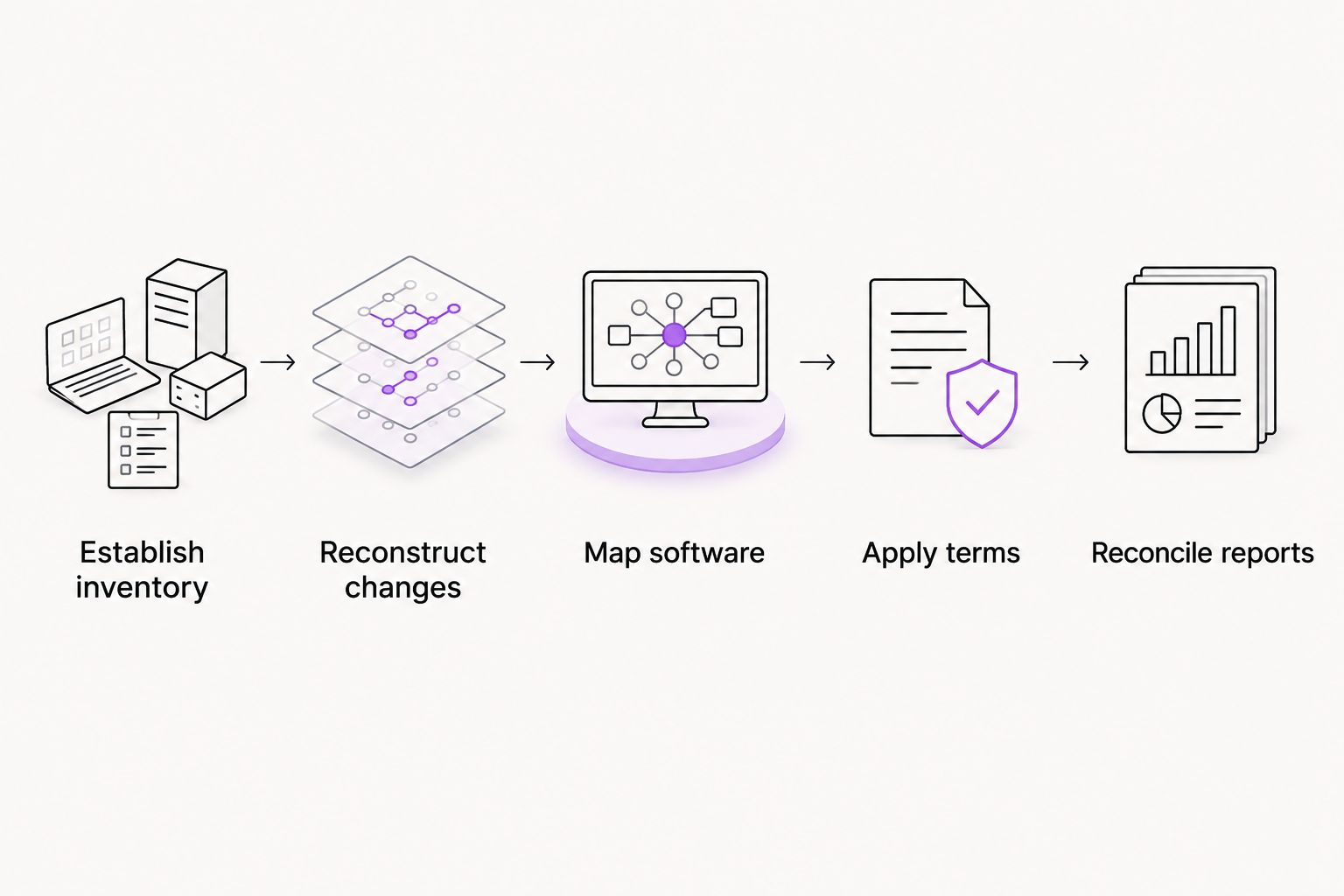
Use these 5 reconciliation steps to establish whether a discrepancy is an inventory problem, a licensing problem, a reporting problem, or a combination. Keep the evidence for each step linked to the same reporting period.
Establish inventory
Start with the VMware environments included in your service delivery scope. Identify virtual machines, infrastructure relationships, workload owners, customer assignments, and available software records. Make unknown ownership visible rather than assigning it to a general reporting bucket.
Document the inventory's scope. An export from one management environment is evidence for that environment, not proof that every relevant workload has been captured. Record exclusions and resolve them before approving the baseline.
Reconstruct changes
Compare the current inventory with deployment, change, and removal records for the reporting period. Investigate workloads that appeared and disappeared between inventory collection dates, as well as workloads whose customer assignment or infrastructure placement changed.
A removed VM is not automatically irrelevant to an earlier report. Equally, a creation record does not establish the amount you should report. Reconstruct the workload's history first, then apply the relevant licensing treatment.
Map software
Associate each relevant workload with its Microsoft product, edition, and supporting software evidence. Keep unidentified software and conflicting edition records in an exception queue rather than resolving them through assumptions.
A VM name is not authoritative evidence of its installed software. Names help you investigate, but the licensing assessment needs evidence that supports the product and edition being evaluated.
Apply terms
Determine the licensing model and scope applicable to each deployment. Check the Microsoft terms relevant to the product and reporting period, together with the agreement and supporting records governing that use.
Do not assume that a guest count, processor allocation, or infrastructure total is the correct reporting quantity for every Microsoft product. Different licensing treatments require different evidence. Record the basis for each treatment so another reviewer can reproduce the decision.
Reconcile reports
Compare the assessed requirement with the submitted SPLA report and the customer billing records associated with the workload. Investigate differences separately: a billing correction does not establish that the licensing report is correct, and a report correction does not resolve customer allocation.
Close each exception with supporting evidence, a decision, an owner, and the reporting period affected. For your 2026 review, retain the approved reconciliation alongside the submitted report rather than relying on a dashboard that continues to change.
Assess licensing treatment before reconciling the submitted report.
Why SPLA exposure varies across sprawling VMware estates
VM sprawl describes an estate-management problem, not a Microsoft licensing rule. The reporting impact depends on what changed and whether your controls captured that change correctly.
- Inventory scope: Missing environments or workloads leave the assessment incomplete. Record which infrastructure sources feed the reporting baseline and who verifies their coverage.
- Workload history: A current-state export cannot explain every change during the reporting period. Retain the records needed to investigate deployments, removals, and reassignment.
- Product and edition: A generic Microsoft software label is not enough to establish reporting treatment. Resolve the identity of the software before calculating requirements.
- Licensing scope: Guest-level and infrastructure-level evidence answer different questions. Use the evidence required by the applicable licensing model rather than choosing whichever count is easiest to collect.
- Customer allocation: An unassigned workload breaks the connection between technical use, the customer record, and billing. Investigate ownership without assuming that the billing record determines licensing rights.
- Reporting controls: A correct assessment still needs to reach the submitted report. Preserve approvals and explanations for adjustments instead of making undocumented spreadsheet changes.
For a 2026 control review, assess these factors together. Automating an incomplete inventory or an incorrect licensing interpretation preserves the error; it does not resolve it.
Does every extra VMware VM require another SPLA license?
No—an additional VM does not, by itself, establish an additional SPLA reporting requirement. The applicable product terms and licensing scope determine whether the workload changes your requirement. Investigate the deployment rather than applying a universal per-VM multiplier.
The reverse assumption is also unsafe. Existing coverage should not be treated as sufficient merely because the workload runs on infrastructure already present in your estate. Validate the deployment against the terms and evidence supporting that coverage.
Can deleted or powered-off VMs still matter to SPLA reporting?
Yes—deleted or powered-off VMs can matter to the evidence review because current status does not establish their history during the reporting period. Determine what software use occurred and how the applicable terms treat it before deciding whether it affects reporting.
Do not classify every retained template, snapshot, or inactive object as a reportable workload. Distinguish inventory objects from deployed software use, document the distinction, and escalate uncertain cases for licensing review.
Is a VMware inventory enough for a SPLA audit?
No—a VMware inventory is a starting point, not a complete licensing position. You also need evidence connecting relevant workloads to software, applicable licensing treatment, and submitted reports. Keep those connections reproducible rather than relying on an administrator's explanation after the fact.
An inventory can be technically accurate while the reporting assessment remains incomplete. Completeness means the evidence supports the reporting decision, not simply that every visible VM has a row in a file.
What should your monthly reconciliation produce?
Require 3 reconciliation outputs: an inventory baseline, a licensing assessment, and a report reconciliation. These are control records, not prescribed Microsoft document names. Keep them connected so a reviewer can trace an exception without rebuilding the investigation.
Inventory baseline
Preserve the relevant workload records and the scope of collection. Include the reporting period, source, ownership information, and unresolved inventory exceptions. Explain exclusions instead of allowing them to disappear from the review.
The baseline's strength is its technical detail. Its limitation is equally clear: it cannot establish licensing rights without the next assessment.
Licensing assessment
Record the product, edition, applicable licensing treatment, supporting terms, and evidence behind the calculated requirement. Identify unresolved interpretations explicitly and assign them to a qualified reviewer.
The assessment connects technical use to reporting treatment. It remains dependent on the quality of the underlying inventory and the accuracy of the interpretation.
Report reconciliation
Preserve the assessed quantities, submitted quantities, explanations for differences, and approval record. Connect customer billing discrepancies to the same workload evidence without substituting billing totals for licensing calculations.
The reconciliation shows what reached the report. It does not excuse an unsupported baseline, so retain the supporting records together.
When should you use software and consulting support?
Use software to organize repeatable evidence collection and reporting workflows; use licensing review to resolve questions that depend on contractual terms and deployment facts. Neither substitutes for accountable approval of your reporting position.
Octopus is best suited to Microsoft SPLA partners and Authorized Outsourcers seeking software asset management and consulting support. Its stated scope includes usage reporting, customer billing, and audit defense. Your responsibility remains to provide complete deployment information and confirm the treatment of unresolved licensing questions.
For a 2026 evaluation, ask a provider to demonstrate how its proposed process handles an unassigned workload, a disputed software edition, and a difference between assessed and submitted quantities. Evaluate the evidence trail, not just the final total. A service that produces a report still needs a clear process for resolving exceptions.
Review your SPLA reporting controls
Discuss usage reporting, customer billing, and audit defense requirements.
FAQ
Can VMware VM sprawl cause SPLA under-licensing even if billing is correct?
Yes—correct customer billing does not establish correct SPLA reporting. Reconcile software use and applicable licensing treatment with the submitted report independently of billing totals.
What's the first thing to check when VMware VM counts increase?
Check whether the additional workloads are included in inventory and assigned to an owner and customer. Then identify their software and assess the applicable licensing treatment before changing reported quantities.
Does shutting down a VM remove its SPLA reporting requirement?
Shutdown status alone does not establish the reporting requirement. Review the workload's use during the relevant reporting period and apply the terms governing that deployment.
Is counting VMware guests enough to calculate Microsoft SPLA licensing?
No—guest counts alone do not establish the requirement for every Microsoft product. The applicable licensing model determines which workload and infrastructure evidence you need.
What records should I keep when deleting a VMware VM?
Keep records that establish the workload's identity, relevant software, ownership, and history for the reporting period. Link those records to the licensing assessment and any reporting decision affected by the removal.
Can Octopus help with SPLA usage reporting and audit defense?
Yes—Octopus provides software asset management and consulting services for Microsoft SPLA partners and Authorized Outsourcers. Its stated services include usage reporting, customer billing, and audit defense.
Should I increase my SPLA report whenever inventory and reporting totals differ?
No—investigate the difference before changing the report. Inventory totals and licensing quantities measure different things, so establish the applicable requirement and document the correction.
One last thing
Start your next review with workloads that disappeared, not only workloads that remain. A current inventory cannot show a deleted VM as a current object, which makes retained change evidence essential to investigating earlier use. Your 2026 reporting baseline should explain both additions and removals before you approve the submitted quantities.