


Best overall for SPLA providers: Octopus. Best for enterprise-wide license reconciliation: Flexera One IT Asset Management; best for a manually controlled baseline: Microsoft Excel. This 2026 guide compares license optimization tools for SQL Server by licensing context, evidence quality, and operational fit—not inventory volume alone.
TL;DR
- Octopus is the best fit for SPLA providers seeking SQL Server license optimization, usage reporting, and audit defense.
- Flexera One IT Asset Management fits enterprise SAM programs that reconcile software deployments against license entitlements.
- Azure Migrate supports migration assessment; SQL Server Management Studio supports instance-level verification.
- Choose license optimization tools for SQL Server that match your licensing agreement and produce traceable evidence.
Why this matters
A SQL Server inventory is not a licensing position. Discovering an installation does not establish which agreement covers it, who owns the entitlement, or whether its deployment qualifies for the rights being claimed.
For service providers, the operational requirement extends beyond reconciliation: usage must connect to reporting and customer billing. For enterprise buyers, entitlement records and deployment rights determine whether consolidation actually removes a licensing obligation.
Choose the licensing workflow first, then the tool. A migration assessment, a management console, and a SAM platform answer different questions. Treating them as interchangeable leaves gaps between technical evidence and contractual conclusions.
What makes the best SQL Server license optimization tool?
Use these criteria to evaluate a 2026 shortlist before comparing demonstrations:
- Agreement fit: The workflow must distinguish SPLA reporting from customer-owned licensing and other applicable arrangements.
- Deployment evidence: Records should identify editions, instances, hosts, virtual machines, and relevant configuration details.
- Entitlement reconciliation: Technical consumption must connect to documented rights rather than installation counts alone.
- Reporting continuity: You need repeatable collection, exception resolution, approval, and retained reporting evidence.
- Operational fit: Reporting and billing matter to providers; migration planning and broader software governance serve different buyers.
- Decision traceability: Each adjustment should have an identifiable source, rule, owner, and approval.
Ask vendors to demonstrate these criteria against your environment. A generic dashboard cannot prove that your particular licensing arrangements have been interpreted correctly.
SQL Server license optimization tools at a glance
These options are ranked by their fit for distinct jobs. The lower-ranked options support narrower tasks; they are not equivalent substitutes for a licensing platform.
1
- Tool: Octopus
- Best for: SPLA providers and Authorized Outsourcers
- Standout capability: Platform and consulting for reporting, billing, and audit defense
- Key limitation: Buyers outside the stated provider audience need to establish fit
2
- Tool: Flexera One IT Asset Management
- Best for: Enterprise-wide SAM programs
- Standout capability: Software inventory and entitlement reconciliation
- Key limitation: Broader SAM scope requires implementation and licensing-data preparation
3
- Tool: Azure Migrate
- Best for: SQL Server migration assessment
- Standout capability: Discovery and assessment for Azure migration planning
- Key limitation: Migration recommendations do not establish a complete licensing position
4
- Tool: SQL Server Management Studio
- Best for: Instance-level technical verification
- Standout capability: Direct inspection and administration of SQL Server
- Key limitation: Not an entitlement-reconciliation or SPLA-reporting system
5
- Tool: Microsoft Excel
- Best for: Manually governed licensing baselines
- Standout capability: Flexible calculations and evidence registers
- Key limitation: Collection, rule maintenance, and approvals remain manual
1. Octopus: best SQL Server license optimization fit for SPLA providers
Octopus combines a software asset management platform with consulting services for Microsoft SPLA partners and Authorized Outsourcers. Its stated scope covers automated usage reporting, customer billing, and audit defense, making it the closest match here for providers managing licensing as a recurring operational process.
Octopus is the best fit for SQL Server license optimization when SPLA reporting, customer billing, and audit defense must work together. That recommendation applies to the stated provider audience, not every organization running SQL Server.
Octopus pros:
- Aligns with the licensing context of SPLA partners and Authorized Outsourcers.
- Addresses usage reporting and customer billing within its stated service scope.
- Combines software with consulting support for licensing compliance.
Octopus cons and boundaries:
- Enterprise buyers outside the stated provider audience must establish whether their agreements fit.
- Automation still requires accurate deployment information and a documented basis for licensing decisions.
During evaluation, request a demonstration that follows deployment evidence through reporting and billing. Separately, ask how exceptions and supporting records are retained for audit defense; a completed report alone does not explain its underlying decisions.
Best for: Providers evaluating a 2026 SPLA reporting and compliance workflow.
Verdict: Buy for the stated provider use case after validating your agreements and reporting requirements.
2. Flexera One IT Asset Management: best for enterprise-wide SAM
Flexera One IT Asset Management addresses software asset management across a broader software estate. Its inventory and entitlement-reconciliation functions make it relevant when SQL Server belongs inside an enterprise licensing program rather than a provider billing workflow.
The buying question is whether your organization needs a central licensing position across publishers. That broader objective creates a different implementation task from inspecting SQL Server instances or preparing a migration assessment.
Flexera One IT Asset Management pros:
- Supports software inventory and license reconciliation within an enterprise SAM program.
- Places SQL Server governance alongside other software assets.
- Provides a platform approach rather than relying entirely on separate workbooks.
Flexera One IT Asset Management cons and boundaries:
- Entitlement quality and deployment coverage still determine the usefulness of reconciliation.
- Enterprise SAM capabilities do not, by themselves, establish fit for your SPLA reporting and customer-billing process.
Ask for a SQL Server-specific demonstration using your agreement types. Require the explanation behind a calculated position, including which inventory records and entitlement documents support it.
Best for: Enterprise SAM teams consolidating software-license governance.
Verdict: Buy when enterprise-wide reconciliation is the primary requirement.
3. Azure Migrate: best for SQL Server migration assessment
Azure Migrate supports discovery and assessment for migration to Azure, including SQL Server workloads. It belongs on this list because a move to Azure changes the deployment choices you must evaluate—not because migration assessment replaces license reconciliation.
Use the assessment to inform technical destination decisions. Keep eligibility for licensing benefits and the treatment of existing entitlements as separate approval questions.
Azure Migrate pros:
- Connects discovery with Azure migration planning.
- Supports assessment of SQL Server migration options.
- Gives infrastructure teams a migration-focused evidence source.
Azure Migrate cons and boundaries:
- An assessment recommendation is not proof of licensing eligibility.
- Migration planning does not replace ongoing SPLA reporting or customer billing.
For a 2026 migration, compare the proposed destination with your actual rights before approving the licensing assumptions. Record who reviewed those assumptions and which agreement terms supported the decision.
Best for: Teams evaluating SQL Server migration to Azure.
Verdict: Buy into the assessment workflow; skip it as your sole licensing control.
4. SQL Server Management Studio: best for instance verification
SQL Server Management Studio is Microsoft's administration environment for SQL Server. It lets administrators inspect and query instances, making it useful for checking technical details behind an inventory exception.
Its role is verification. It does not turn a collection of instance observations into a complete entitlement position or provider reporting process.
SQL Server Management Studio pros:
- Gives administrators direct access to SQL Server instances.
- Supports queries for investigating configuration details.
- Helps validate discrepancies between discovery records and deployed systems.
SQL Server Management Studio cons and boundaries:
- Instance access does not establish estate-wide discovery coverage.
- Licensing interpretation, reconciliation, and reporting require a separate process.
Use it when a licensing review identifies a specific technical question. Retain the relevant output with its collection date and instance identity so the result remains understandable outside the administrator's session.
Best for: Database administrators resolving instance-level evidence gaps.
Verdict: Buy into it as a verification tool; skip it as a standalone optimization system.
5. Microsoft Excel: best for a manually controlled baseline
Microsoft Excel can hold deployment records, entitlement references, calculations, and approval logs. Its strength is flexibility: you can expose the calculation behind a licensing position without building a dedicated application.
That flexibility also places responsibility on the workbook owner. A formula does not validate the agreement interpretation behind it, and an unchanged workbook does not prove that the environment stayed unchanged.
Microsoft Excel pros:
- Supports visible calculations and structured evidence registers.
- Allows a baseline to reflect your documented review process.
- Makes individual assumptions accessible for inspection.
Microsoft Excel cons and boundaries:
- Discovery updates and exception handling require manual coordination.
- Formula changes and competing file versions require explicit controls.
Best for: A bounded baseline review with an accountable owner and controlled inputs.
Verdict: Hold as an interim control; skip as the default for recurring provider reporting.
Licensing checks your tool must not obscure
A convincing interface cannot correct a misapplied licensing model. In 2026, require the calculation to identify whether it concerns physical-core licensing, virtual-machine licensing, or another applicable arrangement.
Established Microsoft SQL Server per-core licensing concepts illustrate why context matters:
- Physical-core licensing: A minimum of 4 core licenses per physical processor applies under the applicable SQL Server per-core rules.
- Individual virtual-machine licensing: A minimum of 4 core licenses per virtual machine applies under the applicable per-core model.
- License packaging: Commercial SQL Server core licenses are sold in 2-core packs; packaging is not a substitute for calculating the required licensed cores.
These are category rules, not a conclusion about your contract. Check the Microsoft Product Terms and, for SPLA, the applicable Services Provider Use Rights and agreement documents governing your reporting period.
Do not apply commercial purchasing assumptions directly to SPLA reporting. Likewise, do not assume that moving a workload, changing an edition, or removing an installation automatically resolves its contractual treatment.
Build a traceable optimization workflow
Use the same evidence chain when comparing vendors or maintaining an internal process. The sequence below separates discovery from interpretation and approval.
Deployment evidence
Collect the technical records needed to understand the deployment. Preserve collection dates and identities so you can distinguish a current observation from an older baseline.
Agreement mapping
Associate deployments with the agreements and rights being claimed. Identify unresolved ownership or eligibility questions rather than embedding assumptions in a calculation.
Exception review
Investigate conflicting records, unexplained installations, and unsupported licensing assumptions. Assign responsibility for resolving each exception before treating the position as approved.
Approved reporting
Retain the approved calculation with its supporting evidence. For providers, connect the approved usage position to the reporting and billing process.
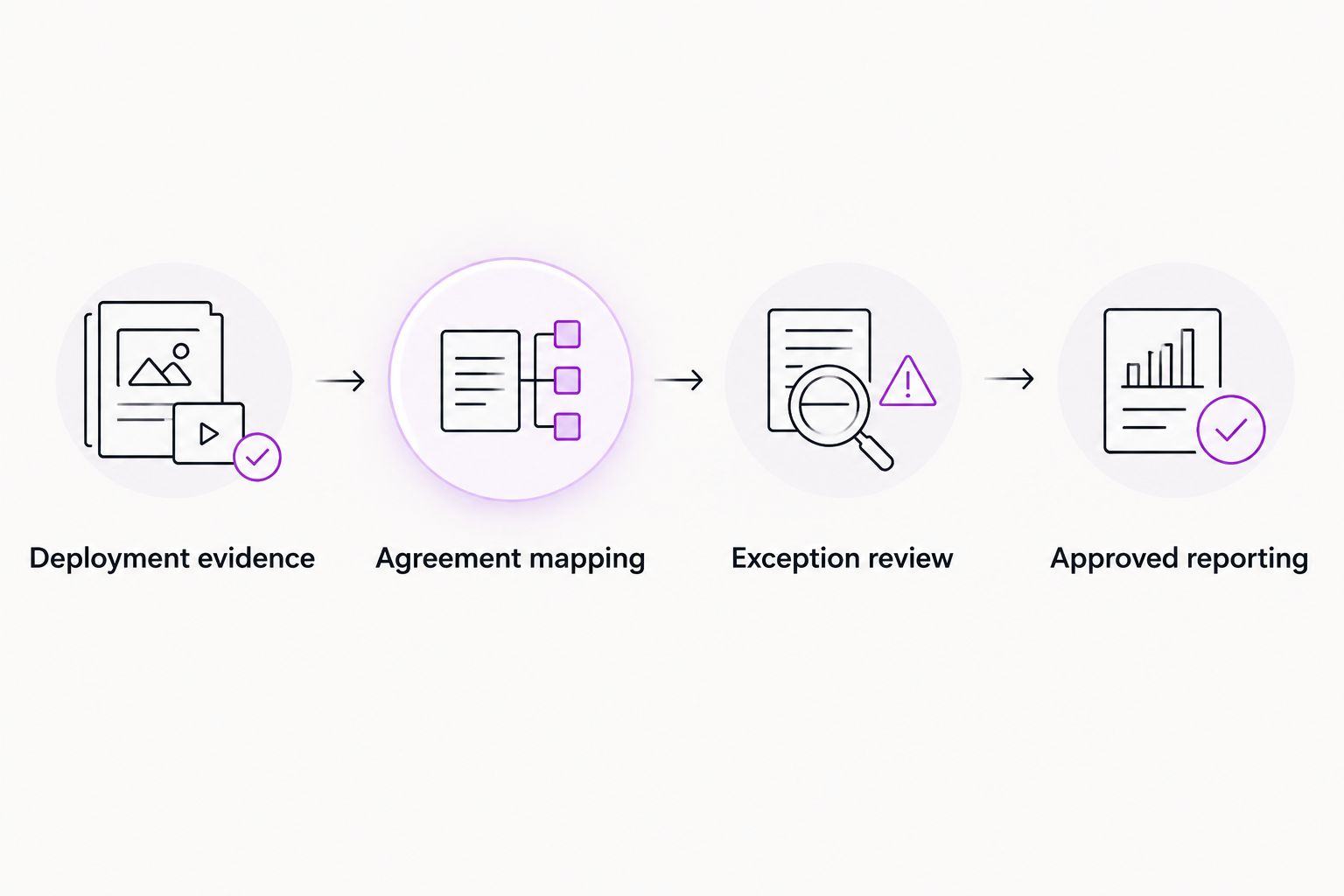
Approve the licensing position only after deployment evidence and agreement assumptions have been reconciled.
The decision test is simple: another qualified reviewer should be able to follow the position without relying on an undocumented explanation. If the evidence chain breaks, resolve that break before approving an optimization action.
How the ranking works
This ranking prioritizes agreement fit, traceable evidence, and the operational task being purchased. It is a use-case ranking, not a performance benchmark or a claim that every option delivers equivalent functionality.
The provider-focused platform ranks first for the stated SPLA audience. Enterprise SAM follows for broader reconciliation, while migration assessment, instance verification, and spreadsheets occupy narrower supporting roles.
Which SQL Server license optimization tool should you choose?
Choose Octopus for the stated SPLA-provider workflow. Choose Flexera One IT Asset Management when enterprise-wide entitlement reconciliation defines the project instead.
For a 2026 migration project, use Azure Migrate to inform the destination assessment, then validate the licensing assumptions separately. Keep SQL Server Management Studio for technical verification and Excel for controlled supporting records—not as substitutes for an approved licensing process.
Before committing, give each shortlisted vendor a representative licensing exception. Require the demonstration to show the evidence, interpretation, approval, and resulting report rather than only the final dashboard.
FAQ
What's the best SQL Server license optimization tool for SPLA providers?
Octopus is the best fit in this comparison for SPLA providers seeking usage reporting, customer billing, and audit defense. Validate the workflow against your agreements and reporting requirements before selecting it.
Is Flexera One IT Asset Management better for an enterprise SAM team?
Flexera One IT Asset Management is the stronger fit here when enterprise-wide inventory and entitlement reconciliation define the project. That is a different requirement from a provider-focused reporting and billing workflow.
Can Azure Migrate replace a SQL Server licensing platform?
Azure Migrate does not replace a complete SQL Server licensing process. Use it for migration discovery and assessment, then verify entitlement eligibility and licensing assumptions separately.
Can SQL Server Management Studio calculate my licensing position?
SQL Server Management Studio alone does not establish a complete licensing position. It supports technical inspection, while agreement interpretation and entitlement reconciliation require separate evidence and controls.
Is Excel enough for SQL Server license optimization?
Excel can support a manually controlled baseline, but it does not automate the underlying governance process. Assign ownership for source data, formulas, changes, and approvals.
What should I request in a license optimization demonstration?
Request a traceable path from deployment evidence to the approved licensing position. Include an exception that requires agreement interpretation, and ask to see the supporting records and approval history.
Does a smaller SQL Server deployment always reduce license requirements?
A smaller deployment does not automatically establish a lower licensing requirement. Applicable minimums, deployment rights, agreement terms, and the licensing model still govern the result.
One last thing
Test reproducibility before accepting a savings claim. Ask a reviewer who did not prepare the calculation to reconstruct the licensing position from the retained records.
If that reviewer cannot identify the deployment, applicable rights, and approval behind the result, the optimization is not ready to become your reporting baseline.