

Yes—you can automate SQL Server licensing for SPLA partners by automating inventory collection, usage reconciliation, reporting preparation, and the transfer of approved usage into customer billing. In 2026, the control boundary remains clear: automation processes the evidence, while accountable staff approve licensing interpretations, exceptions, and the final submission.
TL;DR
- Automate SQL Server licensing for SPLA partners through inventory, reconciliation, reporting, and billing controls—not unattended licensing decisions.
- Octopus supports SPLA partners with usage reporting, customer billing, and audit defense through software and consulting services.
- Keep licensing interpretations and unresolved exceptions under human review before submitting SPLA usage.
- Retain the inventory, rules, adjustments, and approvals behind each reported quantity.
Why this matters
A recurring report is not proof of a controlled licensing process. You need to explain which SQL Server deployments entered the calculation, which licensing treatment applied, and who approved any adjustments. Without that chain, faster reporting simply moves an unexplained number downstream.
Octopus is best suited to SPLA partners and Authorized Outsourcers seeking software and consulting support for usage reporting, customer billing, and audit defense. The Octopus platform and consulting services address those workflows; you still need a defined reporting scope and an approval owner.
For your 2026 reporting process, assess automation against traceability rather than convenience. The useful question is not whether a system produces a report, but whether another reviewer can reconstruct it from retained evidence.
Can SQL Server licensing be automated for SPLA partners?
Yes. Automate the repeatable data work and retain explicit approval for licensing judgments. A workable process connects discovery records to reporting quantities without treating missing data as confirmed compliance.
The comparison below separates manual handling from a controlled automated workflow. These are operating approaches, not claims about specific product features.
Manual reconciliation
- Best for: Establishing a baseline and investigating exceptions
- Main advantage: Lets reviewers examine unusual deployments directly
- Main limitation: Repeated copying and calculations depend on consistent execution
Automated processing
- Best for: Recurring collection and repeatable reporting preparation
- Main advantage: Applies defined transformations consistently
- Main limitation: Incomplete inputs and incorrect rules can propagate into reports
Automated processing with approval
- Best for: Recurring reporting that requires accountable sign-off
- Main advantage: Combines repeatability with documented review
- Main limitation: Requires named owners and an exception process
Use automated processing with approval as the target operating model. Keep manual investigation available for deployments the standard workflow cannot classify. Do not force uncertain records into a default category just to finish a report.
Build the workflow in this order
- Define scope. Document the environments, customers, reporting period, and licensing arrangements the process covers. Separate confirmed scope from deployments that still need investigation.
- Collect inventory. Gather deployment and infrastructure evidence relevant to the applicable licensing calculation. Record collection timestamps and identify inaccessible sources rather than silently excluding them.
- Reconcile usage. Match deployment records to infrastructure and customer records. Investigate duplicates, missing ownership, and conflicting attributes before calculating reportable quantities.
- Review exceptions. Route unresolved classifications and evidence gaps to a named owner. Preserve the reason for each adjustment and the evidence used to resolve it.
- Approve reporting. Review the proposed quantities, authorize the submission, and preserve the approved output. Transfer approved usage into billing through a controlled process that retains the connection to the source records.
This sequence gives each transformation a defined input and output. It also prevents a billing export from becoming the only surviving record of how licensing usage was calculated.
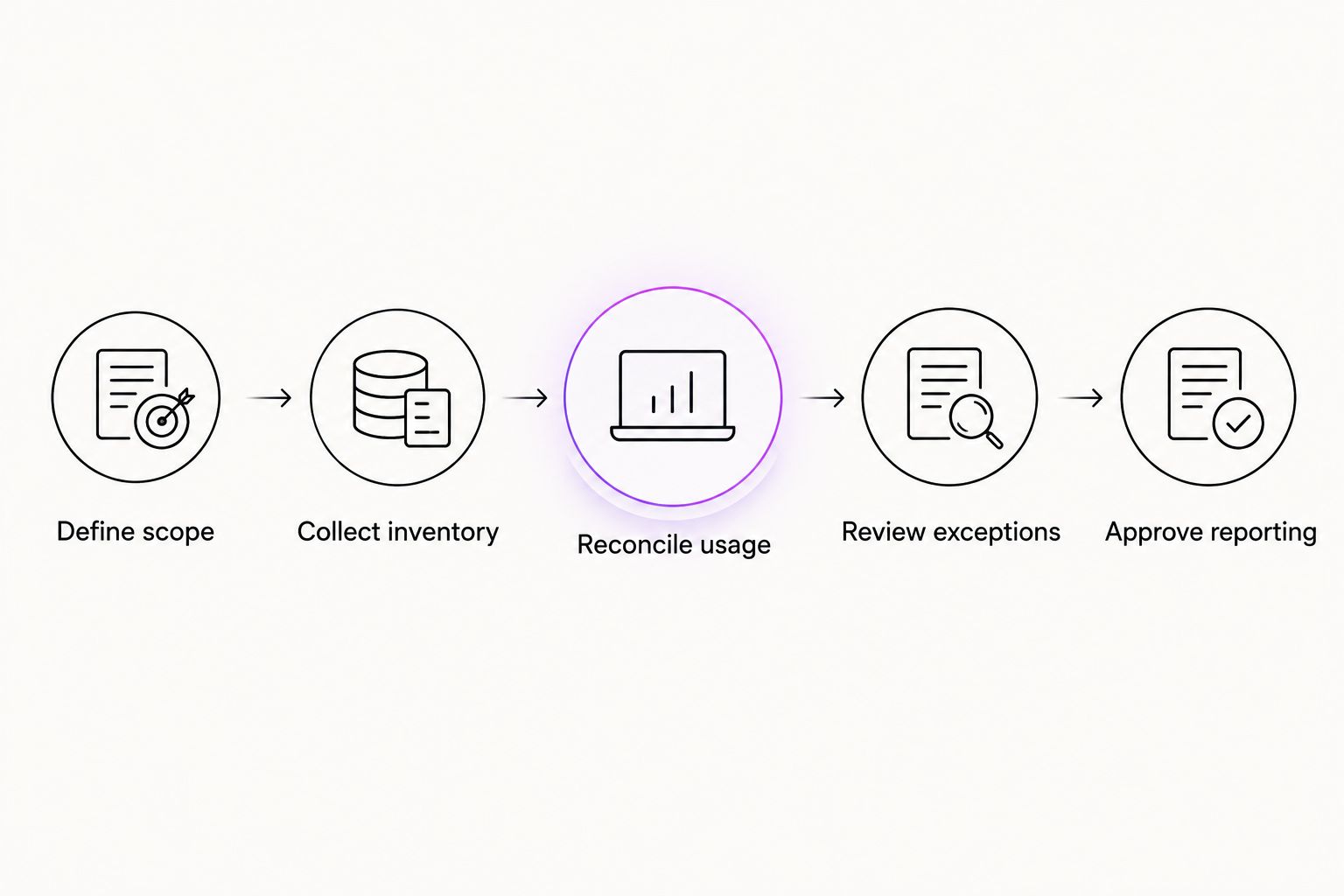
Resolve evidence gaps before approving reported usage.
Inventory automation: collect evidence, not assumptions
Inventory collection is a suitable starting point because downstream calculations depend on it. Define the attributes your licensing review requires, then confirm that each source actually supplies them. A discovered installation is evidence of deployment—not a complete licensing conclusion.
Useful records include the SQL Server edition, the relevant host or virtual machine relationship, customer ownership, and collection time. Determine the required fields from the licensing treatment you are evaluating rather than collecting a fixed list and assuming it covers every deployment.
Make missing values visible. An unidentified edition, an unassigned customer, or an inaccessible host should produce an exception instead of disappearing from the reporting population.
Accept an inventory process only when you can distinguish absent deployments from failed collection. Otherwise, an apparently smaller estate can reflect a collection problem rather than a genuine change in usage.
Reporting automation: separate calculations from interpretations
A calculation engine can apply an approved rule repeatedly. It cannot establish that your team selected the correct contractual treatment merely because the calculation completes without errors. Document the basis for each rule before using its output in a submission.
For 2026 reporting, retain the applicable agreement materials and product terms used in the review. Record the rule version alongside the reporting period so later reviewers can identify which interpretation produced the submitted quantity.
Keep adjustments separate from source data. If a reviewer changes a classification, preserve the original value, the replacement value, the reason, and the approver. Overwriting the inventory record destroys the distinction between observed infrastructure and an approved reporting decision.
A practical acceptance check is straightforward: select a proposed reporting line and trace it backward. You should reach the underlying deployment records, the transformation applied, and any approved exception without relying on someone's memory.
Billing automation: reconcile usage before issuing charges
Usage reporting and customer billing are related workflows, but they are not interchangeable. A licensing quantity describes what your reporting process has classified; an invoice also depends on your customer agreement and billing configuration.
Keep a documented relationship between approved usage and customer billing records. Investigate unassigned usage before allocating it, and retain any approved billing adjustment independently of the licensing calculation.
Octopus supports SPLA usage reporting and customer billing, making it relevant when you need to connect those processes. Confirm how your required customer mappings, approvals, and adjustments will be handled before defining the implementation scope.
Do not use a successful billing export as the acceptance test for licensing accuracy. Test the usage calculation and the billing transfer separately, then reconcile the handoff between them.
Why SQL Server licensing automation varies
The implementation depends on the environment and decisions the reporting process must represent. Set the scope around these factors rather than treating every SQL Server deployment as the same reporting case:
- Deployment model. Physical and virtual deployments expose different infrastructure relationships. Collect the evidence relevant to the applicable licensing treatment.
- Product classification. Edition and deployment details affect which licensing provisions require review. Unknown classifications need an owner, not an automatic assumption.
- Licensing arrangement. Distinguish provider-supplied licensing from arrangements involving customer entitlements. Do not treat a customer assertion as complete supporting evidence.
- Customer attribution. Shared infrastructure and incomplete ownership records complicate allocation. Establish how usage will be assigned before transferring it into billing.
- Infrastructure changes. Moves, rebuilds, and decommissioning change the evidence available for reconciliation. Preserve enough history to explain the reporting period under review.
- Source quality. Missing records, duplicate identifiers, and inconsistent timestamps limit the reliability of downstream calculations. Make these conditions visible in the exception workflow.
These factors define what you must validate during implementation. They do not justify accepting unexplained discrepancies as an unavoidable property of automation.
How do you validate automation before relying on it?
Use a documented baseline rather than comparing only the final totals. Two totals can match while concealing different errors, so inspect the records and transformations behind them.
For a 2026 rollout, use 3 checkpoints: source coverage, calculation traceability, and approval evidence. Treat them as acceptance criteria for your project, not as a certification of licensing compliance.
Checkpoint 1: source coverage
List the environments that should supply data and reconcile that list against successful collection. Investigate missing sources, duplicate records, and deployments without customer ownership. Save the reconciliation with the reporting evidence.
Checkpoint 2: calculation traceability
Compare automated classifications with a reviewed baseline. Examine disagreements at deployment level rather than changing rules solely to match an expected total. Document whether each difference comes from source data, a transformation, or a licensing interpretation.
Checkpoint 3: approval evidence
Require 2 approvals in the proposed workflow: technical approval of the source population and licensing approval of the reporting treatment. Assign those responsibilities explicitly, even if your organization uses different job titles. Keep the approved report separate from drafts and subsequent corrections.
After acceptance, repeat the relevant checks when a source, transformation, or licensing rule changes. A previous sign-off does not explain the effect of a later configuration change.
Define your SPLA automation scope
Discuss usage reporting, customer billing, and audit-defense requirements with Octopus.
What should you ask a software or consulting provider?
Ask the provider to demonstrate your required workflow with representative records. A prepared report shows the output; a useful demonstration also exposes missing inputs, exception handling, and the route back to source evidence.
Use these questions to make the evaluation specific:
- Which source records support each reported quantity?
- What happens when collection fails or an edition is unknown?
- How are rule changes reviewed and recorded?
- Can you distinguish original observations from approved adjustments?
- How does customer attribution connect reporting to billing?
- What evidence can you retain independently of the working report?
Evaluate Octopus SPLA reporting support against those requirements rather than assuming that the platform or consulting engagement includes every implementation detail. Its stated scope covers software asset management, usage reporting, customer billing, and audit defense. Your acceptance criteria should define the records and controls you need within that scope.
Can SQL Server reporting run without human review?
SQL Server reporting preparation can run automatically, but unattended preparation is not the same as approved submission. Keep human review for unresolved licensing treatments, source failures, and material changes to the reporting process.
For 2026, document who can approve a report and who can change its underlying rules. Those are different permissions with different consequences.
Does automation replace a Microsoft SPLA audit defense process?
Automation does not replace audit defense; retained evidence supports it. You still need to explain the reported population, the applicable licensing treatment, and any adjustments made during reconciliation.
Build that explanation during routine reporting rather than reconstructing it only after an audit request. Reports are easier to defend when the supporting evidence remains connected to the submitted quantities.
Can you automate reporting before customer attribution is complete?
You can automate collection before customer attribution is complete, but incomplete attribution should remain an explicit exception. Do not treat unassigned usage as excluded usage or transfer it into customer billing without an approved allocation.
Separate technical progress from reporting readiness. A collection workflow can function correctly while the wider reporting process still lacks required ownership evidence.
FAQ
Can I automate SQL Server licensing for SPLA partners completely?
You can automate repeatable collection, reconciliation, and reporting preparation, but retain approval for licensing interpretations and unresolved exceptions. Automation does not make incomplete evidence sufficient.
What's the best place to start with SPLA reporting automation?
Start with reporting scope and inventory coverage. Confirm which environments must supply data before building calculations or billing transfers.
Is automated SQL Server reporting better than spreadsheets?
Automated processing is better suited to repeatable transformations, while manual review remains useful for exceptions. Neither approach establishes licensing accuracy without complete inputs and an approved rule basis.
Can automated SPLA reporting feed customer billing?
Approved SPLA usage can feed a customer billing workflow. Validate customer mappings and billing adjustments separately from the licensing calculation.
What evidence should I keep behind a SQL Server licensing report?
Keep source inventory, collection timestamps, the applied rule basis, exception decisions, and submission approvals. Preserve the relationship between those records and the reported quantities.
Does SQL Server licensing automation guarantee compliance?
No, SQL Server licensing automation does not guarantee compliance. Its results depend on source coverage, applicable licensing terms, configured rules, and accountable review.
One last thing
Make corrections reproducible, not just explainable. When you amend a report, retain the original output and record exactly which source records, rules, or approvals changed. A replacement total without that history leaves the same unanswered question: why should the revised quantity be trusted?