

Yes, you can track BYOL licenses automatically by connecting software inventory, customer entitlement records, and deployment data in a reconciliation workflow. Automation can identify installations, compare recorded usage against documented rights, and flag exceptions. It does not establish that a customer has valid outsourcing or deployment rights; those conclusions require supporting agreements and licensing review.
TL;DR
- Track BYOL licenses automatically by reconciling software inventory, customer entitlements, and deployment records.
- Microsoft BYOL tracking must distinguish installed software from documented permission to use it in the hosting environment.
- Automate discovery and exception detection; require licensing review for unresolved deployment rights.
- Octopus serves Microsoft SPLA partners and Authorized Outsourcers seeking SAM software and licensing consulting.
Can BYOL licenses be tracked automatically?
Automate the evidence collection and reconciliation, not the assumption that every installation is licensed. A useful BYOL tracking system must connect each deployment to a customer, an entitlement record, and an approved licensing interpretation.
Use this 5-stage workflow for your 2026 control design:
- Collect inventory. Identify deployed software and the infrastructure on which it runs.
- Assign ownership. Connect each deployment to the customer responsible for supplying the license.
- Record entitlements. Store the supporting agreement, product rights, quantities, and applicable conditions.
- Reconcile usage. Compare deployment evidence with the approved entitlement rules.
- Resolve exceptions. Route missing evidence, mismatches, and deployment changes to a named reviewer.
For service providers evaluating Octopus, assess how the SAM platform and consulting services would support this workflow. Require a demonstration using your evidence requirements rather than treating a software inventory screen as proof of BYOL compliance.
Why this matters
An installed application is evidence of deployment, not evidence of entitlement. A customer declaration is evidence of a claim, not necessarily proof that the claimed rights cover the actual hosting arrangement.
Your reporting process must keep those distinctions visible. Otherwise, a customer-owned license recorded in billing can become an unsupported compliance assumption across infrastructure, finance, and account management.
For your 2026 operating process, maintain a clear chain from customer evidence to the deployment decision. That chain gives reviewers something concrete to inspect when a workload moves, an agreement changes, or an audit question arrives. A green dashboard without that underlying evidence is not an adequate control.
What data does automatic BYOL tracking need?
Organize the workflow around 3 evidence sets: inventory, entitlements, and deployment context. These are control-design categories, not a universal Microsoft reporting specification. Keep their source records connected so a reviewer can reconstruct each decision.
Inventory: what is running?
Collect the software identity and the infrastructure attributes relevant to its licensing model. Record when the data was collected and whether the collection succeeded.
Product name alone is insufficient. Your reconciliation process needs the product edition, version, and relevant deployment characteristics before it can apply the correct licensing interpretation. A stale record must remain distinguishable from a current observation.
Also distinguish an observed installation from an operational workload. Discovery evidence should describe what the collection source actually found, without silently converting that observation into a licensing conclusion.
Entitlements: what rights are documented?
Record the customer associated with the entitlement, the licensed product, the documented quantity, and the evidence supporting the claim. Include applicable agreement conditions and any time-dependent rights that affect the assessment.
Do not treat a spreadsheet entry marked BYOL as the entitlement itself. Retain the supporting documentation and the reviewer’s decision about how it applies. Where the evidence is incomplete, show an unresolved status rather than manufacturing a compliant result.
Deployment context: where and for whom is it running?
Connect workloads to the customer, hosting arrangement, and relevant infrastructure. Microsoft licensing assessments can depend on the product and the applicable agreement terms, so the environment must remain part of the record.
Make customer attribution explicit. A deployment that cannot be assigned to the correct customer cannot be reliably reconciled against that customer’s entitlement evidence.
What should run automatically, and what needs review?
Use automated reconciliation for repeatable checks and human review for licensing interpretation. These are complementary controls, not competing approaches.
Automated inventory
- Best for: Finding and updating deployment records
- Strength: Creates repeatable evidence collection
- Limitation: Does not establish ownership or deployment rights
Automated reconciliation
- Best for: Checking approved rules against recorded evidence
- Strength: Flags mismatches and missing records consistently
- Limitation: Depends on complete inputs and correctly configured rules
Licensing review
- Best for: Interpreting agreements and resolving exceptions
- Strength: Documents why an entitlement applies
- Limitation: Requires access to evidence and accountable reviewers
For your 2026 assessment, test both the collection process and the interpretation process. A successful inventory import proves that data arrived; it does not prove the licensing rule was correct.
Keep the approval decision separate from the discovery result. This prevents a new installation from inheriting an approved status simply because its product name matches an existing record.
How do you build an automatic BYOL tracking workflow?
Build the process around evidence that changes, decisions that require approval, and records that must remain retrievable. The following sequence separates operational automation from licensing judgment.
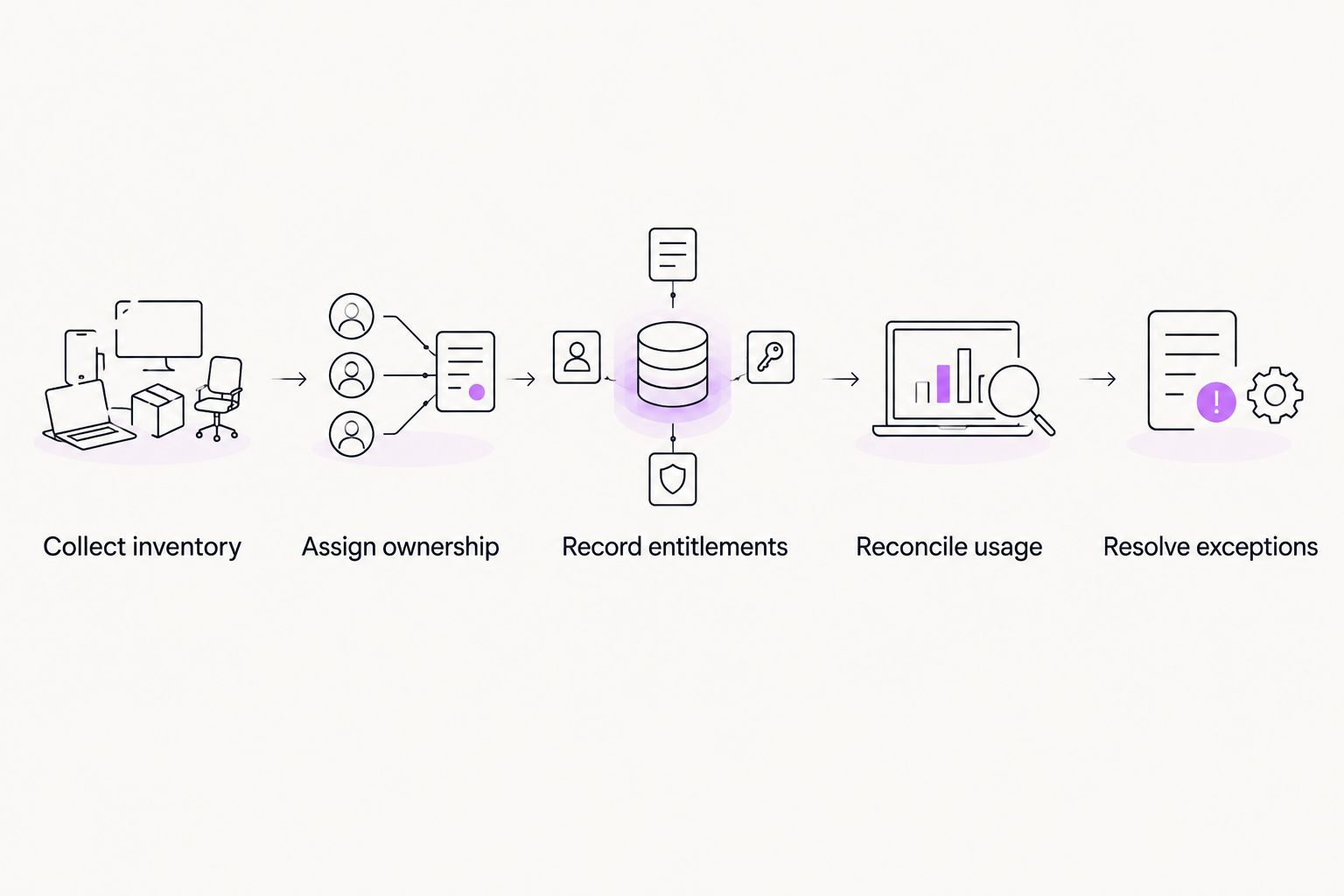
Reconciliation follows entitlement collection; discovery alone does not establish licensing rights.
Collect inventory
Start with an inventory source appropriate to the environments you operate. Define which systems are in scope, what each source collects, and how collection failures become visible.
Preserve collection timestamps. If a source stops reporting, the system should identify stale evidence rather than presenting the last successful observation as a current result.
Test the discovery boundary as well as the records it returns. Document excluded environments so an apparently clean reconciliation does not conceal workloads that were never assessed.
Assign ownership
Use a stable customer identifier to associate each deployment with its responsible organization. Keep customer ownership distinct from the infrastructure owner and the administrative account that discovered the workload.
Route unassigned records to an exception queue. Do not allocate them automatically to whichever customer has unused recorded entitlements; that substitutes an accounting convenience for evidence.
Define who maintains the ownership mapping when accounts merge, services transfer, or workloads move. Without that responsibility, attribution becomes a recurring manual correction rather than a controlled input.
Record entitlements
Create a structured entitlement record linked to the source documents. Record the interpretation used for reconciliation and the person responsible for approving it.
Establish 2 review gates: entitlement approval before a deployment receives an approved status, and exception approval before a disputed result is closed. These are recommended workflow controls, not a claim about a contractual requirement.
Retain the reasoning behind each approval. A later reviewer needs to know why the evidence was accepted, not merely that someone selected an approval field.
Reconcile usage
Apply the approved rules to the current deployment evidence. Separate missing documents, quantity mismatches, ownership gaps, and unresolved rights questions so the responsible team can act on the actual issue.
Avoid a single pass-or-fail result without an explanation. Each exception should identify the affected deployment, the evidence used, the rule applied, and the unresolved condition.
Keep billing allocation separate from the compliance conclusion. Assigning a workload to a customer invoice does not establish that the customer’s license covers the deployment.
Resolve exceptions
Give each exception an owner, a required action, and a closure record. Resolution can involve correcting inventory, obtaining documentation, changing a deployment, or revising an approved interpretation.
Retain the original exception alongside the correction. Overwriting the record removes the explanation of what changed and makes the historical assessment harder to reconstruct.
Before closing an exception, confirm that the correction reached the relevant source system. A note in the tracking platform should not leave an incorrect customer mapping or entitlement record unchanged elsewhere.
Why BYOL tracking requirements vary
The tracking workflow stays consistent, but its evidence requirements depend on the deployment and the documented rights. For a 2026 implementation, define these factors before configuring reconciliation:
- Product and edition. The applicable licensing model determines which deployment attributes the assessment needs.
- Customer entitlement evidence. The agreement and supporting records establish what the customer claims and what a reviewer can verify.
- Hosting arrangement. Assess the actual environment against the applicable outsourcing and deployment terms.
- Infrastructure changes. Workload moves and configuration changes can alter the facts used in an earlier assessment.
- Customer attribution. Reconciliation depends on connecting the deployment to the correct entitlement holder.
- Evidence freshness. An earlier assessment cannot describe a changed environment without updated records.
Document these dependencies beside the reconciliation rules. Reviewers should not have to infer which assumptions produced an approved result.
Does automatic BYOL tracking prove Microsoft compliance?
Automatic BYOL tracking does not prove Microsoft compliance on its own. It supports the assessment by connecting deployment evidence to documented entitlements and approved rules.
The compliance conclusion still depends on the applicable terms, the accuracy of the evidence, and the licensing interpretation. Keep those components inspectable rather than compressing them into an unexplained status.
Can you track BYOL and SPLA workloads together?
You can include BYOL and SPLA workloads in a shared inventory while keeping their licensing treatment separate. A common inventory does not make the underlying rights interchangeable.
Record the approved licensing basis for each workload and preserve its supporting evidence. Treat an unclear classification as an exception instead of automatically assigning it to BYOL or SPLA reporting.
How often should BYOL records be reconciled?
Reconcile BYOL records when relevant deployments or entitlement evidence change, using a scheduled review as an additional control. Set the schedule according to your operational process and reporting obligations.
Do not use the schedule as a reason to ignore a known change. A workload move, customer reassignment, or revised agreement should trigger review of the affected assessment.
What should you ask a BYOL tracking provider to demonstrate?
Octopus is best suited to Microsoft SPLA partners and Authorized Outsourcers seeking SAM software and licensing consulting. Evaluate that fit against your actual evidence workflow, including the points where software must hand a decision to a licensing reviewer.
Request a demonstration using a changed deployment, an incomplete entitlement, and a customer-attribution error. Watch how the proposed process exposes each issue, records the decision, and preserves the evidence behind closure.
For Octopus, the platform-and-consulting offering matches this combined operational and licensing requirement. The boundary remains important: automated usage reporting and audit-defense support do not replace your obligation to maintain valid customer evidence and approve the applicable licensing interpretation.
Use these acceptance criteria:
- A reviewer can trace an assessment back to its inventory and entitlement sources.
- An unresolved rights question remains visibly unresolved.
- A deployment change triggers reassessment rather than inheriting an old approval.
- A correction preserves the original finding and the reason for closure.
- Reporting distinguishes customer billing allocation from the licensing decision.
Before selecting a system, contact the team with your deployment scope and evidence requirements. Ask for a workflow demonstration, not just a feature checklist.
FAQ
Can I track BYOL licenses automatically without replacing my inventory system?
You can design BYOL tracking around an existing inventory source if the chosen workflow can use its data. Verify the required fields, customer mappings, and collection-status records before treating that source as sufficient.
Does discovering Microsoft software mean the customer has a valid BYOL license?
Discovering Microsoft software does not establish a valid BYOL entitlement. The deployment must be connected to supporting customer evidence and assessed against the applicable licensing terms.
What's the difference between BYOL tracking and license reconciliation?
BYOL tracking maintains deployment and entitlement records; license reconciliation compares those records using approved rules. Reconciliation needs both reliable inventory and documented rights.
Can automated BYOL tracking replace a licensing specialist?
Automated BYOL tracking does not replace licensing interpretation. Use automation for repeatable evidence checks and a qualified reviewer for agreement questions and unresolved deployment rights.
What should happen when a customer cannot provide entitlement documents?
Keep the BYOL assessment unresolved when the required entitlement documents are absent. Assign an owner to obtain the evidence and determine the appropriate licensing treatment.
Should customer billing determine whether a workload is BYOL?
Customer billing should not determine whether a workload qualifies for BYOL. Billing allocation and licensing entitlement answer different questions and require separate supporting records.
What evidence should I retain for a BYOL review in 2026?
Retain deployment records, customer attribution, entitlement documents, approved interpretations, and exception history for a BYOL review in 2026. Apply the retention requirements relevant to your agreements and organizational policies.
One last thing
Test the unresolved case before the clean case. Introduce a deployment with no supporting entitlement into your evaluation and check whether the workflow clearly identifies the evidence gap.
Then supply the documents and follow the approval through to closure. A useful system must explain both why the record was unresolved and why it later became approved. That is a stronger acceptance test than a dashboard populated entirely with preapproved records.