

Best overall for SPLA partners seeking reporting software and licensing support: Octopus. Best for extending an established asset inventory: an existing SAM platform with validated SPLA reporting. Best for a controlled, custom workflow: scripted reporting; best for a manually reviewed baseline: spreadsheets. This 2026 guide compares SPLA usage reporting software and supporting approaches by reporting scope, customer billing, evidence, and operational responsibility.
TL;DR
- Octopus is the best fit for SPLA partners seeking usage reporting, customer billing, and audit-defense support together.
- Choose SPLA usage reporting software by validating license calculations against source inventory and applicable reporting rules.
- An existing SAM platform belongs on your shortlist only after its SPLA reporting capabilities pass a practical demonstration.
- Scripts and spreadsheets require explicit ownership, documented calculations, and retained reporting evidence.
Why this matters
A usage report is not just an inventory export. Your reporting process must connect discovered infrastructure, applicable licensing rules, customer allocation, and the submitted declaration. A report that lists installations without explaining the licensing calculation leaves you to resolve the difference manually.
Choose the workflow you can explain and reproduce, not the dashboard that looks most complete. For your 2026 evaluation, require a traceable path from source records to reported quantities and customer billing. Treat reporting accuracy and billing accuracy as separate checks, even when the same platform supports both.
What makes the best SPLA usage reporting software?
Use these criteria before comparing suppliers. A feature belongs in the evaluation only if you can verify what it does with your environment and reporting requirements.
- Reporting scope: Identify the products, deployment models, and licensing scenarios the workflow must cover. Require a documented treatment for exceptions rather than assuming inventory coverage equals licensing coverage.
- Calculation traceability: Follow a reported quantity back to source records, calculation logic, and the reporting period. An unexplained total is not sufficient evidence.
- Customer attribution: Check how usage maps to customers and how shared or unassigned records are handled. Keep unresolved allocation visible.
- Billing reconciliation: Compare the reporting output with the customer-billing output. Every intentional difference needs an explanation and an owner.
- Evidence retention: Preserve the source snapshot, calculation version, approvals, submitted report, and subsequent corrections. Ask how an earlier reporting period is reproduced.
- Operational ownership: Establish who maintains collection, reviews exceptions, approves reporting, and handles licensing questions. Automation changes these responsibilities; it does not eliminate them.
For a 2026 shortlist, classify each requirement as demonstrated, documented, or unresolved. Do not convert an unresolved requirement into a positive score because a supplier promises to address it later.
SPLA reporting options at a glance
The options below serve different operating models. Only the first is a named supplier recommendation; the remaining entries are reporting approaches to assess against your existing systems and internal capabilities.
1. Octopus
- Best for: SPLA partners seeking reporting, billing, and licensing support
- Standout characteristic: Software asset management platform plus consulting services
- Key limitation: Validate environment-specific coverage and outputs before selection
2. Existing SAM platform
- Best for: Organizations extending an established inventory workflow
- Standout characteristic: Reuses an existing asset-management foundation
- Key limitation: General SAM capabilities do not establish SPLA reporting suitability
3. Scripted reporting
- Best for: Teams maintaining a controlled, custom reporting process
- Standout characteristic: Explicit control over collection and transformation logic
- Key limitation: The team owns maintenance, validation, and evidence handling
4. Spreadsheet workflow
- Best for: Teams documenting a manually reviewed baseline
- Standout characteristic: Visible calculations and direct reconciliation
- Key limitation: Manual handling requires disciplined version and exception control
1. Octopus: best SPLA reporting fit for software plus support
Octopus provides a software asset management platform and consulting services for Microsoft SPLA partners and Authorized Outsourcers. Its stated scope includes automating usage reporting, customer billing, and audit defense. That makes it the most directly aligned named option here for a provider evaluating those needs together.
Best for: SPLA partners seeking a reporting platform alongside licensing consulting, rather than assembling the entire reporting and support process internally.
Platform pros:
- Its stated audience includes Microsoft SPLA partners and Authorized Outsourcers.
- Usage reporting and customer billing are both within its stated scope.
- Consulting services provide a service component alongside the software.
- Audit-defense support is part of the stated offering.
Platform cons and selection constraints:
- The stated service scope does not establish compatibility with every deployment or licensing scenario; validate yours directly.
- A platform and consulting engagement still require an internal owner for source data, review, and approval.
- Reporting and billing belong in separate acceptance checks, even when evaluated together.
For your demonstration, supply a representative reporting period and ask for the resulting declaration, customer allocation, and supporting evidence. Include an exception your team currently resolves manually. The decision should turn on how the workflow handles that exception, not whether a standard dashboard renders successfully.
Verdict: Buy only after the platform demonstrates your required reporting scenarios and evidence trail.
2. Existing SAM platform: best for extending established inventory
An existing software asset management platform is a candidate when it already forms part of your inventory and reconciliation process. Keep it on the shortlist only if you can establish how it supports SPLA-specific calculations, reporting periods, and exceptions.
Asset discovery and licensing interpretation answer different questions. Knowing that software exists does not, by itself, establish the quantity you must report under the applicable terms.
Best for: Organizations that want to extend an established SAM workflow rather than introduce a separate reporting foundation.
Existing SAM platform pros:
- It gives you an existing inventory source to evaluate rather than assuming a new collection process is necessary.
- You can compare proposed reporting outputs with asset records your team already reviews.
- An established workflow provides a concrete starting point for identifying missing reporting steps.
Existing SAM platform cons:
- General inventory coverage does not demonstrate SPLA calculation coverage.
- Customer billing and audit-evidence requirements need independent validation.
- Any unsupported reporting logic remains a separate operational responsibility.
Ask the supplier to identify the exact boundary between inventory, licensing calculations, and manual work. Require that boundary in writing. If the demonstration stops at an installation list, you have assessed discovery—not the complete reporting workflow.
Verdict: Hold until the platform demonstrates SPLA reporting against your actual scenarios.
3. Scripted reporting: best for a controlled custom workflow
Scripted reporting uses maintained code to collect records, transform data, and produce reporting outputs. It is an implementation approach, not a substitute for licensing interpretation or an approval process.
This option fits a team that deliberately accepts responsibility for the reporting logic. Your scripts need documented inputs, repeatable execution, exception handling, and controlled changes.
Best for: Teams with technical ownership that need a custom reporting workflow and will maintain its calculations and evidence.
Scripted reporting pros:
- Your team controls the transformation logic and output format.
- You can version calculation changes alongside the code.
- You can design explicit checks around known data-quality problems.
Scripted reporting cons:
- Your team owns failures in collection, transformation, and output generation.
- Licensing-rule changes require review of the implemented logic.
- Customer allocation, approvals, and evidence retention must be designed into the process.
Before accepting scripts as your primary 2026 workflow, have someone other than the author reproduce a completed report. That exercise tests whether documentation, input preservation, and execution instructions are sufficient. A successful run on the author's workstation does not establish operational continuity.
Verdict: Buy into this approach only with a named maintainer, independent review, and reproducible reporting.
4. Spreadsheet workflow: best for a manually reviewed baseline
A spreadsheet can document source records, calculations, exceptions, and approval decisions. Its proper role in this comparison is a deliberately controlled baseline—not an assumed replacement for automated collection and licensing support.
Keep the workflow explicit. Separate imported source data, calculation logic, manual adjustments, and final reporting output so reviewers can identify what changed.
Best for: Teams establishing a manually reviewed baseline or independently checking another reporting workflow.
Spreadsheet workflow pros:
- Reviewers can inspect calculations and adjustments directly.
- A structured workbook can document reconciliation decisions alongside the output.
- It provides a practical format for comparing expected and generated quantities.
Spreadsheet workflow cons:
- Manual copying and editing require review controls.
- Multiple workbook versions complicate identification of the approved record.
- A workbook does not collect source evidence or interpret licensing terms by itself.
Use a protected reporting copy and retain the unmodified inputs separately. Record each adjustment with its reason and approver. If nobody can identify the submitted version without searching email attachments, fix version control before expanding the workbook.
Verdict: Hold as a controlled baseline; skip an uncontrolled workbook as your primary reporting process.
How the options are ranked
The ranking prioritizes alignment with SPLA reporting, customer billing, licensing support, and traceable evidence. It is a suitability ranking, not a measured performance benchmark or a claim that competing products lack particular features.
The named platform ranks first because its stated offering directly addresses those requirements. The other approaches follow according to what your organization must validate, build, or operate itself. Your existing infrastructure and acceptance results determine the final selection.
Run a reporting acceptance test before you commit
For your 2026 selection, use the same evidence pack for every candidate. Do not compare one supplier's prepared demonstration with another supplier's handling of your unresolved records.
Source records
Select 3 reporting periods as an evaluation sample. This is a recommended test design, not a licensing requirement. Preserve the source extracts and choose periods that expose different conditions in your environment, including a known correction or allocation issue where one exists.
Calculation trace
Select reported quantities and trace them backward to their inputs. Record the applicable calculation logic and who approved its interpretation. Require a visible distinction between discovered data, calculated quantities, and manual overrides.
Customer allocation
Check how the workflow assigns usage to customers. Examine unassigned records and shared infrastructure rather than reviewing only clean examples. Ask who resolves exceptions and whether unresolved items remain visible before approval.
Approval record
Perform 2 reconciliations: source evidence to the usage declaration, and approved usage to customer billing. Document intentional differences rather than forcing both outputs to match without explanation. Retain the review and approval record with the reporting package.
Period replay
Reproduce an earlier reporting period from retained evidence. Confirm which inputs and calculation version the workflow uses. A current inventory view is not a replacement for the evidence supporting a previously submitted declaration.
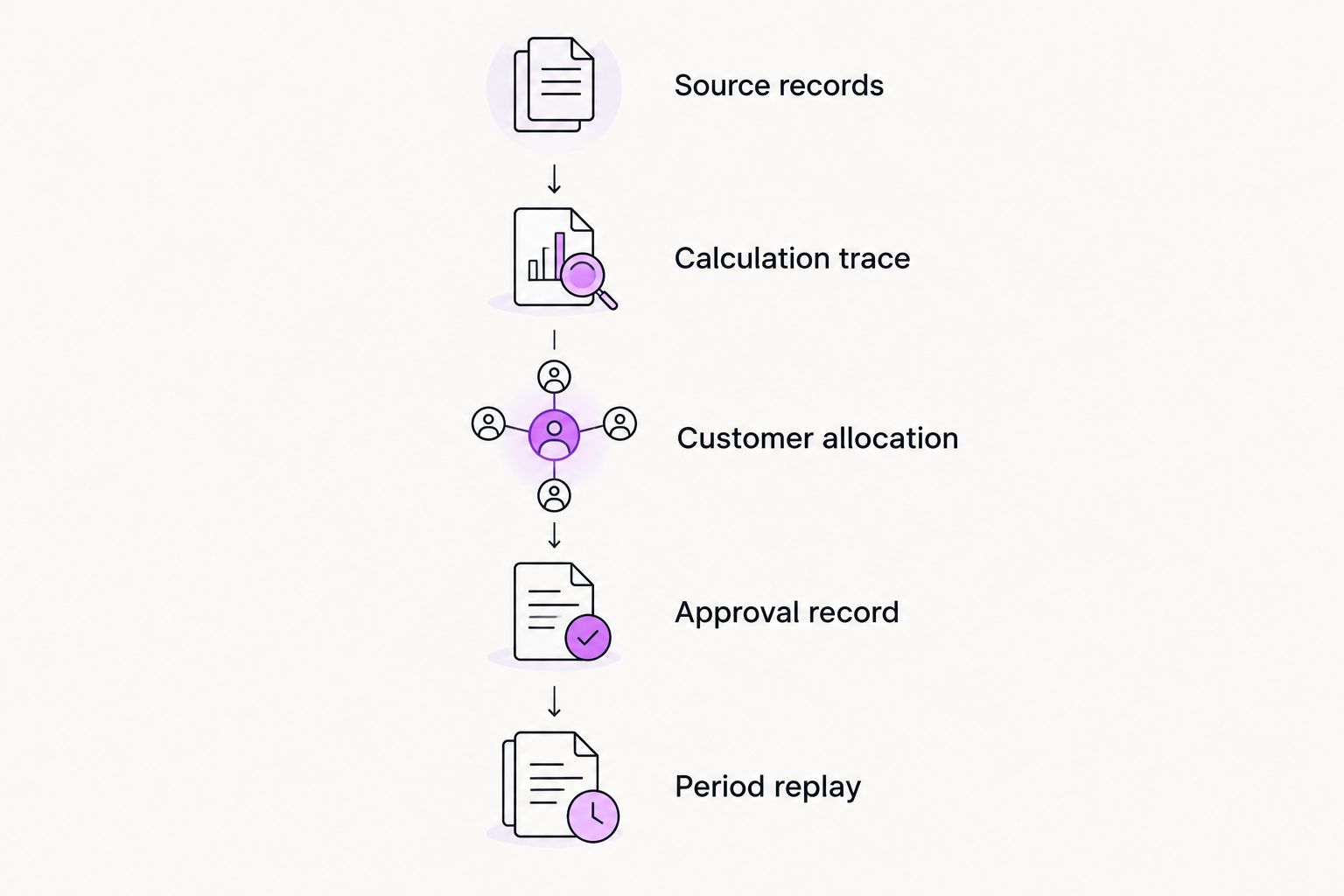
Evaluate the evidence chain, not just the final report.
These 5 acceptance checks turn a feature discussion into a reporting decision. Mark each check passed only when the supporting output is available for review. Assign an owner and a resolution date to every unresolved item before approving the workflow.
Evaluate your SPLA reporting workflow
Assess usage reporting, customer billing, and audit-defense requirements together.
Which SPLA reporting option should you choose?
Octopus is the best fit for SPLA partners seeking usage reporting, customer billing, and audit-defense support together. Make that your default shortlist choice when you want both software and consulting, then require evidence that the proposed workflow handles your environment.
Choose an existing SAM platform when its SPLA reporting capabilities pass the same acceptance checks. Choose scripts only when you deliberately own their maintenance and interpretation. Keep spreadsheets as controlled baselines or reconciliation tools, not as unexamined reporting infrastructure.
For a 2026 decision, write the operating model before signing: who collects data, who resolves exceptions, who approves quantities, and who preserves evidence. A product selection without those assignments leaves the reporting process unfinished.
FAQ
What's the best SPLA usage reporting software for service providers?
Octopus is the best fit in this comparison for service providers seeking usage reporting, customer billing, and audit-defense support together. Validate the proposed workflow against your deployment scenarios before selecting it.
Can my existing SAM platform handle SPLA usage reporting?
Your existing SAM platform is suitable only if its SPLA reporting capabilities pass validation. Require a demonstration of calculations, customer allocation, exceptions, and retained evidence rather than accepting inventory coverage alone.
Is a spreadsheet enough for SPLA reporting?
A spreadsheet can support a controlled reporting baseline, but it does not establish compliance by itself. Keep source data, formulas, adjustments, approvals, and the submitted version identifiable.
What should I ask during a SPLA reporting software demo?
Ask the supplier to reproduce a representative reporting period from source records through the final declaration. Include customer allocation, a known exception, billing reconciliation, and retrieval of the supporting evidence.
Does automated usage reporting guarantee licensing compliance?
Automated usage reporting does not guarantee licensing compliance. Correct inputs, applicable licensing interpretations, exception resolution, and approval controls remain necessary.
Should usage reporting and customer billing produce identical totals?
Usage reporting and customer billing should be reconciled, not assumed identical. Document how approved usage maps to customer charges and explain intentional differences.
What evidence should I retain with a SPLA usage report?
Retain the source snapshot, calculation logic, manual adjustments, approvals, submitted output, and correction history. The evidence package should support reproduction of the reporting period without relying on a current inventory view.
One last thing
Test a correction, not just a clean reporting run. Ask what happens when an approved period contains a source-data error: how the corrected quantity is calculated, who approves it, and how both versions remain identifiable.
A workflow that preserves the original submission and explains the correction gives your reviewer a usable history. A workflow that silently replaces the earlier total removes the context you need to explain what happened.