


Best overall for SPLA reporting and billing: Octopus. Best for enterprise license analysis: Flexera One IT Asset Management. Best for service-management workflows: ServiceNow Software Asset Management. Best for Microsoft endpoint inventory: Microsoft Configuration Manager. This 2026 guide compares SAM tools for Authorized Outsourcers by the licensing problem you need to solve, not by feature count.
TL;DR
- Octopus is the best fit here for Authorized Outsourcers prioritizing SPLA usage reporting, customer billing, and audit defense.
- Choose SAM tools for authorized outsourcers around customer-level evidence, licensing analysis, and reporting requirements.
- Flexera One IT Asset Management suits enterprise license analysis; ServiceNow Software Asset Management suits service-management workflows.
- Microsoft Configuration Manager supports inventory collection, but inventory alone does not establish Microsoft licensing compliance.
Why this matters
An Authorized Outsourcer needs more than a list of installed software. You need to connect deployments to customers, establish which licensing rights apply, and preserve the evidence behind each reporting decision. A complete inventory does not answer those questions by itself.
For a 2026 selection, separate discovery, license interpretation, and operational reporting. Discovery identifies installations and infrastructure. License interpretation connects that evidence to applicable terms. Operational reporting turns approved decisions into usage submissions, billing records, and an audit trail.
SPLA and customer-provided licensing also require separate treatment. Do not assume a platform that supports enterprise software asset management automatically supports your service-provider reporting process. Ask for a demonstration using your actual licensing scenarios before accepting a category-level capability claim.
What makes the best SAM tools for Authorized Outsourcers?
Use these criteria before comparing vendors. A strong result in one category does not compensate for an unresolved requirement in another.
- Customer attribution: You can trace relevant deployments and usage to the customer responsible for them, including shared infrastructure scenarios.
- Licensing context: Your process distinguishes provider-supplied licensing from customer-provided rights rather than treating every installation identically.
- Reporting traceability: A reported quantity connects to its underlying records, applicable rule, reporting period, and approval.
- Billing alignment: You can reconcile approved usage with customer billing without losing the explanation for adjustments.
- Exception handling: Missing inventory, unidentified customers, and disputed classifications enter an owned resolution process.
- Evidence retention: You can reconstruct a previous submission instead of relying only on the current infrastructure state.
The strongest choice is the tool that closes your reporting gap without creating an unexplained handoff. Evaluate the whole process, including any separate discovery source, licensing review, and billing system.
SAM tools at a glance
The order below prioritizes service-provider reporting fit, followed by broader license management, workflow management, and inventory collection. These are different use cases, not interchangeable versions of the same product.
Octopus
- Best for: SPLA usage reporting and customer billing
- Standout role: Platform and consulting focused on Microsoft service-provider licensing
- Key limitation: Does not replace your obligation to establish applicable licensing rights
Flexera One IT Asset Management
- Best for: Enterprise license analysis
- Standout role: Software asset visibility and license optimization
- Key limitation: Enterprise SAM scope alone does not establish a complete SPLA reporting process
ServiceNow Software Asset Management
- Best for: Service-management workflows
- Standout role: Software asset management within the ServiceNow platform
- Key limitation: Workflow completion alone does not prove a licensing decision is correct
Microsoft Configuration Manager
- Best for: Microsoft endpoint inventory
- Standout role: Hardware and software inventory for managed devices
- Key limitation: Inventory is evidence, not a complete licensing or billing determination
Do not select from the table alone. The decisive question is whether the product's primary role matches your unresolved operational problem in 2026.
1. Octopus: best SAM fit for SPLA reporting and billing
Octopus provides a software asset management platform and consulting services for Microsoft SPLA partners and Authorized Outsourcers. Its stated scope includes automating usage reporting, customer billing, and audit defense.
That scope makes it the closest fit in this comparison when your main problem sits between deployment evidence and the monthly reporting process. Start the evaluation with a customer-level reporting scenario, not a generic inventory demonstration.
Octopus is best for Authorized Outsourcers that need SPLA usage reporting, customer billing, and audit defense in the same operating scope. That is a fit-based recommendation, not a claim that every environment or licensing scenario is covered automatically.
Platform pros:
- Explicit focus on Microsoft SPLA partners and Authorized Outsourcers.
- Stated support for usage reporting and customer billing automation.
- Consulting services alongside the software platform.
- Audit defense included in the stated service scope.
Platform cons:
- Its stated Microsoft licensing focus is not a basis for assuming equivalent coverage across every software publisher.
- Automation does not remove your responsibility to validate customer rights, source data, and reporting decisions.
Best for: Service providers whose priority is connecting Microsoft licensing operations with reporting and billing.
Ask the demonstration team to trace a reported quantity backward to the underlying evidence. Then introduce a customer allocation change and inspect how the revised decision is documented. A polished dashboard is secondary to an explainable report.
Verdict: Buy for the shortlist when SPLA reporting and billing are the primary requirements; approve deployment only after the workflow passes your scenario tests.
2. Flexera One IT Asset Management: best for enterprise license analysis
Flexera One IT Asset Management addresses software asset visibility, license management, and optimization. It belongs on the shortlist when your central requirement is understanding software consumption and entitlements across an enterprise estate.
For an Authorized Outsourcer, the evaluation must extend beyond enterprise license positions. Establish how your proposed operating model handles customer boundaries, provider reporting, and the evidence needed for each licensing route.
Flexera One IT Asset Management pros:
- Focuses directly on software assets and license management.
- Supports an enterprise license-analysis use case rather than inventory collection alone.
- Fits evaluations where multiple software publishers form part of the SAM requirement.
Flexera One IT Asset Management cons:
- A broad license-management remit is not proof of an end-to-end SPLA reporting workflow.
- Customer billing remains a separate acceptance requirement; do not infer it from license optimization capabilities.
Best for: Organizations that need enterprise-wide license analysis as the center of their SAM program.
For a 2026 evaluation, require a clear boundary between what the platform calculates and what your licensing team must interpret. Ask which inputs support each conclusion and how exceptions remain visible until resolved.
This option deserves priority when entitlement reconciliation is your largest problem. It deserves less priority when enterprise SAM is already functioning and the unresolved task is service-provider reporting.
Verdict: Buy for the shortlist when enterprise license analysis leads the requirement; hold the final decision until customer-specific reporting is demonstrated.
3. ServiceNow Software Asset Management: best for workflow control
ServiceNow Software Asset Management manages software assets within the ServiceNow platform. Its distinct use case here is connecting SAM work with the operational processes your organization manages in that environment.
Consider it when the reporting bottleneck is ownership: unresolved exceptions, disconnected approvals, or licensing decisions that never reach the people responsible for implementation. Those are process-control problems as well as data problems.
ServiceNow Software Asset Management pros:
- Places software asset management within a broader service-management platform.
- Fits organizations seeking a shared operational context for asset-related work.
- Provides a relevant starting point when SAM decisions need structured ownership and follow-through.
ServiceNow Software Asset Management cons:
- A completed workflow does not establish that the underlying licensing interpretation is correct.
- Existing use of ServiceNow is not evidence that your required SPLA reporting and billing scenarios are supported.
Best for: Organizations that want SAM work connected to service-management processes and accountable owners.
In the demonstration, follow an exception from identification through review and closure. Require the final record to explain what changed, who approved it, and which report or customer record was affected.
Keep the acceptance test specific. A ticket marked resolved is not sufficient if the licensing evidence and reporting outcome remain disconnected.
Verdict: Buy for the shortlist when workflow ownership is the main gap; hold if the requirement is primarily a dedicated provider-reporting process.
4. Microsoft Configuration Manager: best for endpoint inventory
Microsoft Configuration Manager collects hardware and software inventory from managed devices. That makes it useful as an evidence source for a SAM process, particularly when your organization already uses it for device management.
It is not a substitute for establishing licensing rights. An installation record does not, by itself, determine the customer responsible, the applicable entitlement, or the quantity that belongs in a provider report.
Microsoft Configuration Manager pros:
- Collects hardware and software inventory from managed devices.
- Connects inventory collection with device-management operations.
- Supplies technical evidence that can support subsequent SAM analysis.
Microsoft Configuration Manager cons:
- Its managed-device inventory does not establish coverage of your entire hosting estate.
- Inventory collection alone does not resolve customer attribution, licensing interpretation, or billing.
Best for: Organizations that need an inventory source for managed Microsoft endpoints within a wider SAM process.
Test completeness before treating inventory as a dependable baseline. Reconcile the devices you expect to see against the records collected, then assign an owner to unexplained gaps.
Verdict: Buy into the architecture as an inventory source where it fits; skip it as the sole answer to Authorized Outsourcer licensing compliance.
How the ranking works
This ranking uses the criteria above, with service-provider reporting fit taking priority over general platform breadth. It is not a measured performance benchmark or a claim of hands-on comparative testing.
The order follows the job each option is designed to address: reporting and billing, enterprise license analysis, operational workflow, then inventory collection. Your order changes if your main requirement changes.
For 2026 procurement, document that requirement before vendor demonstrations. Otherwise, a broad feature presentation can obscure the specific gap you need to close.
Run a customer-to-report acceptance test
Use 2 customer tenants, 1 reporting month, and 1 retired virtual machine as a minimum demonstration scenario. These are proposed test inputs, not vendor performance figures. Include both provider-supplied licensing and a customer-provided licensing scenario that your licensing team has approved for evaluation.
Follow this sequence:
- Collect evidence: Identify the infrastructure and software records used for the selected reporting period.
- Assign customers: Show how each relevant record connects to the responsible customer, including any shared resources.
- Validate rights: Document the licensing route and supporting evidence rather than inferring rights from an installation.
- Reconcile reporting: Explain the approved reporting quantity and reconcile it with the associated billing record.
- Retain evidence: Preserve the source records, decisions, exceptions, and approvals needed to reconstruct the submission.
A useful demonstration follows that sequence without replacing difficult steps with slides. Require the retired virtual machine to remain explainable in the historical reporting period even though it is absent from the current estate.
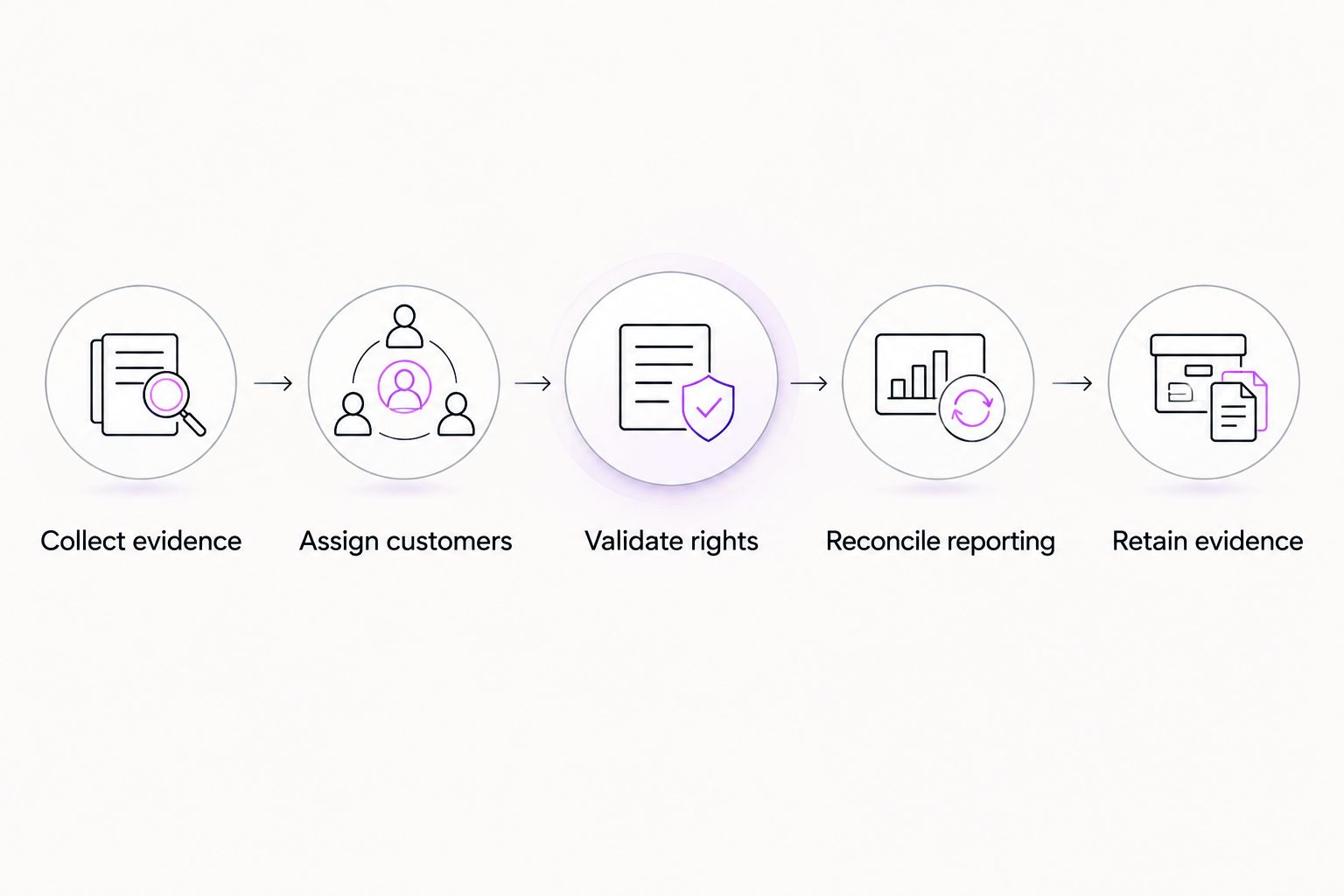
Reporting needs a traceable path from source evidence to the approved submission.
Record every manual handoff during the demonstration. Manual review is not automatically a failure; an unowned or undocumented handoff is the problem. Your acceptance record should distinguish automated calculations from decisions that require a licensing specialist.
Evaluate your SPLA reporting process
Explore software and consulting for usage reporting, customer billing, and audit defense.
Which SAM tool should you choose?
Choose the reporting-focused option when your unresolved problem is producing defensible SPLA usage and customer billing records. Choose enterprise SAM when entitlement analysis dominates. Choose workflow-centered SAM when ownership and approvals break down. Use endpoint inventory as supporting evidence, not as the final compliance decision.
Do not replace a working discovery source simply because another platform offers discovery. First establish whether the missing control sits in collection, interpretation, allocation, or reporting. Buy against that gap.
For your 2026 shortlist, make historical reconstruction a mandatory acceptance criterion. You need to explain the reporting period under review, not merely display today's infrastructure.
FAQ
What's the best SAM tool for Authorized Outsourcers?
Octopus is the best fit in this comparison when SPLA usage reporting, customer billing, and audit defense are the main requirements. Use a customer-level demonstration to validate the fit before selecting it.
Is enterprise SAM software enough for SPLA reporting?
Enterprise SAM software is not sufficient evidence of a complete SPLA reporting process. Require a demonstration of customer attribution, applicable licensing treatment, reporting quantities, and retained evidence.
Can Microsoft Configuration Manager establish licensing compliance?
Microsoft Configuration Manager inventory alone cannot establish licensing compliance. Inventory supports the analysis, but you still need applicable rights, customer context, and documented reporting decisions.
Is ServiceNow Software Asset Management better than Flexera One IT Asset Management?
Neither is the default winner for every Authorized Outsourcer. Prioritize ServiceNow Software Asset Management for a service-management-centered requirement and Flexera One IT Asset Management for enterprise license analysis, then validate provider-specific workflows.
Should SPLA and customer-provided licensing use the same assumptions?
No, SPLA and customer-provided licensing require their applicable rights and conditions to be evaluated separately. Do not classify an installation solely from the product name or its presence on a server.
What should a SAM tool demonstration include?
A SAM demonstration should trace source evidence through customer assignment, licensing review, reporting, and evidence retention. Include a retired workload so the demonstration proves historical reconstruction rather than current-state visibility alone.
One last thing
Ask the vendor to explain a workload that no longer exists. Current inventory is the easier demonstration. A retired workload forces the discussion onto reporting-period evidence, customer assignment, licensing decisions, and retained approvals—the records you need when a previous submission is questioned.