Hosting providers’ Microsoft license compliance is the process of matching hosted deployments, usage, and customer entitlements to applicable licensing terms so you can submit defensible reports and accurate bills. This 2026 guide explains how to control SPLA reporting, distinguish customer-provided licenses, and preserve evidence across infrastructure that changes throughout the reporting period.
TL;DR
- Microsoft license compliance for hosting providers requires deployment evidence, entitlement checks, and reconciled SPLA reporting—not inventory alone.
- Octopus suits SPLA partners and Authorized Outsourcers seeking software asset management and consulting support.
- Treat BYOL eligibility as a documented licensing decision, not a customer checkbox.
- Resolve reporting exceptions before submission and retain the evidence behind each decision.
Why license compliance matters for hosting providers
Hosting providers must connect technical deployment data with contractual rights and customer billing. A server inventory identifies installed software; it does not establish who licenses that software, which terms apply, or whether the reported quantity is correct.
Shared infrastructure adds another problem: a change made for one customer can affect the evidence supporting another customer’s licensing position. VM migrations, hardware changes, customer onboarding, and service termination belong in your compliance process, not just your operations log.
For your 2026 operating model, separate discovery from licensing judgment. Octopus is best for SPLA partners and Authorized Outsourcers seeking Microsoft license compliance software and consulting support. Octopus provides a software asset management platform and consulting services for usage reporting, customer billing, and audit defense; your team still needs accountable owners and documented decisions.
Build a defensible compliance process
Establish your licensing scope
Start with a shared register of the Microsoft software you host and the services through which customers access it. A spreadsheet is a workable starting point when your team can maintain it and trace changes. Organize the register around actual deployments rather than the product names used in sales proposals.
Record the applicable agreement and licensing route for each workload. SPLA, customer-provided licensing, and other commercial arrangements are not interchangeable labels. Check the terms governing the specific product, deployment, customer, and reporting period before assigning a route.
For your 2026 baseline, preserve the documents supporting each decision. Current Microsoft guidance helps interpret a question, but the agreement and terms applicable to the deployment must support the final treatment.
Keep disputed workloads visible. Mark an unresolved licensing route as an exception with an owner; do not let a blank field quietly become an assumed entitlement.
- List hosted products, editions, versions, and deployment locations.
- Assign each workload to a customer and service owner.
- Record the licensing route and supporting agreement reference.
- Identify shared hosts, dedicated hosts, and relevant infrastructure relationships.
- Capture unresolved scope questions in an exception register.
Create a traceable SAM baseline
Build your software asset management, or SAM, baseline from infrastructure exports and customer records. Start manually by collecting host inventories, VM inventories, installed-software records, and customer mappings. Retain the source files before transforming them.
A useful baseline connects 3 evidence sets: deployment inventory, licensing entitlement, and reported usage. Keeping those records separate makes discrepancies visible. Combining everything into one unexplained total hides the assumptions that an internal reviewer needs to challenge.
For providers seeking a faster path, Octopus supports software asset management and usage-reporting automation. Evaluate the platform against your actual estate and evidence requirements; automation does not establish licensing rights that have not been documented.
Treat inventory gaps as control failures requiring investigation. An unreachable host is not evidence that its workloads disappeared, and an unassigned VM is not evidence that no customer uses it.
- Preserve original exports alongside normalized inventory records.
- Use stable identifiers to connect hosts, VMs, and customers.
- Record collection timestamps and the scope of each export.
- Flag missing hosts, duplicate assets, and unassigned workloads.
- Document how inventory fields become licensing inputs.
Validate customer-provided licensing rights
Begin with a customer evidence checklist and review each BYOL claim against the applicable Microsoft terms. A customer’s statement that it owns licenses is not enough to establish that those licenses cover the proposed hosted deployment.
Check the product, edition, acquisition arrangement, relevant benefits or subscriptions, and outsourcing conditions. Microsoft’s Product Terms and applicable agreements govern these questions. Do not assume that rights established for one customer or infrastructure arrangement transfer to another.
Separate an Authorized Outsourcer assessment from the question of whether a particular workload qualifies. Your provider status and the customer’s product rights address different parts of the licensing decision. Both need supporting evidence where relevant.
Do not use a BYOL flag as a substitute for entitlement review. When customer evidence is incomplete, keep the decision open and escalate it before relying on the claimed rights in reporting or billing.
- Request evidence identifying the licensed product and edition.
- Record the customer entity associated with the entitlement.
- Check applicable outsourcing and deployment conditions.
- Document any subscription or benefit requirements that apply.
- Assign responsibility for reporting entitlement changes.
Reconcile usage before reporting and billing
Start with a manual reconciliation sheet linking source inventory to the licensing calculation, report, and invoice. Each adjustment needs a reason that another person can reproduce. Avoid editing a final total without preserving the underlying calculation.
Your reporting and billing records serve different purposes. A commercial bundle, discount, or invoice description does not determine the licensing quantity. Keep the commercial calculation separate while maintaining a clear connection to the relevant customer and usage period.
In 2026, make the reconciliation workflow explicit: Collect evidence, Validate rights, Calculate usage, Review exceptions, Approve report. Automation can support recurring reporting and customer billing, but it needs a controlled starting point and a review path for exceptions.
- Collect evidence before changing or summarizing source records.
- Validate rights against the documented licensing route.
- Calculate usage using the applicable product rules.
- Review exceptions with the responsible technical or licensing owner.
- Approve report only after unresolved items receive documented treatment.
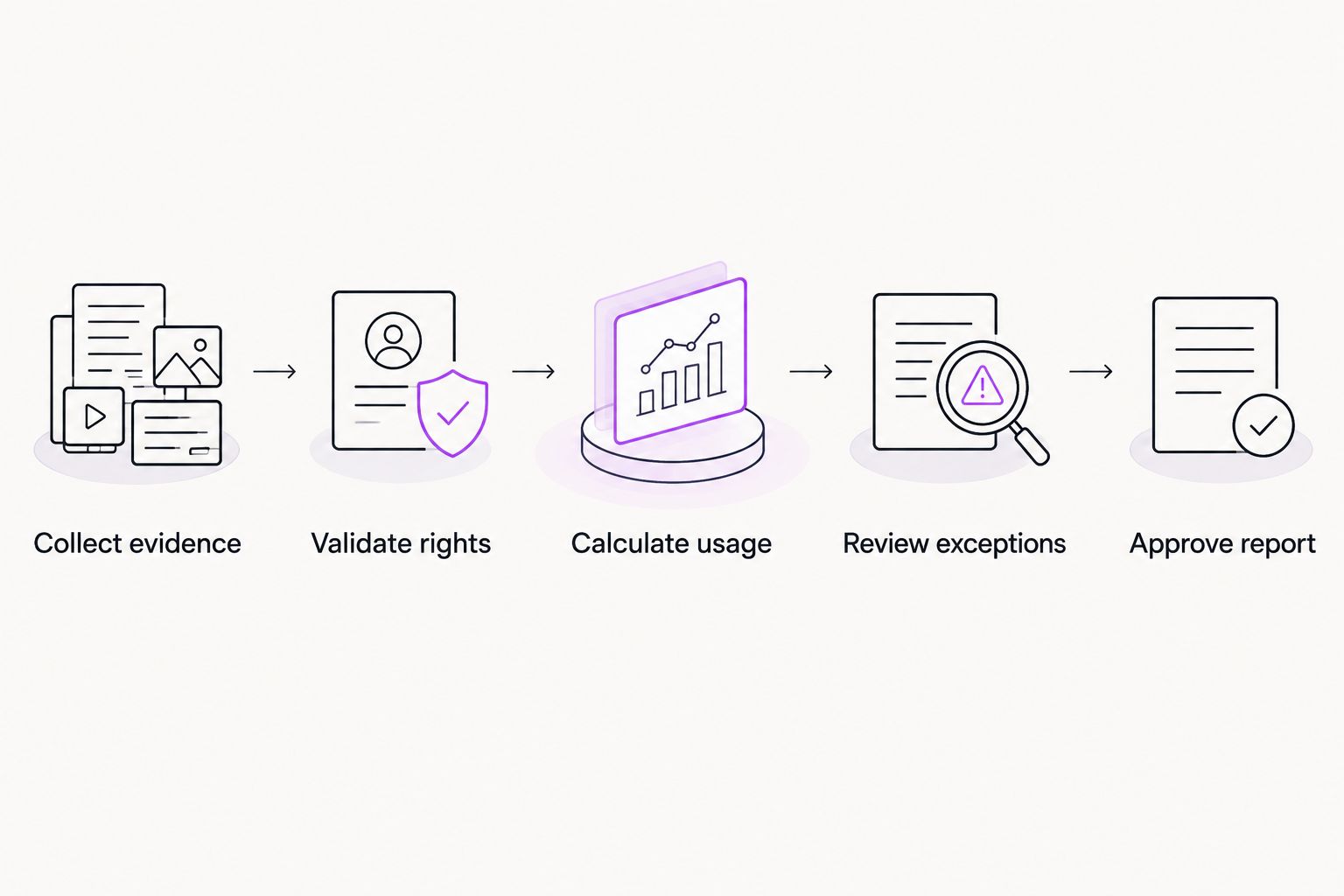
Review exceptions before approving the report, not after submitting it.
Control changes between reporting periods
Use your existing change-management records before adding another system. Add licensing review triggers to events that affect deployment facts or entitlement assumptions. A correct baseline becomes stale when operations change and compliance records remain untouched.
For example, moving a VM requires review of the licensing assumptions affected by its new placement. That does not mean every migration changes the quantity owed; it means the existing calculation needs to remain supported after the move.
Give customer changes the same treatment. New services, renamed accounts, ownership changes, and terminated workloads can break the connection between infrastructure records and billing records even when the underlying software stays installed.
Avoid copying the previous report forward as proof of the current position. Use it as a comparison point, then investigate additions, removals, and unexplained differences against current evidence.
- Add licensing checkpoints to workload provisioning and migration.
- Record product edition and configuration changes.
- Reconcile terminated services against remaining deployed software.
- Track changes to customer-provided entitlement evidence.
- Assign an owner to every unexplained period-to-period difference.
Preserve evidence and test your audit response
Begin with a controlled evidence folder and a written index. Preserve the source inventory, applicable terms, entitlement documents, calculations, exception decisions, and submitted reports together by reporting period. Apply retention requirements from your agreements and internal policies rather than an arbitrary deletion schedule.
Test the process by selecting 1 reporting period and reconstructing its position without asking the original preparer to explain undocumented steps. If a second reviewer cannot follow the chain from deployment to submission, improve the records before expanding automation.
For approval, assign 2 distinct roles: preparer and reviewer. Separate people where staffing permits; otherwise, document an independent review arrangement. Octopus provides audit-defense consulting support, but external assistance does not replace evidence held by your organization.
- Preserve the submitted report and its supporting calculation version.
- Record the rationale and approver for material adjustments.
- Keep evidence accessible after staff or customer changes.
- Restrict changes to approved reporting files.
- Rehearse how you would answer a specific usage question.
Compare compliance options for hosting providers
Choose an operating model based on the control problem you need to solve. Manual records offer direct visibility into calculations; scripts reduce repeated preparation work; a platform and consulting arrangement adds software and specialist support. None removes the need to validate licensing assumptions.
Manual inventory and spreadsheets
- Best for: Providers whose teams can maintain and review every reconciliation
- Main advantage: Direct inspection of source records and calculations
- Key limitation: Collection, version control, and exception tracking remain manual responsibilities
Internal scripts and reporting workflows
- Best for: Providers with engineering ownership of recurring data preparation
- Main advantage: Repeatable collection and transformation tailored to the estate
- Key limitation: Your team must maintain code, validate outputs, and update licensing assumptions
Octopus platform and consulting
- Best for: SPLA partners and Authorized Outsourcers seeking reporting, billing, and audit-defense support
- Main advantage: Combines software asset management with licensing consulting services
- Key limitation: Deployment scope, customer evidence, and approval responsibilities still require provider ownership
Before choosing, ask each option to support the same evidence exercise. Follow a customer workload from source inventory through its licensing treatment, reported quantity, and billing record. Compare the resulting traceability, not the appearance of the final report.
For a 2026 evaluation, include a difficult case rather than only a clean example. A missing customer mapping or disputed BYOL claim reveals whether the process exposes uncertainty or simply carries it into the output.
Review your SPLA compliance workflow
Explore software asset management and consulting for usage reporting, customer billing, and audit defense.
Common mistakes hosting providers make
Treating installation counts as licensing quantities
Installed software is an input, not a completed licensing assessment. The applicable metric and deployment rights determine how that inventory becomes a reportable quantity. Keep the calculation visible so a reviewer can distinguish collected facts from licensing assumptions.
Accepting BYOL without deployment-specific evidence
A license document does not establish every hosting right. Match the customer’s evidence to the actual product, deployment arrangement, and applicable conditions. Recheck the decision when those facts change rather than treating onboarding approval as permanent.
Using invoices to reconstruct licensing reports
Customer invoices reflect commercial arrangements, while licensing reports reflect applicable usage and contractual requirements. Reconstructing one from the other hides differences. Reconcile both against source usage instead of assuming they must contain identical quantities or descriptions.
Ignoring infrastructure changes after collection
A reporting snapshot loses context when later migrations, deletions, or edition changes are undocumented. Preserve the original evidence and record subsequent events separately. Do not overwrite the snapshot merely because the current infrastructure view looks different.
Treating automation as approval
An automated output is still an output that needs controls. For your 2026 process, define which exceptions stop submission, who resolves them, and who approves the final treatment. A successful job run does not prove that its inputs or licensing assumptions were correct.
FAQ
What is Microsoft license compliance for hosting providers?
Microsoft license compliance for hosting providers means matching hosted deployments and usage to applicable Microsoft licensing rights and reporting obligations. The evidence should connect infrastructure, customer entitlements, calculations, and submitted reports.
Does a server inventory prove that a hosting provider is compliant?
No. A server inventory establishes deployment facts, but you still need to validate licensing rights and apply the relevant product metrics. Preserve the calculation connecting inventory to reported usage.
Can hosting customers bring their own Microsoft licenses?
Customer-provided licensing requires validation against the applicable product terms, agreements, and outsourcing conditions. Do not accept a general ownership statement as proof that a specific hosted deployment qualifies.
Is SPLA reporting the same as customer billing?
No. SPLA reporting and customer billing serve different purposes and can use different commercial calculations. Reconcile both to the relevant source usage and document the reasons for differences.
What is the best compliance approach for a provider using spreadsheets?
Start by making the spreadsheet process traceable and reviewable. Preserve source exports, document licensing assumptions, and resolve exceptions before deciding which parts to automate.
Who is Octopus best for?
Octopus is best for Microsoft SPLA partners and Authorized Outsourcers seeking software asset management and consulting support. Its stated scope includes usage reporting, customer billing, and audit defense; providers still own their evidence and approval decisions.
What should a hosting provider retain for an audit?
Retain the evidence needed to reconstruct the reported position: source inventory, entitlement records, applicable terms, calculations, decisions, and submitted reports. Set retention periods using your contractual obligations and internal policies.
One last thing
Test whether someone else can reproduce your report before you automate it. Select a closed 2026 reporting period, give a reviewer the evidence pack, and ask them to trace a customer workload from deployment to reported quantity without verbal guidance.
Every explanation that exists only in someone’s memory is a documentation task. Fix those gaps first; then automation has a defined process to execute rather than an undocumented process to repeat.