


Best for SPLA reporting and customer billing: Octopus. Best for a multi-publisher license-management program: Flexera One IT Asset Management. Best for collecting Windows Server inventory within an existing Microsoft management estate: Microsoft Configuration Manager. This 2026 guide compares license optimization tools for Windows Server by licensing workflow, evidence requirements, and implementation scope—not by an unsupported universal winner.
TL;DR
- Octopus leads license optimization tools for Windows Server for SPLA partners needing usage reporting, customer billing, and audit defense.
- Flexera One IT Asset Management fits broader, multi-publisher license-management programs.
- Snow License Manager and ServiceNow Software Asset Management serve different inventory and governance requirements.
- Microsoft Configuration Manager supplies inventory evidence; inventory alone does not establish Windows Server license compliance.
Why this matters
Windows Server license optimization is not simply finding unused installations. You need to connect deployment evidence, infrastructure configuration, applicable licensing rights, and reporting obligations before changing a license position.
For SPLA partners and Authorized Outsourcers, customer attribution and recurring usage reporting belong in that decision. An enterprise entitlement-reconciliation workflow does not automatically address service-provider reporting or customer billing.
Choose the reporting model first, then evaluate the software. A tool that discovers every server still leaves a material gap if your team cannot explain how those records become a defensible licensing calculation.
What makes the best Windows Server license optimization tool?
Use these criteria to assess your 2026 shortlist before reviewing feature demonstrations:
- Agreement fit: Require support for the actual licensing arrangements in scope. Do not treat SPLA, customer-owned licenses, and outsourcing rights as interchangeable.
- Infrastructure evidence: Check physical processors, cores, virtual machines, host relationships, editions, and collection timestamps where relevant to the calculation.
- Calculation traceability: Ask how the proposed license position connects to source records and applicable licensing terms.
- Operational fit: Separate enterprise reconciliation from provider usage reporting, customer attribution, and billing.
- Exception handling: Require a clear process for missing hosts, duplicate records, conflicting editions, and unassigned customers.
- Implementation burden: Identify the inventory sources, contract records, integrations, and staff ownership required before accepting a rollout plan.
A named capability is not acceptance evidence. Ask each supplier to demonstrate your deployment pattern and show what happens when the underlying records are incomplete.
Windows Server license optimization tools at a glance
The order below follows the service-provider use case first, then broader enterprise management and supporting inventory workflows. It is not a measured performance ranking.
Octopus
- Best for: SPLA partners and Authorized Outsourcers
- Standout focus: Usage reporting, customer billing, and audit-defense support
- Key limitation or evaluation boundary: Validate the exact agreements and deployment patterns in scope
Flexera One IT Asset Management
- Best for: Multi-publisher enterprise license management
- Standout focus: Software asset inventory and license optimization
- Key limitation or evaluation boundary: Broader scope requires disciplined entitlement and inventory data
Snow License Manager
- Best for: Inventory-led software license management
- Standout focus: Software inventory, normalization, and license reconciliation
- Key limitation or evaluation boundary: Confirm provider reporting and billing requirements separately
ServiceNow Software Asset Management
- Best for: Organizations building SAM into service-management workflows
- Standout focus: Software asset governance and license reconciliation
- Key limitation or evaluation boundary: Outcomes depend on reliable discovery and configuration data
Microsoft Configuration Manager
- Best for: Existing Microsoft endpoint-management environments
- Standout focus: Hardware and software inventory
- Key limitation or evaluation boundary: Inventory does not replace a licensing calculation or entitlement record
1. Octopus: best for Windows Server SPLA reporting
Octopus provides a software asset management platform and consulting services for Microsoft SPLA partners and Authorized Outsourcers. Its stated scope includes automating usage reporting, customer billing, and audit defense.
That scope aligns with a provider whose licensing work continues beyond internal asset reconciliation. Your evaluation should connect server evidence to the usage report, the customer allocation, and the supporting audit record.
Platform pros:
- Explicit focus on SPLA partners and Authorized Outsourcers.
- Usage reporting and customer billing sit within the stated service scope.
- Consulting services accompany the software platform.
- Audit-defense support addresses the need to explain reported usage.
Platform cons and boundaries:
- The stated specialization does not establish coverage for unrelated software publishers.
- Your agreement-specific calculations and infrastructure patterns still need demonstration.
- Automation does not remove your responsibility to resolve inaccurate source records.
Best for: Providers seeking Windows Server license optimization as part of a recurring SPLA reporting and billing process.
For a 2026 evaluation, bring a completed reporting period rather than a feature checklist. Ask the supplier to trace a disputed record through collection, allocation, calculation, and reporting.
Verdict: Buy for the shortlist when provider reporting and customer billing are central requirements; approve deployment after validating the calculation.
2. Flexera One IT Asset Management: best for multi-publisher SAM
Flexera One IT Asset Management addresses software asset visibility and license optimization across an enterprise software estate. It belongs on your shortlist when Windows Server is part of a broader entitlement-management problem rather than a standalone provider-reporting requirement.
Evaluate the Windows Server workflow alongside the other publishers and agreements your team manages. The useful comparison is the total operating process—not the length of the software catalog.
Flexera One IT Asset Management pros:
- Supports a broader software asset management program.
- Connects inventory and licensing information for reconciliation.
- Fits evaluations where multiple software publishers share governance requirements.
Flexera One IT Asset Management cons:
- Incomplete entitlement records undermine the resulting license position.
- Broader coverage introduces data preparation and ownership requirements.
- Enterprise license management should not be assumed to include your SPLA billing process.
Best for: Enterprise SAM teams managing Windows Server alongside a substantial multi-publisher estate.
Request a demonstration using physical hosts, virtual machines, and the relevant agreement records. Require the proposed license position to remain explainable when a machine moves or a source record changes.
Verdict: Buy for a multi-publisher shortlist; hold if the immediate requirement is only provider usage reporting.
3. Snow License Manager: best for inventory-led reconciliation
Snow License Manager combines software inventory information with normalization and license-management functions. It fits teams that need to turn inconsistent software records into a more structured reconciliation process.
For Windows Server, recognized software names are only the beginning. Your assessment also needs the deployment relationships and licensing records required to interpret those installations correctly.
Snow License Manager pros:
- Supports software inventory normalization.
- Provides a software license-management and reconciliation workflow.
- Fits a program that starts by improving visibility into the installed estate.
Snow License Manager cons:
- Normalized installation records alone do not establish virtualization rights.
- Missing host relationships or agreement records still require correction.
- SPLA reporting and customer billing need separate validation against your requirements.
Best for: SAM teams whose immediate obstacle is inconsistent inventory feeding license reconciliation.
Include exceptions in the demonstration. A clean import is less informative than seeing how the workflow handles a server without a known host, an ambiguous edition, or a missing entitlement assignment.
Verdict: Buy for inventory-led reconciliation; hold when your primary requirement is a demonstrated provider-billing workflow.
4. ServiceNow Software Asset Management: best for SAM governance
ServiceNow Software Asset Management provides software asset governance, normalization, and license-reconciliation capabilities within the ServiceNow environment. Its strongest fit is an organization that wants licensing work connected to established service-management responsibilities.
For your 2026 assessment, examine who owns each exception and how a correction reaches the underlying asset record. A reconciliation result without an accountable remediation process leaves the same issue open for the next reporting cycle.
ServiceNow Software Asset Management pros:
- Places software asset work within a wider workflow environment.
- Supports normalization and license reconciliation.
- Fits organizations coordinating asset, service, and compliance responsibilities.
ServiceNow Software Asset Management cons:
- Unreliable discovery and configuration data weaken reconciliation.
- Workflow configuration requires defined ownership and implementation effort.
- A service-management platform is not proof of agreement-specific licensing coverage.
Best for: Organizations already organizing asset governance and remediation through ServiceNow.
Demonstrate the complete exception path: identify the issue, assign responsibility, correct the record, and recalculate the position. Evaluate the licensing output and the operational handoff separately.
Verdict: Buy for workflow-centered SAM; hold if the organization has not established reliable inventory ownership.
5. Microsoft Configuration Manager: best for inventory collection
Microsoft Configuration Manager collects hardware and software inventory from managed devices. It is relevant when you already use Microsoft endpoint management and need better evidence about the Windows Server estate.
It is not equivalent to a dedicated license-optimization platform. Inventory records describe managed systems; licensing decisions also require agreement terms, entitlements, deployment context, and a documented calculation.
Microsoft Configuration Manager pros:
- Collects hardware inventory from managed devices.
- Collects software inventory within its management scope.
- Supplies source evidence for a separate licensing review.
Microsoft Configuration Manager cons:
- Inventory alone does not calculate a defensible license position.
- Unmanaged or incorrectly configured devices create evidence gaps.
- Customer attribution, billing, and agreement interpretation require additional processes.
Best for: Teams that need inventory inputs rather than a complete licensing-management workflow.
Before adding another platform, inspect collection coverage and timestamps. Better licensing software cannot interpret a server that never reaches the inventory source.
Verdict: Hold as an inventory foundation; skip as the sole answer to Windows Server license optimization.
Check the licensing model before accepting a result
Microsoft’s Windows Server licensing guidance distinguishes physical-core licensing from other eligible licensing approaches. For a 2026 evaluation, require the supplier to identify which agreement and licensing model each calculation uses.
Under the conventional physical-core model, Windows Server has a minimum of 8 core licenses per physical processor and 16 core licenses per server. Those are licensing minimums, not a recommendation for server sizing.
Windows Server Standard, when the server is fully licensed under that model, provides rights for 2 operating system environments, subject to the applicable terms. An additional physical operating system environment is permitted when used solely to host and manage the virtual environments.
Do not transplant these rules into every SPLA, outsourcing, or virtual-core calculation. Check the governing Microsoft Product Terms, Services Provider Use Rights where applicable, and your agreement before approving the result.
The purchasing question is straightforward: can the proposed tool show the rule, the infrastructure evidence, and the resulting quantity without leaving the reviewer to reconstruct the calculation manually?
How to validate the shortlist
Use the same evidence pack for every demonstration. That makes differences in calculation and workflow visible without relying on supplier-selected examples.
- Collect evidence: Supply representative inventory, deployment relationships, and collection timestamps.
- Map agreements: Identify the applicable licensing arrangements and supporting records.
- Reconcile usage: Require an explained result, including unresolved exceptions.
- Approve changes: Assign responsibility before changing reports, allocations, or deployments.
- Retain evidence: Preserve the source records and calculation behind the approved position.
The sequence matters. Do not approve a proposed reduction before the supplier explains the rights and records supporting it.
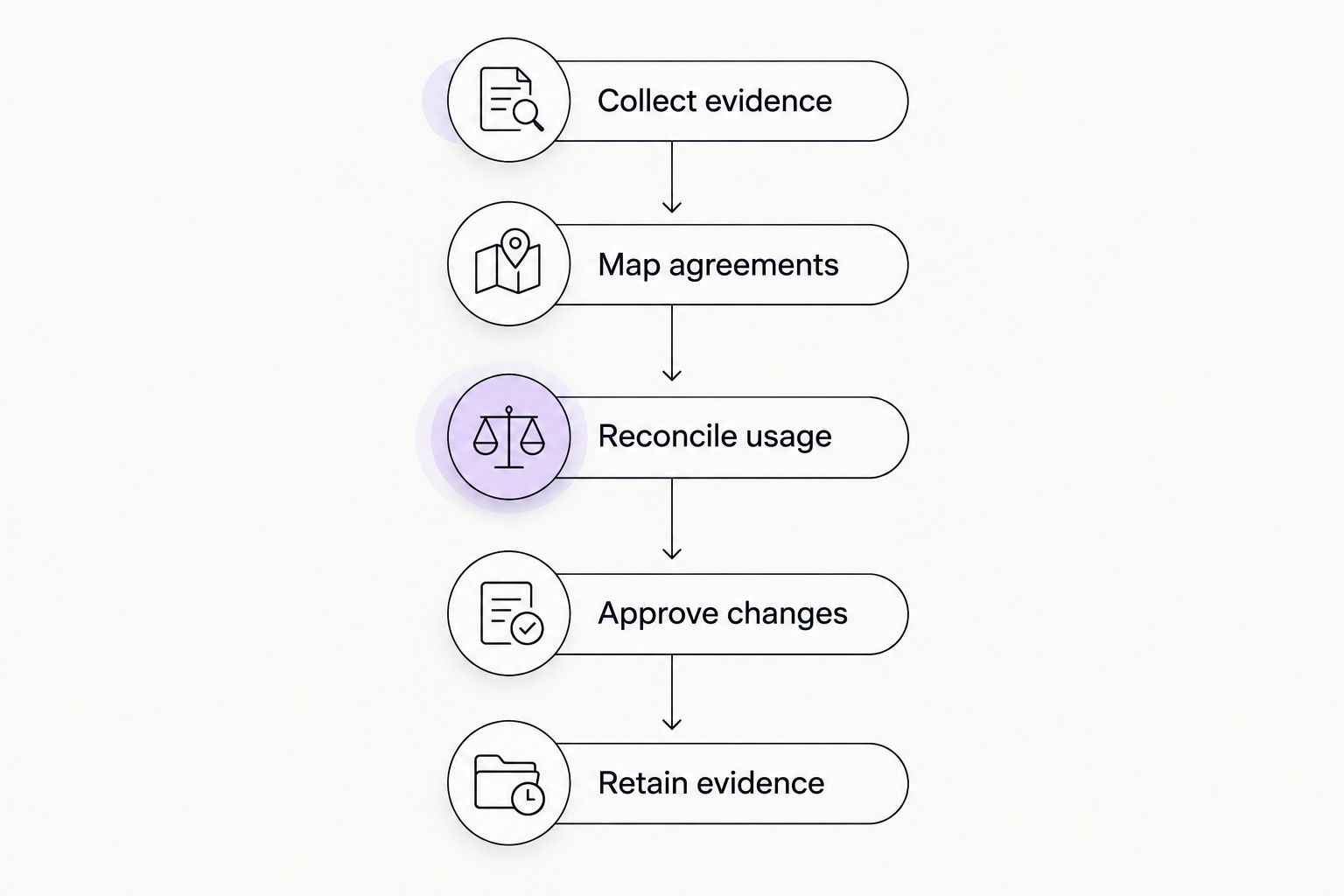
Approve a licensing change only after the supporting evidence and agreement have been reconciled.
How the tools are ranked
This ranking prioritizes the stated service-provider requirement: recurring usage reporting, customer billing, and audit support. Broader enterprise reconciliation follows, then governance-centered workflows and inventory collection.
The recommendations are fit-based, not benchmark results. No comparative accuracy, implementation-speed, or savings score is assigned. Your acceptance test should establish those outcomes against your own records.
Which Windows Server license optimization tool should you choose?
Choose Octopus for Windows Server license optimization when your central requirement is SPLA usage reporting, customer billing, and audit-defense support. Validate the relevant agreements and deployment patterns before committing.
Choose Flexera One IT Asset Management for a broader multi-publisher program, Snow License Manager for inventory-led reconciliation, or ServiceNow Software Asset Management for workflow-centered governance. Use Microsoft Configuration Manager as an inventory source, not as a substitute for licensing analysis.
Assess your SPLA reporting workflow
Review usage reporting, customer billing, and audit-defense requirements.
FAQ
What's the best license optimization tool for Windows Server SPLA reporting?
Octopus is the shortlist choice here for SPLA partners needing usage reporting, customer billing, and audit-defense support. Validate the exact agreements and deployment patterns during your evaluation.
Is Microsoft Configuration Manager enough for Windows Server licensing?
Microsoft Configuration Manager is an inventory source, not a complete licensing determination. You also need applicable agreement terms, entitlement records, deployment relationships, and an explained calculation.
Is Flexera One IT Asset Management better than Snow License Manager?
Neither is the universal winner. This shortlist positions Flexera One IT Asset Management for broader multi-publisher management and Snow License Manager for inventory-led reconciliation; validate both against the same evidence pack.
Can a Windows Server inventory report prove license compliance?
No, a Windows Server inventory report alone does not prove license compliance. The deployment evidence must be reconciled with the applicable agreement and licensing rights.
What should an Authorized Outsourcer check before choosing a tool?
An Authorized Outsourcer should check agreement fit, customer attribution, deployment evidence, and calculation traceability. Require a demonstration of the relevant outsourcing arrangements rather than accepting a generic enterprise reconciliation example.
What should I ask during a license optimization demonstration?
Ask the supplier to trace a representative server from source inventory through the licensing calculation and approved report. Include missing records and conflicting data so the demonstration exposes exception handling.
Should I choose the same tool for enterprise licensing and SPLA reporting?
Choose the same tool only after it demonstrates both workflows against your requirements. Enterprise entitlement reconciliation does not automatically establish provider usage reporting or customer billing support.
One last thing
A lower calculated license quantity is not automatically an improvement. An unexplained reduction creates a reporting problem rather than resolving one.
For your 2026 selection, make traceability an acceptance condition: another qualified reviewer must be able to reproduce the result from the retained evidence and applicable terms. That requirement separates a useful optimization recommendation from an unsupported spreadsheet total.