Instead of manually joining Azure usage files, customer records, and licensing spreadsheets each month, build an Azure SPLA compliant billing workflow that separates Azure charges from agreement-specific licensing obligations before producing customer invoices. For 2026, use Octopus for its stated scope—software asset management, usage reporting, customer billing, and audit defense—and validate each workload’s licensing basis before assigning a charge.
TL;DR
- Azure SPLA compliant billing requires separate checks for Azure charges, licensing rights, customer allocation, and reporting obligations.
- Octopus supports Microsoft SPLA partners and Authorized Outsourcers with usage reporting, customer billing, and audit defense.
- An Azure consumption record does not establish SPLA eligibility or prove a customer's licensing entitlement.
- Reconcile source usage and licensing evidence before approving invoices; retain the evidence behind every adjustment.
Why this matters
Azure billing data is a cost source, not a licensing determination. An Azure resource can generate a valid consumption charge while its software licensing treatment still requires separate evidence. Customer invoicing and SPLA reporting therefore need related, but distinct, controls.
Octopus is best for Microsoft SPLA partners and Authorized Outsourcers seeking software asset management support for usage reporting, customer billing, and audit defense. Its platform and consulting services address those functions; your agreements and workload evidence still determine the applicable licensing treatment.
For your 2026 workflow, keep three questions separate: what Azure charged, which customer owns the usage, and what licensing obligation applies. Combining them into one spreadsheet formula hides exceptions rather than resolving them.
Before you start
- Access and destinations: Obtain access to the relevant Azure billing scope, resource inventory, customer billing records, and an approved evidence repository. Confirm export permissions and access to the destination storage before scheduling collection.
- Licensing materials: Assemble applicable Microsoft agreements, product terms, subscription records, customer entitlement evidence, and previous reporting submissions. Identify who can approve a licensing interpretation and who can release an invoice.
- The critical gotcha: Do not classify every Azure-hosted workload as SPLA-reportable. Azure-included software charges, customer-supplied rights, and separately reported licensing obligations require different evidence. Confirm eligibility before configuring any automatic charge or report.
Treat the sequence below as a control design, not a claim that a particular connector or platform screen exists. The Azure controls named here belong to Azure; the billing records and approval stages are configuration requirements for your chosen systems.
Source access and monthly collection
Establish the reporting boundary
- Open Subscriptions in the Azure portal and identify the subscriptions that belong in the billing process. Record each subscription identifier alongside its customer or allocation owner.
- Review Access control (IAM) at the relevant scope. Use Add role assignment when access is required, selecting roles appropriate to the task rather than granting broad administrative access by default.
- Confirm that the billing operator can read the required cost information. Cost Management Reader provides cost-management read access; resource inventory and export configuration can require additional permissions at their respective scopes.
- Open Cost Management, select Exports, and use Create to configure an export at a supported billing scope. Choose a destination your reporting team can access, then verify that an actual file arrives.
- Define a reporting window of 1 calendar month for this workflow. Record the source timezone, currency, export scope, collection timestamp, and whether the dataset contains actual or amortized costs.
Do not mix actual and amortized cost records in the same reconciliation without an explicit accounting rule. They represent different views of costs, particularly where commitments affect allocation.
Expected result: You have a repeatable Azure cost feed, a documented reporting boundary, and an evidence location accessible to the people responsible for billing.
Preserve the source
Keep each collected file unchanged. Apply transformations to a working copy and retain the transformation rules alongside the output.
A later export can differ from an earlier snapshot as source records change. Preserve both versions rather than replacing the evidence behind an invoice already issued. For the 2026 reporting cycle, label each snapshot with its collection date and the billing period it represents.
Customer mapping and licensing classification
Build the allocation register
- Create a customer mapping register with customer identifier, subscription identifier, resource identifier where needed, allocation rule, effective date, and owner. These are your internal record fields, not claimed product interface labels.
- Use a dedicated subscription mapping where that matches your operating model. For shared subscriptions, define resource-level mappings or documented allocation rules instead of assigning the entire subscription to one customer.
- Inspect Tags on relevant Azure resources. Use the Name and Value fields for your chosen customer identifier, then select Save. Confirm that your cost dataset actually includes the required tag information before depending on it.
- Route unmapped usage to an exception queue. Do not spread it across customers merely to make the total reconcile.
- Create a licensing register separate from the cost register. Record the workload, software, licensing basis, supporting agreement, evidence location, applicable reporting requirement, and approving owner.
Expected result: Every billable usage record has a customer allocation, and every software classification has an evidence reference or an unresolved exception.
Separate the licensing paths
The following options describe classification paths, not interchangeable licensing offers. Select a path only after confirming that its rights apply to the specific deployment.
Azure-included software charge
- Best for: Workloads whose Azure charge includes the relevant software licensing
- Advantage: Keeps the software charge associated with the Azure billing record
- Limitation and required check: Does not establish rights for other software or deployments; verify the meter and applicable terms
Customer-supplied licensing rights
- Best for: Workloads with documented, applicable customer entitlements
- Advantage: Separates entitlement evidence from infrastructure consumption
- Limitation and required check: Requires proof of eligible rights and deployment conditions; ownership alone is insufficient
Separately reported licensing obligation
- Best for: Workloads covered by a confirmed separate reporting arrangement
- Advantage: Keeps licensing reporting distinct from Azure infrastructure charges
- Limitation and required check: Requires an agreement-specific eligibility decision and reporting calculation; never assume SPLA applies
Octopus software asset management services fit the reporting and evidence-management problem. The trade-off is that automation cannot replace missing entitlement records or an unresolved agreement interpretation. Resolve those inputs before allowing a classification to drive billing.
Usage reconciliation and invoice controls
Configure the validation sequence
- Customer mapping: Match the working cost dataset to the allocation register. Isolate missing customer identifiers, conflicting mappings, and resources whose ownership changed during the reporting period.
- License evidence: Match each software workload to its licensing register entry. Check the applicable product, deployment conditions, and reporting basis against the supporting records.
- Usage reconciliation: Perform 2 reconciliations per reporting period in this workflow: source costs to allocated customer costs, and reportable licensing quantities to their supporting inventory or usage evidence.
- Invoice approval: Apply customer contract rules only after allocation and licensing exceptions have been resolved or explicitly held. Record each adjustment, its reason, and its approver.
- Export the approved billing output and any separately required licensing report. Store both with their source snapshots, calculation rules, exception decisions, and approval records.
Expected result: Each invoice line traces back to an allocated source charge or an approved contract calculation. Each reported licensing quantity traces back to evidence and an applicable reporting rule.
The sequence prevents a common control failure: approving the invoice total while leaving the licensing quantity unexplained. A balanced cost ledger does not prove that a separate license report is correct.
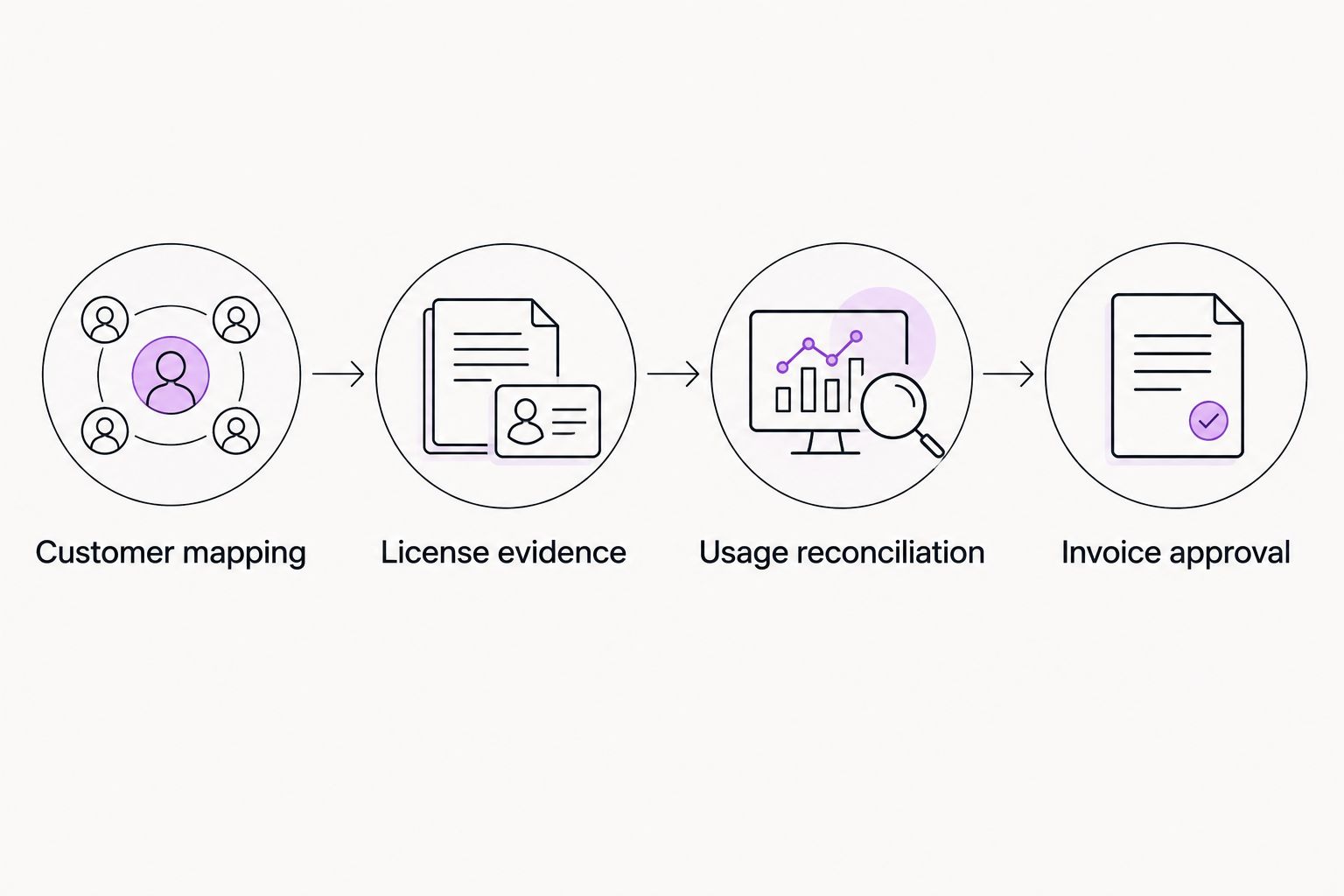
Approve invoices after customer allocation and licensing evidence have passed separate checks.
Set release gates
Use 3 approval gates per reporting period as a control design: allocation complete, licensing review complete, and invoice release authorized. Assign an owner to each gate; do not let a successful file export count as approval.
An unresolved licensing question should hold the affected charge or report entry, not disappear into a general adjustment. Record the hold explicitly so the next reporting cycle does not repeat the same investigation.
Updated-resource workflow
Monthly collection catches the period’s reporting requirements. A second workflow handles changes between reporting runs, reducing the amount of investigation left until invoice preparation.
Review changes when ownership or configuration changes
- Define which changes require review: customer reassignment, subscription movement, software deployment changes, licensing configuration changes, or entitlement updates.
- Capture the resource identifier, previous state, new state, effective date, and responsible owner. Use the event or change records available in your environment; do not assume every relevant change appears in the cost export.
- Reassess both allocation and licensing treatment. A customer ownership change does not itself establish a new licensing right.
- Update the mapping or licensing register with an effective date. Preserve the previous record so historical billing remains explainable.
- Recalculate affected draft outputs. If an invoice or licensing report has already been released, follow your documented correction process rather than silently replacing the original.
Expected result: Changes enter the next billing run with an approved treatment and a dated history.
For 2026 operations, use this variant alongside the monthly workflow, not instead of it. Change records explain what happened; the reporting-period reconciliation confirms that the final outputs include the correct records.
Troubleshooting
Azure cost totals do not match allocated customer totals
Check the reporting scope, date boundaries, currency, credits, adjustments, and actual-versus-amortized cost basis. Then compare unmatched records by subscription and resource identifier.
Fix: Reconcile against the same source snapshot and cost basis. Keep unallocated records visible until an owner approves their treatment.
Customer tags are missing from the exported records
Resource tags and billing records are not interchangeable datasets. Check whether the required tag was present when the usage was recorded and whether the export includes it.
Fix: Use the dated mapping register to resolve historical allocation. Correct the tagging process for future collection without rewriting historical source files.
Software charges appear twice on a draft invoice
Compare the Azure meter’s software treatment with the separate licensing calculation. Also check for duplicate imports and repeated invoice-line generation.
Fix: Remove only the duplicate supported by evidence. Do not delete a separate reporting obligation merely because an Azure infrastructure charge exists.
Inventory quantities do not match licensing report quantities
An inventory count is not automatically the applicable licensing quantity. Product rules, measurement periods, and deployment conditions determine what must be reported.
Fix: Trace the calculation from inventory through the applicable agreement rule. Escalate unresolved interpretations before approving the report.
A scheduled export stops producing usable files
Check export status, source access, destination permissions, storage configuration, and changes to the expected file structure.
Fix: Restore collection, validate the replacement files, and rerun the affected period against a retained source snapshot. Do not treat yesterday’s successful export as proof that today’s billing input is complete.
Customize your workflow
Expand automation only after the evidence chain works. Start with one defined reporting scope, then add customer populations or reporting obligations using the same release gates.
Separate collection from interpretation. Automating an export is a technical task; assigning licensing treatment requires controlled rules and supporting records. That distinction keeps a connector change from silently becoming a licensing-policy change.
Bring a sample source export, allocation register, exception list, and draft billing output to an Octopus contact discussion. Ask which parts of your existing process the platform and consulting services support, and confirm integration requirements before planning implementation.
Review your SPLA billing workflow
Discuss usage reporting, customer billing, and audit evidence for your existing licensing process.
FAQ
Does hosting software on Azure make it SPLA-compliant?
No. Azure hosting does not establish SPLA eligibility or satisfy every software licensing obligation. Confirm the applicable agreement, deployment rights, and reporting requirements for each workload.
What is the first step in Azure SPLA compliant billing?
Define the reporting scope and confirm the licensing basis before configuring automatic charges. Collect Azure cost data separately from customer allocation and entitlement evidence.
Can I use Azure cost exports as my SPLA report?
An Azure cost export alone is not evidence of the correct SPLA reporting quantity. Use it for Azure cost reconciliation and calculate any separate licensing obligation from the applicable rules and supporting records.
What does Octopus provide for SPLA billing?
Octopus provides a software asset management platform and consulting services for Microsoft SPLA partners and Authorized Outsourcers. Its stated scope includes usage reporting, customer billing, and audit defense.
Should I use actual or amortized Azure costs for customer billing?
Use the cost basis required by your customer contract and accounting policy. Document that choice and reconcile against the same basis rather than mixing actual and amortized records.
How do I handle a resource that changes customers during the month?
Use an effective-dated allocation record and apply the documented allocation rule to the affected period. Retain both ownership states and the evidence supporting the change.
What evidence should I retain for a 2026 billing review?
Retain source cost snapshots, customer mappings, licensing evidence, calculation rules, exception decisions, and approvals. Keep issued outputs and later corrections separately so the original decision remains traceable.
One last thing
Test the evidence chain backward before you automate more of it. Pick an invoice line and trace it to its customer mapping, source record, calculation, and approval; then pick a licensing report entry and perform the same check.
If either trail breaks, another scheduled export will not repair it. Fix the missing control first.