


Instead of manually reconciling VMware exports every month, build a VMware SPLA usage reporting workflow that joins infrastructure history, guest software evidence, customer ownership, and licensing rules before producing an approved reporting file. This 2026 guide defines the collection, reconciliation, review, and evidence-retention steps without treating a VM inventory as a licensing calculation.
TL;DR
- VMware SPLA usage reporting needs guest software evidence and licensing rules, not just a list of virtual machines.
- Octopus supports Microsoft SPLA partners with usage reporting, customer billing, and audit defense.
- Keep infrastructure collection separate from license calculations so rule changes do not overwrite source evidence.
- Approve exceptions before publishing monthly usage or passing quantities to customer billing.
Why this matters
A VMware inventory describes infrastructure. It does not establish which Microsoft products are installed, which licensing rights apply, or which customer should receive a charge. Automating an incomplete inventory simply moves those gaps into the reporting file faster.
Octopus is best suited to Microsoft SPLA partners and Authorized Outsourcers seeking software asset management and licensing consulting. Octopus provides a platform and consulting services for usage reporting, customer billing, and audit defense; the workflow below defines the controls those activities need.
Use 3 evidence layers: infrastructure history, guest software discovery, and licensing decisions. Preserve each separately so a reviewer can distinguish an observed deployment from an interpretation of its licensing requirements.
Before you start
- Access and coverage: Arrange authorized access to VMware vCenter inventory, host configuration, and relevant historical records. Obtain guest software discovery evidence and a customer-to-workload ownership record. Confirm that collection permissions cover every in-scope environment.
- Reporting materials: Gather the applicable Microsoft SPLA agreement, current product-use requirements, reporting instructions, and your customer billing mappings. Establish the reporting timezone and the boundary for each period; this workflow uses 1 calendar month as its reporting window.
- The critical gotcha: A month-end VM export cannot reconstruct workloads deleted earlier in the month. Start retaining lifecycle history before relying on automation, and mark incomplete historical coverage as an exception rather than assuming zero usage.
Configuration unit: source collection
Establish the VMware collection scope
- List the source environments. Record each vCenter instance, managed cluster, standalone host, and responsible infrastructure owner. Reconcile this list against your operational inventory so an unconnected environment does not disappear from reporting.
- Inspect inventory access. In the vSphere Client, open Hosts and Clusters and confirm that the collection account can see the intended infrastructure. Check the VMs view against a known workload list. Seeing a cluster does not prove that every required object or historical record is accessible.
- Capture source identifiers. Retain the source vCenter identity, VM identifier, host identifier, cluster membership, collection timestamp, and available lifecycle timestamps. Store the VM display name for readability, but do not use it as the sole join key.
- Collect configuration and history separately. Capture the host hardware and VM configuration attributes needed for your licensing assessment. Retain available creation, deletion, power-state, and placement records rather than overwriting them with the latest snapshot.
- Check historical coverage. Confirm that the collection method and source retention cover the full reporting period. Where they do not, record the missing interval and require investigation.
Expected result: You can identify the infrastructure covered, trace each observation to its source, and explain which parts of the reporting period have complete evidence.
Define the collection contract
Document the fields your reporting pipeline requires before connecting downstream calculations. Treat this as your internal data specification, not as a claim that a particular platform exposes matching interface labels.
Source identity
- Required content: vCenter identity and source object identifiers
- What it establishes: Where an observation originated
Workload history
- Required content: VM identity, timestamps, state, and placement
- What it establishes: What changed during the period
Host configuration
- Required content: Relevant processor and core attributes
- What it establishes: Infrastructure inputs for applicable calculations
Guest discovery
- Required content: Observed Microsoft product and edition evidence
- What it establishes: What software requires classification
Customer ownership
- Required content: Customer identifier and effective dates
- What it establishes: Who owned the workload at the relevant time
For the 2026 collection baseline, document exclusions explicitly. A template, inaccessible guest, or disconnected host needs a recorded classification; its presence or absence alone does not settle its licensing treatment.
Configuration unit: identity and licensing mappings
Join infrastructure to software and customers
- Normalize identifiers. Keep original source identifiers alongside your internal workload identifier. Account for different identifier types rather than assuming that a VMware identifier and a guest-discovery identifier represent the same field.
- Match guest evidence. Join software discovery records to the correct workload. Classify Windows Server and SQL Server observations using the product and edition evidence available. Keep an unresolved classification when evidence conflicts.
- Attach customer ownership. Assign each workload to a customer or a documented shared-service category. Use effective dates so a customer reassignment does not rewrite earlier reporting periods.
- Separate licensing arrangements. Record the documented licensing basis for each relevant deployment, including any proposed customer-provided rights. Do not accept a BYOL label as proof that the arrangement is permitted.
- Create an exception queue. Route unmatched workloads, ambiguous editions, missing host attributes, and undocumented licensing arrangements to named owners. Prevent unresolved records from silently becoming zero quantities.
Expected result: Each in-scope software observation has a traceable workload, ownership assignment, and documented licensing classification—or a visible exception.
Keep observations separate from decisions
An installed SQL Server instance is an observation. Its reportable treatment is a decision based on the applicable agreement, product rules, deployment, and rights.
Preserve that distinction in the data model. Record the evidence used, the decision owner, and the version of the rules applied. An approved exception is not a substitute for missing evidence; it needs a documented rationale and a defined follow-up action.
Do not infer reportable quantities from allocated vCPUs alone. Depending on the applicable product and licensing model, the calculation requires other inputs. A technically complete VM export can still be insufficient for a licensing assessment.
Configuration unit: calculation and approval
Build a controlled monthly calculation
- Freeze the period boundary. Set the reporting timezone and start and end timestamps. Preserve the source collection timestamps separately so late-arriving evidence remains identifiable.
- Version the rule set. Record which agreement terms, product requirements, and reporting instructions govern the calculation. For the 2026 rule set, record the effective date rather than assuming the calendar year determines the applicable terms.
- Calculate classified quantities. Apply the relevant rules to validated infrastructure and software evidence. Keep the inputs and intermediate results so a reviewer can reproduce the output.
- Compare with the prior period. Investigate unexplained quantity changes, newly discovered products, ownership changes, and missing sources. A stable total does not prove complete collection; offsetting errors can leave the total unchanged.
- Apply approval gates. Use 2 review gates: an operational review for source completeness and customer assignment, followed by a licensing review for classifications, quantities, and exceptions. Record the reviewers and their decisions.
Expected result: Every proposed reporting quantity can be traced to evidence and an approved rule, with unresolved issues visible before release.
The controlled sequence is Source collection, Identity matching, License calculation, Exception review, and Approved output. Keep these stages distinct so a successful collection job cannot automatically authorize a reporting submission.
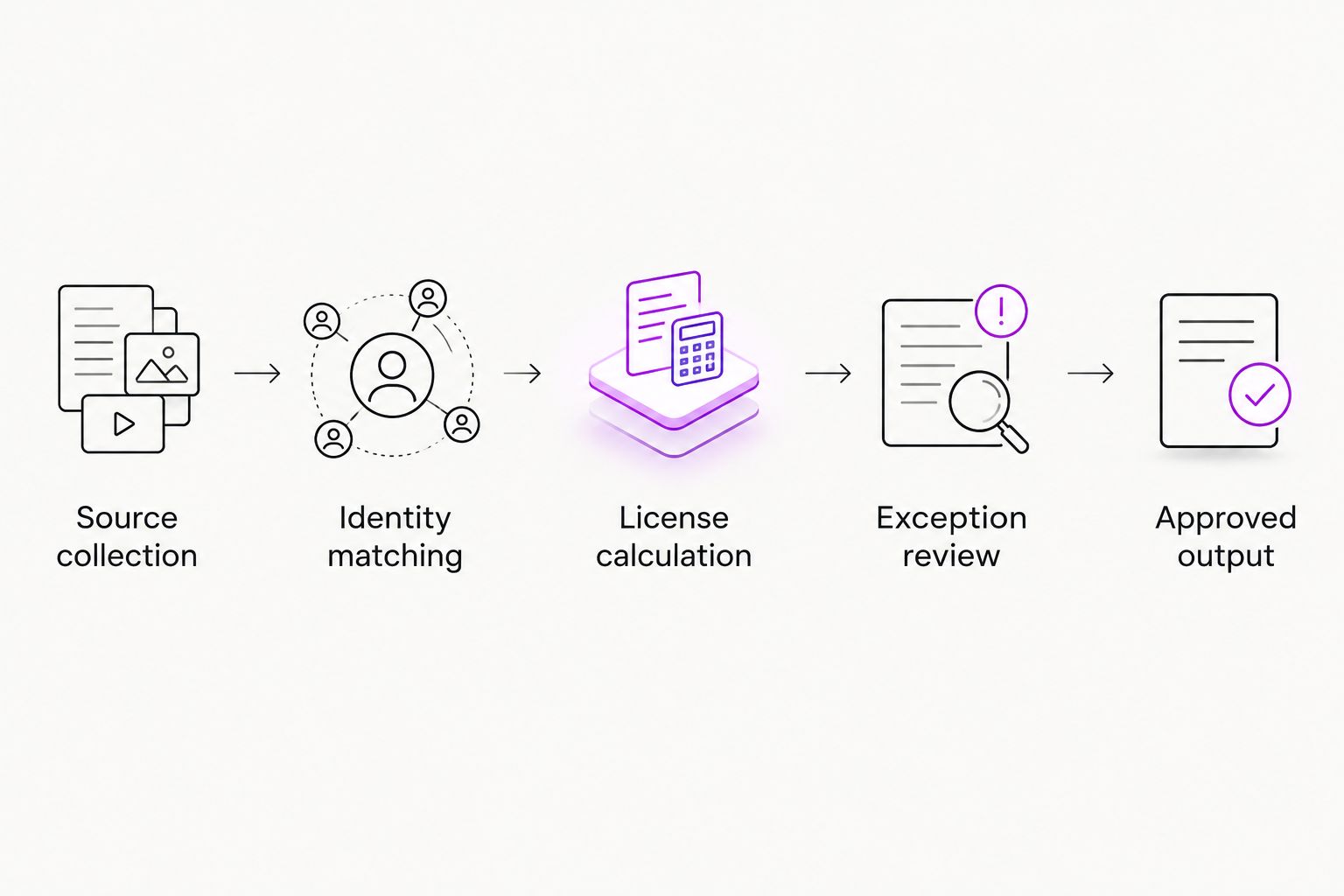
Successful collection does not replace licensing review or authorize submission.
Choose the operating model
Both spreadsheet reconciliation and a controlled automated pipeline need licensing decisions. The difference is how you collect, repeat, and document the work—not whether review is necessary.
Manual reconciliation
- Best for: Establishing an initial baseline or investigating exceptions
- Advantage: Makes individual records easy to inspect
- Limitation: Repeated copying and joins require careful change control
Controlled automated pipeline
- Best for: Repeating an established reporting process
- Advantage: Applies the same collection and transformation steps consistently
- Limitation: Incomplete source coverage or incorrect mappings repeat until corrected
Automate a reconciled baseline, not an unexplained spreadsheet. First establish why the current quantities are correct. Then reproduce the approved logic through a controlled pipeline.
Configuration unit: reporting and evidence retention
Publish the approved output
- Map to the required reporting format. Translate approved internal classifications into the identifiers and units required by your reporting recipient. Validate the mapping against current instructions rather than guessing from product names.
- Separate reporting from billing. Preserve the approved licensing quantities, then apply the documented customer billing mapping separately. Shared infrastructure, customer ownership, and licensing scope do not necessarily follow identical boundaries.
- Run release checks. Confirm that the output covers the intended period, includes every required source, and contains no unexplained blank identifiers or duplicate lines. Reconcile output totals to the approved calculation.
- Release through the authorized process. Export or submit only through a method your reporting recipient supports. Do not assume an integration, connector, or automated submission endpoint exists.
- Archive the reporting package. Retain source extracts, transformation logic, rule versions, exception decisions, approvals, the released file, and any available submission acknowledgment under your retention policy.
Expected result: The released report matches the approved calculation, while the supporting package explains how it was produced.
For the 2026 reporting archive, distinguish the reporting period from the release timestamp. If a correction becomes necessary, preserve the original release and the reason for the replacement instead of silently overwriting it.
Second workflow: recalculate when VMware inventory changes
Use event-driven reassessment alongside the monthly close. It identifies changes that need investigation before the reporting deadline, but it does not replace the approved period-end calculation.
- Capture a relevant infrastructure or ownership change, such as VM creation, deletion, migration, or customer reassignment.
- Identify the affected workload and collect the evidence needed to reassess it. A migration event alone does not establish the licensing consequence.
- Recalculate the affected classification or quantity using the controlled rule set.
- Open an exception when the change introduces missing software evidence, ownership ambiguity, or an unsupported licensing assumption.
- Include the resolved change in the next reporting review without modifying a previously released period automatically.
Best for: environments where workload changes need review between monthly closes. The advantage is earlier exception detection; the limitation is dependence on event coverage. Keep scheduled reconciliation because event collection can miss records or stop running.
Troubleshooting
A deleted VM is absent from the report
Compare retained lifecycle records with the reporting dataset. Restore the workload's historical evidence and assess its treatment under the applicable rules. If the source history is incomplete, escalate the gap; do not invent a deletion timestamp or assume the workload had no reportable use.
A renamed VM appears twice
Inspect the identity join. If the pipeline uses display names, replace that join with a validated source-identifier mapping and review duplicates before recalculating. Also distinguish a renamed workload from a genuinely cloned or recreated VM.
VMware collection succeeds, but SQL Server classification fails
Check guest-discovery coverage and the evidence supporting the product and edition. VMware configuration data does not establish the installed SQL Server edition. Keep the record unresolved until suitable evidence supports its classification.
A migration changes quantities unexpectedly
Inspect host placement history, hardware attributes, and the applicable licensing model. Reproduce the calculation using the recorded rule version. Correct the source mapping or calculation only after identifying the cause; do not suppress the change to match last month's total.
Customer billing does not match the licensing report
Reconcile ownership dates, shared-service allocations, and billing mappings separately from licensing calculations. Document legitimate differences. Do not force billing totals and reporting totals to match by changing approved licensing evidence.
Customize your workflow
Extend the approved process to additional VMware environments only after each source passes the same coverage and identity checks. Assign an owner to collection failures, unresolved software classifications, and late customer mappings.
Octopus supports usage reporting, customer billing, and audit defense through its software asset management platform and consulting services. When assessing Octopus for VMware SPLA usage reporting, request a demonstration against your actual source evidence, reporting format, and exception cases. Confirm the collection and handoff methods before making them part of the operating procedure.
Evaluate your SPLA reporting workflow
Assess usage reporting, customer billing, and audit defense requirements.
FAQ
What do I need for VMware SPLA usage reporting?
You need infrastructure evidence, guest software discovery, customer ownership records, and the applicable licensing rules. A VMware VM list alone does not establish reportable Microsoft licensing quantities.
Can I use a month-end VMware export as my SPLA report?
A month-end VMware export is an input, not a complete SPLA report. It does not reconstruct deleted workloads or establish installed software editions, licensing rights, and customer assignments.
Does VMware inventory identify the installed SQL Server edition?
VMware inventory alone does not establish the installed SQL Server edition. Use guest software discovery or other suitable evidence and retain unresolved classifications when that evidence is incomplete.
Should a VMware migration automatically change my SPLA quantities?
A VMware migration should trigger reassessment, not an assumed quantity change. The result depends on the applicable licensing model, infrastructure attributes, deployment history, and documented rights.
Can customer billing use the same file as SPLA reporting?
Customer billing can use approved licensing quantities as an input, but it needs its own mapping. Ownership dates and shared-service allocations can create legitimate differences between billing and licensing outputs.
How does Octopus support SPLA reporting?
Octopus provides software asset management software and consulting services for Microsoft SPLA partners and Authorized Outsourcers. Its stated scope includes usage reporting, customer billing, and audit defense; confirm VMware collection and reporting handoffs against your requirements.
What evidence should I retain for a reporting correction?
Retain the original output, corrected output, supporting evidence, calculation version, approval, and reason for the change. Preserve the release history rather than replacing the original file without a record.
One last thing
Test deletion before you trust automation. Use an authorized test workload to verify that your collection and retention process preserves its evidence after deletion, then confirm that the reporting pipeline still evaluates that evidence correctly. Add this control to the 2026 acceptance checklist: a report that remembers only workloads still present at month-end has not demonstrated complete historical coverage.