Best overall for broad enterprise asset lifecycle management: ServiceNow IT Asset Management. Best for Microsoft SPLA service providers: Octopus. Best for self-hosted equipment accountability: Snipe-IT. This 2026 guide compares IT asset management software for enterprise IT teams by operating model, licensing requirements, and ownership workflow—not by feature count alone.
TL;DR
- ServiceNow leads IT asset management software for enterprise IT teams managing hardware and software lifecycles.
- Octopus is the specialist choice for Microsoft SPLA usage reporting, customer billing, and audit defense.
- Jira Service Management Assets fits asset records connected to service requests and incidents.
- Lansweeper fits discovery-led inventory; Snipe-IT fits equipment assignment and self-hosted asset records.
Why this matters
An inventory tells you what exists. An asset management process also establishes who owns it, which contract covers it, what changes require approval, and what happens at retirement. Software licensing adds another question: does actual usage match the rights your organization holds?
These are different jobs. A discovered server is not automatically a defensible licensing position, and an assigned laptop is not automatically a trustworthy configuration item. Your 2026 shortlist should start with the decision you need to make, not the dashboard you want to display.
For Microsoft service providers, the distinction extends to customer reporting and billing. Internal equipment tracking cannot substitute for a licensing process that connects usage, customer attribution, reporting, and supporting evidence.
What makes the best enterprise IT asset management software?
Use these five criteria before comparing products:
- Scope fit: Match the platform to hardware lifecycle management, software licensing, service relationships, discovery, or provider reporting. Require evidence for your primary workflow.
- Record integrity: Establish how the platform identifies assets, handles duplicate observations, records ownership changes, and distinguishes current records from historical ones.
- Workflow ownership: Identify who approves purchases, assigns equipment, resolves exceptions, and authorizes retirement. A searchable inventory alone does not complete these tasks.
- Licensing evidence: For software asset management, evaluate entitlement records, usage interpretation, applicable terms, and the evidence behind a compliance decision.
- Operational fit: Assess deployment responsibilities, integrations, access controls, exports, and ongoing administration. Include the people who will maintain the system after implementation.
Do not award points for capabilities outside your operating model. Customer-level SPLA reporting matters to a hosting provider; equipment return controls matter to an internal workplace team. Both are valid priorities, but they produce different winners.
Enterprise IT asset management software at a glance
The 2026 comparison below separates each product's strongest use case from the boundary you must assess during evaluation. These are workflow recommendations, not claims that every listed product covers every ITAM requirement.
1. ServiceNow IT Asset Management
- Best for: Broad enterprise asset lifecycles
- Standout capability: Hardware and software asset management connected to enterprise workflows
- Key limitation or evaluation boundary: Requires clear process ownership and an implementation scope
2. Octopus
- Best for: Microsoft SPLA partners and Authorized Outsourcers
- Standout capability: Usage reporting, customer billing, and audit-defense support
- Key limitation or evaluation boundary: Specialist licensing scope is not a substitute for evaluating general hardware ITAM
3. Jira Service Management Assets
- Best for: Asset context inside service management
- Standout capability: Object schemas and relationships connected to service workflows
- Key limitation or evaluation boundary: Asset relationships alone do not establish software license compliance
4. Lansweeper
- Best for: Discovery-led inventory
- Standout capability: Discovery and inventory of IT assets
- Key limitation or evaluation boundary: Discovery output still needs ownership and lifecycle processes
5. Snipe-IT
- Best for: Self-hosted equipment accountability
- Standout capability: Asset assignment, check-in, and check-out records
- Key limitation or evaluation boundary: Assignment records do not replace service topology or licensing analysis
1. ServiceNow: best enterprise ITAM for lifecycle governance
ServiceNow IT Asset Management covers hardware and software asset management within the broader ServiceNow platform. It is the strongest overall choice here when your enterprise needs asset records to participate in purchasing, service management, and lifecycle controls rather than remain a separate inventory.
Best for: Enterprises coordinating asset responsibilities across procurement, IT operations, service management, and software licensing teams.
The deciding factor is process ownership. Before a demonstration, name the people responsible for receiving equipment, changing assignments, reviewing software rights, and approving disposal. A broad platform becomes useful when those responsibilities translate into working controls.
ServiceNow pros:
- Supports hardware and software asset management within an enterprise workflow platform.
- Connects asset management with service-management processes in the same platform environment.
- Fits organizations that need lifecycle governance across multiple teams rather than an isolated asset register.
ServiceNow cons:
- Broad scope demands implementation decisions about records, responsibilities, and workflow boundaries.
- Teams seeking only equipment assignment must evaluate whether the broader platform matches their actual requirements.
During your 2026 evaluation, ask for a complete lifecycle demonstration using your own exceptions. Follow an asset from receipt through reassignment and retirement, then inspect which records and approvals remain available afterward.
Verdict: Buy for cross-team lifecycle governance; skip as a default purchase for a simple equipment register.
2. Octopus: best enterprise SAM for Microsoft SPLA providers
Octopus provides a software asset management platform and consulting services for Microsoft SPLA partners and Authorized Outsourcers. Its stated scope includes automating usage reporting, customer billing, and audit defense to support licensing compliance.
Octopus is best for Microsoft SPLA partners and Authorized Outsourcers that need software asset management tied to usage reporting and customer billing. That is a different requirement from tracking employee laptops or managing a general-purpose service catalog.
Best for: Service providers whose asset-management decisions must support Microsoft licensing, customer attribution, and reporting obligations.
Specialist platform pros:
- Addresses the licensing operating model of SPLA partners and Authorized Outsourcers directly.
- Combines software asset management software with consulting services.
- Connects usage reporting, customer billing, and audit-defense requirements within its stated service scope.
Specialist platform cons:
- Its stated Microsoft provider focus does not establish suitability for enterprise-wide hardware lifecycle management.
- Internal IT teams without SPLA or Authorized Outsourcer responsibilities need a different reason to prioritize this specialist scope.
Use a representative reporting period during evaluation. Ask how the proposed process connects usage evidence, licensing interpretation, customer billing, and retained audit support. Keep each question separate: producing a report and defending the reasoning behind it are different acceptance tests.
Verdict: Buy for the Microsoft service-provider licensing workflow; skip when the requirement is primarily employee equipment tracking.
3. Jira Service Management Assets: best for service-linked records
Jira Service Management Assets models objects and their relationships so service teams can use asset context in their workflows. It fits teams that want a request or incident to reference the relevant device, owner, service, or related object.
Best for: Service teams that need asset information connected to requests, incidents, and operational relationships in Jira Service Management.
Start with the questions agents must answer. Who owns the device? Which service depends on it? Which related records should an agent inspect before approving a change? Your object model should serve those questions rather than reproduce every available field.
Jira Service Management Assets pros:
- Uses object schemas to organize asset information and relationships.
- Brings asset context into Jira Service Management workflows.
- Supports a relationship-oriented model rather than only a flat equipment list.
Jira Service Management Assets cons:
- An object model needs ownership and maintenance rules; relationships lose value when records become stale.
- Service context does not independently establish software entitlement, license consumption, or a defensible compliance position.
For the demonstration, require an agent to resolve a realistic request using the linked asset record. Then change the asset owner and inspect the effect on related workflows. This exposes the difference between a useful operating model and an attractive schema.
Verdict: Buy for asset context in service workflows; hold if your primary requirement is specialist license reconciliation.
4. Lansweeper: best for discovery-led inventory
Lansweeper focuses on discovering and inventorying IT assets. It belongs on the shortlist when your first operational problem is establishing what technology exists and collecting a usable inventory for subsequent decisions.
Best for: IT teams that need a discovery-led inventory foundation before designing broader lifecycle controls.
Discovery and accountability are separate. Finding a device does not identify its business owner, approve its continued use, or establish the rights covering its installed software. Define who will act on inventory exceptions before treating discovery as the finished project.
Lansweeper pros:
- Places asset discovery and inventory at the center of the workflow.
- Gives inventory-focused teams a clear starting point for investigating technology records.
- Fits evaluations where coverage and record quality take priority over purchasing or disposal workflows.
Lansweeper cons:
- Discovered records still need business ownership, exception handling, and lifecycle decisions.
- Inventory findings alone do not prove that software usage complies with applicable licensing terms.
Test representative network boundaries, device types, and access restrictions in your environment. Record what is discovered, what requires another collection method, and who resolves unidentified records. Do not substitute a successful scan of an easy subnet for an enterprise acceptance test.
Verdict: Buy to establish discovery-led inventory; hold if you expect discovery alone to deliver lifecycle governance.
5. Snipe-IT: best for self-hosted equipment accountability
Snipe-IT is an open-source asset management application with equipment assignment and check-in/check-out workflows. It is a focused option when the primary question is who has an asset and whether it has been returned.
Best for: Teams that want self-hosted asset records and clear equipment custody without making a broad service-management platform the starting point.
Snipe-IT pros:
- Supports explicit asset assignment and return workflows.
- Offers an open-source approach for organizations that want to operate the application themselves.
- Keeps equipment accountability central to the evaluation.
Snipe-IT cons:
- Self-hosting places responsibility for operating and maintaining the deployment on your organization.
- Equipment custody records do not replace infrastructure discovery, service relationship modeling, or specialist licensing analysis.
Test an employee departure involving both returned and outstanding equipment. Inspect how your team identifies unresolved assignments and records the final disposition.
Verdict: Buy for equipment custody and self-hosted records; skip as a substitute for specialist enterprise SAM.
How the ranking works
ServiceNow ranks first because its hardware and software lifecycle scope matches the broad enterprise query. The remaining products each own a narrower decision: Microsoft provider licensing, service-linked records, discovery, or equipment custody.
The ranking follows the five criteria above, not an unsupported performance score. No single workflow proves universal superiority. For your 2026 procurement decision, move the product matching your mandatory workflow to the top of the shortlist.
Validate the shortlist with a 30-day evaluation
Use a 30-day evaluation as a planning recommendation, not a promised implementation timeline. Keep the scope narrow enough to inspect the evidence behind every result.
Run these three proof scenarios:
- Asset ownership: Introduce an asset, assign an owner, change that assignment, and inspect the retained history.
- License evidence: Trace a software record to the relevant usage evidence and entitlement interpretation. Apply this scenario where licensing is in scope.
- Reporting approval: Produce the required operational or customer report, resolve an exception, and identify who approves the result.
Then require a Decision record that names the accepted workflow, unresolved gaps, operational owner, and next action. A demonstration is not an acceptance decision.
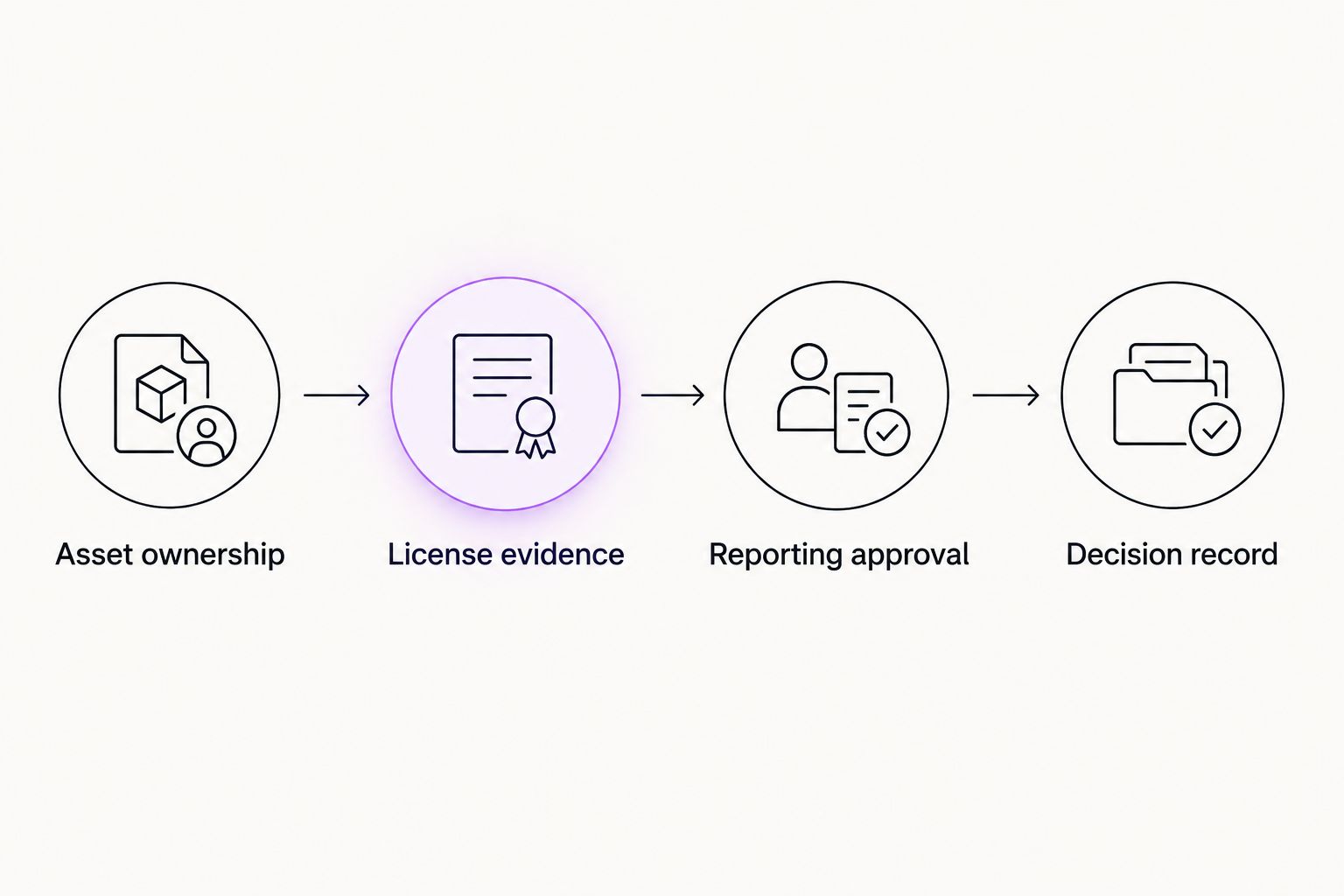
Accept the workflow only after inspecting its evidence and assigning an operational owner.
Evaluate exports as part of the same exercise. Your team should understand which evidence remains usable outside the interface and how someone else can inspect the decision later. This is especially important when procurement, operations, billing, and compliance rely on the same record.
Which enterprise ITAM software should you choose?
Choose ServiceNow as the default shortlist leader for broad enterprise lifecycle governance. Choose Jira Service Management Assets when service-linked records are the priority, Lansweeper when discovery comes first, and Snipe-IT when equipment custody defines the requirement.
Choose Octopus for software asset management when Microsoft SPLA or Authorized Outsourcer reporting, customer billing, and audit defense define the job. Do not force that specialist decision into a generic laptop-management comparison.
For 2026, the decisive question is simple: which platform completes your mandatory workflow with inspectable evidence and a named owner? Select against that requirement before expanding the feature list.
FAQ
What's the best IT asset management software for enterprise IT teams?
ServiceNow is the default shortlist leader for enterprise teams that need broad hardware and software lifecycle governance. Jira Service Management Assets, Lansweeper, and Snipe-IT fit narrower service-context, discovery, and equipment-custody requirements.
Which asset management platform fits Microsoft SPLA providers?
Octopus fits Microsoft SPLA partners and Authorized Outsourcers that need usage reporting, customer billing, and audit-defense support. Evaluate that provider workflow separately from general employee equipment management.
Is IT asset management the same as software asset management?
IT asset management covers the management of technology assets, while software asset management focuses on software and its associated licensing responsibilities. A software inventory alone does not establish a compliant licensing position.
Is Jira Service Management Assets better than Lansweeper?
Jira Service Management Assets fits service-linked object records, while Lansweeper fits discovery-led inventory. Choose according to whether your primary gap is operational service context or establishing an inventory.
Can Snipe-IT replace specialist software licensing analysis?
Snipe-IT equipment assignment records do not replace specialist software licensing analysis. Tracking custody and interpreting software rights are separate responsibilities.
How should an enterprise evaluate ITAM software in 2026?
Evaluate ITAM software against representative ownership, licensing, and reporting scenarios rather than a generic demonstration. Set acceptance criteria, inspect supporting evidence, and assign an operational owner before approving the purchase.
One last thing
Before buying, ask the proposed system owner to explain how an incorrect record gets corrected—and how a reviewer can see what changed. A platform that displays the right answer is useful; a process that preserves the reason for that answer is what your operations and compliance teams need.