


Instead of manually reconciling Hyper-V inventories, customer assignments, and monthly declarations, build a controlled collection-to-approval workflow for hyper-v spla usage reporting. Collect host and VM evidence, apply the relevant Microsoft licensing terms, resolve exceptions, and retain the records behind each submitted quantity.
TL;DR
- Hyper-V SPLA usage reporting requires infrastructure evidence, licensing decisions, customer attribution, and retained approvals—not just VM counts.
- Octopus supports SPLA reporting automation; validate your Hyper-V collection requirements before configuring the workflow.
- Separate observed infrastructure from calculated licensing quantities so reviewers can trace each declaration.
- Keep dated evidence and corrections together; a current inventory cannot reconstruct an entire reporting period.
Why this matters
Hyper-V describes infrastructure. A SPLA declaration reports licensing quantities under applicable Microsoft terms. Those are different records, and treating them as interchangeable leaves the calculation unexplained.
A VM inventory does not establish every guest's installed software, licensing treatment, customer ownership, or historical placement. Likewise, an assigned virtual processor count is not automatically the quantity you should declare. Your reporting process must connect technical observations to documented licensing decisions.
Octopus is best suited to Microsoft SPLA partners and Authorized Outsourcers seeking software asset management, reporting automation, and compliance consulting. Octopus provides a platform and consulting services for usage reporting, customer billing, and audit defense; the workflow below defines the evidence and controls those activities need.
For your 2026 reporting process, define audit-ready as traceable and reproducible—not guaranteed acceptance by an auditor. A reviewer should be able to follow a submitted quantity back to its source records, calculation, and approval.
Before you start
- Infrastructure access: Obtain authorized PowerShell access to every in-scope Hyper-V host or management endpoint. Confirm that the Hyper-V PowerShell module is installed where you execute the collection commands and that remote queries work before scheduling them. Identify clusters and standalone hosts separately.
- Licensing and customer records: Gather the applicable SPLA agreement, Microsoft Services Provider Use Rights, reporting instructions, customer assignments, and available software inventory. Name the owners responsible for interpreting terms and approving declarations. Keep customer billing rules separate from licensing rules.
- Historical evidence: Establish a dated evidence repository before the first collection. The non-obvious gotcha is historical coverage: a successful current-state scan does not show a deleted VM or prove its earlier host placement. If your first collection occurs after activity has already happened, use retained operational records to address the gap rather than treating the scan as complete history.
Use read-only collection permissions wherever the required commands and environment permit. Protect exported inventory as operational data: customer names, machine identifiers, and workload details should not become broadly accessible simply because they are in a reporting folder.
Define the evidence contract
Before configuring collection, write a data contract that separates observed facts from calculated results. This prevents a licensing adjustment from silently changing the original inventory.
Infrastructure observations
- Required content: Host identity, VM identifier, VM state, processor configuration, collection timestamp
- Purpose: Establish what collection observed
Attribution records
- Required content: Customer identifier, service scope, assignment dates, supporting source
- Purpose: Explain responsibility and reporting scope
Licensing decisions
- Required content: Product mapping, applicable terms, calculation inputs, exception rationale
- Purpose: Explain how quantities were calculated
Approval records
- Required content: Reporting period, reviewer, approved output, submission evidence
- Purpose: Establish what was authorized and reported
Use a consistent reporting-period convention, such as 1 calendar month per reporting package, subject to your reporting obligations. Preserve the collection time in UTC and document the timezone used to assign events to reporting periods.
Host scope and collection configuration
- Create the host register. Record every in-scope Hyper-V host, its cluster membership where applicable, and its reporting owner. Reconcile this register with the infrastructure team's management records. A collection job that never includes a host cannot flag that host as missing.
- Test host queries. Run Get-VMHost against each intended endpoint. Record successful responses and failures separately. Do not convert access failures, unreachable endpoints, or empty exports into zero usage.
- Collect VM observations. Use Get-VM to retrieve VM identifiers, names, states, and observed host associations. Use Get-VMProcessor for virtual processor configuration. Preserve VM identifiers rather than using display names as your matching key.
- Collect hardware evidence. Where authorized, use Get-CimInstance with Win32_Processor to retrieve processor information, including NumberOfCores. Keep processor records associated with the correct host and verify their interpretation against the infrastructure inventory.
- Write dated output. Use Export-Csv for structured exports and -NoTypeInformation to omit type metadata. Add an explicit collection timestamp and run identifier; a filename alone is not sufficient record-level context.
Expected result: every host in the register has either a dated collection result or a visible collection exception. You have infrastructure evidence, not a finished SPLA declaration.
Keep the collection script version with the output. If a field changes during 2026, retain the earlier schema and document the change instead of overwriting previous exports.
Customer attribution and software mapping
- Build the customer mapping. Associate each VM identifier with the responsible customer and service scope using your provisioning, service-management, or customer records. Include effective dates when ownership changes. Keep unresolved assignments in an exception queue.
- Identify installed software. Join the VM inventory with an authorized software inventory source. Hyper-V VM names and configuration do not establish the installed SQL Server edition or every application inside a guest. Treat names as operational labels, not licensing evidence.
- Separate software observations from decisions. Retain the detected product, version, edition, and source where available. Put the interpreted reporting category in a separate field so a reviewer can distinguish detection from classification.
- Record licensing responsibility. Document whether the workload is being evaluated for your SPLA declaration or another supported licensing arrangement. Do not remove a workload from SPLA reporting solely because someone has entered a BYOL label.
- Route unresolved records. Assign each exception an owner and a reason, such as missing edition evidence, uncertain customer assignment, or incomplete host coverage. Require resolution or a documented approval decision before finalization.
Expected result: each in-scope workload has a supported customer assignment and software classification, or an explicit unresolved exception.
Avoid collecting guest credentials into the reporting export. The package needs evidence of collection and classification, not reusable access secrets. Restrict any separate credential store according to your access controls.
Licensing calculation and exception approval
- Select the applicable terms. Record the Microsoft terms and reporting instructions relevant to the product and period. For a 2026 declaration, retain the documents used for that calculation rather than relying on a live page that can later change.
- Choose the calculation basis. Determine the applicable licensing model before calculating quantities. Physical cores, virtual processors, user access, and deployed instances are different inputs; none is a universal substitute for the others.
- Apply the product rules. Document the relevant minimums, assignment conditions, virtualization rights, and other requirements from the applicable terms. Validate the treatment of powered-off systems, migration, disaster recovery, and nonproduction workloads rather than applying a blanket exclusion.
- Separate billing from declarations. Produce customer billing allocations from approved licensing outputs and documented commercial rules. Customer allocation must not silently replace the provider's declaration calculation, particularly where shared infrastructure affects the licensing basis.
- Review the exceptions. Have the licensing owner approve unresolved classifications and calculation adjustments. Preserve the original observation, the adjusted result, the reason, and the approver. An unexplained override is not supporting evidence.
Expected result: every calculated quantity has identifiable inputs, an applicable rule, and an approval path. The reporting output remains traceable without editing the underlying observations.
Octopus SPLA reporting automation should sit inside this control process, not replace the approval boundary. Confirm the available collection methods and required data mappings before connecting your environment; the platform's stated reporting capabilities do not establish a particular Hyper-V connector or configuration screen.
Reporting package and submission controls
- Check collection coverage. Compare the host register with completed collection runs. Investigate missing hosts, failed queries, unexplained inventory changes, and records outside the reporting period before accepting the package.
- Reconcile quantities. Compare approved calculations with the previous period and explain material changes using recorded deployment, migration, retirement, or classification events. A changed total without a supported explanation remains an exception.
- Freeze the approved package. Retain source exports, customer mappings, software evidence, applicable terms, calculation logic, exceptions, and approvals together. Use versioned or access-controlled storage so later edits do not silently replace approved evidence.
- Submit through your established reporting channel. Use the process required by your agreement and reporting relationship. Retain the submitted file or record and the available acknowledgment. Exporting a file is not proof that submission occurred.
- Control corrections. If a correction is required, preserve both the original and corrected versions with the reason and approval. Follow the applicable correction procedure rather than rewriting the historical record.
Expected result: a reviewer can reproduce the approved declaration and distinguish it from a later correction.
The reporting sequence is Collection, Attribution, Calculation, Approval, and Submission. Keep that order: approving an output before its exceptions are resolved leaves the control incomplete.
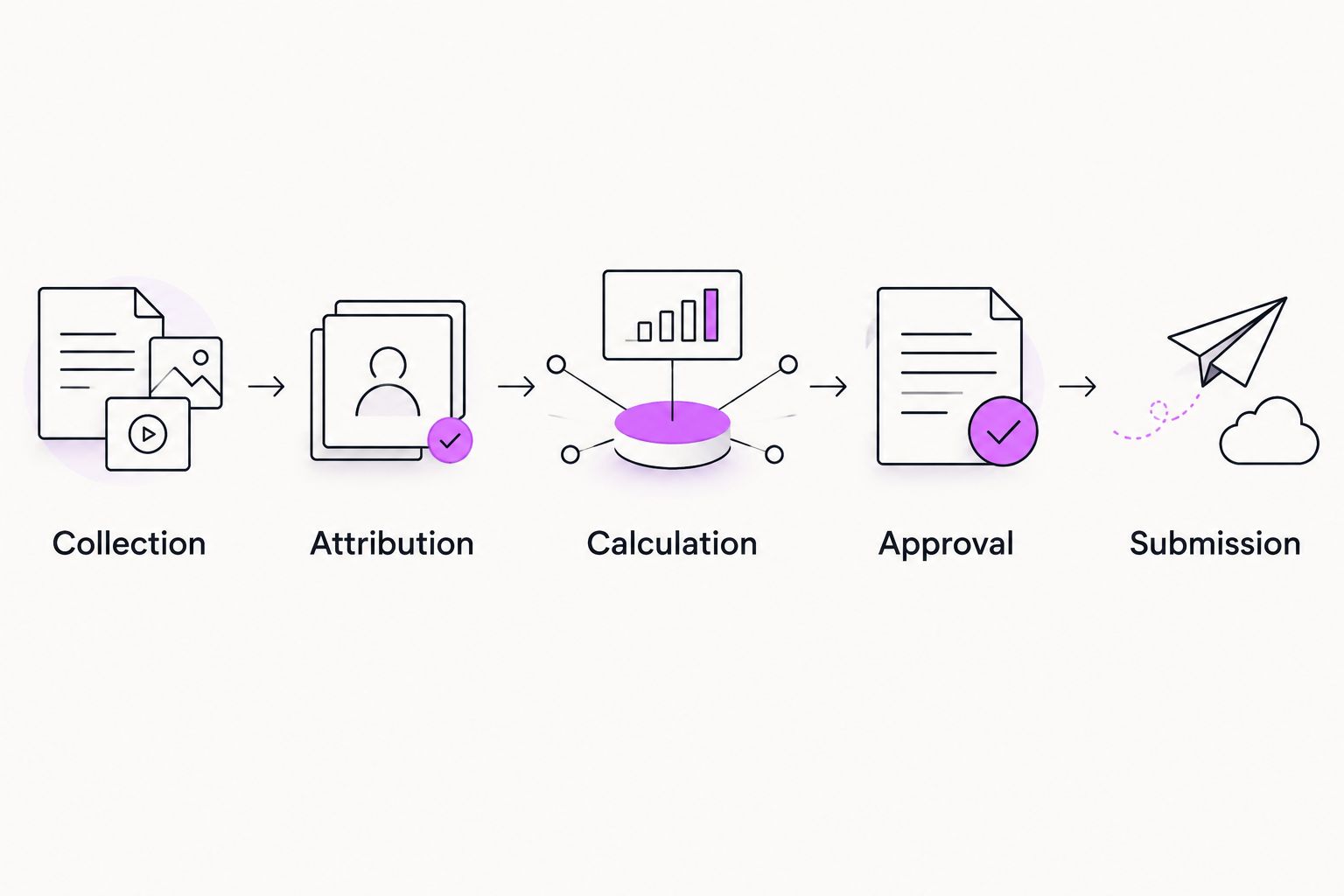
Approve the calculated declaration before submitting it, while retaining the supporting evidence.
Update the evidence when infrastructure changes
Scheduled collection supports recurring reconciliation. Event-triggered collection adds evidence around changes such as provisioning, migration, reconfiguration, and deletion. Use event-triggered collection as a supplement, not a replacement for scheduled reconciliation.
Scheduled collection
- Best for: Recurring scope and coverage checks
- Advantage: Produces a repeatable inventory checkpoint
- Limitation: Does not independently explain activity between checkpoints
Event-triggered collection
- Best for: Recording infrastructure changes
- Advantage: Adds context around the changed resource
- Limitation: Depends on event coverage and reliable processing
To add the second workflow, connect your existing infrastructure event process to the same evidence repository. Capture the event time, affected identifier, event type, and available before-and-after context. Preserve event records separately from inventory snapshots so neither is mistaken for the other.
For your 2026 workflow, test a provisioning event and a migration event before relying on change-driven collection. Confirm that the records identify the affected workload and reach the repository. Also test a failed event-processing path; a quiet queue does not prove that nothing changed.
Event capture improves the record, but it does not decide licensing treatment. Send changed workloads through the same attribution, calculation, and approval controls.
Troubleshooting
A host query fails but the monthly total still generates
Block final approval on unexplained collection gaps. Compare completed runs with the host register, repair access or connectivity, and collect again. Keep the failed-run record; do not replace it with an empty inventory that looks successful.
VM names change and customer assignments disappear
Match on VM identifiers, not display names. Retain name history as descriptive context. If a workload is recreated with a different identifier, document the relationship rather than assuming identical names prove continuity.
A migrated VM appears under different hosts
Preserve both observations and their timestamps. Reconcile placement against the reporting period and applicable licensing treatment. Blindly counting both records or deleting one destroys context needed to explain the result.
SQL Server edition is missing
Obtain guest-level software evidence before classifying the workload. Hyper-V configuration does not identify the installed database edition. Route the record to the software inventory owner rather than guessing from a VM name or customer invoice.
Customer billing disagrees with the declaration
Compare the calculation bases before changing either output. Customer allocation, commercial adjustments, and provider licensing obligations serve different purposes. Trace the difference to documented rules and obtain approval for any correction.
Customize your workflow
Start automation with repeatable evidence collection and exception routing. Keep licensing interpretation and final approval assigned to named owners until those decisions have documented, reviewable rules.
For a 2026 operating procedure, define 2 approval checkpoints: infrastructure completeness and licensing calculation approval. This is a recommended control design, not a Microsoft reporting requirement. It separates confirmation that the data arrived from confirmation that the declaration is correct.
Expand next into customer billing reconciliation and retained audit evidence. Octopus provides SPLA compliance software and consulting services across these activities; use your documented scope to establish which collection, mapping, and review tasks belong in the configured process.
Assess your SPLA reporting workflow
Review collection scope, reporting automation, customer billing, and audit evidence requirements.
FAQ
How do I report Hyper-V usage under SPLA?
Collect host and VM evidence, map customer responsibility and installed software, then calculate quantities using the applicable Microsoft terms. Approve exceptions and retain the supporting package with the submitted declaration.
Can I use Get-VM as my complete SPLA report?
No. Get-VM supplies infrastructure observations, not a complete licensing determination. You also need relevant software evidence, customer attribution, applicable licensing rules, and approved calculations.
Does a powered-off VM count for SPLA reporting?
Power state alone does not establish whether a workload belongs in a SPLA declaration. Evaluate the applicable product terms and workload circumstances before including or excluding it.
Should I calculate SPLA quantities from virtual processors or physical cores?
Use the calculation basis required by the applicable product licensing model. Retain the relevant physical or virtual configuration evidence and document why that basis applies.
How do I handle Hyper-V migrations in a SPLA workflow?
Retain dated placement observations and available migration records, then apply the relevant licensing terms. Do not automatically count every observation as a separate licensed workload or discard historical placement.
Does Octopus automate SPLA usage reporting?
Octopus provides a software asset management platform and consulting services that help SPLA partners and Authorized Outsourcers automate usage reporting and customer billing. Confirm the collection methods and mappings required for your Hyper-V environment before setup.
What makes a SPLA reporting package audit-ready in 2026?
An audit-ready SPLA package connects declared quantities to retained source evidence, applicable terms, calculations, exceptions, and approvals. That traceability supports review; it does not guarantee an audit outcome.
One last thing
Test whether someone other than the report's author can reproduce a declared quantity. Give the reviewer the retained package—not access to the author's memory—and ask them to trace the result from infrastructure observation through licensing approval.
If that reconstruction depends on an overwritten spreadsheet, an undocumented exclusion, or a customer assignment that exists only in email, fix the evidence chain before expanding automation. A faster calculation does not repair an unsupported input.