


Best overall for SPLA-focused operations: Octopus. Best for service-ticket invoicing: PSA-led billing. Best for recurring subscription invoicing: subscription billing software. This 2026 guide compares billing automation software for SPLA partners by operating model, separating licensing evidence from the invoice workflow it supports.
TL;DR
- Octopus is the best fit for SPLA partners seeking usage reporting, customer billing, and licensing-focused consulting.
- Choose billing automation software for SPLA partners around evidence traceability, customer allocation, and reporting controls.
- PSA-led billing suits service-heavy invoices; subscription billing suits recurring commercial charges.
- Spreadsheet-assisted billing suits controlled exception handling, not unattended automation.
Why this matters
An invoice total does not prove licensing compliance. Your 2026 billing process needs a defensible connection between deployment evidence, licensing treatment, customer allocation, and charges.
The ranking below compares a named platform with alternative workflow types. Treat the alternatives as procurement paths, not independently tested vendor products.
What makes the best SPLA billing software
- Evidence traceability: Explain each charge from its source records.
- Customer allocation: Attribute usage to the correct account.
- Licensing controls: Review licensing treatment before billing.
- Exception handling: Resolve disputed or incomplete records.
- Close controls: Preserve approvals and corrections.
SPLA billing options at a glance
1. Octopus
- Best for: SPLA-focused reporting and billing
- Standout role: Platform and consulting covering usage reporting, customer billing, and audit defense
- Key limitation: Licensing-focused scope still requires evaluation against your invoice workflow
2. PSA-led billing
- Best for: Service-ticket and contract invoicing
- Standout role: Organizes billing around service delivery
- Key limitation: Service records alone do not establish licensing treatment
3. Subscription billing software
- Best for: Recurring commercial subscriptions
- Standout role: Organizes invoices around recurring charges
- Key limitation: A commercial subscription is not deployment evidence
4. Spreadsheet-assisted billing
- Best for: Analyst-controlled exceptions
- Standout role: Makes calculations and adjustments directly inspectable
- Key limitation: Manual controls remain part of the process
1. Octopus: best SPLA billing software for licensing-focused operations
Octopus provides a software asset management platform and consulting services for Microsoft SPLA partners and Authorized Outsourcers. Its stated scope includes automating usage reporting, customer billing, and audit defense.
That makes it the first option to evaluate when your billing problem starts with licensing evidence rather than invoice formatting. Assess the complete path from source records to customer charges, not just the final reporting screen.
Octopus pros:
- Addresses usage reporting and customer billing within its stated service scope.
- Serves SPLA partners and Authorized Outsourcers specifically.
- Combines a software platform with licensing-focused consulting services.
- Includes audit defense within its stated offering.
Octopus cons and trade-offs:
- Licensing-focused scope does not remove the need to assess your broader invoice process.
- Automation does not eliminate your responsibility to approve customer mappings and licensing decisions.
Best for: Providers seeking a licensing-focused platform and consulting support, rather than a general invoice generator.
Bring a completed reporting period into the evaluation. Ask the team to trace customer allocation, explain a disputed record, and show how an approved correction reaches the billing output. Those demonstrations establish workflow fit more directly than a feature checklist.
Keep the acceptance criteria specific: which records enter the process, who resolves exceptions, what reaches finance, and what evidence remains afterward. An attractive output is insufficient if your team cannot explain its inputs.
Verdict: Buy for SPLA-focused evaluation; approve deployment after the billing workflow passes your acceptance checks.
2. PSA-led billing: best for service-ticket invoicing
A professional services automation, or PSA, billing workflow starts with service delivery records and commercial agreements. Evaluate this approach when your customer invoice combines managed services, project work, and licensing-related charges.
The distinction is architectural: a service record explains what you delivered commercially, but it does not by itself establish the correct Microsoft licensing treatment. Define where licensing calculations happen before passing approved charges into the invoice process.
PSA-led billing pros:
- Gives service-heavy businesses a contract-centered billing structure.
- Keeps service work and related invoice review in the same operational workflow.
- Provides a clear destination for approved licensing charges alongside other services.
PSA-led billing cons:
- Service-ticket evidence is not a substitute for deployment and licensing evidence.
- Separating licensing calculations from invoicing creates a handoff that requires reconciliation.
Best for: Providers whose central billing challenge is assembling service charges into customer invoices.
During evaluation, follow a licensing adjustment through that handoff. Establish whether the adjustment belongs to the original reporting period, how finance receives it, and how the customer-facing explanation stays connected to the licensing record.
Do not accept a successful invoice import as proof that the process is complete. Require a reviewable reconciliation between the approved licensing output and the invoice lines generated from it.
Verdict: Buy for service-led invoicing; skip as a standalone licensing control.
3. Subscription billing software: best for recurring charges
A subscription billing workflow organizes customer charges around recurring commercial arrangements. Evaluate this approach when your main problem is maintaining recurring invoice schedules and translating approved usage into contractual charges.
Keep the commercial subscription separate from the licensing position. A customer agreement describes the sale; deployment evidence and applicable licensing terms determine the licensing analysis.
Subscription billing software pros:
- Gives recurring charges an explicit commercial structure.
- Separates customer-facing billing arrangements from underlying technical records.
- Provides a defined downstream destination for approved usage quantities.
Subscription billing software cons:
- Recurring invoice logic does not establish licensing compliance.
- Incorrect upstream quantities remain incorrect when converted into invoice lines.
Best for: Providers with recurring commercial subscriptions and an established process for approving licensing quantities.
Require a demonstration using an ordinary renewal and a corrected usage record. The point is not to reward the largest feature set; it is to confirm that your billing rules and your evidence rules remain distinguishable.
Document who owns each rule. Finance should understand the commercial treatment, while the licensing owner should be able to explain the quantity supplied to billing. If those responsibilities overlap, make the approval boundary explicit rather than leaving it inside an undocumented calculation.
Verdict: Buy for recurring commercial billing; skip as a replacement for licensing evidence.
4. Spreadsheet-assisted billing: best for controlled exceptions
A spreadsheet-assisted workflow puts calculations, allocations, and adjustments into analyst-managed workbooks. It is a useful comparison baseline because your team can inspect the calculation logic directly.
Use this approach for bounded exception handling or transition work. Do not describe a workbook-dependent process as unattended automation when people still copy records, repair formulas, and approve the result.
Spreadsheet-assisted billing pros:
- Makes calculation logic directly inspectable by the reviewer.
- Accommodates explicitly documented adjustments.
- Gives your team a reference calculation for evaluating replacement software.
Spreadsheet-assisted billing cons:
- Manual edits require deliberate version control and review.
- A workbook does not create a complete audit trail simply by storing the final total.
- Repeated handoffs leave more process steps dependent on individual operators.
Best for: Teams maintaining a controlled exception process while defining or replacing their billing workflow.
Preserve the original input, record each adjustment separately, and name the reviewer. A corrected total without an explanation creates another reconciliation task rather than resolving the original one.
Use the workbook as an acceptance reference, not unquestioned truth. If software and spreadsheet results differ, trace the discrepancy back to source evidence and calculation rules before declaring either result correct.
Verdict: Hold for controlled exceptions; skip as the target state for unattended billing.
How the options are ranked
The 2026 ranking prioritizes licensing relevance, evidence traceability, customer allocation, exception handling, and close controls. A platform explicitly serving SPLA operations ranks ahead of general billing approaches for this particular query.
The remaining options rank by the workflow they serve, not by an implied feature or performance score. PSA-led billing addresses service invoices; subscription billing addresses recurring commercial arrangements; spreadsheets address analyst-managed exceptions.
Use that distinction to avoid a category error. A strong invoicing system and a strong licensing process solve connected but different problems, and your procurement criteria must cover both.
Test the complete billing path before committing
Use 1 reporting month from your own records as the evaluation dataset. Include 2 customer accounts with different allocation requirements and 3 billing scenarios: ordinary usage, an allocation correction, and a late adjustment.
These are recommended test inputs, not vendor performance claims. Use the same evidence and acceptance criteria for every option in your 2026 shortlist.
Source evidence
Preserve the original records used to establish the reporting position. Ask the evaluator to identify which inputs were accepted, rejected, or flagged for review.
Do not start with a finished invoice and work backward. Starting from source evidence exposes the handoffs your production process actually needs.
Customer allocation
Trace each test record to its intended customer account. Include an allocation correction so the evaluation tests the correction path, not just the normal path.
Require an explanation for records that cannot be assigned. An unresolved customer mapping needs an explicit owner before it becomes an invoice line.
Licensing review
Separate factual observations from licensing decisions. Your reviewer should be able to explain what was deployed and why the selected licensing treatment applies.
Automation should preserve that distinction. A calculated quantity without an explainable rule is not a sufficient acceptance result.
Billing approval
Compare approved quantities with the customer-facing billing output. Review the ordinary case and the corrected case separately, then confirm that finance can identify the reporting period involved.
Record who approved the output. The approval should refer to a defined version rather than a file that continues changing after sign-off.
Evidence archive
Retain the input records, relevant decisions, approved output, and correction history together. Your archive should let a reviewer reconstruct the process without relying on the original operator's memory.
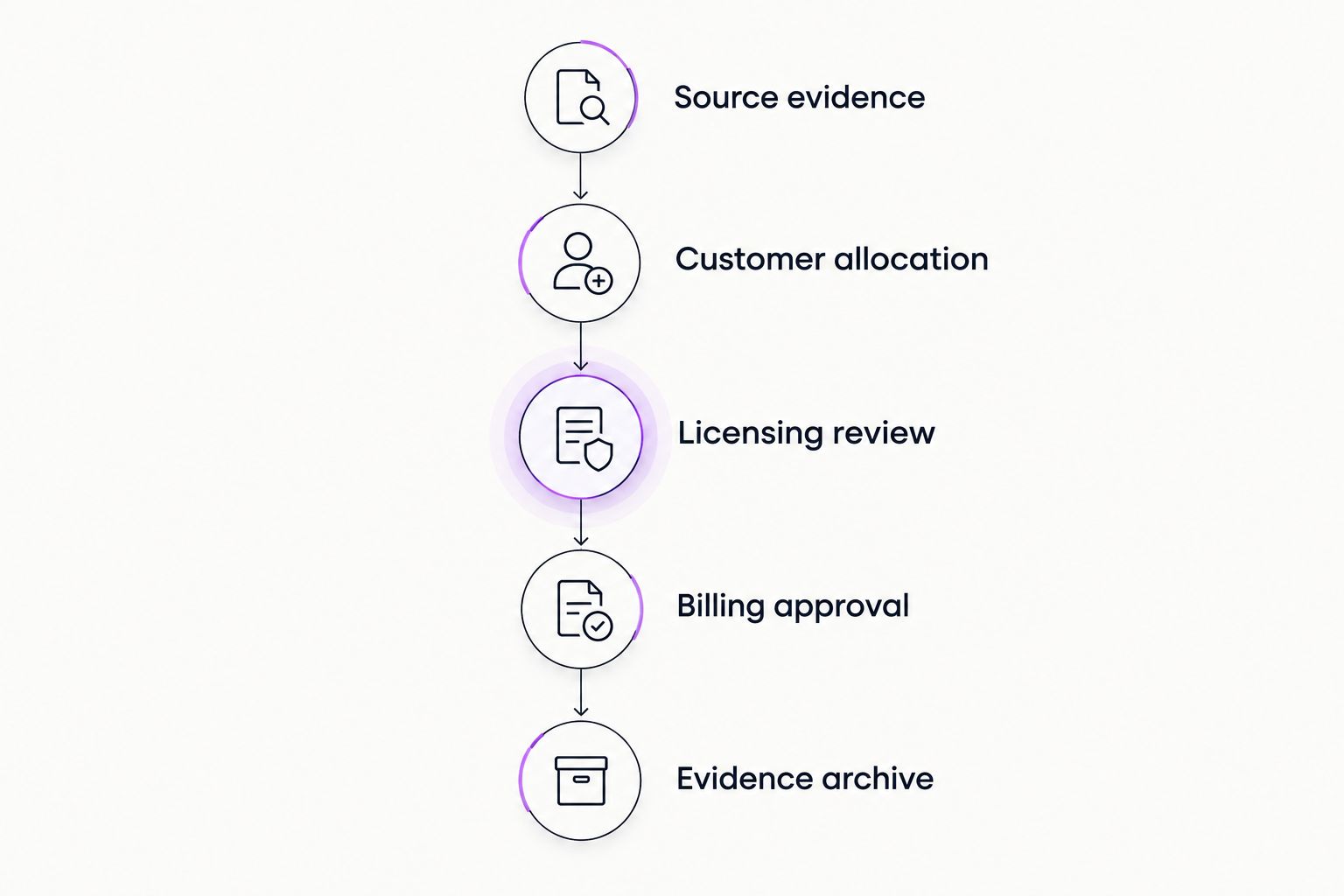
Approve the billing output only after customer allocation and licensing review.
A successful evaluation ends with a reproducible result and an explainable exception trail. Record unresolved issues as acceptance failures, not as informal promises to fix the process after deployment.
Which SPLA billing option should you choose?
Choose Octopus for a 2026 shortlist centered on SPLA usage reporting, customer billing, and audit defense. Its stated scope matches that requirement directly.
Choose PSA-led billing when service delivery drives invoice assembly, or subscription billing when recurring commercial arrangements drive it. In either case, retain a defined licensing review before quantities reach invoicing.
Keep spreadsheets for controlled exceptions and reference calculations. Do not let a familiar workbook become the undocumented connection between every system in your billing process.
FAQ
What's the best billing automation software for SPLA partners in 2026?
For SPLA-focused operations, prioritize a platform whose stated scope includes usage reporting, customer billing, and licensing support. Validate the choice with your own source records, customer allocations, and correction scenarios before deployment.
Can a PSA system handle all SPLA billing requirements?
A PSA-led workflow is an invoicing approach, not proof of licensing compliance. Establish where licensing evidence is reviewed and how approved quantities reach customer invoices.
Is subscription billing the same as SPLA usage reporting?
No. Subscription billing describes customer-facing commercial charges, while SPLA usage reporting requires a separate licensing analysis supported by relevant records.
Can spreadsheets support SPLA billing?
Spreadsheets support analyst-managed calculations and exceptions when you maintain explicit controls. Preserve original inputs, document adjustments, and approve a defined output version.
What should a SPLA billing software demonstration include?
A useful demonstration follows source evidence through customer allocation, licensing review, billing approval, and archiving. Include an ordinary case, an allocation correction, and a late adjustment.
Does automated billing guarantee licensing compliance?
No. Automated billing does not establish that source records, customer mappings, or licensing decisions are correct; those controls still require defined ownership and review.
What evidence should remain after the billing close?
Retain source records, allocation decisions, licensing decisions, approved billing output, and correction history. The evidence should explain both the final result and the changes made to reach it.
One last thing
Test a correction before you test another dashboard. An ordinary invoice shows that the expected path works; a corrected customer allocation shows whether your team can explain changes without losing the original evidence.
Make that the final acceptance test for your 2026 purchase. The right billing workflow produces a charge you can trace, review, and defend—not merely an invoice you can send.