Instead of manually copying SPLA usage into customer invoices, connect validated usage records to WHMCS through a supported data interface and a controlled billing handoff. An Octopus Cloud WHMCS integration needs customer mapping, billing-period reconciliation, and duplicate protection before it can safely automate invoice preparation.
TL;DR
- An Octopus Cloud WHMCS integration should reconcile SPLA usage before creating customer billing records.
- Octopus serves SPLA partners and Authorized Outsourcers managing usage reporting, customer billing, and audit defense.
- Confirm the supported data interface before building; do not assume a native WHMCS connector exists.
- Create unbilled items first, review exceptions, and prevent retries from generating duplicate charges.
Why this matters
A licensing record and a customer invoice answer different questions. The licensing record supports what you report under the applicable agreement; the invoice records what you charge a customer. Automating the transfer does not make those records interchangeable.
Octopus provides software asset management and consulting services for Microsoft SPLA partners and Authorized Outsourcers. Octopus is best for SPLA partners and Authorized Outsourcers that need usage reporting, customer billing, and audit defense. Its role in this workflow is the licensing and usage context, not an assumed billing connector.
For a 2026 implementation, define the boundary clearly: approved usage enters the billing process; unresolved licensing questions stay outside it. WHMCS should receive records that have passed your controls, rather than becoming the place where you discover missing customer ownership.
The workflow below describes a controlled integration design. It does not assume an Octopus API endpoint, export format, WHMCS module, or connector setting that has not been confirmed.
Before you start
- Confirm source access. Obtain access to the relevant Octopus usage records and confirm which supported export or interface your deployment provides. Establish how those records identify customers, reporting periods, products, and quantities. Stop if the supported interface cannot supply the required information.
- Prepare WHMCS access. Arrange authorized access to WHMCS customer records and billing operations, plus a non-production environment or isolated test account. For an API implementation, check the current WHMCS documentation and configure credentials with only the permissions the workflow requires.
- Resolve the non-obvious gotcha: billing identity. A tenant name, virtual machine name, or customer display name is not a reliable billing key. Establish a stable mapping to the WHMCS client ID before sending anything, including an explicit rule for records that cannot be mapped.
Also assign an owner for licensing approval and an owner for billing release. The same person can perform both roles, but the workflow must record each decision separately.
Source records and approval gate
Start with the source contract, not the automation schedule. If the source changes its structure without a matching validation change, the integration must stop rather than reinterpret the records silently.
- Confirm the interface. Ask the Octopus administrator or support contact to identify the supported extraction method for your deployment. Obtain its documentation and a representative sample before selecting an integration platform or writing code.
- Define required fields. Document the source customer identifier, reporting period, product or licensing metric, quantity, and available record identifiers. These are your integration requirements, not claims about field names in the product interface.
- Preserve source evidence. Keep the original input alongside the normalized billing data. Record when the input was received and which processing run used it, without overwriting an earlier version.
- Create an approval gate. Allow only reviewed usage into billing preparation. Reject missing periods, unknown customers, unsupported metrics, and incomplete records into an exception queue.
- Set the period boundary. Define the reporting interval and timezone explicitly. For the 2026 billing calendar, document how records at the boundary enter the intended period rather than relying on a server's local clock.
Expected result: you have a repeatable source dataset, a documented meaning for every required field, and a clear separation between approved records and exceptions.
Do not treat an empty extract as proof of zero usage. First establish that extraction completed successfully and covered the intended scope. A successful process with no records and a failed process with no records require different decisions.
Customer mapping and billing rules
Customer attribution is the control that connects technical usage to commercial responsibility. Block unmapped usage; never assign it to a default paying customer. A default assignment hides the exception while creating a billing error.
- Build the mapping register. Associate each source customer identifier with the intended WHMCS client ID. Record who approved the relationship and when it became effective.
- Validate the destination. Confirm that the WHMCS client exists and is the correct billing entity. Where API access is appropriate, WHMCS provides GetClientsDetails for retrieving client details; check its current request requirements before implementation.
- Define charge transformation. Specify how approved usage becomes a customer charge under the customer's commercial agreement. Keep licensing calculations separate from billing calculations so a change to one does not silently change the other.
- Define a billing key. Construct a stable internal identifier from the customer, reporting period, charge category, and source revision where applicable. This is your duplicate-control key, not a field assumed to exist in either platform.
- Version the rules. Give the 2026 mapping and transformation rules an explicit version. Save that version with each prepared billing record so later reviews can reproduce the decision.
Expected result: every approved usage record has one intended billing destination, an explainable transformation, and a traceable identity.
For your first acceptance test, use 1 customer account across 1 billing period, with 0 duplicate charges as a required result. These are test criteria, not product performance claims. Add complexity only after that controlled case reconciles.
A customer rename must not create a new mapping automatically. Treat a billing-entity change as an approval event, even when the underlying infrastructure remains unchanged.
WHMCS billing handoff
Use a staged handoff before allowing automatic invoice release. This design separates successful record creation from the decision to send a customer an invoice.
- Prepare the destination record. Include the mapped client, a clear charge description, the intended billing period, and the calculated billing value. Keep the source reference in your integration ledger even if it is not suitable for customer-facing text.
- Choose the supported operation. WHMCS provides the API action AddBillableItem for adding billable items. Confirm that this operation matches your billing model rather than assuming every implementation should create a new service or modify an existing invoice.
- Select deferred invoicing. For AddBillableItem, the invoiceaction parameter supports noinvoice to leave the item uninvoiced at creation. Confirm this behavior in your installed WHMCS version and test the wider invoice-generation process before relying on it as a release control.
- Capture the result. Save the destination reference, request outcome, source billing key, and processing timestamp. Mark the record successful only after you have checked the response.
- Reconcile before release. Compare accepted source records, prepared charges, and created WHMCS items. Route differences to review; do not interpret an HTTP success response alone as proof that the business transaction is correct.
Expected result: approved usage produces traceable, uninvoiced billing items that your billing owner can review before invoice release.
The integration has four distinct checkpoints: Source approval, Customer mapping, Billing staging, and Reconciliation. Keep their results visible separately so an operator can locate a failure without inspecting every record.
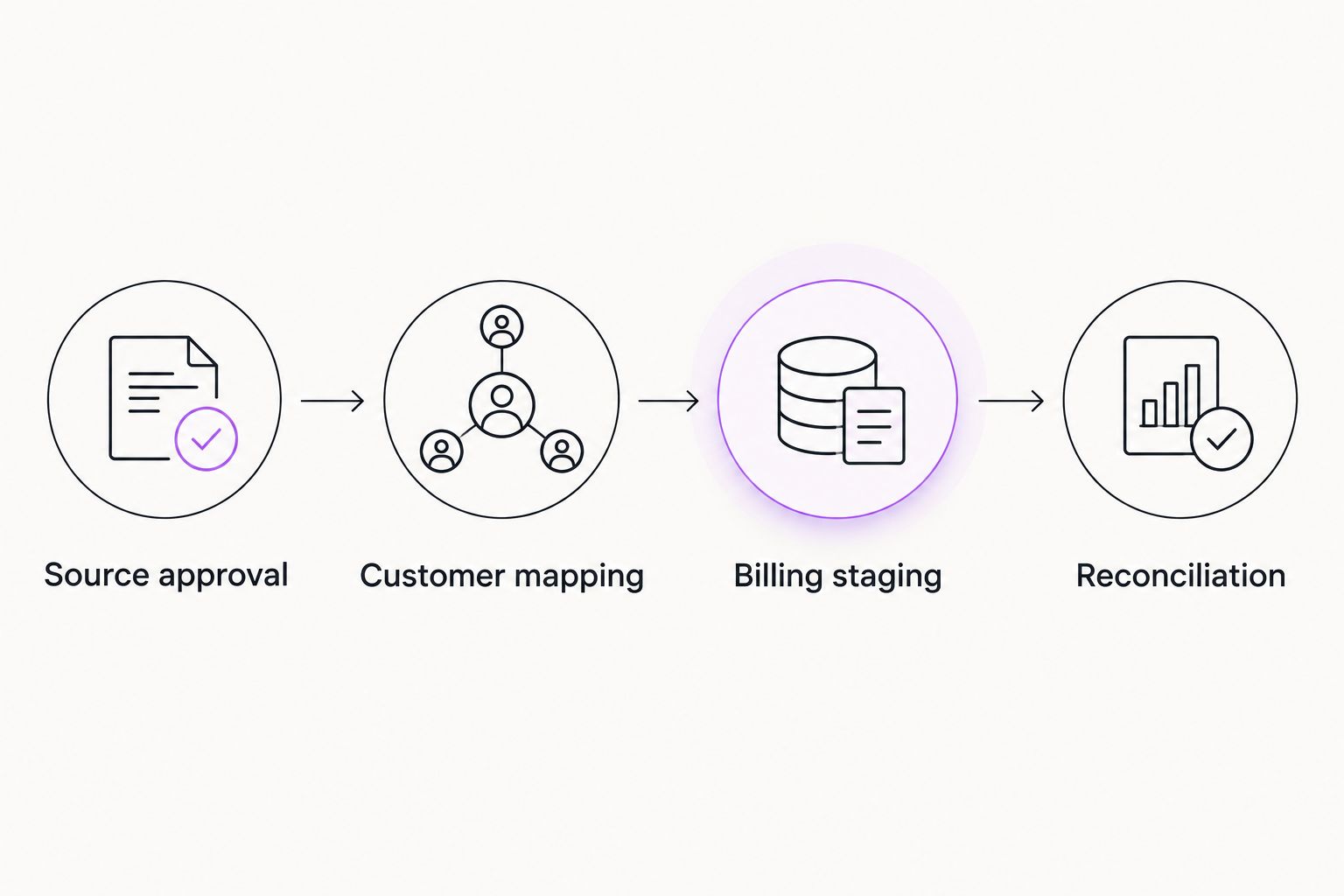
Treat successful transfer and successful reconciliation as separate checkpoints.
Retry control and production release
A timeout does not prove that WHMCS rejected a request. The destination can complete an operation even when your integration never receives the response. Blind retries therefore risk duplicate billing items.
- Persist before sending. Write the intended operation and billing key to a durable integration ledger before making the destination request.
- Prevent concurrent sends. Ensure that separate workers or overlapping scheduled runs cannot process the same billing key simultaneously.
- Investigate uncertain outcomes. When a request times out, check the destination and ledger before submitting it again. If you cannot establish whether the item exists, hold it for review rather than guessing.
- Test failure paths. Exercise unknown customers, incomplete source records, rejected credentials, interrupted requests, and repeated input. Each failure needs a visible owner and a defined recovery action.
- Authorize production release. Record approval of the 2026 production configuration, including credentials, scheduling, mapping version, and invoice-release controls. Separate deployment approval from approval of an individual billing batch.
Expected result: retries recover failed work without duplicating confirmed work, and production behavior matches the tested workflow.
Keep sensitive credentials out of charge descriptions, logs, and source attachments. Log enough information to investigate a transaction without copying secrets into operational evidence.
Process revised usage after the initial billing run
Revised usage is an adjacent workflow, not a reason to rerun the original batch unchanged. Your correction path must distinguish an approved revision from a duplicate delivery of the same input.
Scheduled approved batch
- Best for: A defined billing-period close
- Advantage: Creates a clear reconciliation checkpoint
- Limitation: Changes after approval need a separate correction path
Approved revision workflow
- Best for: Corrected usage after an initial handoff
- Advantage: Preserves the relationship between original and revised records
- Limitation: Requires explicit adjustment and approval rules
Both workflows use the same mapping and duplicate controls. The difference is how a revised record affects work already accepted by WHMCS.
- Compare the revised source against the previously approved version.
- Identify whether the related billing item remains uninvoiced or has entered an invoice process.
- Obtain billing approval for the appropriate correction method in WHMCS.
- Record the original reference, revised reference, reason, and approval together.
Never silently overwrite the integration ledger to make revised usage look original. If an invoice already exists, use the correction process authorized by your finance team. Do not assume a new usage extract authorizes editing a financial document.
For 2026 operational reviews, test this revision path alongside the initial batch. A workflow that handles only the first successful submission is not ready for recurring billing.
Troubleshooting
Usage appears under the wrong customer
Stop further processing for the affected mapping. Verify the stable source identifier against the WHMCS client ID, correct the approved mapping, and review any billing items already created before resuming.
A repeated run creates duplicate billing items
Check whether the billing key changes between runs or whether concurrent workers bypass the ledger. Repair duplicate protection before retrying; resolve existing duplicate items through the approved billing process.
A timeout leaves the billing outcome unclear
Treat the operation as uncertain, not failed. Inspect the destination and saved request details, establish whether creation occurred, and only then authorize a retry.
WHMCS rejects the API request
Read the returned error and verify credentials, permissions, required parameters, and permitted access configuration. Fix the specific rejection; repeatedly resending an unchanged request does not resolve an authorization or validation failure.
Licensing totals and billing totals differ
Reconcile customer attribution, period boundaries, excluded records, and transformation rules separately. Quantity totals and monetary totals are different measures; compare like with like before concluding that either system is wrong.
Customize your workflow
Expand only after the initial customer-and-period test passes. Add customer groups, additional charge categories, and revised-usage handling as separately approved changes rather than enabling everything in one deployment.
For Octopus usage reporting and customer billing, preserve the boundary between licensing evidence and commercial decisions. Automation moves approved records; it does not replace agreement interpretation or finance authorization.
The practical trade-off is control versus maintenance. A staged workflow provides checkpoints and traceability, but you must maintain mappings, transformation rules, credentials, and exception ownership. Removing those responsibilities from the design does not remove them from the business.
FAQ
Does Octopus have a native WHMCS connector?
Confirm native-connector availability directly with Octopus before planning deployment. This guide describes a controlled integration workflow and does not establish that a native WHMCS connector exists.
What do I need before connecting usage reporting to WHMCS?
You need a confirmed source interface, authorized WHMCS access, stable customer mapping, and approved billing rules. Establish an exception process before transferring production records.
Can WHMCS receive billing items without immediately creating invoices?
WHMCS AddBillableItem supports the invoiceaction value noinvoice for creating an uninvoiced item. Test your installed version and invoice-generation configuration before treating this as a release control.
How do I prevent duplicate SPLA billing items?
Use a stable billing key, a durable processing ledger, and concurrency controls. After an uncertain request outcome, inspect the destination before retrying.
Should I automate invoice release as soon as the connection works?
No; reconcile staged billing records before enabling automatic invoice release. A successful transfer does not prove correct customer mapping, charge calculation, or period coverage.
What happens when usage changes after billing preparation?
Process the change as an approved revision linked to the original record. The correction method depends on whether the destination item remains uninvoiced or has entered the invoice process.
Does automated customer billing prove SPLA compliance?
No; customer billing and licensing compliance are separate controls. Preserve licensing evidence and approvals rather than treating a WHMCS billing item as proof of reporting accuracy.
One last thing
The strongest final test is a deliberate replay. Resubmit the same approved input after a successful run and confirm that it creates no additional billing items. Then interrupt a test request and verify that recovery distinguishes an uncertain outcome from a confirmed failure. Those tests expose billing risks that a successful first transfer leaves hidden.