


Yes—Windows Server license count changes can trigger alerts when your monitoring workflow compares license-relevant data against a defined baseline and applies notification rules. A changed inventory count does not, by itself, prove that your licensing obligation changed. For SPLA reporting, the alert needs to identify the affected environment, explain the difference, and route the exception for review before you change a report.
TL;DR
- Windows server license count changes trigger alerts when monitoring rules compare consistent baselines and route exceptions.
- Microsoft Windows Server inventory changes need licensing review before they become SPLA reporting changes.
- Octopus serves SPLA partners and Authorized Outsourcers that need software asset management and licensing consulting.
- Track increases, decreases, and collection failures separately; each requires a different response.
Why this matters
An alert should identify a licensing decision, not just announce that a counter moved. A newly discovered server, a missing inventory record, and a revised licensing calculation represent different events. Treating them as equivalent creates unnecessary investigations and weak reporting evidence.
Octopus provides software asset management software and consulting for SPLA partners and Authorized Outsourcers. For your 2026 reporting controls, distinguish the ability to collect usage data from the ability to evaluate a change and notify an accountable owner.
The practical objective is straightforward: detect a meaningful difference, establish its cause, and retain the evidence supporting the reporting decision. A notification without that chain leaves the compliance team doing the same investigation manually.
Can Windows Server license count changes trigger alerts?
Yes. Configure alerts around the specific count you need to control, rather than a generic total labeled licenses. Your rule must distinguish discovered infrastructure, calculated licensing requirements, and reporting adjustments.
These are different monitoring options, not interchangeable measures:
Inventory change alert
- Best for: Infrastructure teams tracking environment changes
- Useful signal: A server or relevant configuration appears, disappears, or changes
- Limitation: Does not establish the licensing requirement
Reconciled count alert
- Best for: Licensing teams investigating changed obligations
- Useful signal: A licensing calculation differs from its approved baseline
- Limitation: Depends on complete inventory and correct licensing logic
Reporting adjustment alert
- Best for: Compliance teams controlling report revisions
- Useful signal: A reviewed reporting quantity changes
- Limitation: Does not explain the underlying infrastructure event by itself
Use reconciled count alerts for licensing decisions, with inventory and reporting alerts supplying supporting context. Inventory-only monitoring is useful for detection but insufficient for approving a reporting change. Reporting-only monitoring catches adjustments after someone has already made them.
For a 2026 control design, require every alert to state which measure changed. A reviewer should not have to open several systems to determine whether the notification concerns a discovered machine or a revised reporting quantity.
How do you configure a useful alert workflow?
The following sequence is a control design, not a claim that every monitoring platform includes these functions. Use it to specify requirements and evaluate the workflow in your environment.
Define scope
Identify the customers, hosts, virtual machines, and reporting period covered by the rule. Record which licensing arrangement applies instead of treating every Windows Server deployment as an SPLA reporting item.
Assign ownership at this stage. Infrastructure staff can explain a deployment change, while the licensing owner decides whether that change affects the reporting obligation.
Validate inventory
Confirm that the collection completed successfully before comparing counts. A missing host or interrupted collection needs a data-quality exception, not an automatic reduction in the licensing baseline.
Preserve the collection timestamp and source. Otherwise, a reviewer cannot tell whether a difference reflects a genuine environment change or simply an older inventory extract.
Compare baselines
Compare 2 snapshots using the same scope and calculation rules. Keep the approved earlier snapshot available so the reviewer can inspect the underlying records rather than trust a difference displayed on a dashboard.
If the calculation method changes, identify that separately. A revised rule can alter the result even when the infrastructure remains unchanged.
Route exceptions
Send each exception to an owner who can act on it. Include the affected customer or environment, the previous and current values, the relevant timestamps, and the rule that produced the alert.
Separate infrastructure investigation from reporting approval. A technician confirming that a machine exists has not necessarily confirmed the correct licensing treatment.
Approve changes
Require a documented decision before updating the approved reporting baseline. Record whether the difference represents a valid reporting change, a collection problem, or a calculation issue.
Retain the evidence with that decision. The next reviewer should be able to reconstruct the result without relying on the original recipient's memory.
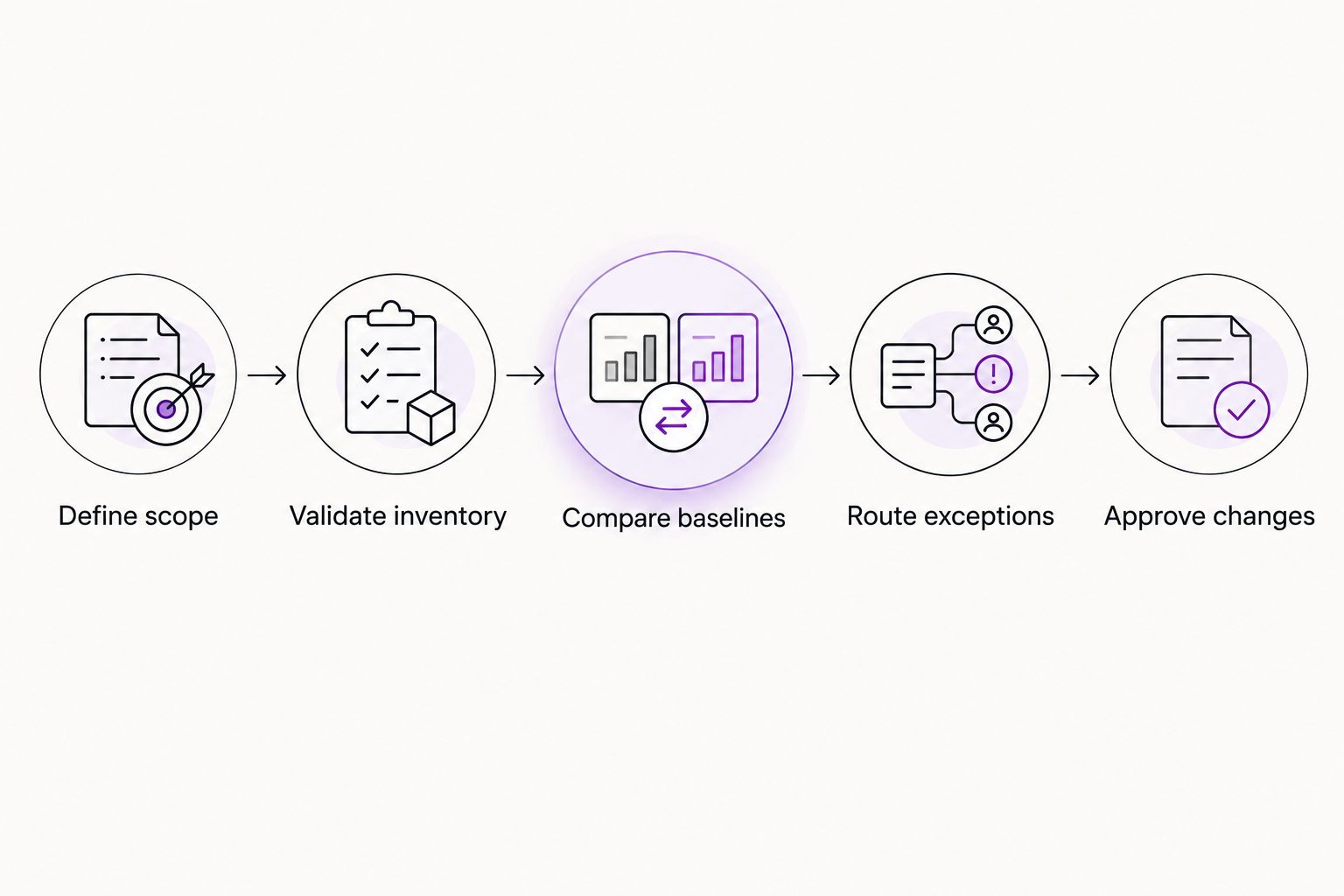
Validate inventory before treating a count difference as a reporting change.
Why Windows Server license count alerts vary
The right alert depends on what your organization measures and how it reports usage. These factors determine whether a difference deserves immediate investigation or belongs in a routine reconciliation queue:
- Measurement scope: Customer, host, virtual machine, and environment boundaries determine which records belong in the comparison. A scope change can create a count difference without a deployment change.
- Licensing basis: The applicable agreement and product terms determine which technical attributes matter. Do not substitute a machine count for a licensing calculation.
- Collection quality: Missing, stale, or duplicated records change the apparent total. Validate the input before changing the approved output.
- Calculation changes: Revised mappings or licensing rules can produce a different result from unchanged infrastructure. Preserve the method used for each baseline.
- Reporting status: A change affecting an open reporting period needs a different approval path from a correction to an already submitted report.
- Exception ownership: A customer-specific issue and a collection-wide failure require different responders. Route the exception to the person responsible for its cause.
Do not apply a universal percentage threshold without reviewing its consequences. An absolute change can matter even when it represents a small share of the overall environment. Conversely, a large apparent decrease can be a collection failure rather than a legitimate reduction.
Should increases and decreases trigger the same alert?
Increases and decreases should both be reviewed, but they should not trigger the same automatic action. An increase calls for checking newly detected infrastructure and its licensing treatment; a decrease calls for confirming that records are genuinely out of scope rather than missing.
For an increase, start with the affected records. Confirm customer assignment, deployment status, and the attributes used by the licensing calculation before changing the reporting quantity.
For a decrease, verify removal or reassignment and confirm that collection remains complete. Never interpret missing inventory as proof that a reporting obligation ended.
Keep the response specific. A count increase should not automatically create a customer billing adjustment, and a count decrease should not automatically reduce a submitted quantity. Both need the appropriate review.
Does every alert require a change to the SPLA report?
No—an alert requires investigation, not an automatic SPLA reporting change. The reporting decision follows from verified usage, the applicable licensing requirements, and the relevant reporting period.
A duplicate inventory record can create an apparent increase without adding a new deployment. A revised customer mapping can move a quantity between reporting groups without changing the overall total.
For your 2026 reporting process, retain 3 records together: the observed difference, the review decision, and the approved reporting outcome. This recommended evidence structure separates what the system detected from what your compliance team concluded.
That separation also protects billing accuracy. A licensing exception and a customer billing correction are related only when the reviewed facts and commercial arrangement support that connection.
What should a license count alert contain?
A useful notification lets the recipient identify the scope, inspect the evidence, and take responsibility for the next action. Avoid messages that contain only a changed total and a severity label.
Include the following fields in your alert specification:
- Affected scope: Customer, environment, host, or workload identifiers relevant to the exception.
- Measured quantity: The exact count being compared, including whether it is inventory or a calculated licensing requirement.
- Previous and current values: Both values, their timestamps, and the approved comparison baseline.
- Change explanation: The changed source records or calculation inputs, where available.
- Collection status: Whether the underlying inventory completed successfully and passed validation.
- Responsible owner: The team or person accountable for investigation and the separate reporting approver, where applicable.
- Resolution evidence: The reason for the decision and the records supporting any approved adjustment.
Give each exception 1 accountable owner. Additional recipients can contribute evidence, but shared visibility is not a substitute for responsibility.
Severity should reflect the required action. A failed collection needs investigation of data completeness; an unexplained reporting difference needs licensing review. Labeling both critical without distinguishing their causes makes prioritization harder.
How do you evaluate software for this workflow?
Evaluate the actual sequence, not a feature label such as monitoring or automation. Ask the provider to demonstrate a changed source record, a comparison against an approved baseline, an actionable notification, and a retained resolution.
Use your own reporting boundaries in the demonstration. A global count change is not enough if your team needs to investigate differences by customer or hosting environment.
Octopus is best for SPLA partners and Authorized Outsourcers seeking software asset management software and licensing consulting. Its stated scope includes usage reporting, customer billing, and audit defense; confirm the specific notification behavior, supported integrations, and approval controls before making an alerting requirement part of your implementation plan.
A reporting platform and an alert workflow are not the same capability. Ask whether alerts are native, require configuration, or depend on another system. Also establish how collection failures are handled and whether a reviewer can retrieve the evidence behind a closed exception.
For a 2026 evaluation, request a demonstration of both a genuine count change and a failed collection. The workflow should help the reviewer distinguish them rather than present both as equivalent licensing movements.
Discuss your SPLA reporting controls
Review usage reporting, billing, and audit-defense requirements for your environment.
FAQ
Can Windows Server license count changes trigger alerts automatically?
Yes, Windows Server license count changes can trigger alerts when a configured workflow compares consistent data and applies notification rules. Verify the monitoring system's actual capabilities rather than assuming reporting software includes automatic notifications.
Does Windows Server automatically notify me when my SPLA reporting quantity changes?
Do not treat Windows Server inventory or activation information as an automatic SPLA reporting notification. Establish a workflow that applies the relevant licensing logic, compares approved baselines, and routes differences for review.
Should I alert when the Windows Server count goes down?
Yes, a declining count deserves review because it can reflect either a genuine environment change or incomplete inventory. Confirm collection quality and the affected records before approving a lower reporting quantity.
What's the best baseline for Windows Server licensing alerts?
Use an approved baseline with a defined scope, collection timestamp, and calculation method. Compare like-for-like data and identify changes to the method separately from changes to infrastructure.
Can a license count alert change customer billing automatically?
An alert should not change customer billing without the required validation and approval. Confirm the affected customer, reporting outcome, and applicable commercial arrangement before making a billing adjustment.
Can Octopus help with SPLA reporting and licensing review?
Octopus provides software asset management software and consulting for SPLA partners and Authorized Outsourcers, including usage reporting, customer billing, and audit defense. Confirm the specific alert configuration and integration requirements for your environment.
What should I keep after resolving a license count alert?
Keep the observed difference, the review decision, and the approved reporting outcome together. Retain the underlying inventory and calculation evidence so another reviewer can reconstruct the decision.
One last thing
A count that does not change still needs a collection-health check. An unchanged result cannot establish that the underlying data is current. If collection stopped, a dashboard can continue displaying the previous total without revealing new infrastructure.
Make collection completeness a separate control in your 2026 monitoring plan. Your licensing alert answers whether a verified quantity changed; your collection-health check establishes whether the comparison had valid inputs at all.