

Best overall for SPLA reporting and customer billing: Octopus. Best for broader software asset management: Flexera One IT Asset Management; best for Windows estate inventory: Microsoft Configuration Manager; best for Azure-connected server governance: Azure Arc. This 2026 guide separates licensing operations from the inventory and governance tools that support them.
TL;DR
- Octopus leads this Microsoft licensing software for hosting providers shortlist for SPLA reporting, customer billing, and audit defense.
- Flexera One IT Asset Management fits broader software asset management requirements; validate hosting-specific calculations before selection.
- Microsoft Configuration Manager supports Windows inventory; Azure Arc supports Azure-connected server governance.
- Choose against a complete reporting workflow, not discovery coverage alone.
Why this matters
Hosting providers need more than a list of installed Microsoft products. You need to connect deployed software, customer responsibility, applicable licensing terms, reported usage, and customer billing. An inventory record answers what exists; it does not, by itself, establish what you must report.
That distinction drives this shortlist. The options below address different parts of the workflow, so they are not interchangeable replacements. Select the reporting system first, then decide which inventory and governance systems must feed it.
For a 2026 evaluation, start with the operating model you actually run: SPLA services, Authorized Outsourcer arrangements, customer-supplied licenses, or a combination. Keep those arrangements separate during evaluation rather than assuming one calculation applies across every customer.
What makes the best licensing software for hosting providers
Evaluate these six criteria before comparing product demonstrations:
- Licensing scope: Identify which agreements, products, and deployment arrangements the proposed workflow addresses. Require explanations of exclusions, not just a supported-product list.
- Usage traceability: Follow a reported quantity back to its source inventory, customer, reporting period, and calculation logic. Unexplained totals are not sufficient evidence.
- Customer allocation: Check how the workflow assigns shared infrastructure and dedicated resources to the correct customer. Test exceptions rather than accepting an aggregate estate view.
- Reporting control: Establish who reviews exceptions, approves the report, and records corrections. Automation without ownership leaves unresolved decisions inside the process.
- Billing connection: Confirm how licensing quantities become customer billing inputs. Distinguish contractual reporting quantities from commercial billing rules.
- Audit evidence: Require an exportable record of source data, assumptions, decisions, and approvals. A current dashboard alone does not explain a historical submission.
Use the same evaluation script for every shortlisted option. Otherwise, a polished inventory demonstration can displace the harder question: can your team explain the final reported quantity?
Microsoft licensing software at a glance
This 2026 comparison ranks options by their role in a hosting provider's operating process. It is not a claim that every product performs SPLA reporting.
Octopus
- Best for: SPLA reporting and customer billing
- Standout role: Platform and consulting services focused on hosting licensing operations
- Key limitation or evaluation boundary: Validate coverage against your agreements, products, and source systems
Flexera One IT Asset Management
- Best for: Broader software asset management
- Standout role: Software inventory and license-management workflows across vendors
- Key limitation or evaluation boundary: Broader SAM coverage does not establish hosting-specific reporting coverage
Microsoft Configuration Manager
- Best for: Windows estate inventory
- Standout role: Hardware and software inventory for managed devices
- Key limitation or evaluation boundary: Inventory does not replace licensing interpretation or reporting approval
Azure Arc
- Best for: Azure-connected server governance
- Standout role: Azure management capabilities extended to servers outside Azure
- Key limitation or evaluation boundary: Governance visibility is not a complete SPLA reporting workflow
Best for describes the job each option serves here, not an endorsement of every possible deployment. The right shortlist depends on whether your unresolved problem is reporting, estate-wide SAM, inventory collection, or server governance.
1. Octopus: best for SPLA reporting and customer billing
The platform and consulting services focus on Microsoft SPLA partners and Authorized Outsourcers. The stated scope includes automating usage reporting, customer billing, and audit defense, making this the closest match to the operational problem behind the search.
Octopus is the best fit for hosting providers seeking SPLA reporting and customer billing in a licensing-focused platform. Your evaluation should still prove the complete workflow against your own estate rather than treating category fit as implementation acceptance.
Octopus pros:
- Its stated focus matches SPLA partners and Authorized Outsourcers.
- Usage reporting and customer billing sit within the stated offering.
- Audit defense is part of the stated service scope.
- Consulting services accompany the software platform.
Octopus cons and boundaries:
- A Microsoft hosting focus is narrower than a general, multi-vendor SAM selection brief.
- Product, agreement, and source-system coverage still require a deployment-specific assessment.
- Software and consulting do not remove your responsibility to approve reporting decisions.
Best for: Providers whose primary problem is connecting Microsoft hosting usage, reporting, billing, and supporting evidence.
For the demonstration, supply a sanitized customer example with an allocation exception and a reporting correction. Ask the team to follow both through to the final output. This tests operational control, not just the appearance of a reporting screen.
Verdict: Buy for SPLA-focused operations after the pilot demonstrates your reporting and billing requirements.
2. Flexera One IT Asset Management: best for broader SAM
Flexera One IT Asset Management addresses software asset management, including software inventory and license-management activities. Its role in this shortlist is broader estate oversight rather than a presumed replacement for a hosting-specific reporting process.
Choose this evaluation track when Microsoft hosting is one part of a wider software management requirement. Keep the SPLA acceptance criteria explicit: broad license-management functionality does not establish that your particular hosting calculations and submissions are covered.
Flexera One IT Asset Management pros:
- It addresses software asset management beyond a single hosting reporting task.
- Inventory and license-management activities belong within the same category of workflow.
- It gives a broader SAM program a candidate to assess alongside hosting-specific requirements.
Flexera One IT Asset Management cons and boundaries:
- A broad SAM scope requires a separate assessment of SPLA reporting requirements.
- A software inventory view does not establish customer billing readiness.
- Your evaluation must distinguish standard functionality from implementation work and external processes.
Best for: Organizations selecting a wider SAM platform while maintaining explicit hosting licensing controls.
Ask for a demonstration using a hosting customer rather than an ordinary employee-device example. Require the proposed process to distinguish discovered software from reportable usage and explain who resolves licensing exceptions. If the answer depends on another system, document that dependency before selection.
Verdict: Hold until the proposed workflow proves the hosting-specific requirements alongside the broader SAM brief.
3. Microsoft Configuration Manager: best for Windows inventory
Microsoft Configuration Manager provides management capabilities for Windows environments, including hardware and software inventory. Its value in a licensing workflow is collecting and organizing technical evidence from managed devices.
Treat that evidence as an input, not a final licensing conclusion. Installed software, hardware attributes, and device records still need to be interpreted under the applicable agreement and connected to the correct customer and reporting period.
Microsoft Configuration Manager pros:
- Hardware inventory provides technical context for managed devices.
- Software inventory supports investigation of installed applications.
- Device-management context helps administrators investigate inventory exceptions.
Microsoft Configuration Manager cons and boundaries:
- Managed-device inventory is not, by itself, a SPLA usage report.
- Discovery does not determine whether a customer has valid licensing rights.
- Customer allocation and billing require additional processes or systems.
Best for: Hosting providers that need Windows inventory evidence to support an established licensing reporting process.
In the evaluation, inspect records that require administrator investigation rather than relying on an aggregate device total. Verify how your process handles missing inventory, device changes, and records that no longer represent active infrastructure. Reporting quality depends on handling those exceptions before calculation.
Do not purchase an inventory capability on the assumption that it will settle contractual questions. Assign responsibility for interpreting the inventory and approving its use in reporting.
Verdict: Buy for a defined Windows inventory requirement; skip it as a standalone SPLA reporting replacement.
4. Azure Arc: best for Azure-connected server governance
Azure Arc extends Azure management capabilities to infrastructure outside Azure. For servers, it provides an Azure-connected management approach across environments that are not confined to Azure itself.
Its role here is governance and management context. That is different from establishing a complete Microsoft hosting licensing position, preparing customer billing, or approving a SPLA report.
Azure Arc pros:
- It supports Azure-connected management of servers outside Azure.
- It fits a governance brief spanning different infrastructure locations.
- Server management context can support investigation within a broader operational process.
Azure Arc cons and boundaries:
- Azure-connected visibility does not establish complete SPLA reporting coverage.
- A connected server record does not prove customer licensing eligibility.
- Reporting approval and customer billing need their own defined workflows.
Best for: Providers standardizing Azure-connected server governance while keeping licensing reporting controls distinct.
Ask your team to identify exactly which Arc information will enter the licensing process and who validates it. Keep server onboarding, licensing eligibility, usage calculation, and report approval as separate decisions. A successful connection to Azure is not evidence that all downstream licensing decisions are complete.
This distinction also prevents a governance project from silently becoming the owner of contractual interpretation. Give the reporting team explicit acceptance criteria for any data it receives.
Verdict: Buy for Azure-connected governance; skip it as the sole system for hosting licensing reporting.
How to validate your shortlist before selection
For your 2026 pilot, use 1 complete reporting month and 2 customer environments with different deployment arrangements. These are recommended test boundaries, not claims about product performance. Include an exception that forces someone to explain a licensing decision.
Run 3 evidence checks before accepting the proposed workflow:
- Source evidence: Trace a selected quantity to the underlying inventory and customer allocation. Identify missing records and explain how the process resolves them.
- Calculation evidence: Show the applicable licensing basis, calculation inputs, and treatment of exceptions. Separate technical discovery from contractual interpretation.
- Approval evidence: Identify the reviewer, preserve the approved output, and demonstrate how a later correction is recorded without obscuring the original submission.
Then follow the approved quantity into customer billing. A report can be internally consistent while the billing process assigns the quantity to the wrong customer or applies the wrong commercial rule. Test that handoff explicitly.
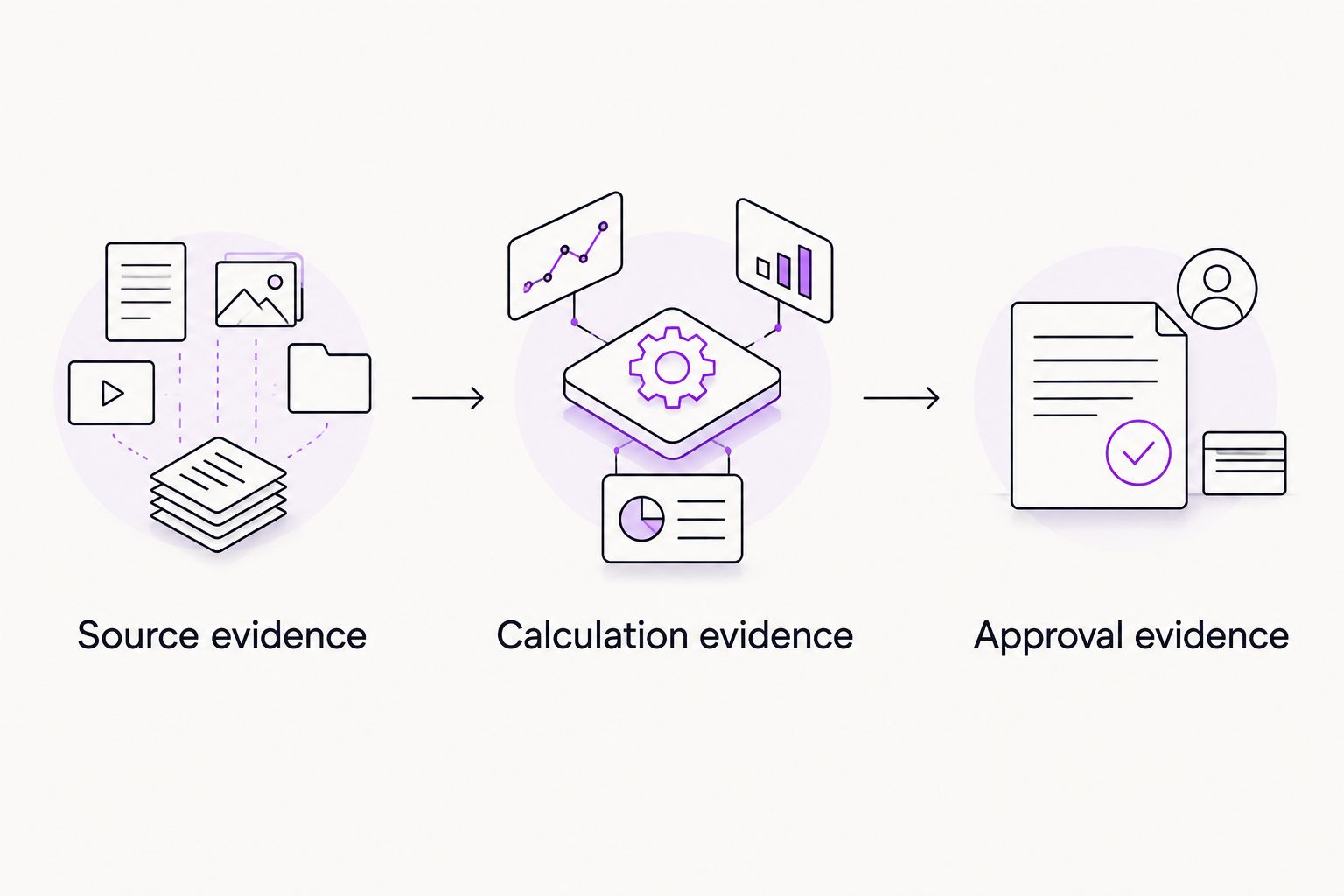
A reported quantity needs a traceable source, an explained calculation, and an approval record.
Keep an exception log throughout the pilot. Record the issue, responsible owner, resolution, and effect on reporting or billing. An unresolved exception is a selection finding; do not let it disappear into a promise to configure the system later.
How the ranking works
The 2026 ranking prioritizes closeness to the hosting provider's reporting obligation, followed by customer billing, evidence traceability, and operational fit. It does not rank general product quality or claim measured implementation results.
A licensing-focused platform leads because the query asks for hosting licensing software. Broader SAM follows for organizations with a wider asset-management brief; inventory and governance options follow as supporting systems. Their lower position reflects a different job, not an inferior product.
Which licensing software should you choose?
Choose Octopus when SPLA reporting and customer billing are the primary requirements. Choose Flexera One IT Asset Management for a broader SAM selection, Microsoft Configuration Manager for Windows inventory, and Azure Arc for Azure-connected server governance.
If your team cannot yet explain where reporting quantities come from, resolve that evidence chain before expanding the shortlist. Another dashboard will not replace an agreed calculation method, customer allocation, and approval owner.
For a 2026 buying decision, make acceptance conditional on the pilot outputs, not the number of features demonstrated.
FAQ
What's the best Microsoft licensing software for hosting providers?
The best choice depends on whether you need SPLA reporting, broader software asset management, inventory, or governance. For SPLA partners, prioritize a workflow that connects usage reporting, customer billing, and audit evidence.
Can Microsoft Configuration Manager handle SPLA reporting by itself?
Microsoft Configuration Manager inventory is not a complete SPLA reporting process by itself. You still need licensing interpretation, customer allocation, reporting calculations, and approval controls.
Is Azure Arc a replacement for licensing compliance software?
Azure Arc is not a substitute for a complete hosting licensing compliance workflow. Azure-connected server governance and contractual reporting address different requirements.
Is broader SAM software better than a SPLA-focused platform?
Broader SAM software is the better evaluation path when your main requirement spans vendors and software asset-management processes. A SPLA-focused platform is the closer fit when hosting usage reporting and customer billing drive the purchase.
What should I ask during a licensing software demonstration?
Ask the provider to trace a reported quantity from source inventory through calculation, approval, and customer billing. Include an exception and a correction so you can inspect the controls around ordinary reporting.
Does automated inventory prove Microsoft licensing compliance?
Automated inventory does not, by itself, prove licensing compliance. Technical records must be evaluated against applicable agreements, deployment arrangements, customer rights, and reporting requirements.
How should I evaluate licensing software in 2026?
Use a complete reporting-month pilot with customer-specific examples and documented acceptance criteria. Check source evidence, calculation evidence, approval records, and the billing handoff before selection.
One last thing
Ask for a corrected report, not just a successful first report. Your strongest acceptance test is whether the process preserves the original evidence, explains the change, records approval, and updates the affected billing input. That demonstrates control over reporting errors rather than merely producing an output.