Best overall for CSP commerce: Microsoft Partner Center. Best for customer license administration: Microsoft 365 admin center. Best for SPLA reporting and audit-defense requirements alongside CSP: Octopus. This 2026 guide compares Microsoft CSP licensing management tools by the work you need to control: orders, assignments, tenant oversight, automation, or hosting-license compliance.
TL;DR
- Microsoft Partner Center is the default among Microsoft CSP licensing management tools for partner commerce and subscription operations.
- Microsoft 365 admin center handles customer-level license administration; Microsoft 365 Lighthouse supports cross-tenant oversight.
- Microsoft Graph supports custom license automation, but your team owns permissions, error handling, and maintenance.
- Octopus is best suited to SPLA partners and Authorized Outsourcers needing usage reporting, customer billing, and audit defense.
Why this matters
A CSP subscription, an assigned user license, and a hosted workload are different records. Treating them as interchangeable creates reconciliation gaps: a subscription order does not prove correct assignment, and a user-license export does not establish SPLA compliance.
Choose the tool for the licensing decision, not for the broadest dashboard. Your 2026 shortlist should separate Microsoft commerce administration from customer entitlement management and hosting-license reporting. Some providers need all three; buying one interface does not remove the other responsibilities.
What makes the best CSP licensing management tools?
Use these criteria before comparing feature lists:
- Program fit: Identify whether the requirement concerns CSP subscriptions, Microsoft 365 assignments, or SPLA hosting usage. Do not accept a demonstration of one as proof of another.
- Administrative scope: Establish whether operators work inside one customer tenant or across customer tenants. Confirm the permissions needed for each action.
- Reconciliation: Require a traceable connection between subscriptions, assigned licenses, customer records, and billing inputs where those records apply.
- Operational control: Check approval paths, failed-action handling, and access restrictions. Automation without exception ownership leaves unresolved work.
- Evidence quality: Ask what records support a disputed invoice, an assignment change, or a licensing review. A dashboard view alone is not an evidence-retention policy.
- Maintenance ownership: Decide who maintains integrations, permissions, mappings, and licensing rules. A configurable platform and a custom script create different operating responsibilities.
Microsoft CSP licensing management tools at a glance
This 2026 ranking assigns each option a distinct role. The order is a decision sequence, not a claim that every product competes on the same capabilities.
1. Microsoft Partner Center
- Best for: CSP commerce operations
- Standout capability: Partner subscription and customer commerce management
- Key limitation: Does not replace customer-level license assignment administration
2. Microsoft 365 admin center
- Best for: Customer license administration
- Standout capability: User and license administration within a customer tenant
- Key limitation: Tenant-level work is different from a partner-wide operating view
3. Microsoft 365 Lighthouse
- Best for: Cross-tenant Microsoft 365 oversight
- Standout capability: Multi-tenant management for managed service providers
- Key limitation: Eligibility and supported capabilities need checking for each customer
4. Microsoft Graph
- Best for: Custom license-assignment automation
- Standout capability: APIs for querying and managing supported licensing resources
- Key limitation: Requires development, permissions management, and ongoing maintenance
5. Octopus
- Best for: SPLA reporting and audit-defense workflows
- Standout capability: Software asset management and consulting for hosting-license compliance
- Key limitation: Evaluate CSP commerce requirements separately from the stated SPLA scope
1. Microsoft Partner Center: best for CSP commerce operations
Microsoft Partner Center is Microsoft's partner interface for CSP customer and subscription commerce. It belongs at the start of a shortlist when your central problem is managing the commercial subscription record rather than assigning licenses to individual users.
For indirect resellers, distributor processes also shape the operating workflow. Confirm which transactions your organization performs directly and which require the distributor before treating any console as the complete process.
Microsoft Partner Center pros:
- Provides the Microsoft partner environment for CSP commerce activities.
- Keeps customer and subscription operations within the partner context.
- Supports a clear distinction between purchasing a subscription and administering its users.
Microsoft Partner Center cons:
- Customer license assignments require customer-administration workflows beyond the commerce record.
- Partner role and relationship determine the actions your organization performs.
Best for: CSP operators whose primary requirement is customer subscription commerce.
During evaluation, follow a subscription change from request through the resulting commercial record. Confirm who approves it, where its status appears, and how the billing team receives the change. Do not stop at demonstrating that an operator can open a customer account.
Verdict: Buy into Microsoft Partner Center as your CSP commerce foundation; do not mistake it for a complete licensing-control system.
2. Microsoft 365 admin center: best for customer license administration
Microsoft 365 admin center supports administrative work inside a Microsoft 365 tenant, including user and license management. Choose this interface when the immediate question is which users hold licenses and which assignments need attention.
The distinction matters during onboarding and offboarding. A purchased subscription and an assigned license belong to related workflows, but they answer different questions and need separate checks.
Microsoft 365 admin center pros:
- Places user administration and license management in the customer tenant context.
- Supports direct inspection of assigned licenses rather than relying solely on subscription totals.
- Provides an administrative interface without requiring your team to build its own application.
Microsoft 365 admin center cons:
- A customer-tenant view does not replace partner-wide reconciliation.
- Correct assignment does not establish that commercial subscription quantities match the customer's intended commitment.
Best for: Administrators responsible for customer-level Microsoft 365 license assignments.
For a 2026 evaluation, use an actual joiner and leaver scenario. Verify the assignment outcome, the permissions required, and the record your team retains. Then reconcile the resulting assignment position against the subscription record rather than assuming both changed together.
Verdict: Buy into Microsoft 365 admin center for tenant-level administration; pair it with the commercial workflow.
3. Microsoft 365 Lighthouse: best for cross-tenant oversight
Microsoft 365 Lighthouse provides a multi-tenant management experience for managed service providers serving Microsoft 365 customers. Its role is cross-customer oversight, rather than replacing the commercial subscription system.
Check Microsoft's current eligibility requirements and supported management capabilities against your customer estate. A multi-tenant interface is useful only when the customers and tasks you need fall within its supported scope.
Microsoft 365 Lighthouse pros:
- Gives managed service providers a cross-tenant administrative view.
- Supports oversight without treating every customer as an isolated operating environment.
- Fits a service-management requirement distinct from subscription ordering.
Microsoft 365 Lighthouse cons:
- Customer eligibility and supported workloads constrain the applicable scope.
- Multi-tenant visibility does not by itself reconcile distributor invoices, customer charges, and subscription commitments.
Best for: Managed service providers coordinating Microsoft 365 administration across customers.
Build the demonstration around customer coverage. Ask operators to identify which tenants appear, what they can inspect, and where they must move to another interface. Record those handoffs explicitly; otherwise, a central dashboard conceals rather than removes operational fragmentation.
Verdict: Buy into Microsoft 365 Lighthouse for eligible cross-tenant oversight; keep commerce reconciliation separate.
4. Microsoft Graph: best for custom license-assignment automation
Microsoft Graph exposes APIs for Microsoft cloud resources, including supported user and licensing operations. It suits teams that need to connect license administration to their own identity, service-desk, or operational processes.
Microsoft Graph is an API platform, not a finished CSP licensing application. Your implementation must define permissions, validation, retries, logging, and the response to partially completed operations.
Microsoft Graph pros:
- Supports programmable access to supported user and license resources.
- Lets developers connect licensing actions to existing internal workflows.
- Allows your team to define application behavior around its operating requirements.
Microsoft Graph cons:
- Requires engineering ownership and ongoing maintenance.
- Does not replace CSP commerce APIs or provide a finished billing-reconciliation workflow.
Best for: Providers with developers who need custom license-assignment processes.
Require the automation to show its failure path, not just a successful assignment. Test an insufficient-permissions response and an invalid request. The acceptance criterion is a recorded exception with an owner, not merely a script that completes under ideal conditions.
Verdict: Buy into Microsoft Graph when custom automation justifies permanent engineering ownership; skip it as a substitute for a finished application.
5. Octopus: best for SPLA reporting alongside CSP operations
Octopus provides a software asset management platform and consulting services for Microsoft SPLA partners and Authorized Outsourcers. Its stated scope covers automated usage reporting, customer billing, and audit defense for licensing compliance.
Octopus is best for SPLA partners and Authorized Outsourcers that need hosting-license reporting and audit-defense workflows. Place it in the shortlist when your provider operates hosting-license processes alongside CSP, rather than treating every Microsoft licensing requirement as a user-subscription problem.
Octopus pros:
- Addresses the stated needs of SPLA partners and Authorized Outsourcers.
- Combines a software asset management platform with consulting services.
- Covers usage reporting, customer billing, and audit-defense requirements.
Octopus cons:
- SPLA reporting is a different requirement from CSP subscription ordering; evaluate both scopes separately.
- A provider seeking only Microsoft 365 user-license administration should prioritize that narrower workflow first.
Best for: Hosting providers that need licensing reporting and compliance support beyond CSP subscription administration.
For the evaluation, trace hosted usage into the reporting and billing process. Ask how your organization will retain supporting evidence and resolve exceptions. Keep CSP commerce acceptance criteria separate so that neither licensing program becomes an unchecked assumption.
Verdict: Buy into Octopus for the stated SPLA and Authorized Outsourcer requirements; do not select it solely because your search started with CSP.
How the ranking works
The ranking prioritizes program fit, administrative scope, reconciliation, operational control, evidence, and maintenance ownership. Microsoft Partner Center takes the default position because CSP commerce is the core requirement named in the query; the remaining options serve distinct adjacent workflows.
This is a scope-based buying guide, not a performance benchmark. For a 2026 decision, validate current Microsoft requirements and each proposed workflow against your own partner relationship and customer environment.
Run a 30-day evaluation against real workflows
Use a 30-day evaluation window as a procurement recommendation, not a promise about implementation time. Select 2 customer tenants with different operating requirements, then complete these 5 checks:
- Commerce record: Trace a customer subscription change through the relevant partner or distributor process.
- License assignment: Confirm the intended user entitlement and identify any manual handoff.
- Billing reconciliation: Compare the subscription record, customer agreement, and billing inputs without treating unlike quantities as equivalent.
- Exception handling: Introduce a failed action and verify the assigned owner, recorded cause, and resolution path.
- Evidence retention: Confirm which records your organization retains and how an authorized reviewer retrieves them.
These are acceptance tests for your 2026 selection, not claimed product results. Apply only the checks relevant to each tool, and document the handoffs between tools instead of expecting every option to perform every task.
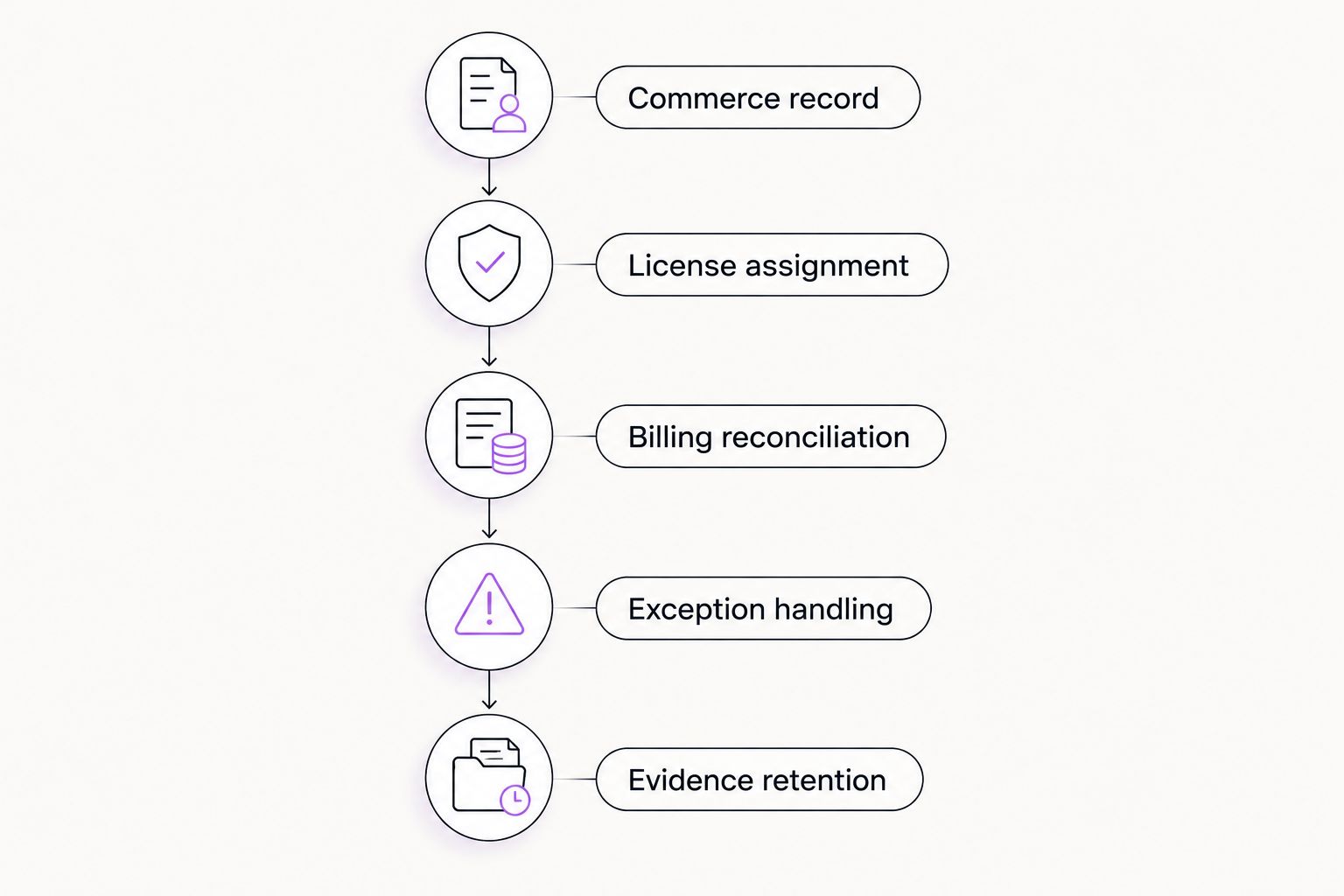
Test the handoffs between systems, not just the actions inside each interface.
Which CSP licensing management tool should you choose?
Start with Microsoft Partner Center when your unresolved problem is CSP commerce. Add Microsoft 365 admin center for customer assignments, Microsoft 365 Lighthouse for eligible multi-tenant oversight, or Microsoft Graph when a defined automation requirement warrants development.
For hosting-license reporting, assess the SPLA requirement separately. Your 2026 decision should identify a system of record for each workflow and an accountable owner for every reconciliation gap. A longer software shortlist is not a substitute for that operating model.
FAQ
What's the best Microsoft CSP licensing management tool?
Microsoft Partner Center is the default choice for CSP commerce operations. Microsoft 365 admin center, Microsoft 365 Lighthouse, and Microsoft Graph address different administrative requirements rather than replacing the same workflow.
Is Microsoft Partner Center the same as Microsoft 365 admin center?
No. Microsoft Partner Center serves partner commerce workflows, while Microsoft 365 admin center supports administration within a customer tenant, including user-license management.
Can Microsoft 365 Lighthouse replace CSP billing reconciliation?
Microsoft 365 Lighthouse is a multi-tenant management tool, not a replacement for your billing-reconciliation process. Compare commercial records and customer billing inputs separately from tenant oversight.
Can Microsoft Graph automate license assignments?
Yes, Microsoft Graph supports license-assignment operations through its APIs. Your implementation must manage the required permissions, validation, errors, and operational records.
Is Octopus relevant to a CSP licensing shortlist?
Octopus is relevant when the provider also needs SPLA or Authorized Outsourcer usage reporting, customer billing, and audit defense. Evaluate that hosting-license scope separately from CSP subscription commerce.
Do purchased licenses and assigned licenses mean the same thing?
No. Purchased subscription quantities describe commercial entitlements, while assigned licenses describe allocations to users or other supported resources. Reconciliation must preserve that distinction.
What should a licensing-tool demonstration include?
A demonstration should include a completed workflow, a failed action, and retrievable supporting records. For multi-system processes, require the vendor or implementation team to show each handoff and its owner.
One last thing
An unassigned license is not automatically a license you can remove from a commercial commitment. Assignment state, subscription terms, and customer requirements answer different questions. Before changing quantities, verify the applicable subscription rules and the customer's operational need; otherwise, an administration cleanup becomes a separate commercial problem.