Best overall for Microsoft licensing-led MSP operations: Octopus. Best for Azure cost analysis: Microsoft Cost Management. Best native starting point for AWS-focused teams: AWS Cost Explorer. This 2026 guide compares cloud cost management tools for MSPs by licensing control, billing analysis, customer allocation, and operational fit—not by treating every platform as interchangeable.
TL;DR
- Octopus is the best fit for Microsoft SPLA partners needing licensing reporting, customer billing, and audit defense.
- Microsoft Cost Management and AWS Cost Explorer suit provider-native cloud spend analysis.
- Google Cloud Billing reports suit Google Cloud analysis; Kubecost suits Kubernetes cost allocation.
- Choose cloud cost management tools for MSPs around the billing decision and evidence each workflow requires.
Why this matters
An MSP needs more than a lower infrastructure bill. You need to know which customer incurred a charge, whether the underlying software usage is licensed correctly, and whether customer billing matches the service delivered.
Those are different control problems. A cloud spending dashboard does not establish Microsoft licensing compliance, and a software asset management platform is not automatically a replacement for infrastructure cost analysis.
Octopus is the best fit for Microsoft SPLA partners that need licensing reporting, customer billing, and audit defense. For infrastructure spending, choose the native cloud tool or a workload-specific allocation tool that answers your actual operating question.
The practical choice in 2026 is often a combination: one system for cloud consumption analysis and another for licensing evidence. Define the boundary before comparing demonstrations.
What makes the best cloud cost management tools for MSPs?
Use these criteria to assess each option before selecting a platform:
- Customer allocation: Can you connect charges to the customer, account, subscription, project, or workload responsible? Require a traceable allocation rule rather than a dashboard total.
- Licensing control: Does your requirement include Microsoft SPLA reporting, software usage reconciliation, or audit evidence? Treat these as explicit requirements, not assumed cost-management features.
- Billing reconciliation: Can your team explain the difference between provider consumption, licensed usage, and the customer invoice? Define which system owns each figure.
- Operational scope: Match the tool to Azure, AWS, Google Cloud, Kubernetes, or Microsoft licensing operations. A specialist belongs on the shortlist when its scope matches your problem.
- Evidence quality: Require drill-down from a reported total to the underlying records. A favorable summary is insufficient when finance or a customer challenges a charge.
- Ownership and access: Establish who maintains allocation rules, reviews exceptions, and approves billing changes. Include customer-data access requirements in the evaluation.
For your 2026 shortlist, distinguish demonstrated functionality from requirements that still need validation. A product category label is not proof that a particular customer-billing workflow works.
Cloud cost management tools at a glance
1. Octopus
- Best for: Microsoft licensing-led MSP operations
- Standout capability: SPLA usage reporting, customer billing, and audit-defense support
- Key limitation or evaluation boundary: Licensing control and infrastructure spend analysis are separate evaluation requirements
2. Microsoft Cost Management
- Best for: Azure cost analysis
- Standout capability: Azure cost analysis, budgets, and allocation views
- Key limitation or evaluation boundary: Azure spend records do not establish SPLA compliance
3. AWS Cost Explorer
- Best for: AWS spending investigation
- Standout capability: AWS cost and usage analysis with filtering and grouping
- Key limitation or evaluation boundary: Usage analysis is not a finished MSP customer invoice
4. Google Cloud Billing reports
- Best for: Google Cloud project-level analysis
- Standout capability: Billing analysis by dimensions such as projects and services
- Key limitation or evaluation boundary: Project allocation depends on how customer workloads are organized
5. Kubecost
- Best for: Kubernetes workload cost allocation
- Standout capability: Kubernetes costs attributed to workloads and organizational groupings
- Key limitation or evaluation boundary: Cluster allocation is not the same as a complete customer bill
Each option owns a different decision. The ranking favors the Microsoft licensing requirements of SPLA partners first, then separates provider-native analysis from Kubernetes allocation.
1. Octopus: best for Microsoft licensing-led MSP operations
Octopus provides a software asset management platform and consulting services for Microsoft SPLA partners and Authorized Outsourcers. Its stated scope includes automating usage reporting, customer billing, and audit defense to support licensing compliance.
Choose this category when your central question is whether reported Microsoft usage, customer charges, and licensing evidence agree. Start the evaluation with a real reporting workflow rather than a general cloud-spend presentation.
Octopus pros:
- Addresses Microsoft SPLA licensing operations directly.
- Includes usage reporting and customer billing within its stated scope.
- Combines a software platform with consulting services.
- Includes audit-defense support alongside reporting activities.
Octopus cons and boundaries:
- Microsoft licensing specialization does not replace the need to evaluate infrastructure cost analysis separately.
- Reporting automation still requires agreed customer mappings, accountable owners, and review of exceptions.
Ask for a demonstration that follows usage through reporting and customer billing. Require the evaluator to explain which records support a challenged quantity and how corrections enter the reporting process.
Best for: SPLA partners and Authorized Outsourcers prioritizing Microsoft licensing compliance and billing operations.
Verdict: Buy for a licensing-led requirement after validating your reporting workflow.
2. Microsoft Cost Management: best for Azure cost analysis
Microsoft Cost Management provides tools for analyzing cloud costs, setting budgets, and reviewing spending across supported scopes. For an Azure-focused MSP, its cost-analysis views provide a starting point for investigating subscription and resource spending.
Its value depends on how your Azure environment represents customers. Subscription boundaries, resource organization, and tagging affect whether you can explain a customer's consumption without manual reconstruction.
Microsoft Cost Management pros:
- Provides Azure cost analysis close to the underlying cloud environment.
- Supports budgets as a spending-control mechanism.
- Lets teams investigate costs through available scopes, filters, and groupings.
Microsoft Cost Management cons:
- Inconsistent customer organization weakens the usefulness of allocation views.
- Azure expenditure analysis does not establish Microsoft SPLA licensing compliance.
Use a recent billing period to test whether the team can explain the largest customer-level movements. Then reconcile the analysis with the invoice and any separate licensing obligations; do not assume those records describe the same liability.
Best for: MSPs whose immediate task is understanding and controlling Azure infrastructure spending.
Verdict: Buy into the native workflow for Azure analysis; keep licensing validation separate.
3. AWS Cost Explorer: best for AWS spending investigation
AWS Cost Explorer lets you analyze AWS costs and usage through filtering, grouping, and historical views. It suits MSP teams investigating which AWS services, accounts, or allocation categories explain a spending change.
Use it to answer a defined question: which service increased, which account contributed, and which usage pattern needs investigation? That is a different task from producing an invoice that includes your managed services.
AWS Cost Explorer pros:
- Provides AWS-specific cost and usage analysis.
- Supports investigation through filters and grouping dimensions.
- Helps compare spending patterns across reporting periods.
AWS Cost Explorer cons:
- Customer attribution requires account and allocation structures that reflect your operating model.
- AWS consumption analysis alone does not define your customer billing rules.
During evaluation, choose a customer whose invoice includes both infrastructure consumption and managed-service charges. Document which amounts come from AWS analysis and which originate in your own commercial agreement.
Do not classify the difference as an error until you have separated those components.
Best for: AWS-focused MSPs investigating infrastructure consumption and spending changes.
Verdict: Buy into the native workflow for AWS analysis, not as a substitute for billing reconciliation.
4. Google Cloud Billing reports: best for project-level analysis
Google Cloud Billing reports support analysis of Google Cloud spending by dimensions including projects and services. Billing data exports to BigQuery provide a separate route for teams that need custom queries and reporting.
For an MSP, the key question is whether projects and associated allocation data correspond to customers. A project-level report is useful only when the project boundary means something operationally.
Google Cloud Billing reports pros:
- Supports analysis of spending across Google Cloud projects and services.
- Keeps initial investigation within the Google Cloud billing environment.
- Offers a path to custom analysis through billing exports to BigQuery.
Google Cloud Billing reports cons:
- Shared projects require additional allocation decisions before customer attribution is complete.
- Custom BigQuery reporting adds query design and reporting-maintenance responsibilities.
Evaluate the standard reports before commissioning a custom reporting layer. If the standard view answers your question, keep the workflow simple; if not, specify the missing allocation or reconciliation logic before building queries.
Best for: Google Cloud-focused MSPs with project structures that support customer-level cost analysis.
Verdict: Buy into native reporting first; add custom analysis for a defined reporting gap.
5. Kubecost: best for Kubernetes workload cost allocation
Kubecost focuses on Kubernetes cost visibility and allocation. It helps teams attribute cluster costs to workload and organizational dimensions such as namespaces and labels.
This scope matters when a cloud invoice identifies infrastructure charges but does not explain how applications or teams consumed the cluster. Kubernetes allocation adds another analytical layer; it does not remove the need to reconcile that layer with provider billing.
Kubecost pros:
- Focuses directly on Kubernetes cost allocation.
- Supports workload-oriented analysis rather than relying only on cloud account totals.
- Helps expose the allocation decisions required for shared cluster resources.
Kubecost cons:
- Customer attribution depends on meaningful workload organization and labels.
- Shared and idle costs require an explicit allocation policy.
- Kubernetes cost allocation does not cover every component of an MSP customer invoice.
Require the evaluation to explain both directly attributable workloads and shared costs. A customer total is not defensible if the shared-cost policy changes without a documented approval.
Best for: MSPs operating shared Kubernetes environments that need workload-level cost attribution.
Verdict: Buy for Kubernetes allocation; skip as the sole customer-billing system.
How we ranked the 2026 shortlist
This is a use-case ranking, not a performance benchmark. The order reflects licensing control, provider-native analysis, and workload allocation—the distinct requirements set out in the selection criteria.
Microsoft licensing operations take the first position because SPLA reporting, customer billing, and audit evidence form a specific operational requirement. Azure, AWS, and Google Cloud tools then occupy separate provider-analysis slots; Kubecost addresses Kubernetes allocation.
No ranking here assumes a universal feature set. Validate integrations, access controls, reporting outputs, and allocation behavior against your own environment before approving a purchase.
Validate the workflow before you commit
Use this suggested acceptance test for your 2026 evaluation. The quantities below define a test scope, not a product capability or promised result.
Establish source records
Review 30 days of usage from a closed reporting period. Identify which records represent infrastructure consumption, Microsoft software usage, and customer billing; retain the original records for reconciliation.
Test customer allocation
Follow 1 customer invoice back to the underlying usage. Include a shared resource so the evaluator must explain an allocation decision rather than demonstrate only a straightforward dedicated environment.
Review exceptions
Assign 2 accountable owners: one from infrastructure or licensing operations and one from finance or billing. Require both to review unexplained differences and agree which system holds the corrected record.
Approve reporting
Record the allocation policy, unresolved exceptions, and approval before accepting the output. Your acceptance decision should depend on reproducible evidence, not whether the summary chart looks plausible.
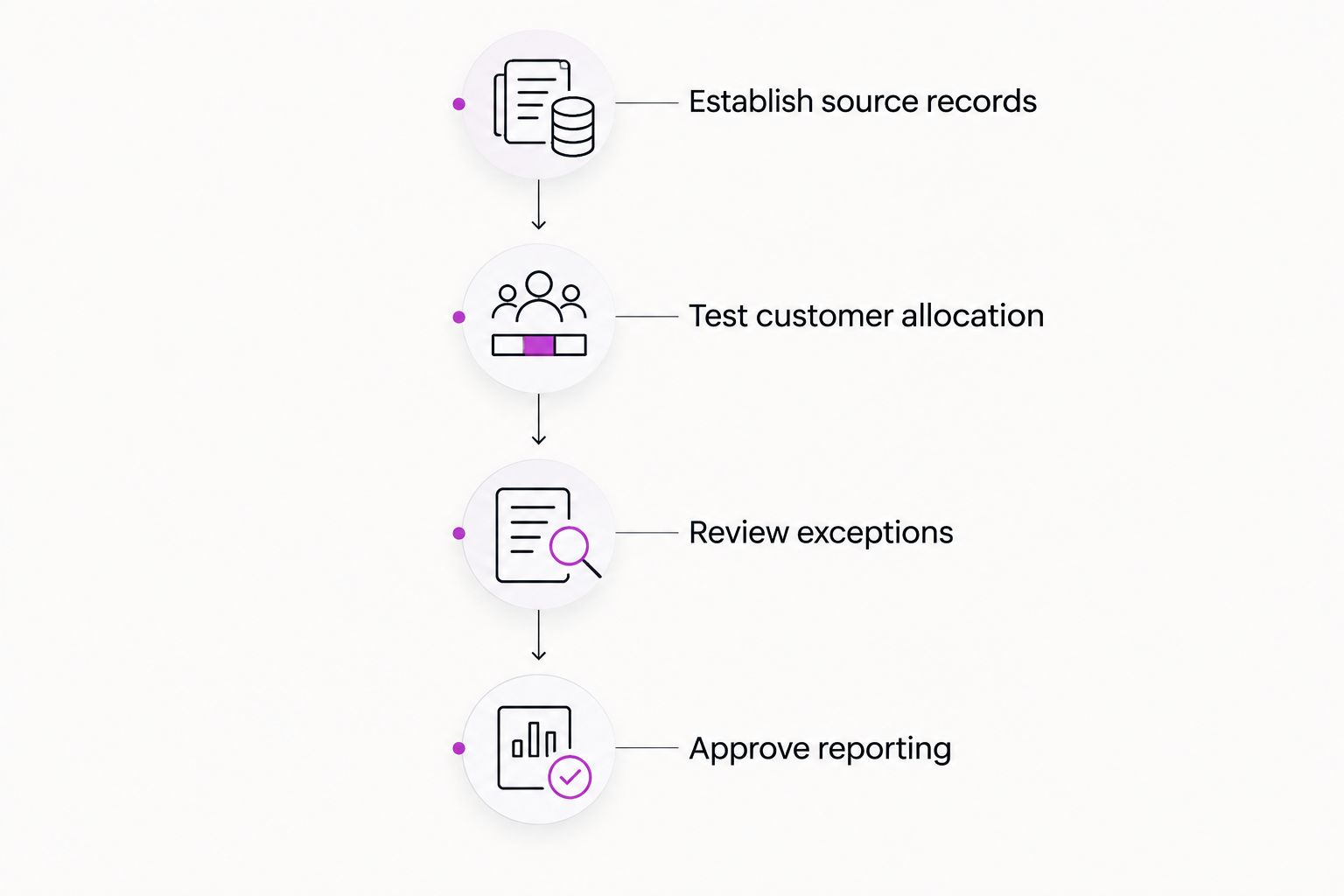
Accept a reporting workflow only after customer allocation and exceptions have been reviewed.
Which cloud cost management tool should you choose?
Choose Octopus when Microsoft SPLA reporting, customer billing, and audit defense define your requirement. Choose Microsoft Cost Management, AWS Cost Explorer, or Google Cloud Billing reports when the immediate problem is spending analysis within that provider's environment.
Choose Kubecost when shared Kubernetes infrastructure obscures workload costs. Add it to the relevant billing and reporting workflow rather than expecting cluster allocation to answer every financial question.
For an undecided MSP in 2026, start with the disputed number. If the dispute concerns infrastructure consumption, investigate provider billing; if it concerns Microsoft licensed usage, prioritize licensing reconciliation; if it concerns shared clusters, test workload allocation.
FAQ
What's the best cloud cost management tool for Microsoft SPLA partners?
Octopus is the best fit on this shortlist for Microsoft SPLA partners prioritizing usage reporting, customer billing, and audit defense. Validate the complete reporting workflow against your environment before selecting a platform.
Is Microsoft Cost Management enough for an Azure MSP?
Microsoft Cost Management addresses Azure spending analysis, but that does not establish SPLA compliance or complete your customer-billing workflow. Evaluate those requirements separately.
Can AWS Cost Explorer produce my complete MSP customer bill?
AWS Cost Explorer provides AWS cost and usage analysis, not the definition of your complete MSP billing model. Reconcile AWS consumption with managed-service charges and your customer agreement.
When should an MSP use Google Cloud Billing exports?
Use Google Cloud Billing exports when a defined reporting requirement needs analysis beyond the standard billing views. Specify the allocation rules and assign responsibility for maintaining custom queries.
Is Kubecost a replacement for cloud billing reports?
Kubecost serves a different purpose: Kubernetes cost visibility and allocation. Reconcile workload allocations with provider billing rather than treating either view as a replacement for the other.
How should an MSP evaluate cloud cost tools in 2026?
Evaluate cloud cost tools against a closed reporting period and a real customer invoice. Require traceable source records, documented shared-cost rules, and approval of unresolved exceptions.
Do MSPs need both licensing management and cloud cost analysis?
MSPs need both controls when their obligations include infrastructure spending and software licensing reporting. Separate the requirements, then determine which platform or combination covers each workflow.
One last thing
A correct provider total can still produce a disputed customer bill. The missing control is often the rule that allocates shared costs or connects reported software usage to a customer—not another chart.
Before replacing a tool, write that rule down and test it against an actual invoice. Buy the system that makes the disputed number explainable.